
このページはアプリまたはその開発者の公式ページではなく、情報提供および論評を目的として作成された独立した編集出版物です。明示的に別段の記載がない限り、アプリおよびその開発者は、MWM、Apple、Google Play、アプリのパブリッシャー、またはアプリの開発者と提携、承認、後援、認可、またはその他の公式的な関係はなく、このページのいかなる内容も、アプリがMWMのサービスを使用して開発されたことを意味するものではありません。すべての商標、ロゴ、スクリーンショット、その他のコンテンツはそれぞれの所有者の財産です。


Protake - Mobile Cinema Camera
モバイルデバイスを、妥協なき映像制作の核へと変貌させる。このアプリは、一般的なビデオ撮影の限界を打ち破り、ユーザーに真のシネマクオリティをもたらす。
ダウンロード
2.5M+ユーザー評価
評価数
15.1K開発元
カテゴリ
Photo & Video対応言語
3最新バージョン
4.2.4サイズ
75.0 MBリリース日
2020年4月26日モバイルデバイスでプロフェッショナルな映像制作を実現する主要機能と、コンテンツクリエーターへの影響度を評価します。
Protake - モバイルシネマカメラの主要機能分析
Wi-Fiビデオ伝送
最大4台のモニターで映像をリアルタイム監視し、複数のカメラの録画をワイヤレスで制御できるため、プロフェッショナルなモバイル制作ワークフローが大幅に効率化されます。
業界標準のLOGガンマカーブ
業界標準であるALEXA Log Cに厳密にマッチングされたLOGガンマカーブを提供することで、ユーザーはポストプロダクションで広範なカラーグレーディングの柔軟性を得られます。
プロフェッショナル撮影モード (PROモード)
ユーザーは、すべてのカメラ情報と制御設定が画面に整然と配置されたPROモードにより、シャッター速度、ISO、ホワイトバランスなどを手動で完全にコントロールし、映画のような映像を撮影できます。
高度な撮影アシスタントツール
波形モニター、フォルスカラー、フォーカスピーキングなどの包括的なアシスタントツールにより、ユーザーは露出、フォーカス、構図を正確に調整し、プロフェッショナルな品質の映像を確実に記録できます。
厳格なデータ管理機能
厳密な定フレームレート、標準的なファイル命名規則、豊富なメタデータ記録、シネマカメラ互換のタイムコード機能により、ユーザーはポストプロダクションの効率を高め、プロフェッショナルなワークフローを維持できます。
多彩なシネマティックルック
クラシックなフィルムエミュレーションや映画にインスパイアされたスタイルを含む多数のシネマティックルックが提供されており、ユーザーは撮影した映像に独自の芸術的なトーンを簡単に適用できます。
デュアルカメラ録画
ユーザーは同時に2つのカメラで映像を録画でき、ピクチャー・イン・ピクチャーまたは個別のファイルとして保存されるため、クリエイティブな表現の幅が広がり、ユニークなコンテンツを作成できます。
リアルタイム背景ぼかし (ポートレートモード)
LiDARセンサーと強力なプロセッサを活用し、ユーザーはリアルタイムで背景をぼかしたポートレートモードビデオを録画できるため、被写体を際立たせたプロフェッショナルな映像表現が可能です。
よくある質問
について知っておくべきこと Protake - Mobile Cinema Camera
What is Protake?
Protake transforms mobile devices into professional cinema cameras, offering advanced filmmaking features for vloggers, commercial directors, and well-established filmmakers to enhance their productions.
Does Protake support wireless video monitoring?
Yes, Protake features a Wi-Fi Video Transmission system. It allows transmitting video from one "camera" to four "monitors" and watching up to four "cameras" on one "monitor" with wireless recording control.
What shooting modes are available in Protake?
Protake offers AUTO mode for vloggers, PRO mode for professional filmmakers with aligned controls, DUAL mode for simultaneous dual-camera recording, and PORTRAIT mode with real-time blurred backgrounds using LiDAR sensors.
Does Protake offer LOG recording for color grading?
Yes, Protake features a genuine LOG gamma curve strictly matched to the industrial standard ALEXA Log C. It also provides a dozen of cinematic looks, including film emulation and movie-inspired styles.
What filmmaking assistance tools does Protake provide?
Protake provides extensive filmmaking assistants including monitoring tools (Waveform, Histogram), composition aids (Aspect Ratios, Thirds), exposure tools (Zebra Strips, False Color), and focus assistants (Focus Peaking, Auto Focus).
How does Protake manage video data and file organization?
Protake manages video data through Frame Rate Normalization for constant FPS, a standard file-naming system (Camera Unit + Reel Number + Clip Count + Date + Suffix), and comprehensive metadata recording for various details.
What features are included with Protake+ membership?
Protake+ membership unlocks all advanced features, including Pro mode, LOG gamma curve, Protake Cinematic Looks, all assistant tools, data management, and support for 3rd-party accessories.
How much does Protake+ membership cost?
A 1-year Protake+ membership costs USD 19.99. Payment is charged to your iTunes Account and automatically renews unless auto-renew is turned off at least 24 hours before the current period ends.
How do I cancel my Protake+ subscription?
Users can cancel their Protake+ subscription and manage auto-renewal by accessing their Account Settings after purchase. Auto-renewal must be switched off at least 24-hours before the current period ends.
Does Protake collect user data?
Yes, Protake handles all personal data according to its terms and conditions and privacy policy. More details are available via the provided privacy policy link in the app description.
以下のスクリーンショットと説明は、アプリの公式ストアリスティングから直接取得されたものであり、アプリ開発者の所有物です。
アプリストア
スクリーンショット
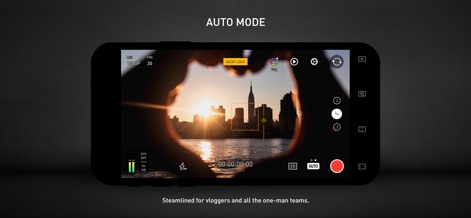
このアプリのオートモードでは、「AE/AF LOCK」機能で露出とフォーカスを固定し、さらに「Vlogプリセット」を活用することで、VloggerやYouTubeクリエイターが手軽に高品質なコンテンツを制作できます。
簡単撮影

本アプリは、最大4台のカメラからの映像を1台のモニターで同時に監視できます。ユーザーは「Wi-Fi (Mesh)」ネットワークを通じて複数のデバイスを接続し、「HDRとSDR」の異なるビデオストリームを同一画面で確認できます。
多視点ワイヤレス
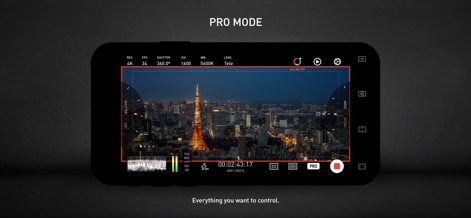
プロモードでは、ユーザーは「シャッタースピード」や「ISO感度」といった詳細なカメラ設定を自在に調整できます。また、波形モニターなどのプロフェッショナルな情報表示により、露出を正確にコントロールできます。
プロフェッショナル制御
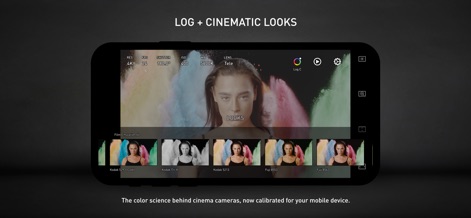
このアプリは、映画制作で用いられる「Log C」ガンマカーブに対応し、広範なダイナミックレンジで映像を記録します。さらに、クラシックな「KodakやFujiのフィルムエミュレーション」を含む多彩なシネマティックルックを適用可能です。
映画的色彩
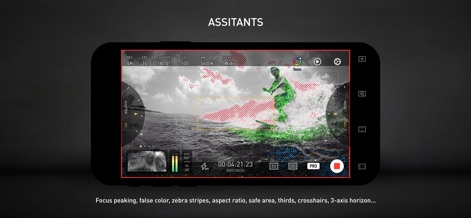
撮影アシスタント機能により、ユーザーは「フォーカスピーキング」で正確なピント合わせを行えます。また、「フォルスカラーやゼブラストライプ」を使用して露出レベルを視覚的に確認し、映像の品質を向上させることができます。
精確な補助
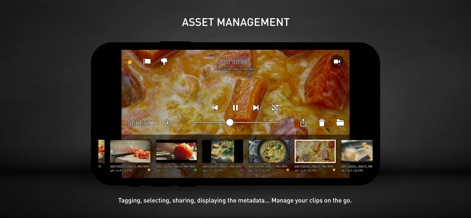
本アプリは、撮影したクリップを簡単に閲覧できる「ビデオプレビューとタイムライン」を提供します。ユーザーは「クリップの選択、共有、削除」などの操作を直感的に行い、移動中でも効率的にアセットを管理できます。
効率的管理
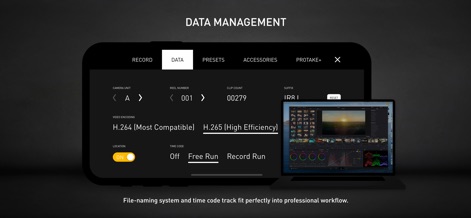
このアプリは、プロフェッショナルなワークフローに合わせた「標準ファイル命名システム」を採用しており、映像素材の整理を簡素化します。さらに、「フリーランおよびレコードラン」のタイムコードオプションを提供し、外部のシネマカメラとの互換性も確保します。
データ連携
説明
Download
類似アプリ
似た機能とユーザー体験を持つアプリ

Blackmagic Camera
Blackmagic Design Inc

飓风相机
Hangzhou Ostar Media Co.,Ltd.

ProMovie Recorder
Panda Apps Limited

ReLens Camera-DSLR Portrait
Pixl Concerto Technology Limited

Leica LUX - Pro Manual Camera
Leica Camera AG

FotorGear - Camera in Pocket
Shenzhen Fotorgear Technology Co., Ltd.

Unsharp
北北 宋

ProCam:Professional RAW Camera
BRAND CELLAR HOLDINGS PTE LTD

Vibe Cam - Moments Never Fade
森 林
このページはアプリまたはその開発者の公式ページではなく、情報提供および論評を目的として作成された独立した編集出版物です。明示的に別段の記載がない限り、アプリおよびその開発者は、MWM、Apple、Google Play、アプリのパブリッシャー、またはアプリの開発者と提携、承認、後援、認可、またはその他の公式的な関係はなく、このページのいかなる内容も、アプリがMWMのサービスを使用して開発されたことを意味するものではありません。すべての商標、ロゴ、スクリーンショット、その他のコンテンツはそれぞれの所有者の財産です。