Record3D — 3D Videos
ダウンロード: App Store

このページはアプリまたはその開発者の公式ページではなく、情報提供および論評を目的として作成された独立した編集出版物です。明示的に別段の記載がない限り、アプリおよびその開発者は、MWM、Apple、Google Play、アプリのパブリッシャー、またはアプリの開発者と提携、承認、後援、認可、またはその他の公式的な関係はなく、このページのいかなる内容も、アプリがMWMのサービスを使用して開発されたことを意味するものではありません。すべての商標、ロゴ、スクリーンショット、その他のコンテンツはそれぞれの所有者の財産です。


ロゴ: Record3D — 3D Videos
ダウンロード: App Store

Record3D — 3D Videos

iPhoneをハイファイ3Dカメラに変えましょう。プロフェッショナルな3Dパイプラインおよび没入型AR/VR体験のために、ボリューメトリックビデオをFBX、OBJ、またはSpatial Video形式でキャプチャ、ストリーミング、エクスポート—100%オンデバイスプライバシーで。

主要数値

ダウンロード

21K+

ユーザー評価

4.0/5

評価数

100

開発元

Marek Simonik

カテゴリ

Photo & Video

対応言語

1

最新バージョン

1.10.6

サイズ

24.1 MB

リリース日

2019年9月6日
機能

クリエイターのためのプロレベルのボリューメトリックキャプチャ

モバイルハードウェアとプロフェッショナル3Dプロダクションのギャップを埋めます。Record3Dは、アーティストや開発者がハイファイな空間コンテンツをキャプチャ、ストリーミング、エクスポートできるようにします。

シネマ品質の3D録画

LiDARとFaceIDのパワーを活用して、専用のTrue3Dビューアーで画面から飛び出すような没入型ボリューメトリックビデオを録画します。

プロダクション対応エクスポート

パイプラインに直接統合します。FBX、glTF、Alembicにエクスポートするか、Apple Vision ProおよびMeta Quest用のSpatial Videoを作成します。

以下のスクリーンショットと説明は、アプリの公式ストアリスティングから直接取得されたものであり、アプリ開発者の所有物です。

アプリストア

スクリーンショット
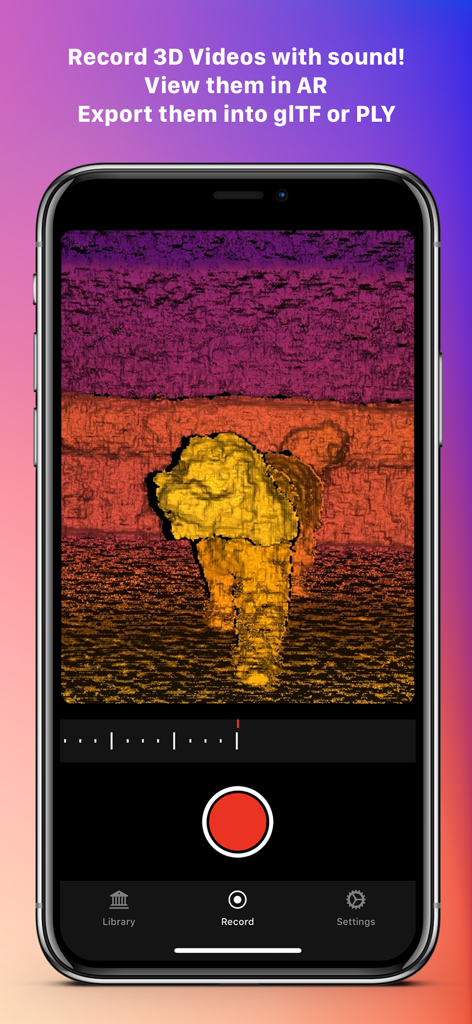
Record3D — 3D Videos - 深度マッピングを使用して犬のボリューメトリック3Dビデオをキャプチャしている間、Record3Dアプリインターフェースを表示するスマートフォン。
深度マッピングを使用して犬のボリューメトリック3Dビデオをキャプチャしている間、Record3Dアプリインターフェースを表示するスマートフォン。

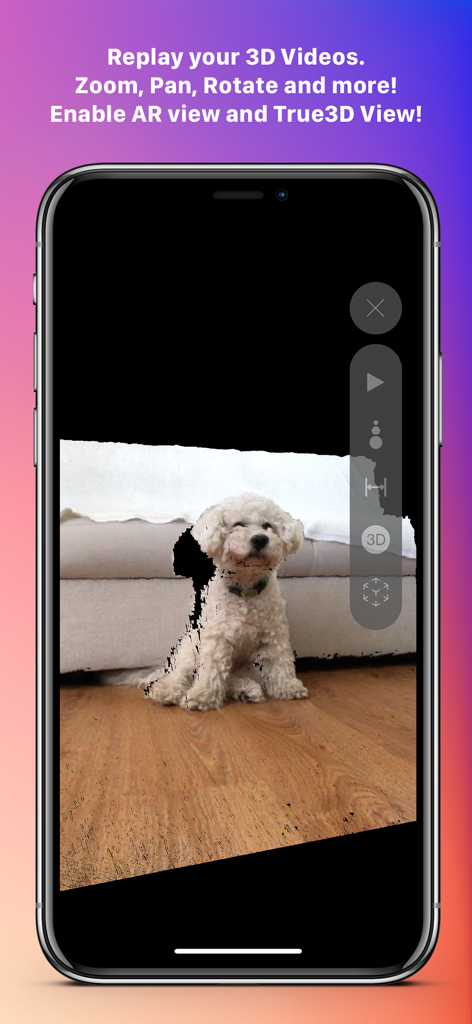
Record3D — 3D Videos - iPhoneで小型の白い犬の3Dボリューメトリックビデオ再生を表示するRecord3Dアプリインターフェース
iPhoneで小型の白い犬の3Dボリューメトリックビデオ再生を表示するRecord3Dアプリインターフェース

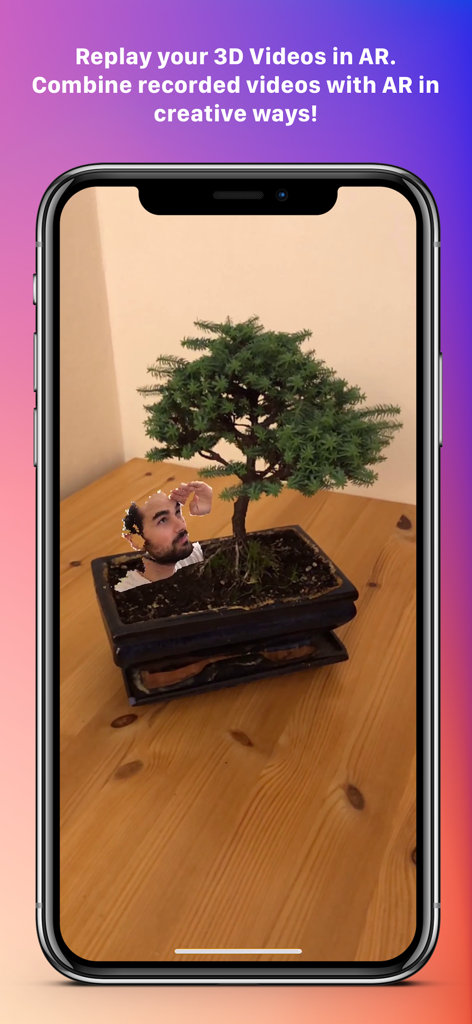
Record3D — 3D Videos - 拡張現実を使用して、実際の盆栽に統合された人間の頭の3Dビデオ

拡張現実を使用して、実際の盆栽に統合された人間の頭の3Dビデオ

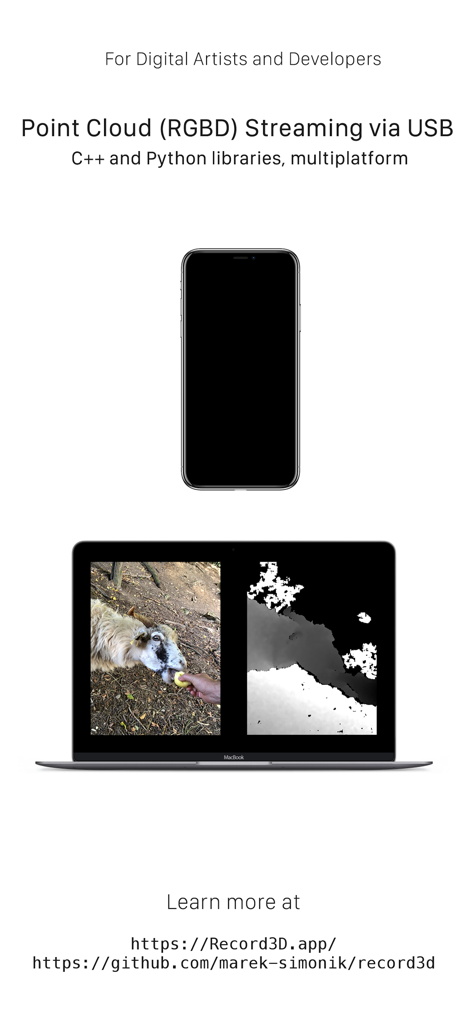
Record3D — 3D Videos - 開発者向けRecord3Dを使用して、iPhoneがノートPCにRGBDポイントクラウドビデオデータをストリーミングしている様子

開発者向けRecord3Dを使用して、iPhoneがノートPCにRGBDポイントクラウドビデオデータをストリーミングしている様子

説明

Record your very own 3D Videos using the selfie *FaceID* camera or the *LiDAR* sensor! Export them into FBX, glTF, sequence of PLY files, OBJ or Alembic. Use WebRTC Wi-Fi Streaming, export into RGBD mp4 videos. Export 3D videos into the Spatial Video format (only on iOS 17 or newer) or into SBS (Side-by-Side) stereo videos. Show your Volumetric Videos in AR and experience the **True3D effect**: turn your iPhone or iPad into a window through which you can see into the world behind your screen, where your 3D Videos live! True3D is activated by pressing the "3D" button in the vertical toolbar. Be sure to be in portrait orientation to activate True3D. Are you a Digital Artist or a Developer? Then there is something for you too. You can stream RGBD video from your device into your computer via USB cable. Just install C++ or Python library and you are good to go. The C++ and Python libraries are open source — therefore there is no need to be worried about privacy (as you can easily verify for yourself). You can also buy the Wi-Fi Streaming & RGBD Video export Extension Pack and stream 3D Videos (with color-coded depth data) via Wi-Fi using WebRTC — that means you can stream 3D Videos even into a web browser! Note that Wi-Fi Streaming works ONLY over your local network (LAN), NOT over the Internet. Wi-Fi Streaming delivers lower quality depth data compared to USB streaming, because it leverages lossy compression. For more details about Wi-Fi Streaming, visit https://record3d.app Note that the Unity USB Streaming demo is currently not compatible with the Wi-Fi Streaming feature. Wi-Fi Streaming uses a completely different technology, so you will need to rewrite the Unity demo to work with Wi-Fi Streaming. With that same Extension Pack, you can encode (export) 3D Videos into RGBD mp4 videos, which can be used for example for viewing your 3D Videos in a Looking Glass holographic display. If you are an artist or a developer, you can use the mp4 RGBD videos for offline 3D Video visualisation. Speaking of privacy, Record3D does not track you, does not contain any analytics, ads nor any other invasive things. Everything you do in the app stays on the device, is completely yours and not shared with any third parties. The Wi-Fi Streaming feature works only on your local network (LAN), it does NOT work over the Internet. The app offers you 3 free 3D Videos so that you can evaluate some of its functionality before purchasing. Visit https://record3d.app/ for more details, tutorials and demos. You can contact me at support@record3d.app if needed.

Download

ダウンロード: App Store

このページはアプリまたはその開発者の公式ページではなく、情報提供および論評を目的として作成された独立した編集出版物です。明示的に別段の記載がない限り、アプリおよびその開発者は、MWM、Apple、Google Play、アプリのパブリッシャー、またはアプリの開発者と提携、承認、後援、認可、またはその他の公式的な関係はなく、このページのいかなる内容も、アプリがMWMのサービスを使用して開発されたことを意味するものではありません。すべての商標、ロゴ、スクリーンショット、その他のコンテンツはそれぞれの所有者の財産です。