
このページはアプリまたはその開発者の公式ページではなく、情報提供および論評を目的として作成された独立した編集出版物です。明示的に別段の記載がない限り、アプリおよびその開発者は、MWM、Apple、Google Play、アプリのパブリッシャー、またはアプリの開発者と提携、承認、後援、認可、またはその他の公式的な関係はなく、このページのいかなる内容も、アプリがMWMのサービスを使用して開発されたことを意味するものではありません。すべての商標、ロゴ、スクリーンショット、その他のコンテンツはそれぞれの所有者の財産です。


Remove BG - Background Remover
どんな写真も、数秒でプロ品質の商品リスティング、ソーシャルメディアサムネイル、証明写真に変身させましょう。デザインスキル不要、スタジオ品質の背景削除をワンタップで体験してください。
ダウンロード
4K+ユーザー評価
評価数
0開発元
カテゴリ
Photo & Video対応言語
48最新バージョン
1.2.1サイズ
57.6 MBリリース日
2023年5月5日AIでサイドハッスルを強化
複雑な編集ソフトウェアでの格闘はやめましょう。Remove BGは、クリエイター、再販業者、デジタル起業家のために特別に設計されたプログレードのツールを提供します。
ワンタップAI背景削除
人物、ペット、商品を数秒で自動的に切り抜きます。当社のスマートAIは、手作業なしでピクセルパーフェクトなエッジを実現します。
プロレベルのEコマースリスティング
Poshmark、eBay、Etsyでの売上を伸ばしましょう。散らかった自宅での写真を、クリーンでスタジオ品質の商品ショーケースに瞬時に変身させます。
よくある質問
について知っておくべきこと Remove BG - Background Remover
Remove BG - Background Remover とは何ですか?
Remove BG - Background Remover は、元の画像の背景を瞬時に削除するためのアプリケーションです。画像を自動で切り抜き、不要な部分を消去し、必要な要素だけを残します。
Remove BG アプリで背景を削除するにはどうすればよいですか?
Remove BG アプリで背景を削除するには、ギャラリーまたはカメラから画像をアップロードします。次に、画面上の「背景を削除」ボタンを押します。新しい背景を選択するか、画像を保存することができます。
Remove BG - Background Remover は背景削除に AI を使用していますか?
はい、Remove BG - Background Remover には AI モードが搭載されています。このモードは、人物、動物、植物、アニメを自動認識して背景を削除します。シャープなエッジを持つ高品質な切り抜き画像を生成します。
Remove BG - Background Remover で切り抜きを編集できますか?
はい、Remove BG - Background Remover にはマニュアルモードが用意されています。ユーザーは、切り抜きたいオブジェクトを素早く輪郭で囲んで抽出し、その後、切り抜かれた画像を手動で消去および修復して、正確な編集を行うことができます。
Remove BG - Background Remover は無料アプリですか?
はい、「Remove BG - Background Remover」アプリは、その機能のために「一銭も請求しない」と記載しています。コストなしで背景削除を行うスマートツールとして位置づけられています。
Remove BG - Background Remover はどのような背景オプションを提供していますか?
Remove BG - Background Remover は、さまざまな組み込み背景オプションを提供しています。これには、単色、グラデーション、製品固有の背景が含まれます。アプリには、「ベルベット」のようなカテゴリもあり、多様なスタイリングが可能です。
Remove BG - Background Remover は e コマース用の画像を作成できますか?
はい、Remove BG - Background Remover は、e コマース製品のショーケースに適した画像を作成できます。また、ポッドキャストカバー、漫画のプロフィール、完璧な表示画像用の画像の生成もサポートしています。
Remove BG - Background Remover は、公式 ID やパスポート写真に使用できますか?
はい、Remove BG - Background Remover は、公式 ID、パスポート、または申請写真に使用できます。ユーザーは、特定の要件を満たすために、抽出された画像に色の背景を追加できます。
以下のスクリーンショットと説明は、アプリの公式ストアリスティングから直接取得されたものであり、アプリ開発者の所有物です。
アプリストア
スクリーンショット
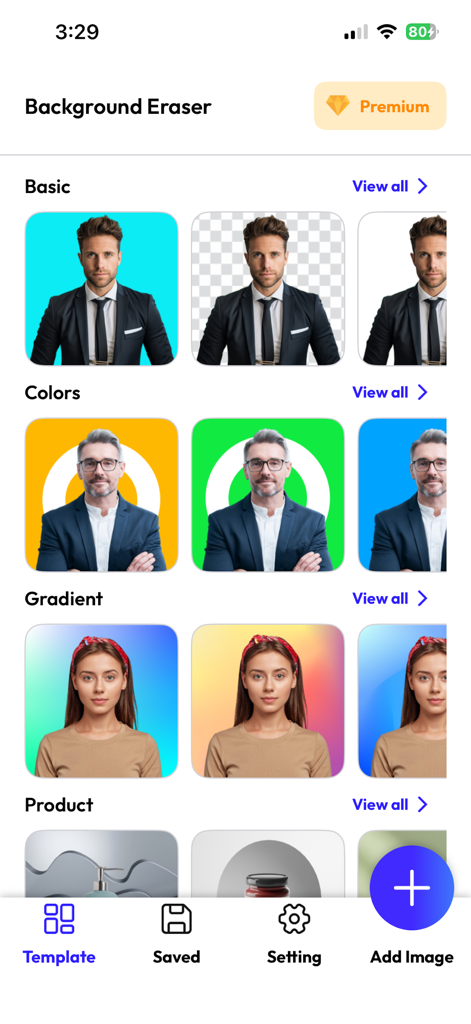
背景削除のモバイルアプリインターフェース。ポートレートや商品用の様々な色とグラデーションのテンプレートが表示されています。
Remove BGアプリのスプラッシュスクリーン。円形のプロフィール写真と青いグラデーションの背景にローディングインジケーターが表示されています。
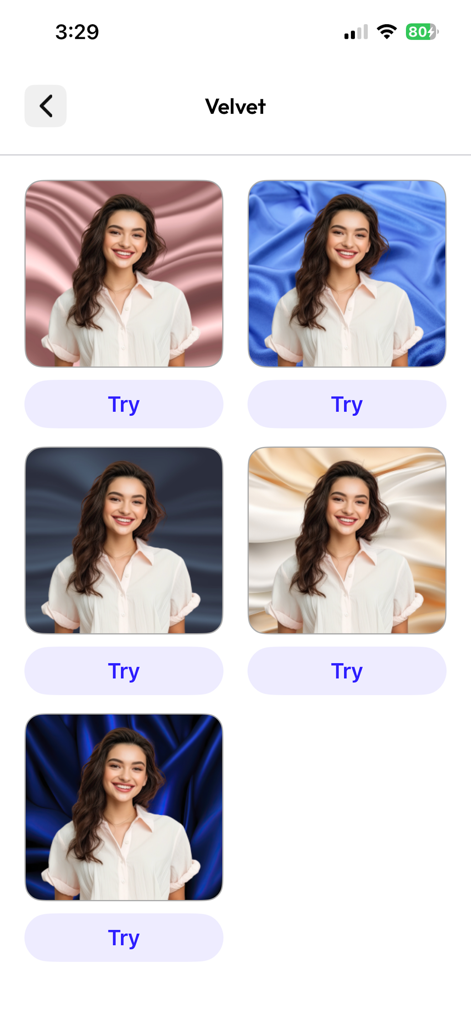
ポートレート写真用のベルベット調の背景オプションを複数表示するモバイルアプリ画面。
説明
Download
類似アプリ
同じカテゴリのトップランクアプリ

CapCut: Photo & Video Editor
BYTEDANCE PTE. LTD.

Instagram, Inc.

YouTube
Google LLC

Canva: AI Photo & Video Editor
Canva Pty Ltd

快手
Beijing Kwai Technology Co., Ltd.

Snapchat
Snap, Inc.

Edits: Video Editor
Instagram, Inc.

Google Photos: Backup & Edit
Google LLC

Meta AI - Vibes & AI Glasses
Meta Platforms, Inc.
このページはアプリまたはその開発者の公式ページではなく、情報提供および論評を目的として作成された独立した編集出版物です。明示的に別段の記載がない限り、アプリおよびその開発者は、MWM、Apple、Google Play、アプリのパブリッシャー、またはアプリの開発者と提携、承認、後援、認可、またはその他の公式的な関係はなく、このページのいかなる内容も、アプリがMWMのサービスを使用して開発されたことを意味するものではありません。すべての商標、ロゴ、スクリーンショット、その他のコンテンツはそれぞれの所有者の財産です。