
このページはアプリまたはその開発者の公式ページではなく、情報提供および論評を目的として作成された独立した編集出版物です。明示的に別段の記載がない限り、アプリおよびその開発者は、MWM、Apple、Google Play、アプリのパブリッシャー、またはアプリの開発者と提携、承認、後援、認可、またはその他の公式的な関係はなく、このページのいかなる内容も、アプリがMWMのサービスを使用して開発されたことを意味するものではありません。すべての商標、ロゴ、スクリーンショット、その他のコンテンツはそれぞれの所有者の財産です。


RICOH Smart Device Connector
紙とデジタルの壁を壊し、情報はあなたの指先で踊る。
ダウンロード
1M+ユーザー評価
評価数
241開発元
カテゴリ
Business対応言語
26最新バージョン
3.16.19サイズ
72.0 MBリリース日
2014年9月22日モバイル連携によるオフィスワークフローの最適化
RICOH Smart Device Connector: 主要機能分析
多様なデバイス接続方法
ユーザーは、Bluetooth Low Energy、QRコード、またはIPアドレス/ホスト名を通じて、複合機やプロジェクターに迅速かつ容易に接続できます。
モバイルおよびクラウドからの印刷
ユーザーは、スマートデバイス、主要なクラウドストレージサービス(Box, Dropbox, Google Drive, Microsoft OneDrive)、メールの添付ファイル、またはウェブページから直接文書や画像を印刷できます。Microsoft Office文書の印刷にも対応しています。
スマートデバイス・クラウドへのスキャン
ユーザーは、RICOH複合機でスキャンした文書を自身のスマートデバイスや、Box, Dropbox, Google Drive, Microsoft OneDriveなどの主要なクラウドストレージに直接保存し、共有や管理を効率化できます。
高度なプレゼンテーション機能
ユーザーは、スマートデバイスやクラウド上の文書、画像、メール、ウェブページをRICOHプロジェクターやインタラクティブホワイトボードに投影できます。インタラクティブホワイトボードで注釈を付けた文書の保存や、Apple TVを介した動画ファイルの投影も可能です。
スマートデバイスによるユーザー認証
ユーザーは、自身のスマートデバイスを利用してRICOH複合機の認証を実行できるため、セキュリティを確保しつつ、デバイスへのアクセスと操作を迅速に行えます。
ネットワークデバイスの自動検出
本アプリは、同じネットワーク内にある利用可能なRICOH複合機やプロジェクターを自動的に検索し、ユーザーが手動でデバイス設定を行う手間を省き、接続プロセスを簡素化します。
よくある質問
について知っておくべきこと RICOH Smart Device Connector
How can I connect a RICOH device to the RICOH Smart Device Connector app?
The RICOH Smart Device Connector app connects to RICOH MFPs or projectors using Bluetooth Low Energy, QR codes, an IP address, or a hostname. The app interface displays a "Connect with QR Code" option.
Which cloud services are compatible with RICOH Smart Device Connector?
The RICOH Smart Device Connector supports Box, Dropbox, Google Drive, and Microsoft OneDrive. This allows users to print, scan, and project documents and images directly from these cloud storage services.
Can I print emails and web pages using RICOH Smart Device Connector?
Yes, the RICOH Smart Device Connector facilitates printing of emails, file attachments, and webpages. These items can be printed directly from the smart device through the app.
Does the RICOH Smart Device Connector app provide document scanning capabilities?
Yes, the RICOH Smart Device Connector app provides document scanning capabilities. Users can scan documents to their smart device or directly to supported cloud services like Box, Dropbox, Google Drive, and Microsoft OneDrive.
Does RICOH Smart Device Connector support projection to a RICOH Interactive Whiteboard?
Yes, RICOH Smart Device Connector supports projecting documents and images to a RICOH Interactive Whiteboard. It also supports RICOH projectors. Specific firmware versions may be required for certain Interactive Whiteboard models.
Is there a fax function available in the RICOH Smart Device Connector app?
Yes, the RICOH Smart Device Connector app includes a dedicated Fax feature. This function is accessible directly from the app's main menu for users to send faxes.
Can users authenticate through the RICOH Smart Device Connector app?
Yes, the RICOH Smart Device Connector app enables user authentication directly via a smart device. This feature enhances security and manages access to connected RICOH machines.
What are the available print setting options in RICOH Smart Device Connector?
The RICOH Smart Device Connector offers print settings such as copies, color/B&W, paper size, orientation, 1-sided or 2-sided, paper tray selection, stapling, and combining documents.
Does RICOH Smart Device Connector automatically detect network machines?
Yes, the RICOH Smart Device Connector app automatically searches for available machines on the same network. This automatic detection excludes RICOH Interactive Whiteboards, which require manual connection.
Can RICOH Smart Device Connector print Microsoft Office documents?
Yes, RICOH Smart Device Connector supports printing Microsoft Office documents. Users should note that the layout of these documents may change when printed through the app.
以下のスクリーンショットと説明は、アプリの公式ストアリスティングから直接取得されたものであり、アプリ開発者の所有物です。
アプリストア
スクリーンショット
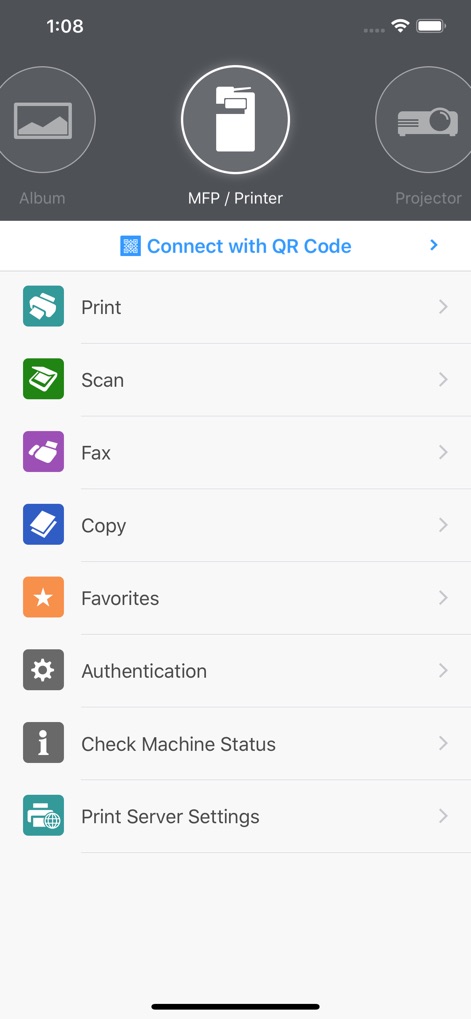
ユーザーはMFP/プリンターやプロジェクターを選択し、印刷やスキャンといった主要な操作へ迅速にアクセスできます。
主要機能へ簡単アクセス
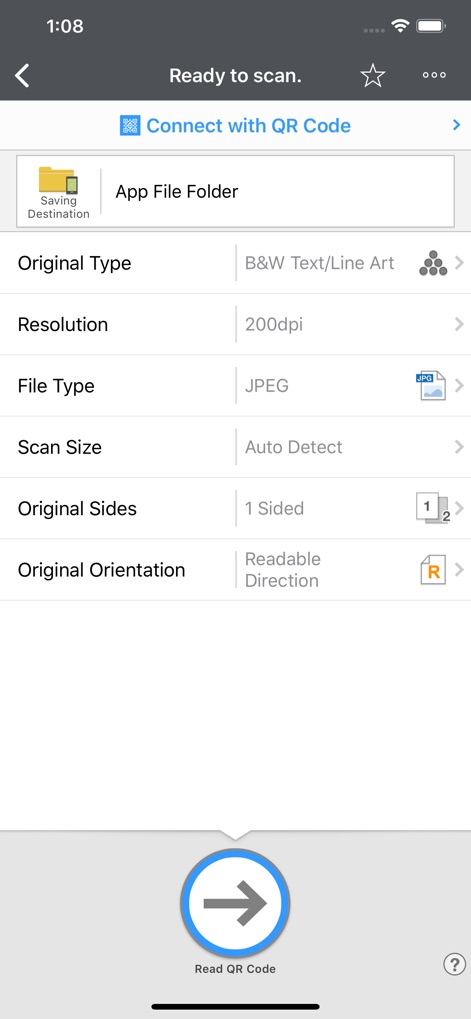
本画面では、ファイルタイプ(JPEG)や解像度といった詳細なスキャン設定を調整し、スキャンしたドキュメントをアプリ内フォルダーに保存できます。
スキャン設定を最適化
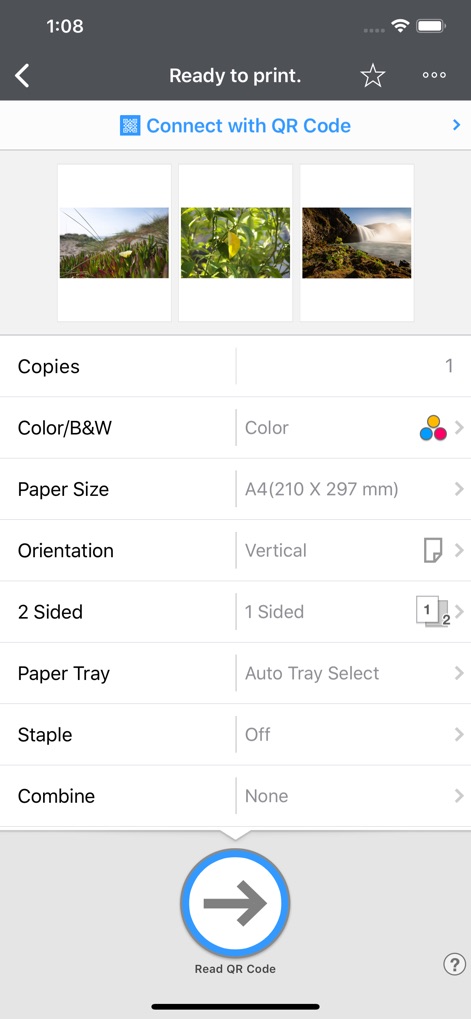
ユーザーは印刷前に画像のプレビューを確認し、部数や用紙サイズ、両面印刷などの詳細なプリントオプションを設定できます。
プリント設定を細やかに
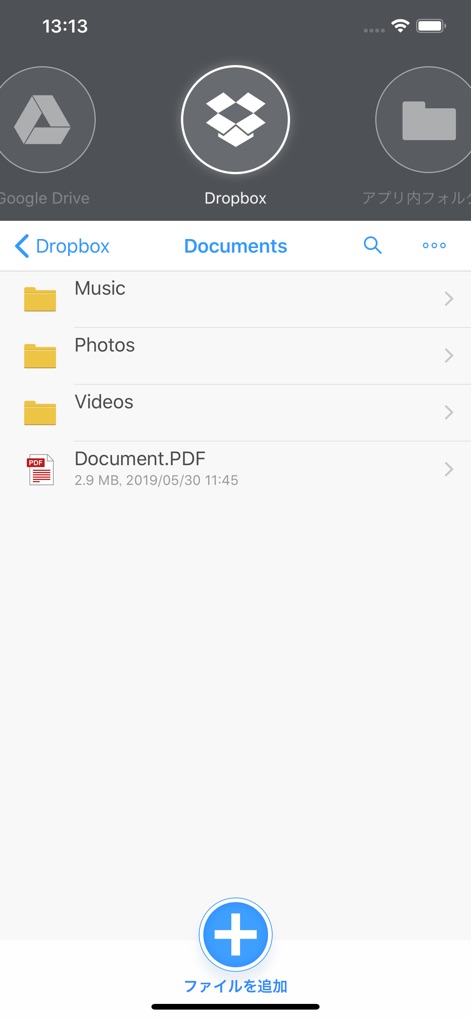
この画面では、Dropboxなどの主要なクラウドサービスから直接ファイルにアクセスでき、PDFファイルの追加や管理が容易に行えます。
クラウド連携でスムーズに
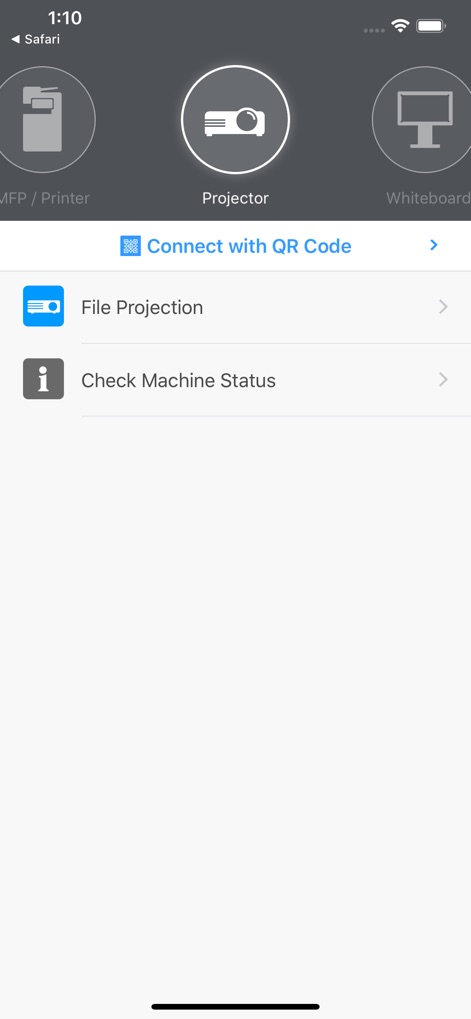
プロジェクターを選択することで、ファイルの投写や機器ステータスの確認といった専用の機能に素早くアクセスできます。
プロジェクター連携を強化
説明
Download
類似アプリ
似た機能とユーザー体験を持つアプリ

DJI Mimo
SZ DJI TECHNOLOGY CO., LTD

DJI Ronin
SZ DJI TECHNOLOGY CO., LTD

Roku TV Remote Control & Cast
Aleh Piashkou

Remote for Hisense TV.
Duscov Stepan

Alpha Linker - Camera Transfer
恒茂 刘

MyCentsys Pro
Centurion Systems (Pty) Ltd

Roku TV Remote Control・
Artur Belov

Luminair
Synthe FX, LLC

FUJIFILM XApp
FUJIFILM Corporation
このページはアプリまたはその開発者の公式ページではなく、情報提供および論評を目的として作成された独立した編集出版物です。明示的に別段の記載がない限り、アプリおよびその開発者は、MWM、Apple、Google Play、アプリのパブリッシャー、またはアプリの開発者と提携、承認、後援、認可、またはその他の公式的な関係はなく、このページのいかなる内容も、アプリがMWMのサービスを使用して開発されたことを意味するものではありません。すべての商標、ロゴ、スクリーンショット、その他のコンテンツはそれぞれの所有者の財産です。