
このページはアプリまたはその開発者の公式ページではなく、情報提供および論評を目的として作成された独立した編集出版物です。明示的に別段の記載がない限り、アプリおよびその開発者は、MWM、Apple、Google Play、アプリのパブリッシャー、またはアプリの開発者と提携、承認、後援、認可、またはその他の公式的な関係はなく、このページのいかなる内容も、アプリがMWMのサービスを使用して開発されたことを意味するものではありません。すべての商標、ロゴ、スクリーンショット、その他のコンテンツはそれぞれの所有者の財産です。


ダウンロード
7.5M+ユーザー評価
評価数
3.8K開発元
カテゴリ
Business対応言語
11最新バージョン
4.7.0サイズ
62.8 MBリリース日
2009年6月8日企業の認証セキュリティを強化し、ユーザーエクスペリエンスを向上させるための分析
RSA Authenticator (SecurID) の主要機能評価
多様な多要素認証 (MFA) オプションの提供
本アプリは、ワンタイムパスコード、QRコード、コードマッチング、プッシュ通知、生体認証、ハードウェア認証器など、幅広い多要素認証オプションを通じてアカウントの保護を可能にします。
デバイスバウンドパスキーによる強力なフィッシング耐性
ユーザーは、フィッシング攻撃に対して高い耐性を持つデバイスバウンドパスキーを活用し、アプリケーションやサービス全体で一貫したスムーズな認証体験を享受できます。
パスワードレス認証による生産性向上とリスク軽減
このツールは、パスワードの入力を不要にするデバイスバウンドパスキーを提供することで、迅速かつセキュアで摩擦のない認証を実現し、組織のリスクを低減し、従業員の生産性を向上させます。
企業および規制産業向けの信頼性の高い認証基盤
本アプリは、企業および高度に規制された業界の厳しい要件を満たすよう設計されており、どのようなIT環境においても信頼性の高い認証ソリューションを提供します。
よくある質問
について知っておくべきこと RSA Authenticator (SecurID)
What is the RSA Authenticator App?
The RSA Authenticator App secures digital life and streamlines access for enterprises and highly regulated industries. It provides trusted authentication regardless of the environment, offering robust multi-factor options.
What multi-factor authentication (MFA) options does the RSA Authenticator App offer?
The RSA Authenticator App offers diverse MFA options. These include one-time passcodes (OTP), QR codes, code matching, push notifications, biometrics, and hardware authenticators for enhanced security and protection.
Does the RSA Authenticator App support passwordless authentication?
Yes, the RSA Authenticator App supports passwordless security through passkeys. Users authenticate with device-bound passkeys for fast, secure, and frictionless access, which reduces risks and boosts productivity.
Is the RSA Authenticator App available to individual users?
No, the RSA Authenticator App is not available to everyone. Your company must be an RSA customer to use it. Users should contact their help desk administrator for registration information.
What applications does the RSA Authenticator App replace or update?
The RSA Authenticator app is an update to the existing SecurID 4.X app. It also serves as a replacement for the SecurID Authenticate 3.9.x app, consolidating authentication services.
Can I use biometrics with the RSA Authenticator App?
Yes, the RSA Authenticator App offers biometric authentication. Users can utilize methods like Face ID for fast and secure access, enhancing the security of their stored credentials.
How does the RSA Authenticator App handle sign-in requests?
The RSA Authenticator App handles sign-in requests through push notifications. Users can then approve the sign-in by matching a code, typing a code, or using other verification methods presented in the app interface.
Can I use QR codes for authentication with the RSA Authenticator App?
Yes, the RSA Authenticator App supports QR code authentication. Users can scan a QR code with their device's camera to initiate registration or complete an authentication process quickly and securely.
以下のスクリーンショットと説明は、アプリの公式ストアリスティングから直接取得されたものであり、アプリ開発者の所有物です。
アプリストア
スクリーンショット

本アプリは、パスキーとワンタイムパスコード (OTP) のリストを異なるテーマで表示し、ユーザーが複数の認証情報を一元的に管理できるインターフェースを提供します。
統合認証管理

ユーザーは、ライトモードとダークモードでOTP入力画面を切り替え、設定メニューから個人の好みに合わせてアプリの見た目をカスタマイズできます。
テーマの選択

本アプリは、「RSA Authenticator」または「iCloud Keychain」のどちらに新しいパスキーを保存するかを選択できる作成プロンプトを通じて、パスワードレス認証を容易にします。
パスキー作成

ロック画面に「Authenticator」からのサインインリクエスト通知が表示され、ユーザーはアプリを開くことなく、迅速な承認プロセスを開始できます。
プッシュ通知

サインインリクエストの詳細画面では、ユーザーは提供された複数のコードの中から一致するものを選択することで、承認または拒否のアクションを実行できます。
コードマッチング

ユーザーは、サインインリクエストの承認画面で、指定されたコードをテキスト入力フィールドに入力することで、認証を完了または拒否できます。
コード入力認証
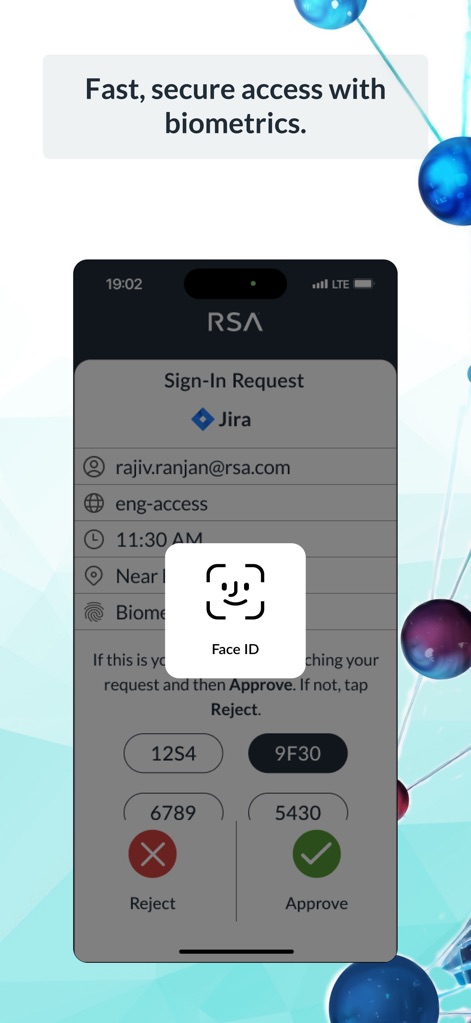
サインインリクエストの処理中にFace IDのプロンプトが表示され、ユーザーはコードマッチングの選択肢と合わせて生体認証による承認が可能です。
生体認証アクセス

本アプリはQRコードスキャン用のカメラインターフェースを提供し、ユーザーはQRコードを読み取ることで、登録または認証プロセスを開始できます。
QRスキャン認証
説明
Download
類似アプリ
似た機能とユーザー体験を持つアプリ

WatchGuard AuthPoint
WatchGuard Technologies Inc.

Multifactor
MULTIFAKTOR, OOO

Smart Log On
Acceptto Corporation

Kavach Authentication
Tirender Wig

Aladdin 2FA
Aladdin R.D. ZAO

Google Smart Lock
Google LLC

FortiToken Mobile
Fortinet, Inc

X5 Ключ
Closed Joint Stock Company"Trade House"Perekrestok

TrustBuilder Authenticator
In-Webo Technologies
このページはアプリまたはその開発者の公式ページではなく、情報提供および論評を目的として作成された独立した編集出版物です。明示的に別段の記載がない限り、アプリおよびその開発者は、MWM、Apple、Google Play、アプリのパブリッシャー、またはアプリの開発者と提携、承認、後援、認可、またはその他の公式的な関係はなく、このページのいかなる内容も、アプリがMWMのサービスを使用して開発されたことを意味するものではありません。すべての商標、ロゴ、スクリーンショット、その他のコンテンツはそれぞれの所有者の財産です。