
このページはアプリまたはその開発者の公式ページではなく、情報提供および論評を目的として作成された独立した編集出版物です。明示的に別段の記載がない限り、アプリおよびその開発者は、MWM、Apple、Google Play、アプリのパブリッシャー、またはアプリの開発者と提携、承認、後援、認可、またはその他の公式的な関係はなく、このページのいかなる内容も、アプリがMWMのサービスを使用して開発されたことを意味するものではありません。すべての商標、ロゴ、スクリーンショット、その他のコンテンツはそれぞれの所有者の財産です。


Screen Recorder - Record.TV
退屈な画面録画に魂を吹き込む。このアプリが提供するのは、ただの記録ではない。画面の向こう側に、あなたの存在を解き放つ力だ。
ダウンロード
1M+ユーザー評価
評価数
4.1K開発元
カテゴリ
Photo & Video対応言語
37最新バージョン
3.19サイズ
150.8 MBリリース日
2018年7月31日モバイルコンテンツクリエイター向けの一体型iOSソリューション
アプリ「Screen Recorder - Record.TV」の主要機能分析
ビデオリアクションと音声解説
ユーザーは、ゲームプレイやアプリデモンストレーション中に自身の顔と声を録画に追加し、コンテンツに個性と直接的なエンゲージメントをもたらすことが可能です。
高品質な全画面録画
本アプリは、iOS 11以降のグローバル画面録画APIを活用し、デバイスの全画面を高解像度でスムーズにキャプチャします。
多様な共有とエクスポート
ユーザーは、録画したコンテンツを他のアプリ、メール、AirDrop、またはWi-Fi経由でPCに簡単に共有・転送し、幅広いプラットフォームで利用できます。
基本的な動画編集機能
このツールは、録画のトリミング、回転、フィルター適用といった基本的な編集機能を提供し、オンザゴーでの迅速な調整を可能にします。
プレミアム素材への無制限アクセス
サブスクリプションにより、ユーザーは著作権フリーの音楽、多様なステッカー、エフェクト、および無制限の動画保存機能を利用でき、コンテンツをさらに魅力的に装飾できます。
直感的な録画管理
本アプリは、録画された動画を一箇所に整理し、ユーザーが容易にアクセス・管理できるシンプルなインターフェースを提供します。
よくある質問
について知っておくべきこと Screen Recorder - Record.TV
Can I record my screen with Screen Recorder - Record.TV (Recordora)?
Yes, Screen Recorder - Record.TV (Recordora) records full-screen videos using iOS 11 global screen recording APIs. A 2-step guide is available upon app launch.
Does Screen Recorder - Record.TV support video reactions or facecam recording?
Yes, Screen Recorder - Record.TV (Recordora) supports adding video reactions with audio commentary, often called facecam. This feature is ideal for gaming or app demonstrations.
What video editing features does Screen Recorder - Record.TV offer?
Screen Recorder - Record.TV (Recordora) offers video trimming, rotation, and filters. Users can also add touch screen gestures, stickers, and text animations to their recordings.
How can I share or export recordings from Screen Recorder - Record.TV (Recordora)?
Screen Recorder - Record.TV (Recordora) allows sharing and exporting to other apps, email, or AirDrop. You can also export recordings to your computer via WiFi.
How much does Screen Recorder - Record.TV Premium cost?
Screen Recorder - Record.TV (Recordora) Premium offers a 3-day free trial followed by $2.99 per week or $9.99 per month. Subscriptions provide unlimited access to features.
Does Screen Recorder - Record.TV Premium subscription auto-renew?
Yes, the Screen Recorder - Record.TV (Recordora) Premium subscription automatically renews. Users must turn off auto-renewal at least 24 hours before the current period ends.
Does Screen Recorder - Record.TV include chroma key green screen effects?
Yes, Screen Recorder - Record.TV (Recordora) includes green screen effects with chroma key functionality. This feature is available within the video editing interface.
Where can I find the Terms of Use and Privacy Policy for Screen Recorder - Record.TV?
The Terms of Use for Screen Recorder - Record.TV (Recordora) are at https://tos.vidanimate.co. The Privacy Policy is available at https://privacy.vidanimate.co.
以下のスクリーンショットと説明は、アプリの公式ストアリスティングから直接取得されたものであり、アプリ開発者の所有物です。
アプリストア
スクリーンショット

ユーザーは、簡単な操作で画面録画を開始できます。このスクリーンショットでは、画面ブロードキャストのオプションと、マイクのオン/オフ機能が視覚的に示されています。
画面録画開始
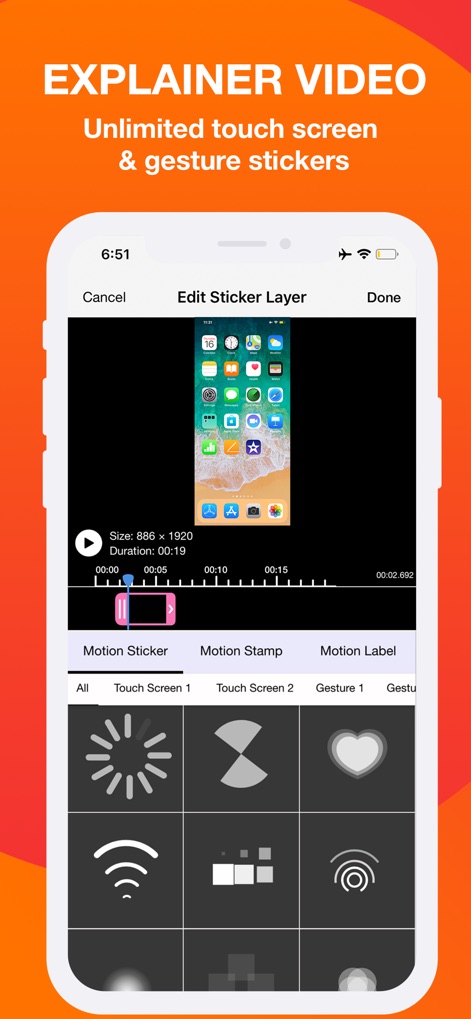
この編集画面では、ユーザーは動画に視覚的な要素を追加できます。モーションステッカーの選択肢と、タイムライン上でのステッカー配置機能が確認できます。
ステッカー追加

本ツールは、動画にキャプションやタイトルを追加する機能を提供します。この画面では、エフェクト、色、スタイルを調整できるオプションと、テキストアニメーションのプリセットが示されています。
テキスト装飾

ユーザーは、動画にリアクションを簡単に加えることができます。このスクリーンショットでは、メインの画面録画に重ねられたフェイスカム映像と、複数のトラックが表示される編集タイムラインが視覚的に確認できます。
リアクション動画

このアプリでは、高度なビデオ編集機能が利用可能です。ユーザーは、クロマキー機能を使用して背景を透過させたり、動画レイヤーのサイズ変更と回転を行ったりできます。
クロマキー編集
説明
Download
類似アプリ
似た機能とユーザー体験を持つアプリ

Medal - Game Clipping
Medal B.V.

Screen Recorder,Video Recorder
VIDEOSHOW PTE. LTD.

Screen Recorder
App of the Year LLC

Record it! :: Screen Recorder
DIGISET LLC

Screen Recorder Voice & Video
Arthur Eduardo Skaetta Alvarez Desenvolvimento de Software LTDA.

Screen Recorder ®
Poster App LLP

Super Screen Recorder: Full HD
Dream United, Ltd.

Screen Recorder: Go Record
Torqued Studios LLC

Screen Recorder-Video & Voice
Danila Ianushev
このページはアプリまたはその開発者の公式ページではなく、情報提供および論評を目的として作成された独立した編集出版物です。明示的に別段の記載がない限り、アプリおよびその開発者は、MWM、Apple、Google Play、アプリのパブリッシャー、またはアプリの開発者と提携、承認、後援、認可、またはその他の公式的な関係はなく、このページのいかなる内容も、アプリがMWMのサービスを使用して開発されたことを意味するものではありません。すべての商標、ロゴ、スクリーンショット、その他のコンテンツはそれぞれの所有者の財産です。