
このページはアプリまたはその開発者の公式ページではなく、情報提供および論評を目的として作成された独立した編集出版物です。明示的に別段の記載がない限り、アプリおよびその開発者は、MWM、Apple、Google Play、アプリのパブリッシャー、またはアプリの開発者と提携、承認、後援、認可、またはその他の公式的な関係はなく、このページのいかなる内容も、アプリがMWMのサービスを使用して開発されたことを意味するものではありません。すべての商標、ロゴ、スクリーンショット、その他のコンテンツはそれぞれの所有者の財産です。


ダウンロード
1M+ユーザー評価
評価数
55.3K開発元
カテゴリ
Utilities対応言語
9最新バージョン
1.118サイズ
143.4 MBリリース日
2021年10月12日モバイルコンテンツクリエーター向けの主要機能評価
「Screen Recorder ®」アプリ分析
ソーシャルメディアへのライブストリーミング
ユーザーは、YouTube、Facebook、Twitchなどの様々なソーシャルメディアプラットフォームへ画面をライブストリーミングすることが可能です。
高品質画面録画
このアプリは、ビデオ通話、ビデオゲーム、オンラインビデオ、チュートリアル、ライブショーなどをスムーズかつ鮮明に高品質HDで録画します。
包括的なビデオ編集ツール
録画されたビデオのトリミング、結合、音楽の追加、テキストやステッカーの挿入、速度変更、フィルター適用、クロップ、複数の動画のマージといった機能を提供します。
リアクションカメラ(Facecam)
Facecam機能を使用して、ユーザーが反応動画を作成し、InstagramやFacebookで即座に共有できるよう、リアルタイムでの顔の反応録画をサポートします。
音声解説とリアルタイム反応コメント
外部オーディオや音声録音を通じて、ユーザーはゲームプレイやチュートリアルに音声解説を追加し、ビデオ視聴中にリアルタイムでコメントを録画できます。
直感的な録画開始・停止
通知バーまたはフローティングウィンドウから、ワンタップで録画を簡単に開始および停止することができ、スムーズなユーザーエクスペリエンスを実現します。
よくある質問
について知っておくべきこと Screen Recorder ®
What is the Screen Recorder ® app used for?
The Screen Recorder ® app is an HD screen recorder and screenshot capture tool for recording video games, live shows, online videos, and video chats. It also supports live streaming.
Can Screen Recorder ® livestream content to social media?
Yes, Screen Recorder ® can livestream your screen to various social media platforms like YouTube, Facebook, and Twitch, enhancing content sharing capabilities.
Does Screen Recorder ® include video editing features?
Yes, Screen Recorder ® offers comprehensive video editing tools. Users can trim, combine, add music, text, frames, stickers, filters, and change video speed.
How does Screen Recorder ® initiate and stop screen recordings?
Screen Recorder ® initiates and stops recordings smoothly with just one tap. This can be done conveniently via the notification bar or a floating window interface.
Can I add voice commentary to my videos using Screen Recorder ®?
Yes, Screen Recorder ® allows adding voice commentary. Users can record external audio and create commentary videos in real-time, ideal for tutorials or gameplay.
Does Screen Recorder ® support Facecam for reaction videos?
Yes, Screen Recorder ® supports Facecam. This feature enables users to create engaging reaction videos and respond immediately on platforms like Instagram and Facebook.
What video quality settings are available in Screen Recorder ®?
Screen Recorder ® provides adjustable video quality settings. Users can select resolution up to 4K, modify bit rate (Mbps), and set frame rate (fps) up to 60.
Are there subscription plans for Screen Recorder ®?
Yes, Screen Recorder ® offers auto-renewing subscription options. These plans, billed monthly or yearly, provide unlimited access to all features and content.
How can I cancel my Screen Recorder ® subscription?
Users can manage their Screen Recorder ® subscriptions and turn off auto-renewal by going to their Account Settings after purchase. Cancellation of the current subscription is not allowed during the active period.
Does Screen Recorder ® have a Privacy Policy?
Yes, Screen Recorder ® has a Privacy Policy. It is available for review at the URL: https://screenrecord.posterapplab.com/screenrecoder/privacy-policy.
以下のスクリーンショットと説明は、アプリの公式ストアリスティングから直接取得されたものであり、アプリ開発者の所有物です。
アプリストア
スクリーンショット

このアプリは、4K解像度でのゲーム録画に対応しており、鮮明な映像で高品質なコンテンツを制作できます。
4K高画質録画
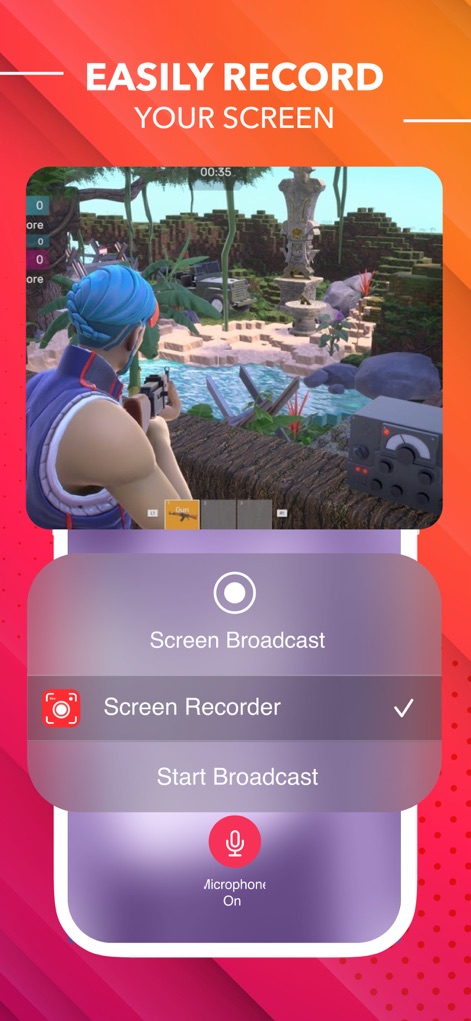
ユーザーは、画面下部に表示される直感的なメニューから「画面収録」を簡単に選択し、マイクのオンオフも手軽に切り替えられます。
簡単画面収録

このツールは、ゲームプレイ映像にFace Camを重ねてユーザーのリアルタイムな反応を映し出し、臨場感あふれる実況動画を作成できます。
Face Camリアクション

高度な動画編集機能により、ユーザーはタイムラインでクリップを視覚的に管理し、Face Cam追加や音楽挿入などの多様なツールを利用できます。
完璧な編集ツール

このアプリでは、ユーザーは解像度スライダーで最大4Kまでの画質を選び、フレームレートスライダーで滑らかな60fps設定も可能です。
画質を自在に

録画した動画はタイムライン上で簡単に管理でき、速度調整スライダーを使って0.2倍から20倍までの再生速度を自在に変更できます。
動画速度管理

ユーザーは、波形表示されたオーディオトラックを確認しながら動画にBGMを追加でき、下部の編集メニューから他の機能も利用可能です。
音楽を追加

このツールは、「Lomo」や「Vintage」など複数のフィルターオプションを提供し、動画に魅力的な視覚効果を瞬時に適用できます。
多彩なフィルター
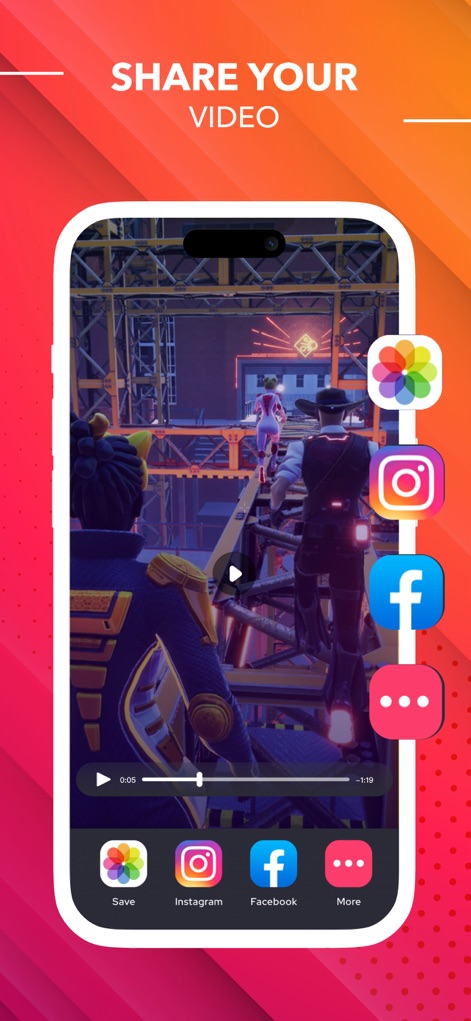
作成した動画は、InstagramやFacebookなどの主要なソーシャルメディアへ直接共有でき、デバイスのカメラロールへ保存するオプションも利用できます。
動画を共有
説明
Download
類似アプリ
似た機能とユーザー体験を持つアプリ

Medal - Game Clipping
Medal B.V.

Screen Recorder,Video Recorder
VIDEOSHOW PTE. LTD.

Screen Recorder
App of the Year LLC

Record it! :: Screen Recorder
DIGISET LLC

Screen Recorder Voice & Video
Arthur Eduardo Skaetta Alvarez Desenvolvimento de Software LTDA.

Super Screen Recorder: Full HD
Dream United, Ltd.

Screen Recorder: Go Record
Torqued Studios LLC

Screen Recorder-Video & Voice
Danila Ianushev

Screen recorder - video
Mark Thomas
このページはアプリまたはその開発者の公式ページではなく、情報提供および論評を目的として作成された独立した編集出版物です。明示的に別段の記載がない限り、アプリおよびその開発者は、MWM、Apple、Google Play、アプリのパブリッシャー、またはアプリの開発者と提携、承認、後援、認可、またはその他の公式的な関係はなく、このページのいかなる内容も、アプリがMWMのサービスを使用して開発されたことを意味するものではありません。すべての商標、ロゴ、スクリーンショット、その他のコンテンツはそれぞれの所有者の財産です。