
このページはアプリまたはその開発者の公式ページではなく、情報提供および論評を目的として作成された独立した編集出版物です。明示的に別段の記載がない限り、アプリおよびその開発者は、MWM、Apple、Google Play、アプリのパブリッシャー、またはアプリの開発者と提携、承認、後援、認可、またはその他の公式的な関係はなく、このページのいかなる内容も、アプリがMWMのサービスを使用して開発されたことを意味するものではありません。すべての商標、ロゴ、スクリーンショット、その他のコンテンツはそれぞれの所有者の財産です。


ダウンロード
1k+ユーザー評価
評価数
58開発元
カテゴリ
Productivity対応言語
1最新バージョン
2.1.4サイズ
17.6 MBリリース日
2016年3月19日Apple Watch向け生産性向上ツールの主要機能分析
Silo: Focus & Study Timer アプリ評価
目立たない触覚アラート
音や視覚的な通知ではなく、手首への繊細な触覚フィードバックにより、集中時間と休憩時間の切り替わりを知らせるため、周囲に配慮しながら作業できます。
ポモドーロ方式タイマー
25分間の集中と5分間の休憩を繰り返すポモドーロテクニックを採用しており、集中力を高め、精神的な疲労を軽減する効果が期待できます。
Apple Watch専用設計
このアプリはApple Watchに特化して設計されており、手首から直接集中セッションと休憩セッションを管理できます。
集中を妨げない使用体験
飛行機モードでも機能するため、外部からの通知や干渉を完全に遮断し、ユーザーがタスクに完全に集中できる環境を提供します。
集中・休憩サイクルの自動切り替え
集中セッションと休憩セッションの間でタイマーが自動的に切り替わるため、ユーザーは手動で操作することなく、フローを維持できます。
ウォッチ上でのタイマー間隔調整
ユーザーはApple Watchから直接、集中セッションや休憩セッションの時間を調整できるため、柔軟な時間管理が可能です。
セッションの一時停止と再開
ユーザーは必要に応じていつでも集中セッションを一時停止し、後で再開できるため、予期せぬ中断にも柔軟に対応できます。
Apple Watchコンプリケーション対応 (Pro)
Apple Watchの文字盤にタイマー情報や進捗状況を直接表示できるため、アプリを開かずに一目で状況を把握できます。
To-Doとリマインダーで日を計画 (Pro)
このツールは、毎日のタスクリストを作成し、リマインダーを設定する機能を提供するため、ユーザーは目標を整理し、計画的に取り組めます。
集中時間の統計追跡 (Pro)
日次および週次の集中セッションの統計を記録および表示することで、ユーザーは自身の生産性パターンを分析し、改善に役立てることができます。
以下のスクリーンショットと説明は、アプリの公式ストアリスティングから直接取得されたものであり、アプリ開発者の所有物です。
アプリストア
スクリーンショット
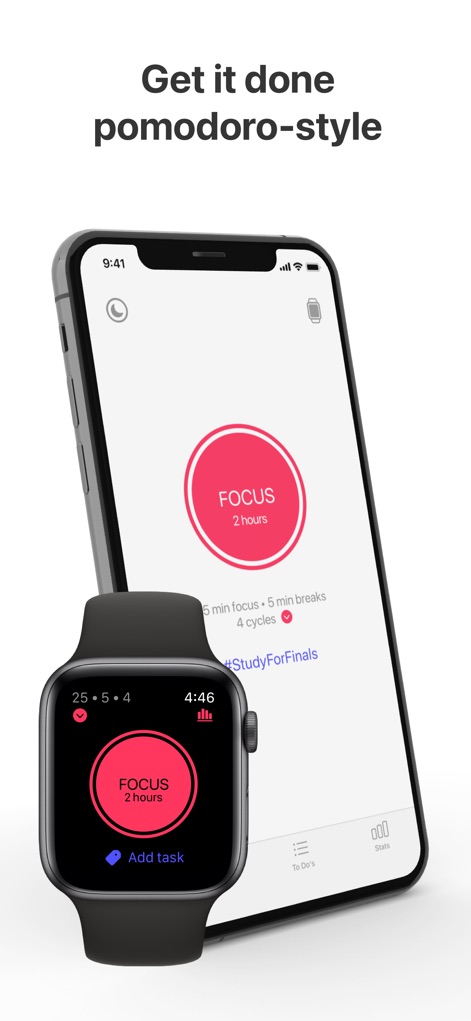
このアプリは、Apple Watchでポモドーロサイクルの「FOCUS」セッションの残り時間と、iPhoneで設定されたセッションの詳細やハッシュタグを視覚的に表示します。
集中セッション開始
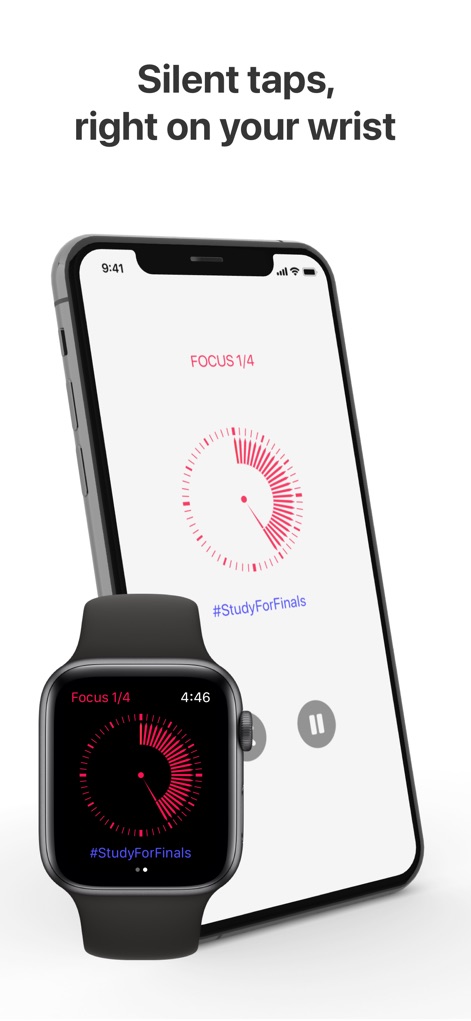
Apple WatchとiPhoneの両方で、現在のフォーカスセッションの進捗状況を円形のプログレスバーと「FOCUS 1/4」という現在のサイクルを示すテキストで確認できます。
手首で進捗確認
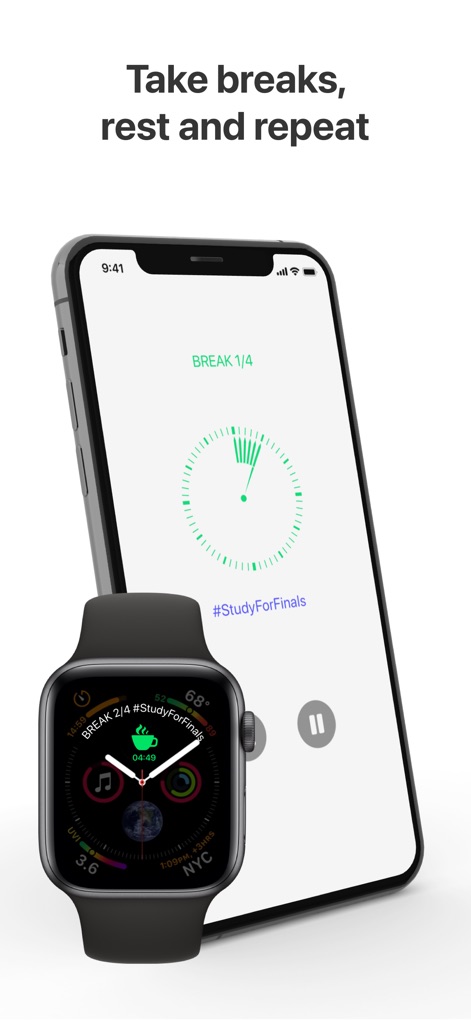
休憩時間には、Apple Watchの画面が緑色の「BREAK」表示に変わり、iPhoneでも同様に休憩サイクルを示す進捗状況が円形タイマーで示されます。
効率的な休憩管理

このツールは、日付ごとに整理されたタスクリストとカレンダービューを提供し、ユーザーは特定のタスクをスケジュールし、日中のタイムスロットに割り当てることができます。
タスクを計画する
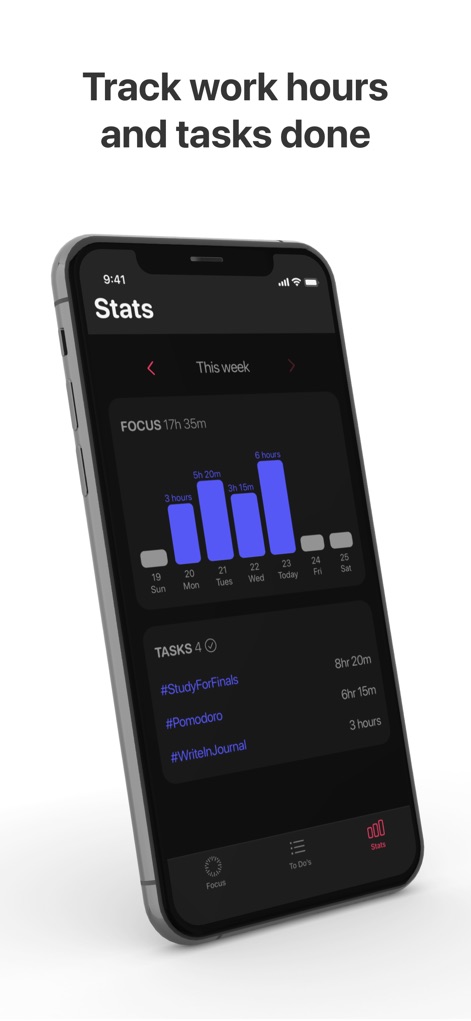
ユーザーは、日ごとの集中時間を表示する棒グラフと、完了したタスクとその集中時間を一覧で示す機能を通じて、自身の生産性を追跡できます。
進捗を追跡する
説明
Download
類似アプリ
同じカテゴリのトップランクアプリ

ChatGPT
OpenAI OpCo, LLC

Google Gemini
Google LLC

Grok
X.AI Corporation

Gmail - Email by Google
Google LLC

千问 - 阿里最强大模型官方AI助手
Shanghai Zhixin Puhui Technology Co., Ltd.

Google Drive
Google LLC

Microsoft Authenticator
Microsoft Corporation

Google Sheets
Google LLC

Google Docs
Google LLC
このページはアプリまたはその開発者の公式ページではなく、情報提供および論評を目的として作成された独立した編集出版物です。明示的に別段の記載がない限り、アプリおよびその開発者は、MWM、Apple、Google Play、アプリのパブリッシャー、またはアプリの開発者と提携、承認、後援、認可、またはその他の公式的な関係はなく、このページのいかなる内容も、アプリがMWMのサービスを使用して開発されたことを意味するものではありません。すべての商標、ロゴ、スクリーンショット、その他のコンテンツはそれぞれの所有者の財産です。