Site Audit Pro

Site Audit Pro

ダウンロード: App Storeダウンロード: Google Play
ロゴ: Site Audit Pro

Site Audit Pro:外出先での検査と監査の最速の方法

現場から直接、プロフェッショナルでブランド化されたレポートを生成することで、オフィスでの何時間もの作業をなくしましょう。検査、不具合リスト、安全監査を効率化している何千人ものプロに参加しましょう。

開発元

Veam Studios Ltd

カテゴリ

Productivity

ダウンロード

467K+

ユーザー評価

4.8/5

評価数

30K+

対応言語

1

あらゆるフレームに効率性

このインターフェースを利用する 467K+ 人のユーザー.

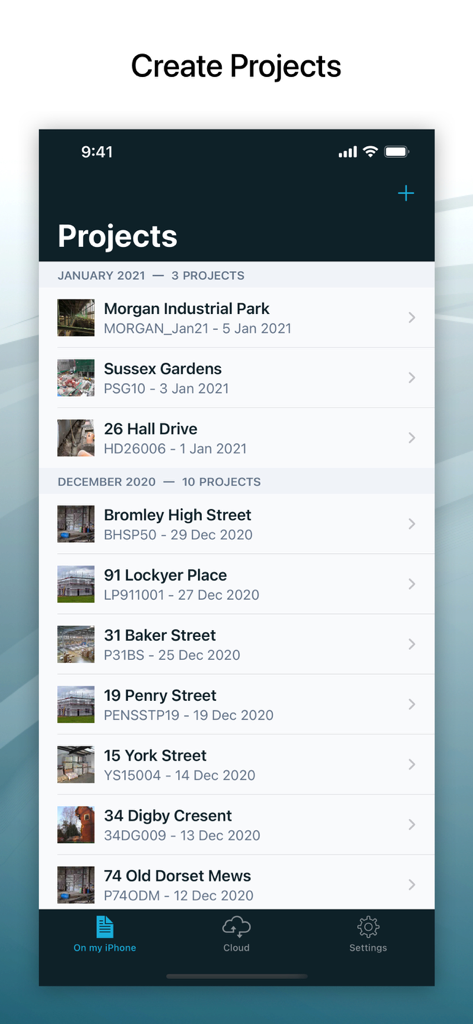
Site Audit Proモバイルアプリインターフェイスの検査および監査プロジェクトのリスト。
Site Audit Proモバイルアプリインターフェイスの検査および監査プロジェクトのリスト。

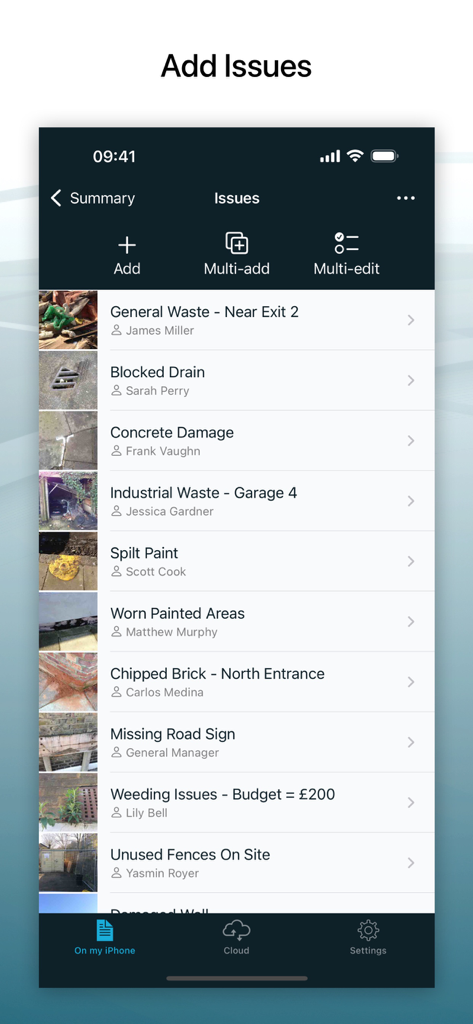
写真と担当者付きの記録されたサイト検査問題のリストを表示するSite Audit Proモバイルアプリインターフェイス。
写真と担当者付きの記録されたサイト検査問題のリストを表示するSite Audit Proモバイルアプリインターフェイス。

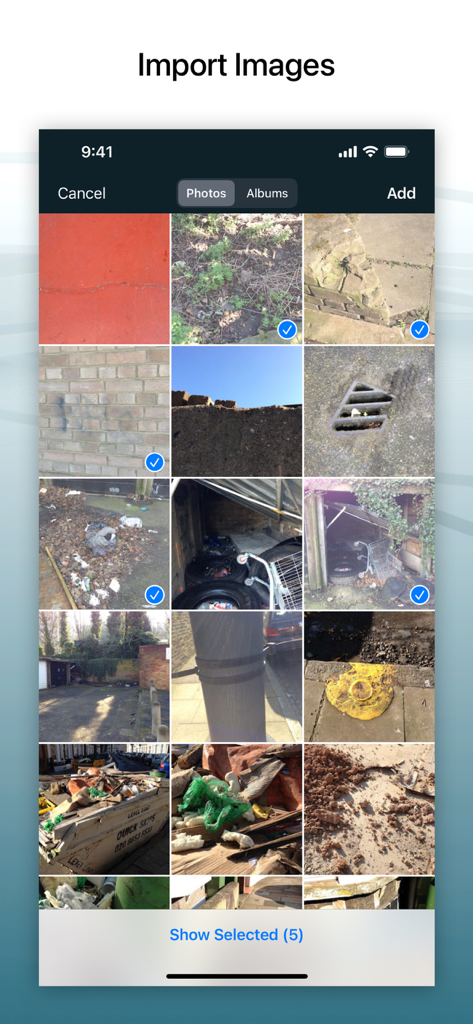
写真ギャラリーから監査レポートにインポートするための複数のサイト写真の選択を示すSite Audit Proのモバイルインターフェイス。
写真ギャラリーから監査レポートにインポートするための複数のサイト写真の選択を示すSite Audit Proのモバイルインターフェイス。

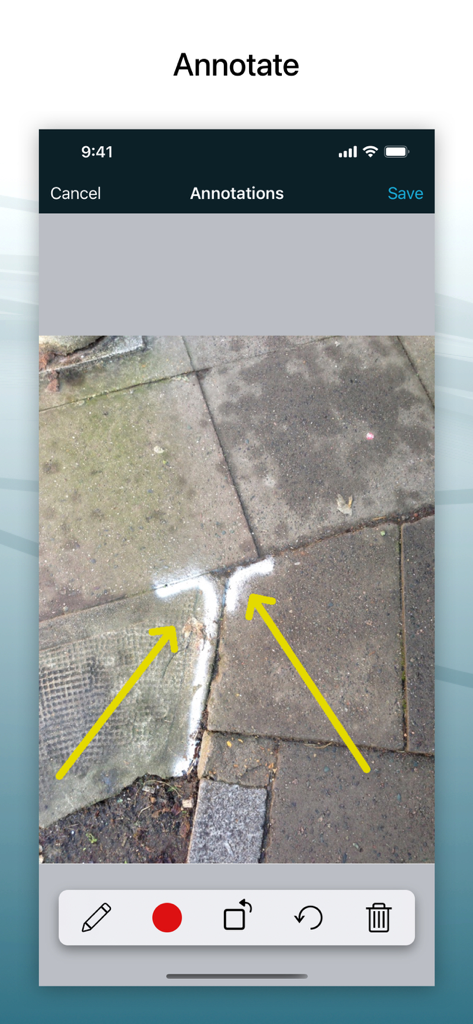
矢印で建設現場の写真を注釈付けするためのモバイルアプリインターフェイス。
矢印で建設現場の写真を注釈付けするためのモバイルアプリインターフェイス。

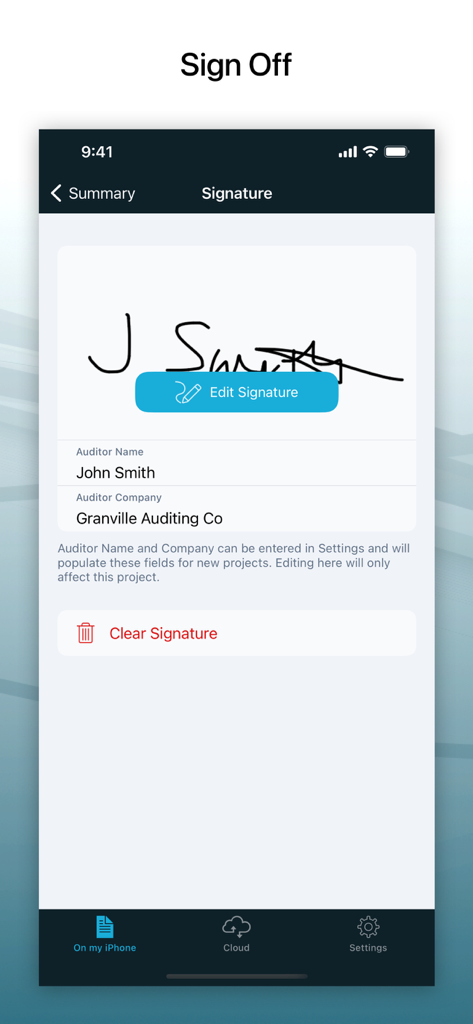
Site Audit Proアプリでの監査人署名のためのデジタル署名キャプチャ画面。
Site Audit Proアプリでの監査人署名のためのデジタル署名キャプチャ画面。

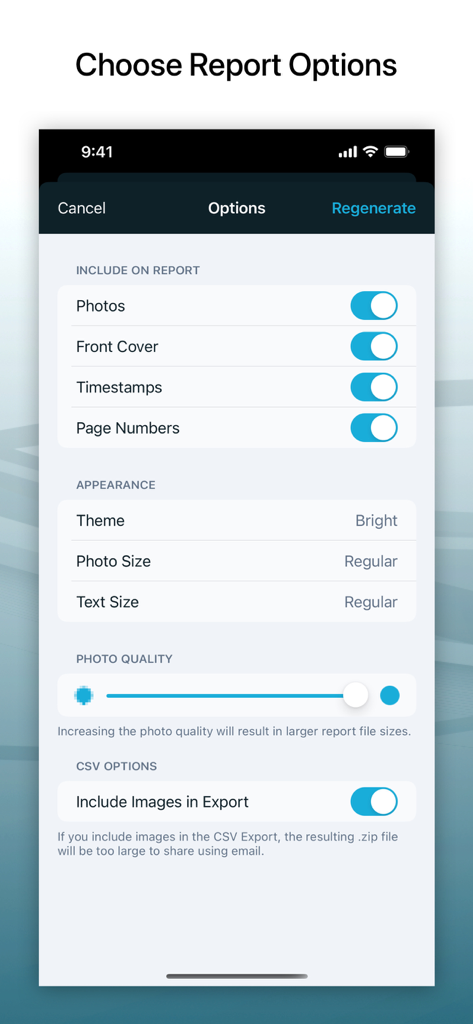
写真の品質やタイムスタンプなど、監査レポートオプションをカスタマイズするためのインターフェイス。
写真の品質やタイムスタンプなど、監査レポートオプションをカスタマイズするためのインターフェイス。

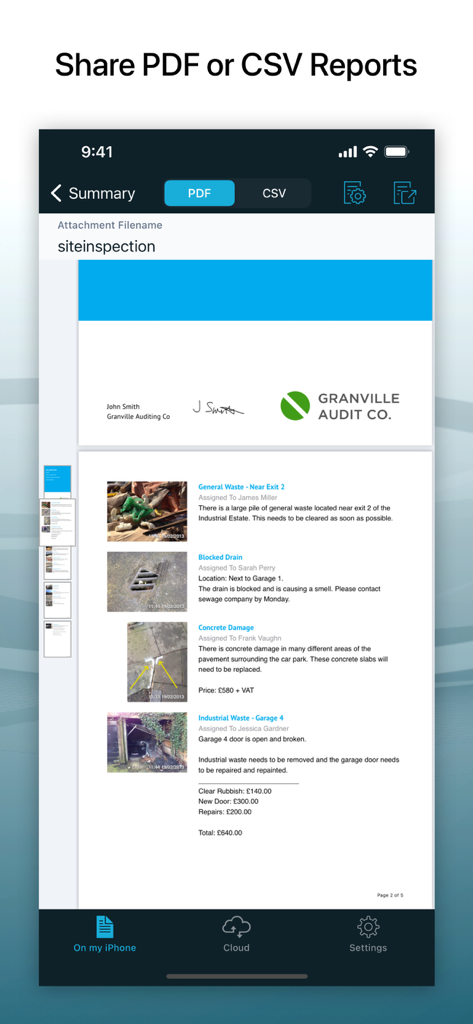
写真と問題の説明が付いたプロフェッショナルなPDF監査レポートを示すモバイルアプリインターフェイス。
写真と問題の説明が付いたプロフェッショナルなPDF監査レポートを示すモバイルアプリインターフェイス。

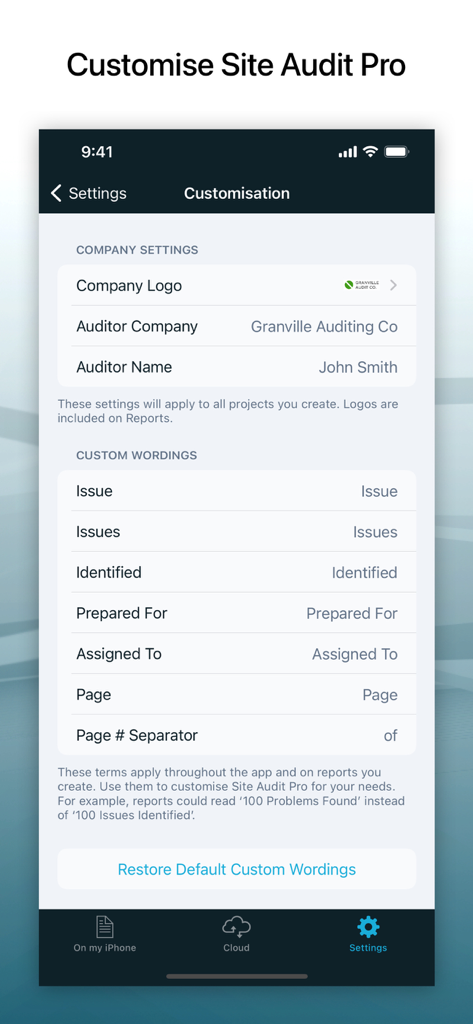
会社ブランディングとレポート用語をカスタマイズするためのSite Audit Proアプリインターフェイス。

会社ブランディングとレポート用語をカスタマイズするためのSite Audit Proアプリインターフェイス。

フィールドワークを数分でマスターする

このアプリを際立たせるツール、 467K+ 人のユーザーが選択.

🚀

サイト後の事務作業ゼロ

二重入力の疲労をなくしましょう。モバイルデバイスからサイトを離れる前に、調査結果をコンパイルし、プロフェッショナルなPDFレポートを関係者と即座に共有しましょう。

✏️

正確な写真注釈

直接画像に描画することで、サイトの問題を明確に伝えましょう。欠陥、安全上のリスク、または不具合リストの項目を強調表示して、チームが正確に何に注意を払う必要があるかを確実に把握できるようにします。

🏗️

プロフェッショナルなブランディングとコンプライアンス

GPSスタンプ付き画像と、会社ロゴ、監査人の署名、プロフェッショナルなレイアウトを特徴とするカスタマイズされたレポートでビジネスを保護し、すべてのクライアントを感動させましょう。

アプリについて

について知っておくべきこと Site Audit Pro.

説明

‘The fastest way to audit on the go’ Site Audit Pro helps thousands of businesses worldwide improve their productivity by making audits and inspections quicker to carry out and easier to manage. Whether performing a safety inspection, snagging issues, creating a punch list, or providing a quotation, Site Audit Pro will help you collate and share your findings on the go with customised Reports to add a personal and professional touch. --- FEATURES - Record Issues: Add a title, assignee, and comments to document each Issue. - Add and Annotate Images: Highlight and draw important information directly on Images to emphasise key points. - Organise Issues into Projects: Add Site and Client details specific to each Project for better organisation and clarity. - Image Details: Optionally show timestamps and GPS locations on each Image in the Report for precise documentation of when and where Issues were recorded. - Share Professional Audit Reports: Eliminate the need to return to the office by sharing a PDF or CSV via email, Dropbox, device file sharing, and more. --- CUSTOMISATIONS - Add personal details to your Reports; include Company Name, Logo, Auditor Name and Signature. - Change the content to reflect your industry. Instead of ‘Identified 12 Issues’, why not use ‘Found 12 Problems’ or ‘Examined 12 Properties’? - Choose from and customise a range of 8 professional Report designs. --- GREAT FOR - Audits - Inspections - Punch Lists - Snag Lists - Documenting various items Site Audit Pro is adaptable to a number of industries. Whenever you need to capture and report important data, choose Site Audit Pro. Download Site Audit Pro today to save time, improve productivity and make audits and inspections organised and hassle-free. --- SUBSCRIPTION Site Audit Pro Cloud is our subscription service that allows you to store your projects in the cloud and access them from the web. Whilst the subscription does give you access to some of the more advanced features and access, it is not required to use and generate Reports. The features below are what you would gain access to by subscribing, whereas the features above are what are already included in the base app. SUBSCRIPTION FEATURES 1. ACCESS PROJECTS FROM THE WEB Create, edit and share Reports from our web app. Using the website allows you to quickly type up comments using your computer keyboard as well as accessing your Projects from any browser. 2. MULTIPLE IMAGES You can show more than one Image for each Issue. This is useful for showing several angles of the same Issue, or to compare before and after Images. 3. SYNCING Sync your projects between devices. Start your project with your iPhone, type it up on an iPad, and do final editing on your PC or laptop. Reports can be generated from any location. 4. FOLDERS Organise your Projects into Folders. Name your Folders after the property, area, client, group, site or anything you want to keep organised! 5. MORE PROJECT INFORMATION Add a site address for each Project, as well as a Project photo to give the finishing touch to your Report’s cover. 6. ISSUE DUE DATES Give Issues a Due Date so your Assignees know exactly how long they have to complete any tasks required. 7. COMPLETE ISSUES Mark your Issues as completed. If all your Issues are completed, you can even mark the whole Project as completed. 8. REPORT COLOURS In addition to more themes, you can set up your own colour scheme! Use this to match your company branding or specific report types. --- *** Subscription Information *** Subscriptions will automatically renew unless cancelled within 24-hours before the end of the current period. You can cancel anytime with your Apple account settings. Any unused portion of a free trial will be forfeited if you purchase a subscription. *** Subscription Terms *** You can find the terms and conditions of the subscription here: https://www.siteauditpro.com/terms

最新バージョン

8.25.0

サイズ

69.5 MB

リリース日

2011年4月26日

トラックに戻る前にレポートを完成させる

二重入力の疲労をなくした467,000人以上の専門家に参加しましょう。今日Site Audit Proをダウンロードして、現場から直接、プロフェッショナルでブランド化されたレポートの提供を開始しましょう。

ダウンロード: App Storeダウンロード: Google Play
FAQ

よくある質問

について知っておくべきこと Site Audit Pro

Site Audit Proは、ビジネスの生産性をどのように向上させますか?

Site Audit Proは、監査と検査の実施を迅速化し、管理を容易にすることで、企業の生産性向上を支援します。カスタムレポートで所見を収集・共有します。

Site Audit Proは、問題に対する画像注釈をサポートしていますか?

はい、Site Audit Proでは、監査と検査の文書化の明確さを高めるために、重要なポイントを強調するために画像を追加したり、問題に直接注釈を付けたりすることができます。

Site Audit Proのレポートで利用可能なカスタマイズオプションは何ですか?

Site Audit Proでは、会社名とロゴの追加、業界固有の言葉遣いの変更、8つのプロフェッショナルなレポートデザインからの選択など、レポートのカスタマイズが可能です。

Site Audit Proでレポートを生成するためにサブスクリプションは必要ですか?

いいえ、Site Audit Pro Cloudのサブスクリプションは、基本アプリを使用し、レポートを生成するために必要ありません。サブスクリプションは、高度なクラウドベースの機能へのアクセスを提供します。

Site Audit Pro Cloudサブスクリプションに含まれる高度な機能は何ですか?

Site Audit Pro Cloudサブスクリプションは、プロジェクトへのWebアクセス、問題ごとの複数の画像、デバイス同期、プロジェクトフォルダ、追加のプロジェクト情報、問題の期日、カスタムレポートの色などの機能を提供します。

ユーザーはSite Audit Pro内で監査プロジェクトを整理できますか?

はい、Site Audit Proでは、さまざまなプロジェクトのリストを表示する「プロジェクトの作成」というタイトルのスクリーンショット#1で実証されているように、プロジェクトを整理できます。

Site Audit Proでは、監査レポートに署名を含めることができますか?

はい、Site Audit Proはレポートに署名を追加することをサポートしています。スクリーンショット#5、「署名」というタイトルのものには、監査人名と会社のフィールドとともに署名領域が表示されています。

Site Audit Proを使用してPDFレポートを生成できますか?

はい、Site Audit ProはPDFレポートを生成できます。スクリーンショット#7、「PDFまたはCSVレポートの共有」というタイトルのものには、画像と所見を含むプロフェッショナルなPDFレポートのプレビューが表示されています。

Site Audit Proのサブスクリプション条件はどこで見つけられますか?

Site Audit Proのサブスクリプションの利用規約は、アプリの説明に記載されているリンクからアクセスできる公式ウェブサイトで入手できます。

App information, icons, screenshots, and descriptions displayed on this page are sourced from the Apple App Store and are the property of their respective developers. Download estimates and rankings are based on MWM's proprietary models and may not reflect actual figures. This page is provided for informational and analytical purposes only.

Believe this page infringes your intellectual property? File a dispute