Sketch Pad 3
Sketch Pad 3
ダウンロード: App Store

このページはアプリまたはその開発者の公式ページではなく、情報提供および論評を目的として作成された独立した編集出版物です。明示的に別段の記載がない限り、アプリおよびその開発者は、MWM、Apple、Google Play、アプリのパブリッシャー、またはアプリの開発者と提携、承認、後援、認可、またはその他の公式的な関係はなく、このページのいかなる内容も、アプリがMWMのサービスを使用して開発されたことを意味するものではありません。すべての商標、ロゴ、スクリーンショット、その他のコンテンツはそれぞれの所有者の財産です。

ロゴ: Sketch Pad 3
ダウンロード: App Store

Sketch Pad 3

紙のノートパッドを、軽量で集中を妨げないワークスペースに置き換えましょう。複雑さを捨てて、学習曲線ゼロでスケッチ、メモ、思考の整理を始めましょう。

主要数値

ダウンロード

215K+

ユーザー評価

3.9/5

評価数

2K+

開発元

Catalystwo Limited

カテゴリ

Productivity

対応言語

2

最新バージョン

3.9.10

サイズ

27.2 MB

リリース日

2011年4月20日
機能

iPadをパワフルなパッドに変える

紙の無駄を捨てましょう。Sketch Pad 3は、視覚的に考え、素早く行動する必要がある忙しいプロフェッショナルやクリエイターのために設計された、集中を妨げない環境を提供します。

瞬時の視覚的キャプチャ

インスピレーションが閃いた瞬間に、摩擦のないツールとアイデアとともに成長する無限のキャンバスでスケッチを始めましょう。

スマートワークフロー統合

アラームをスケッチに割り当て、思考をプロジェクト固有のフォルダーに整理することで、メモとタスクの間のギャップを埋めましょう。

手間のかからないプロフェッショナル共有

手描きのコンセプトをPDFに変換するか、DropboxやGoogle Docsに直接同期して、チームの連携を維持しましょう。

以下のスクリーンショットと説明は、アプリの公式ストアリスティングから直接取得されたものであり、アプリ開発者の所有物です。

アプリストア

スクリーンショット
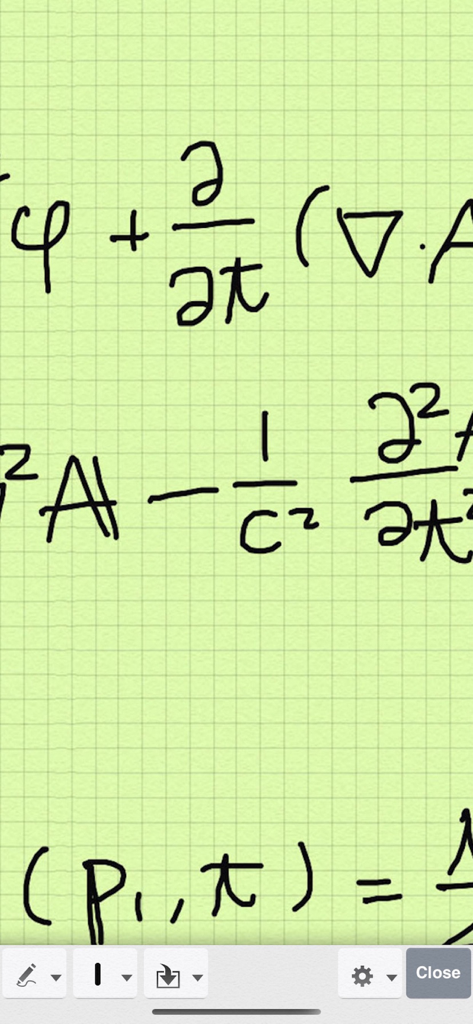
Sketch Pad 3 - Sketch Pad 3デジタルメモ帳アプリの緑色のグリッド背景に手書きの数学の公式
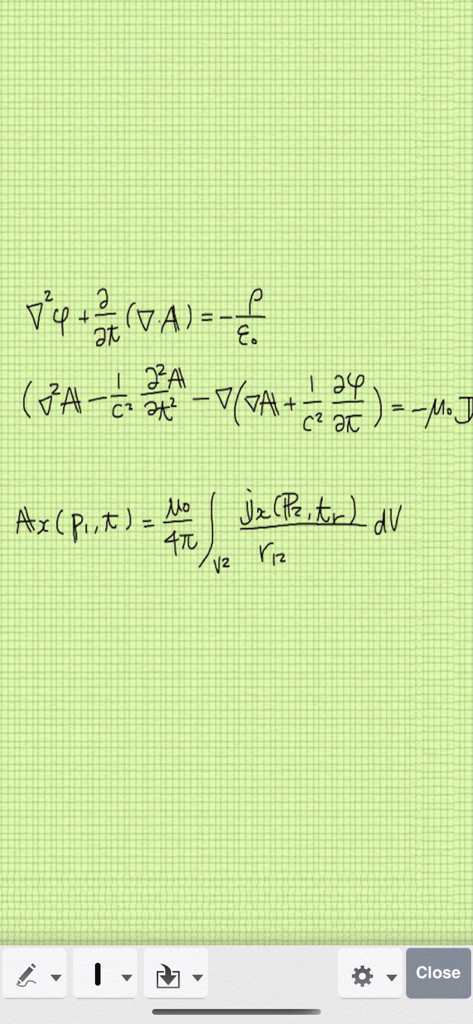
Sketch Pad 3デジタルメモ帳アプリの緑色のグリッド背景に手書きの数学の公式

Sketch Pad 3 - 緑色のデジタルグリッド紙の背景に手書きの物理学の数式

緑色のデジタルグリッド紙の背景に手書きの物理学の数式

説明

Thank you for all your support. Sketch Pad has now been downloaded more than 1,200,000 times Best app ever - Love it … by Syd-a-ney Excellent app. Very useful…. by Fettner Very useful for taking notes with the addition of adding pictures to them… by J Allard Best notes application EVER!….. by KunovicIvan Best doodle app... simple and intuitive. This one is excellent… by Macnd62478 Are you artistic or creative? Use Sketch Pad 3 on your iPad to: .... doodle, sketch or draw .... write lists or memos .... jot down notes during lectures .... share your inspirational thoughts with friends (Also available on iPhone and iPod touch) Sketch Pad doesn't waste precious paper and is quick, simple and fun from pre-school to retirement. Use your finger as a pen and choose: .... 3 pen-stroke sizes. .... 7 colors for iPad (4 for iPhone/iPod touch) .... erase all or portions of your drawing or list if you make a mistake or change your mind. .... unlimited edits of pen-strokes with undo and redo functions. .... zoom in/ zoom out simply by pinching in any mode, or double tap in scroll mode. .... cut and paste. .... drag stroke. Sketch Pad automatically saves your work on closing the application so you can instantly continue next time you open Sketch Pad. *** FEATURES *** - Unlimited canvas size - Trackpad for easy scrolling - Customizable grid lines - Customizable background colour - Smooth line with rounded ends - Organizing document folders - Export to Twitter, Evernote, Google docs, Picasa, Dropbox, PDF, Air-Printing compatible printer, other apps, email, photo library and Mac. - Flag a sketch or note - Assign Alarm to a sketch or note - Palm Rest (ideal for stylus users)... Fully adjustable for either right handed or left handed users (iPad only) - Two finger scrolling in writing mode - Zooming in/out by double tapping in browse mode - Zooming by pinching gesture can also be selectable *** TIPS *** Use two fingers and swipe the screen to scroll in Pen mode. Use Palm Rest so you don't get unwanted imprints. ==== *** Because of bugs in iOS 5, iPad 3rd generation with Retina Display model requires free upgrade to iOS 6 to use this app. It works correctly on other devices with iOS 5. You don't have to upgrade to iOS 6 if you are not using iPad 3. iCloud sync function is no longer supported from v3.7. Floating toolbar feature has been removed from v3.7. Version 3.6.1 had a bug in which ** free ** version crashed. (c) iStokcphoto 2833639

Download

ダウンロード: App Store

このページはアプリまたはその開発者の公式ページではなく、情報提供および論評を目的として作成された独立した編集出版物です。明示的に別段の記載がない限り、アプリおよびその開発者は、MWM、Apple、Google Play、アプリのパブリッシャー、またはアプリの開発者と提携、承認、後援、認可、またはその他の公式的な関係はなく、このページのいかなる内容も、アプリがMWMのサービスを使用して開発されたことを意味するものではありません。すべての商標、ロゴ、スクリーンショット、その他のコンテンツはそれぞれの所有者の財産です。








