
このページはアプリまたはその開発者の公式ページではなく、情報提供および論評を目的として作成された独立した編集出版物です。明示的に別段の記載がない限り、アプリおよびその開発者は、MWM、Apple、Google Play、アプリのパブリッシャー、またはアプリの開発者と提携、承認、後援、認可、またはその他の公式的な関係はなく、このページのいかなる内容も、アプリがMWMのサービスを使用して開発されたことを意味するものではありません。すべての商標、ロゴ、スクリーンショット、その他のコンテンツはそれぞれの所有者の財産です。


Slideshow Maker w Music
写真の羅列を、あっという間に記憶に残る物語へ変える。MWMがユーザーに与えるのは、ただのツールではなく、個々の思い出に生命を吹き込む力だ。
ダウンロード
2.5M+ユーザー評価
評価数
2.8K開発元
カテゴリ
Photo & Video対応言語
1最新バージョン
6.5サイズ
104.9 MBリリース日
2016年6月23日Slideshow Maker w Musicの主要機能をテックアナリストの視点から評価。
Slideshow Maker w Music アプリケーション分析
独自の音楽追加
ユーザーは個人のデバイスから独自の音楽をアップロードし、スライドショーにパーソナルなサウンドトラックを設定できます。
プレミアムサウンドトラック
本ツールは、高品質なサウンドトラックのライブラリを提供し、ユーザーは豊富な選択肢から音楽を選べます。
出力アスペクト比選択
アプリは、ユーザーがソーシャルメディアなどの様々なプラットフォームに合わせて、スライドショーの出力アスペクト比を選択することを可能にします。
テーマ選択
アプリは様々なテーマから選択可能で、ユーザーは視覚的なスタイルを簡単にカスタマイズできます。
ナレーション追加
ユーザーはスライドショーに独自のナレーションを録音して追加し、より個人的なタッチと説明を加えることができます。
写真の並べ替え
ユーザーは写真を自由に並べ替えることで、ストーリーの流れを調整できます。
キャプション追加
各スライドにテキストキャプションを追加することで、視覚的なストーリーテリングを強化できます。
スライドショー速度調整
アプリは4つのプリセットからスライドショーの速度を選択し、全体のペースを簡単に設定できます。
長尺スライドショー対応
アプリは最大100枚の写真を使用した長尺スライドショーの作成に対応しており、より包括的なストーリーを構築できます。
写真のトリミングと調整
本ツールは写真のトリミングやフレーム調整機能を提供し、完璧な構図を実現します。
以下のスクリーンショットと説明は、アプリの公式ストアリスティングから直接取得されたものであり、アプリ開発者の所有物です。
アプリストア
スクリーンショット

ユーザーは「Calm」のような多様なテーマの中から選択でき、下部のナビゲーションバーでは「Themes」タブがハイライトされています。
美しいテーマ選択

スライドショーにナレーションを追加する際、ユーザーは音声解説を録音し、リアルタイムで表示される波形を確認できます。
音声解説を追加

各写真に「Together it's wonderful place to be」のようなタイトルやキャプションを簡単に追加でき、サムネイルで編集中の写真を確認できます。
写真にタイトル追加
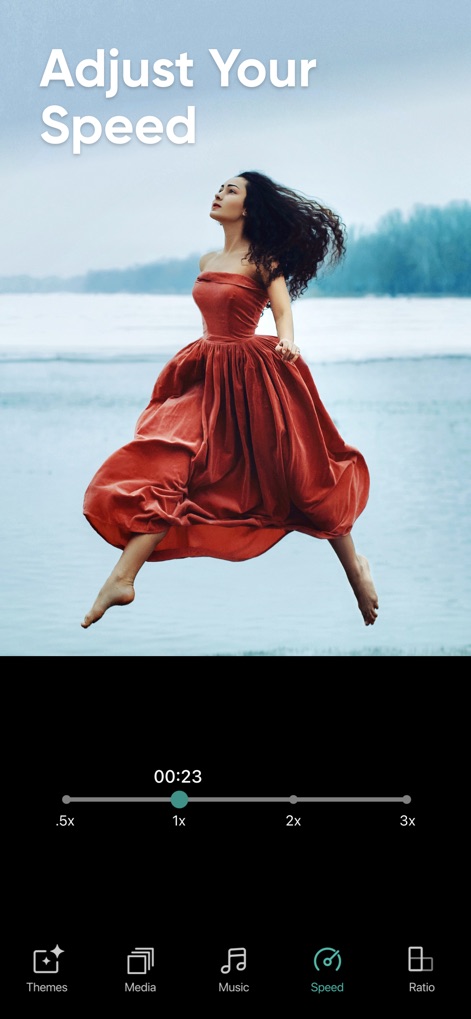
ユーザーはスライドショーの再生速度をスライダーで調整でき、リアルタイムで更新される合計再生時間を確認できます。
速度を自由に調整

ユーザーは「3:4 Portrait」や「1:1 Square」など、様々なアスペクト比を選択して、出力するスライドショーの形式を決定できます。
アスペクト比を選択

作成したスライドショーは、InstagramやYouTubeなどの主要なソーシャルメディアプラットフォームへ簡単に共有でき、「Share Anywhere」機能で手軽に拡散できます。
思い出を共有
説明
Download
類似アプリ
同じカテゴリのトップランクアプリ

CapCut: Photo & Video Editor
BYTEDANCE PTE. LTD.

Instagram, Inc.

YouTube
Google LLC

Canva: AI Photo & Video Editor
Canva Pty Ltd

Snapchat
Snap, Inc.

快手
Beijing Kwai Technology Co., Ltd.

Edits: Video Editor
Instagram, Inc.

Meitu- AI Photo & Video Editor
Xiamen Meitu Technology Co., Ltd.

Google Photos: Backup & Edit
Google LLC
このページはアプリまたはその開発者の公式ページではなく、情報提供および論評を目的として作成された独立した編集出版物です。明示的に別段の記載がない限り、アプリおよびその開発者は、MWM、Apple、Google Play、アプリのパブリッシャー、またはアプリの開発者と提携、承認、後援、認可、またはその他の公式的な関係はなく、このページのいかなる内容も、アプリがMWMのサービスを使用して開発されたことを意味するものではありません。すべての商標、ロゴ、スクリーンショット、その他のコンテンツはそれぞれの所有者の財産です。