Smarter Inventory
Smarter Inventory
ダウンロード: App Store

このページはアプリまたはその開発者の公式ページではなく、情報提供および論評を目的として作成された独立した編集出版物です。明示的に別段の記載がない限り、アプリおよびその開発者は、MWM、Apple、Google Play、アプリのパブリッシャー、またはアプリの開発者と提携、承認、後援、認可、またはその他の公式的な関係はなく、このページのいかなる内容も、アプリがMWMのサービスを使用して開発されたことを意味するものではありません。すべての商標、ロゴ、スクリーンショット、その他のコンテンツはそれぞれの所有者の財産です。


ロゴ: Smarter Inventory
ダウンロード: App Store

Smarter Inventory

小規模ビジネスや転売業者のための強力なモバイルファースト在庫管理アプリ。商品の整理、バーコードのスキャン、利益の追跡を即座に行えます。登録や広告は不要です。

主要数値

ダウンロード

7K+

ユーザー評価

3.7/5

評価数

0

開発元

HELIOBYTE LLC

カテゴリ

Productivity

対応言語

1

最新バージョン

3.05

サイズ

13.6 MB

リリース日

2016年10月19日
機能

ビジネスを拡大するために必要なすべてがここに

Smarter Inventoryは、スプレッドシートや紙の書類を、小規模ビジネスやEコマースの転売業者向けに構築された強力なモバイルファーストシステムに置き換えます。

スマート・バーコードスキャン

カメラを使って商品を瞬時に識別。QRコードや15種類以上のバーコードタイプに対応し、在庫確認をかつてないほど高速化します。

ビジネス対応のレポート作成

確定申告用にプロフェッショナルなPDFやCSVレポートを書き出し。在庫回転率や利益率を正確に追跡します。

以下のスクリーンショットと説明は、アプリの公式ストアリスティングから直接取得されたものであり、アプリ開発者の所有物です。

アプリストア

スクリーンショット
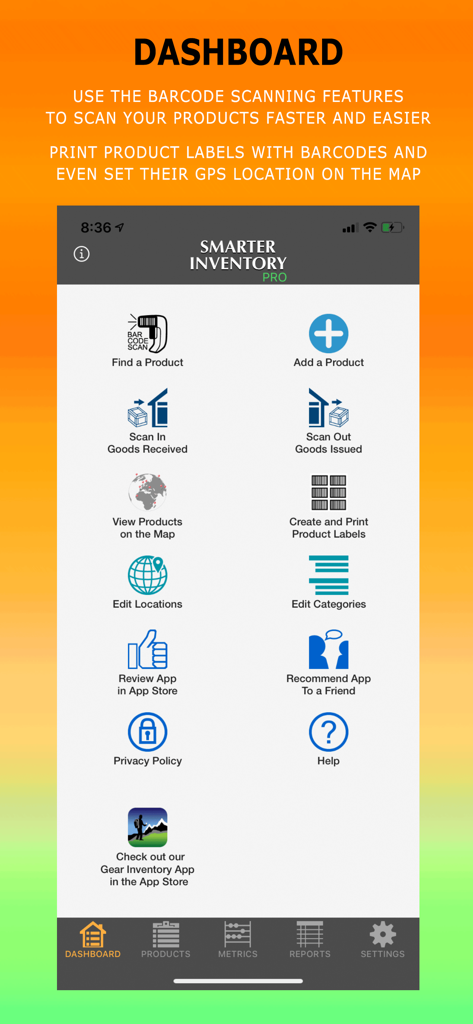
Smarter Inventory - バーコードスキャン、商品管理、レポート作成のメニューアイコンが表示されたSmarter Inventoryアプリのメインダッシュボード
バーコードスキャン、商品管理、レポート作成のメニューアイコンが表示されたSmarter Inventoryアプリのメインダッシュボード

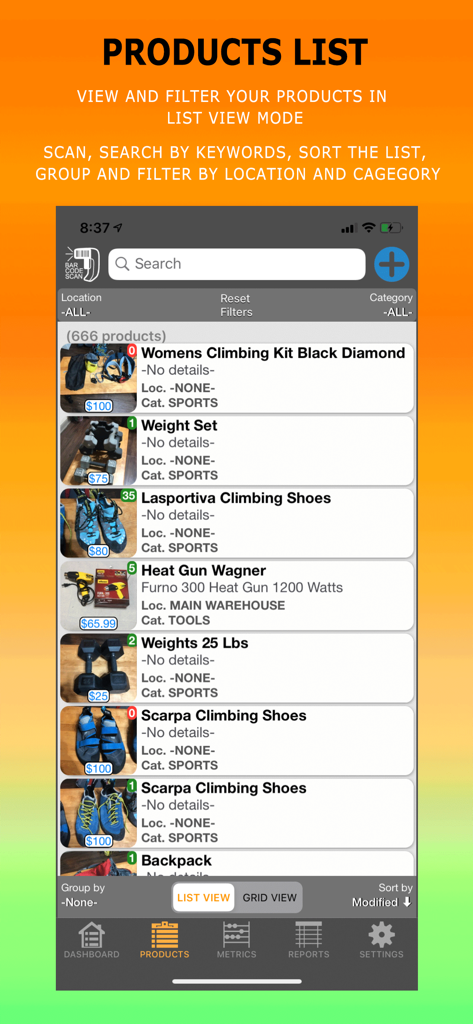
Smarter Inventory - 写真と価格が表示された追跡対象商品のリストを表示するSmarter Inventoryアプリ
写真と価格が表示された追跡対象商品のリストを表示するSmarter Inventoryアプリ

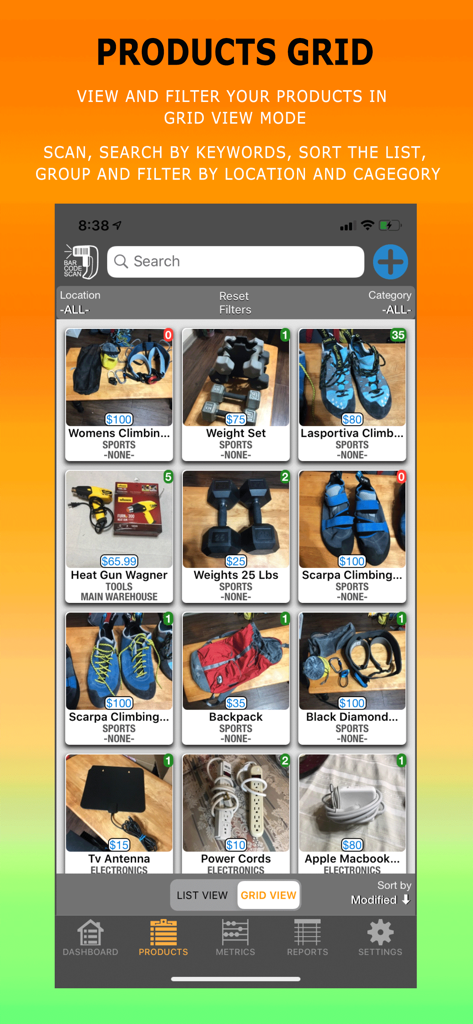
Smarter Inventory - 写真と価格で整理されたアイテムを表示するSmarter Inventoryアプリの商品グリッド
写真と価格で整理されたアイテムを表示するSmarter Inventoryアプリの商品グリッド

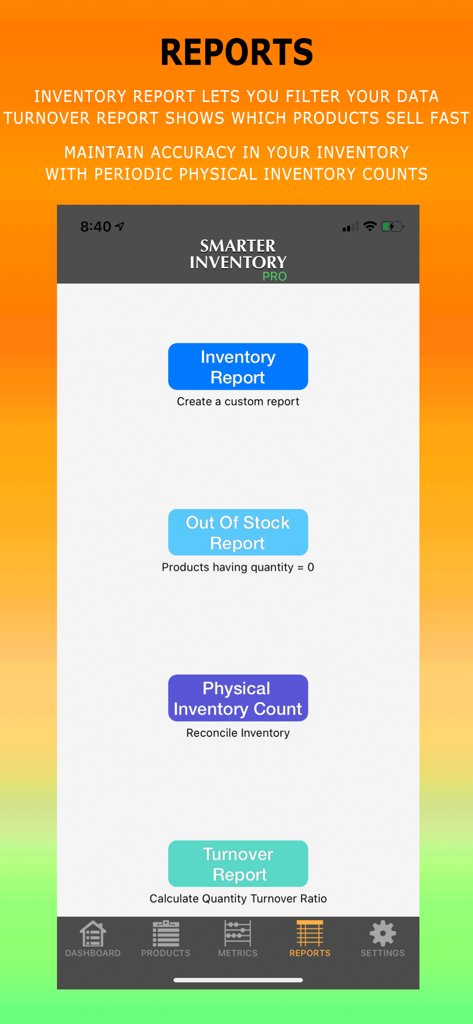
Smarter Inventory - 在庫、在庫切れ、実地棚卸、回転率レポートのオプションを表示するSmarter Inventory Proのレポートメニュー
在庫、在庫切れ、実地棚卸、回転率レポートのオプションを表示するSmarter Inventory Proのレポートメニュー

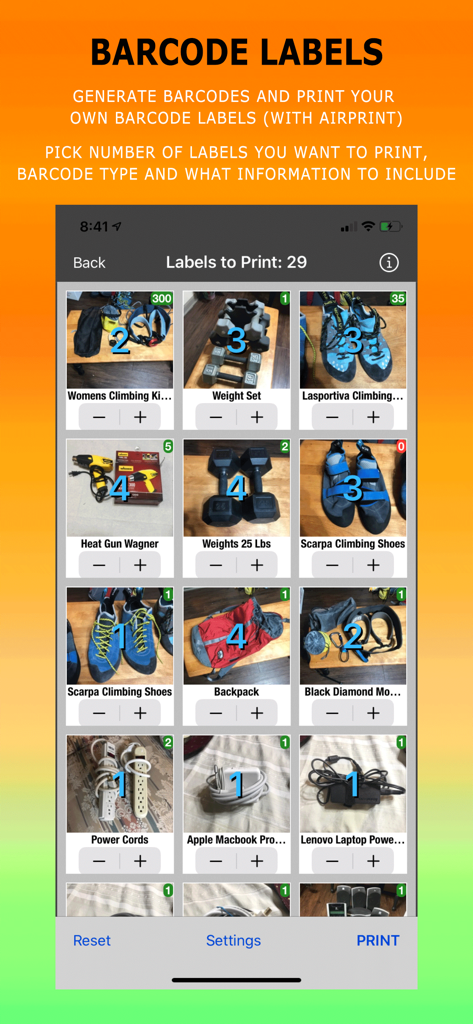
Smarter Inventory - 数量の選択とバーコードラベルの印刷オプションを備えた在庫アイテムグリッドを表示するモバイル画面
数量の選択とバーコードラベルの印刷オプションを備えた在庫アイテムグリッドを表示するモバイル画面

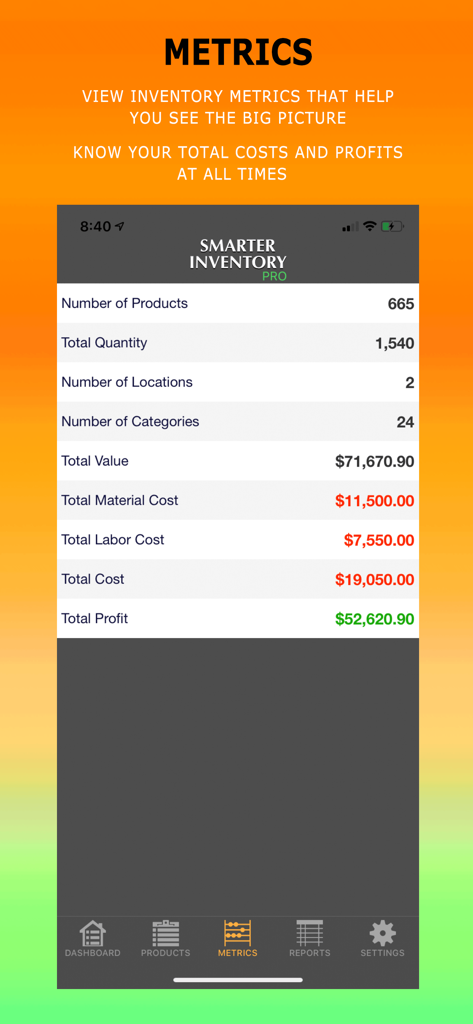
Smarter Inventory - 総利益や人件費などのビジネス指標を表示するSmarter Inventoryアプリのダッシュボード表示
総利益や人件費などのビジネス指標を表示するSmarter Inventoryアプリのダッシュボード表示

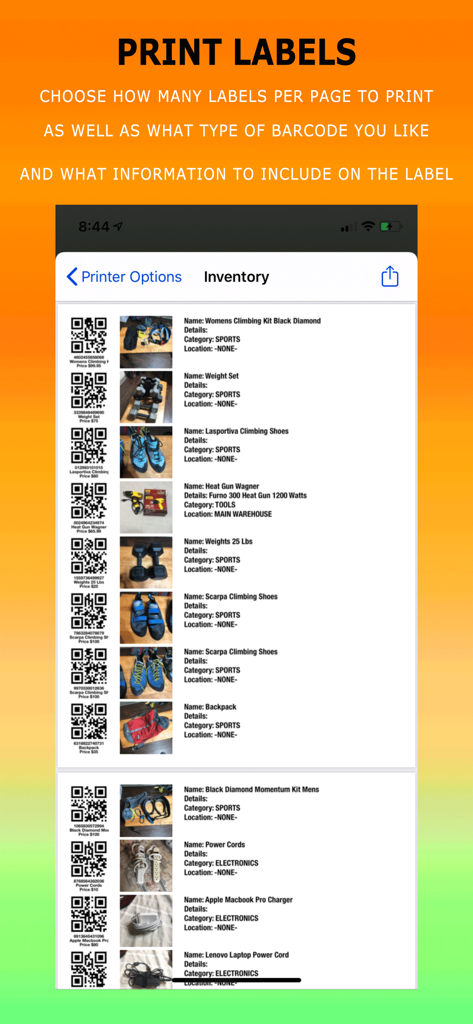
Smarter Inventory - 商品画像付きのカスタムバーコードラベルを印刷するためのSmarter Inventoryアプリの画面
商品画像付きのカスタムバーコードラベルを印刷するためのSmarter Inventoryアプリの画面

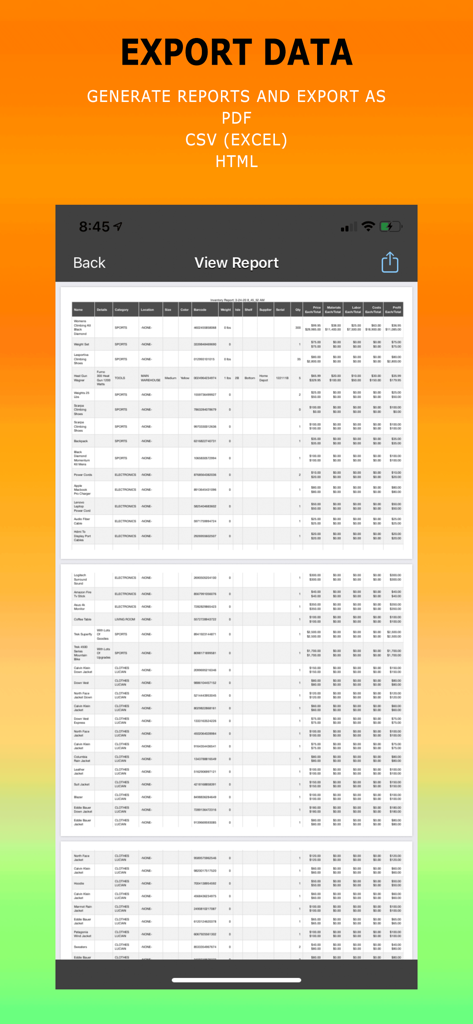
Smarter Inventory - 詳細な在庫レポートをPDFまたはCSVファイルとして生成・書き出すためのインターフェース
詳細な在庫レポートをPDFまたはCSVファイルとして生成・書き出すためのインターフェース

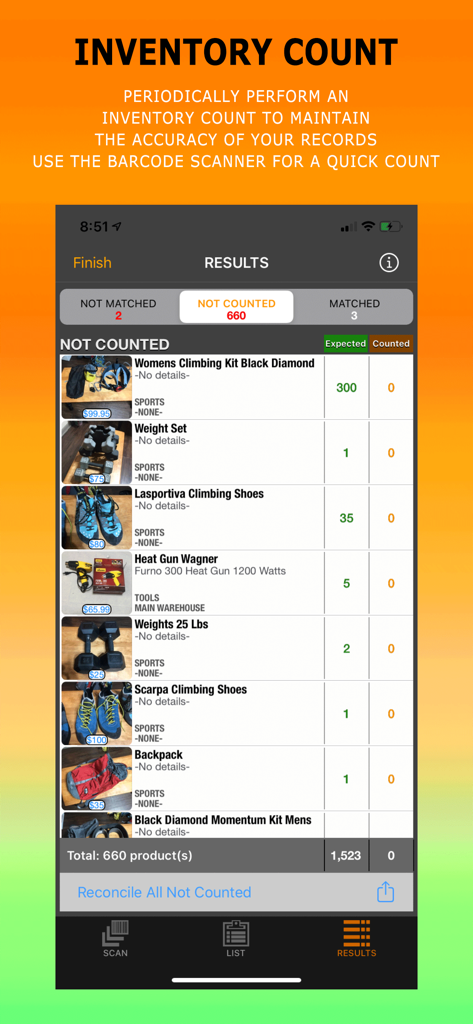
Smarter Inventory - 様々なビジネスアイテムの予定在庫数と実数値を含む在庫カウント結果を表示するSmarter Inventoryアプリの画面
様々なビジネスアイテムの予定在庫数と実数値を含む在庫カウント結果を表示するSmarter Inventoryアプリの画面

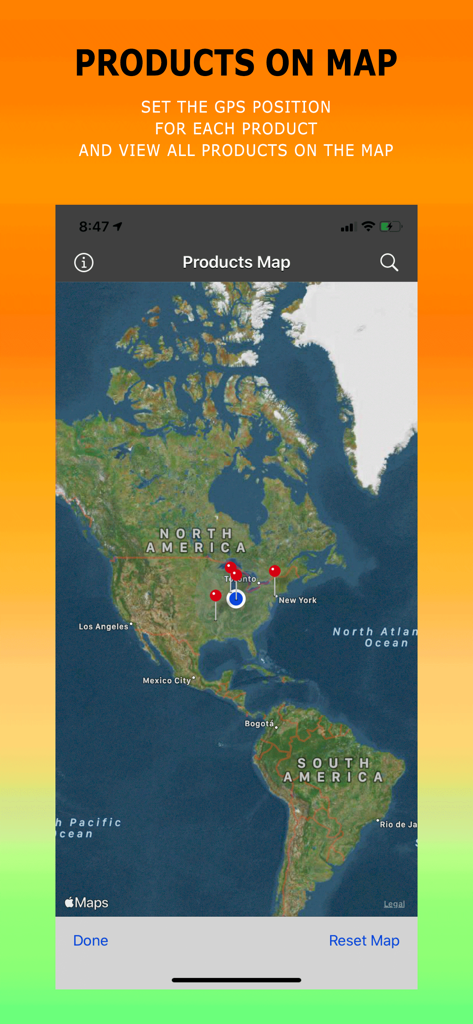
Smarter Inventory - 様々な商品のGPS位置を示す赤いピンが刺さった世界地図を表示するSmarter Inventoryアプリのインターフェース

様々な商品のGPS位置を示す赤いピンが刺さった世界地図を表示するSmarter Inventoryアプリのインターフェース

説明

Smarter Inventory is the smarter way to organize and track your products right on your mobile device. Whether you have a small business, a large warehouse full of products, or just want to track your personal assets and belongings, Smarter Inventory provides an extensive list of features with an intuitive layout that meets your inventory needs. How Smarter Inventory can benefit you: 1. Saves you a lot of time in organizing your products 2. Reduces the need for computers and paperwork with the convenience of having access to your inventory system on your mobile device 3. Search, filter and group functions help you quickly find the products in your inventory 4. Effective barcode scanning features 5. Create custom reports for your inventory, and know when products are out of stock 6. Perform an Inventory Count periodically to maintain the accuracy of your records 7. Reduces backorders and overstocking 8. Add unlimited number of products, no restrictions 9. No advertisements that waste your time 10. Use app right away, without the need to register or create any accounts. App Features included in the Standard Version: 1. Classify products by location and category 2. Keep track of Product Name, Details, Quantity, Price, Photo, Barcode, Color, Weight & Units, Size, Notes 3. Find a product using the barcode scan feature, or search by keywords 4. Scan barcodes, QR codes and over 15 other common barcode types to quickly identify and update your inventory 5. Know when you are out of stock by running the Out of Stock Report 6. View products in a list or in a grid 7. Filter and also Group products list by location and category 8. Sort Products by: Name, Price, Quantity, Location, Category, Created and Modified Dates, etc 9. View Inventory metrics 10. Pick a currency symbol for your country and enter default weight units 11. Allows you to duplicate products which saves you a lot of time when adding similar products 12. Create a customizable Inventory Report 13. Generate random barcodes with the tap of a button 14. Filter report by one or more categories and locations and sort data. 15. Share products with your contacts via e-mail, text message, social media, etc… App Features included in the Pro Version: 1. Use a Bluetooth Scanner to scan your products 2. Perform an Inventory Count periodically and reconcile any differences found in your inventory. 3. Customizable Inventory Report with additional Filters and Export type options CSV and PDF (with AirPrint option) 4. Turnover Report that calculates the inventory turnover ratio which shows which products sell fast 5. Generate, Export & Print your own Barcode Labels 6. Track Material and Labor Costs, as well as Isle, Shelf, GPS Position, Supplier Name and Serial Number. It automatically calculates Total Cost & Profit 7. View your products on the global map in relation to each other 8. View historical data of all changes in quantity and price 9. Scan In & Out Goods 10. Additional App Security using FaceID/TouchID or Password 11. Restore and Backup There are 3 subscription options if you choose to upgrade to the Pro Version. All come with a Free Trial, so you can try it before you buy it. Prices vary by location and are subject to change. - Monthly Auto-Renewable subscription for $2.99 per month - 6 Month Auto-Renewable subscription for $14.99 per 6 months - 1 Year Auto-Renewable subscription for $29.99 per year If you choose to purchase the Pro Subscription, payment will be charged to your iTunes Account only at the end of the free trial period. Subscription automatically renews unless auto-renew is turned off at least 24-hours before the end of the current period. Subscriptions can be managed and auto-renewal may be turned off by going to the user's Account Settings after purchase. No cancellation of the current subscription is allowed during an active subscription period. Privacy Policy and Terms Of Use: https://heliobyte.files.wordpress.com/2020/03/privacypolicy.pdf

Download

ダウンロード: App Store

このページはアプリまたはその開発者の公式ページではなく、情報提供および論評を目的として作成された独立した編集出版物です。明示的に別段の記載がない限り、アプリおよびその開発者は、MWM、Apple、Google Play、アプリのパブリッシャー、またはアプリの開発者と提携、承認、後援、認可、またはその他の公式的な関係はなく、このページのいかなる内容も、アプリがMWMのサービスを使用して開発されたことを意味するものではありません。すべての商標、ロゴ、スクリーンショット、その他のコンテンツはそれぞれの所有者の財産です。








