
このページはアプリまたはその開発者の公式ページではなく、情報提供および論評を目的として作成された独立した編集出版物です。明示的に別段の記載がない限り、アプリおよびその開発者は、MWM、Apple、Google Play、アプリのパブリッシャー、またはアプリの開発者と提携、承認、後援、認可、またはその他の公式的な関係はなく、このページのいかなる内容も、アプリがMWMのサービスを使用して開発されたことを意味するものではありません。すべての商標、ロゴ、スクリーンショット、その他のコンテンツはそれぞれの所有者の財産です。


ダウンロード
50M+ユーザー評価
評価数
271.4K開発元
カテゴリ
Utilities対応言語
17最新バージョン
7.0.0サイズ
155.4 MBリリース日
2009年1月4日Speedtest by Ookla: 技術アナリストによる主要機能分析
インターネット速度とネットワークパフォーマンスを最適化するための不可欠なツールを評価します。
精密なインターネット速度テスト
世界中のサーバーネットワークを活用し、迅速かつ正確にインターネットのダウンロード、アップロード速度、Ping、ジッターを測定します。これにより、ユーザーは現在のネットワークパフォーマンスを客観的に評価できます。
モバイルカバレッジマップ
アプリが収集した実世界のデータに基づき、プロバイダーごとのモバイルネットワークカバレッジを視覚的に表示します。ユーザーは最適な接続エリアを特定し、新しいプロバイダーを選択する際の参考にすることができます。
ビデオストリーミング品質テスト
ネットワークの現在のストリーミング品質(最大解像度、読み込み時間、バッファリング)をリアルタイムで評価します。ユーザーはオンラインビデオ体験を最適化するための実用的な知見を得ることができます。
詳細なテスト履歴
過去のテスト結果を詳細なレポートで追跡し、時間の経過によるネットワークパフォーマンスの変化を把握したり、問題の特定に活用したりできます。これはインターネットサービスプロバイダーとの交渉にも役立ちます。
セキュアな無料VPN
オンライン接続のプライバシーとセキュリティを確保するため、ユーザーは毎月2GBまで無料でデータ通信を保護できます。これにより、公共Wi-Fiなどでの安全なインターネット利用が可能です。
リアルタイム安定性モニタリング
接続の安定性をリアルタイムでグラフ表示し、ユーザーがネットワークのパフォーマンス変動を視覚的に把握するのに役立ちます。これは特にオンラインゲームやビデオ会議において重要です。
高度なテストモード
ファイルダウンロードのシミュレーション(シングル接続)やネットワークの最大スループット理解(マルチ接続)のために、ユーザーがテスト方法を選択できる柔軟性を提供します。
テスト結果の共有
テスト結果を容易に共有できるため、インターネットサービスプロバイダーとの問題報告や、友人や同僚とのパフォーマンス比較に便利です。
よくある質問
について知っておくべきこと Speedtest by Ookla
What is Speedtest by Ookla?
Speedtest by Ookla is an application for a quick, easy, one-tap internet speed test. It accurately measures download, upload, ping, and jitter using a global server network.
How does Speedtest by Ookla measure internet speed?
Speedtest by Ookla measures internet speed by calculating your download, upload, and jitter. It also measures ping at idle, download, and upload stages using its global server network.
Does Speedtest by Ookla offer mobile network coverage maps?
Yes, Speedtest by Ookla offers Speedtest Maps. These maps display mobile network coverage based on real-world data, allowing users to compare performance by provider and region.
Can I test my network's video streaming quality with Speedtest by Ookla?
Yes, Speedtest by Ookla provides video testing. This feature offers a real-time assessment of your network’s current streaming quality to help optimize your online video experience.
Does Speedtest by Ookla include a VPN service?
Yes, Speedtest by Ookla includes Speedtest VPN™ to keep your online connection private and secure. Users receive up to 2GB of VPN data per month for free.
How much does Speedtest VPN Premium cost?
Speedtest VPN Premium costs $4.99 monthly for unlimited usage. Premium users also receive an ad-free experience while their subscription is active.
Can I remove ads from the Speedtest by Ookla app?
Yes, you can remove ads from the Speedtest by Ookla app. The option to remove ads from Speedtest costs $0.99.
Does Speedtest by Ookla track past internet speed tests?
Yes, Speedtest by Ookla tracks past tests. Users can view their detailed reporting and historical results, including download, upload, and ping information.
What is Downdetector in Speedtest by Ookla?
Speedtest by Ookla now includes Downdetector, which provides real-time performance tracking of thousands of apps and services. This helps users monitor popular apps and troubleshoot connectivity issues.
Does Speedtest by Ookla support 5G testing?
Yes, Speedtest by Ookla is capable of accurately measuring 5G connections. It identifies the network type during the speed test.
How many servers does Speedtest by Ookla use for testing?
Speedtest by Ookla utilizes over 18,000 testing servers located globally. Users can also change their testing server manually.
Can I get detailed results for my Speedtest by Ookla tests?
Yes, Speedtest by Ookla provides detailed results for each test. These include download and upload speeds, ping (idle, download, upload), jitter, and packet loss percentages.
以下のスクリーンショットと説明は、アプリの公式ストアリスティングから直接取得されたものであり、アプリ開発者の所有物です。
アプリストア
スクリーンショット

即時スピード測定
ダウンロードとアップロードの速度が視覚的に表示され、現在のインターネット速度を示すゲージで、接続の品質を即座に確認できます。
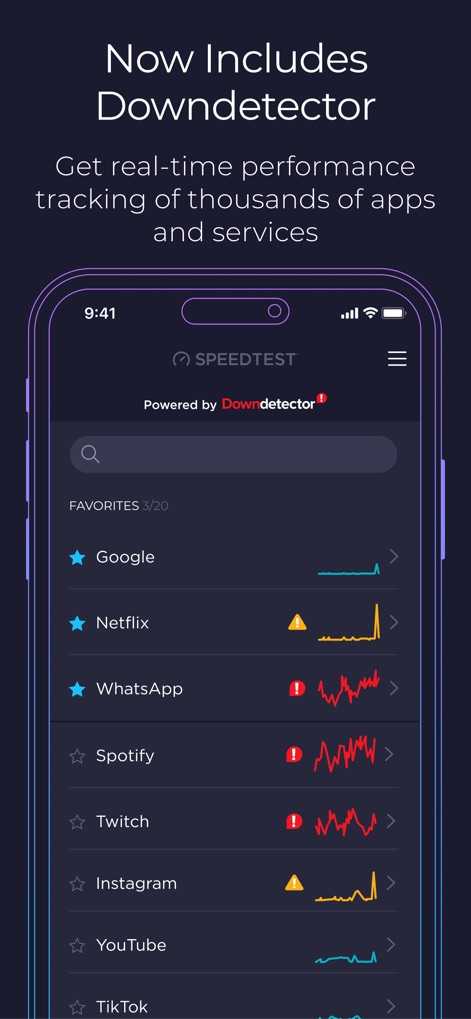
アプリ状態監視
人気のアプリのパフォーマンスがリアルタイムグラフで表示され、障害発生時には警告アイコンで通知されるため、アプリの状態を一目で把握できます。
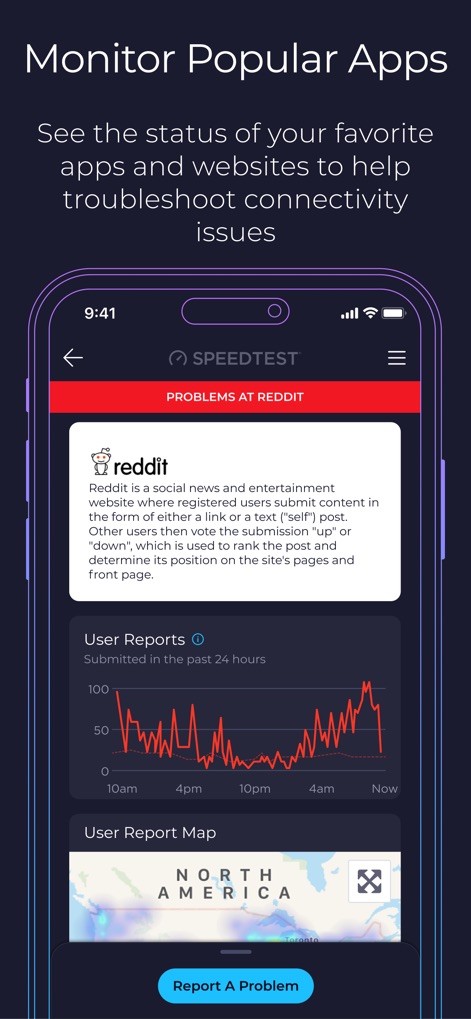
詳細障害報告
特定のアプリの障害情報がユーザーレポートのグラフで視覚化され、地域ごとの問題発生状況をマップ上で確認できます。

過去結果比較
デバイスタイプごとの速度テスト履歴がグラフで表示され、過去の測定結果が一覧表で詳細に確認できます。

詳細分析レポート
ダウンロードとアップロードの速度が詳細に表示され、Ping、Jitter、パケットロスといった応答性に関するデータが確認できます。

動画ストリーミング測定
動画テスト中の視覚的なアニメーションと、テスト中の動画解像度表示により、ネットワークのストリーミング性能を効果的に測定します。
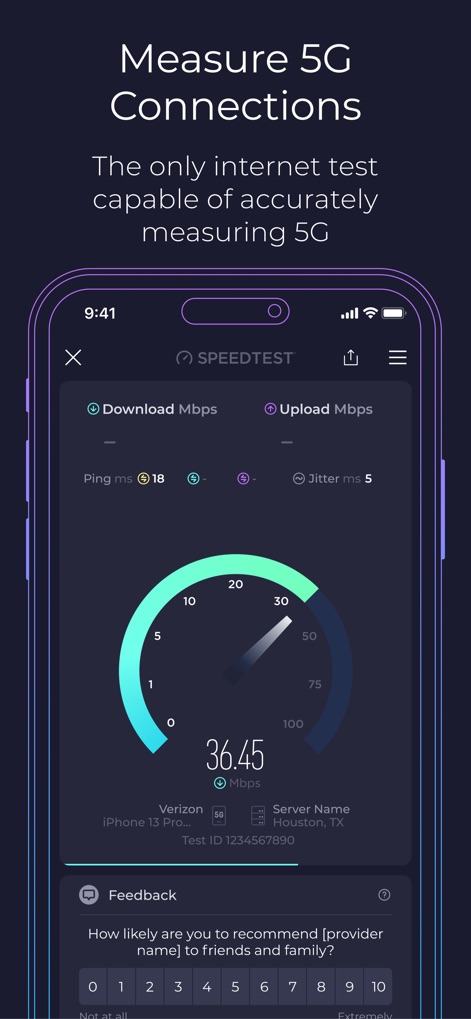
5G接続速度
ダウンロードおよびアップロード速度がリアルタイムで測定され、5G接続における現在のインターネット速度が明確なゲージで表示されます。
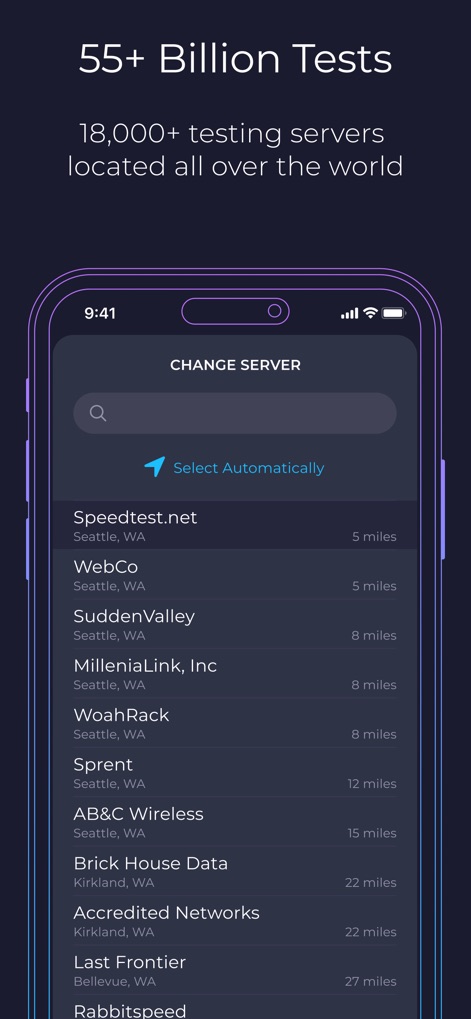
サーバー選択
世界中に広がる利用可能なテストサーバーの一覧が表示され、ユーザーは自動選択または手動で最適なサーバーを選択できます。
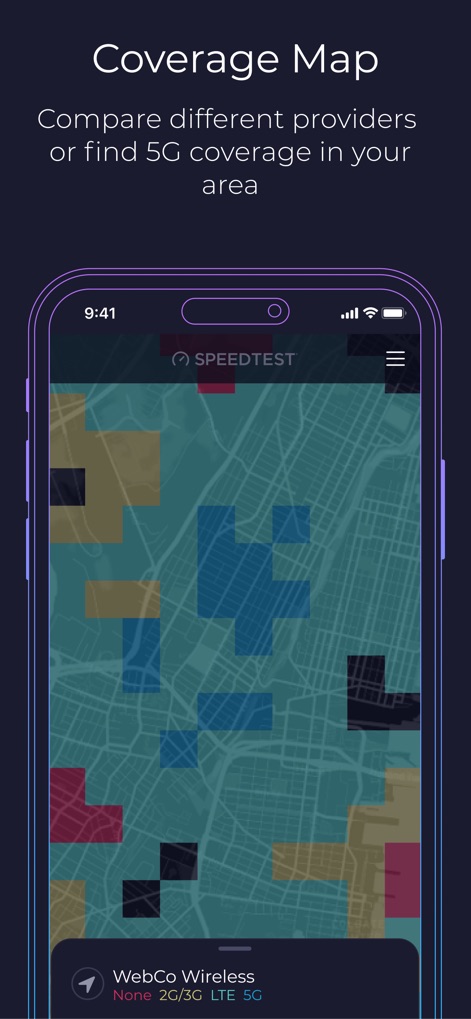
通信エリアマップ
地図上で様々な通信キャリアのネットワークカバレッジが色分けされて表示され、ユーザーは頻繁に訪れる場所の電波状況を簡単に比較できます。
説明
Download
類似アプリ
似た機能とユーザー体験を持つアプリ

Ubiquiti WiFiman
Ubiquiti Inc.

Fing - Network Scanner
Fing Limited

SPEED TEST MASTER: Wifi Tester
Spring Tech Co., Ltd.

Internet Speed Test Master App
Huacen Co., LTD

NetClash-Network's Vital Signs
Mattis Knutsson

Network Analyzer Pro
Jiri Techet

Network Analyzer: net tools
Jiri Techet

Speed Test - WiFi Analyzer +
方勇 侯

Ping - network utility
Iurii Mozharovskyi
このページはアプリまたはその開発者の公式ページではなく、情報提供および論評を目的として作成された独立した編集出版物です。明示的に別段の記載がない限り、アプリおよびその開発者は、MWM、Apple、Google Play、アプリのパブリッシャー、またはアプリの開発者と提携、承認、後援、認可、またはその他の公式的な関係はなく、このページのいかなる内容も、アプリがMWMのサービスを使用して開発されたことを意味するものではありません。すべての商標、ロゴ、スクリーンショット、その他のコンテンツはそれぞれの所有者の財産です。