SW Maps
SW Maps
ダウンロード: App Store

このページはアプリまたはその開発者の公式ページではなく、情報提供および論評を目的として作成された独立した編集出版物です。明示的に別段の記載がない限り、アプリおよびその開発者は、MWM、Apple、Google Play、アプリのパブリッシャー、またはアプリの開発者と提携、承認、後援、認可、またはその他の公式的な関係はなく、このページのいかなる内容も、アプリがMWMのサービスを使用して開発されたことを意味するものではありません。すべての商標、ロゴ、スクリーンショット、その他のコンテンツはそれぞれの所有者の財産です。

ロゴ: SW Maps
ダウンロード: App Store

SW Maps

プロフェッショナル向けに設計された包括的なマッピングツールで、フィールドワークを強化します。外部GNSSレシーバーに接続し、複雑なShapefileを管理し、高精度な地理データを簡単に収集できます。すべて無料、広告なしです。

主要数値

ダウンロード

32K+

ユーザー評価

3.8/5

評価数

0

開発元

Aviyaan Tech

カテゴリ

Productivity

対応言語

1

最新バージョン

1.2.4

サイズ

17.2 MB

リリース日

2022年11月17日
機能

プロフェッショナルなフィールドデータ収集

エンタープライズ価格なしで信頼性の高いデータを必要とする測量士、エンジニア、研究者のために設計された、完全な高精度GISツールキット。

センチメートルレベルの精度

Bluetooth経由で外部GNSS/RTKレシーバーに接続し、モバイルデバイスで直接プログレードの精度を実現します。

信頼性の高いオフラインマッピング

ベースマップをキャッシュし、カスタムmbtilesまたはKMLオーバーレイをインポートすることで、どこでも作業できます。リモートフィールドでの全機能に対応します。

以下のスクリーンショットと説明は、アプリの公式ストアリスティングから直接取得されたものであり、アプリ開発者の所有物です。

アプリストア

スクリーンショット
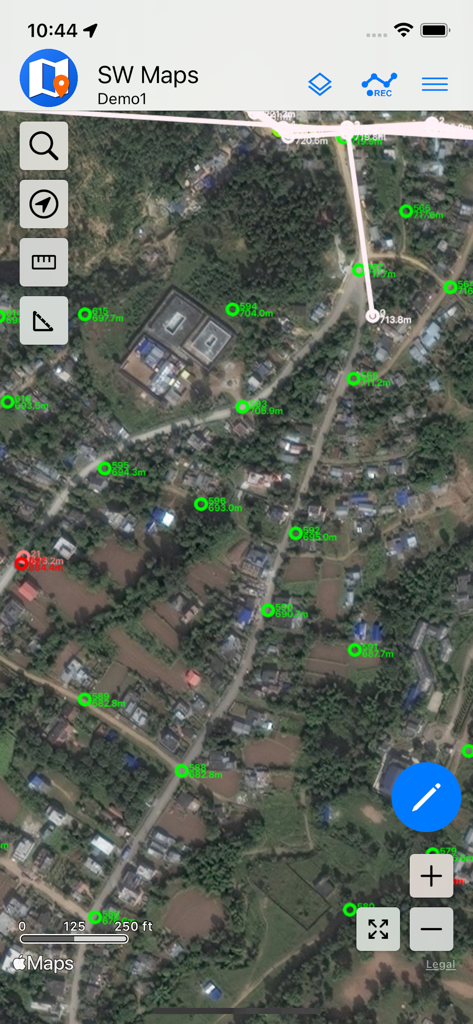
SW Maps - SW Mapsインターフェイスに衛星背景上にGIS測量ポイントが表示されています
SW Mapsインターフェイスに衛星背景上にGIS測量ポイントが表示されています

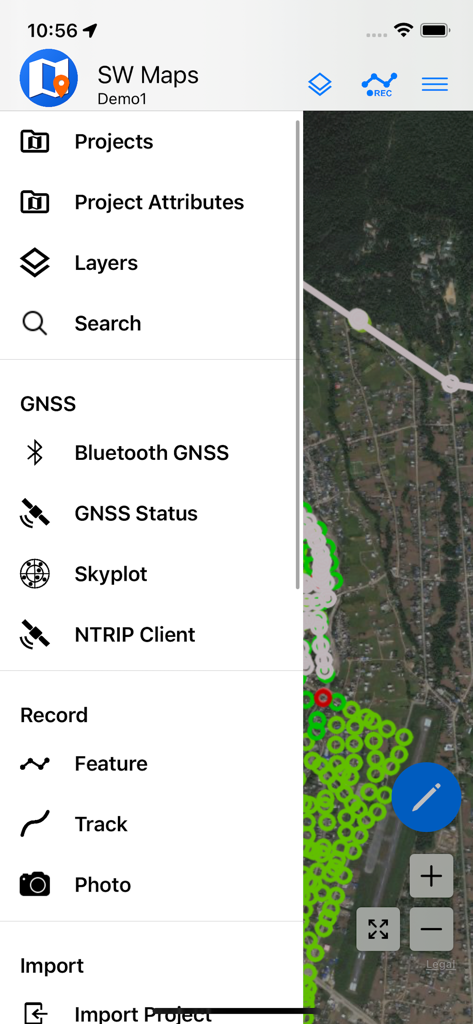
SW Maps - SW MapsモバイルアプリのメニューにGISデータ収集とGNSS測量オプションが表示されています
SW MapsモバイルアプリのメニューにGISデータ収集とGNSS測量オプションが表示されています

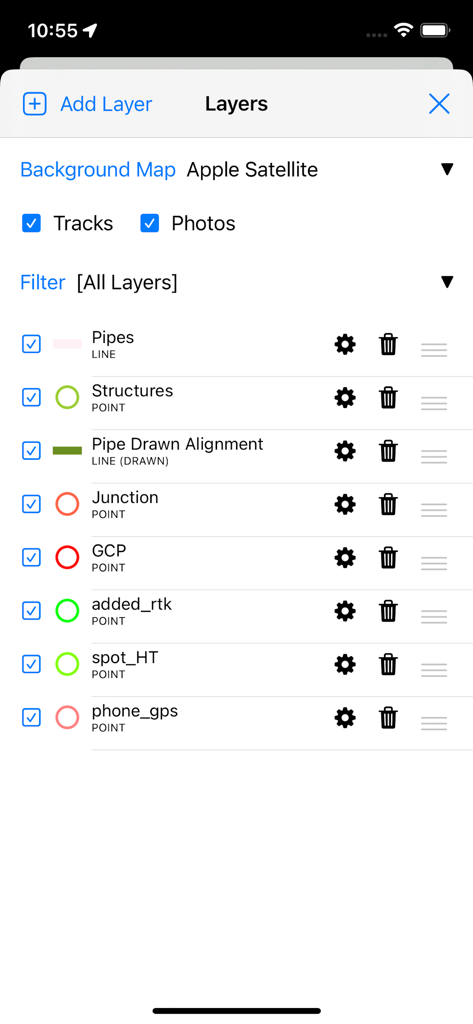
SW Maps - SW Mapsアプリのインターフェイスに、測量とマッピングのためのプロフェッショナルGISデータレイヤー管理が表示されています
SW Mapsアプリのインターフェイスに、測量とマッピングのためのプロフェッショナルGISデータレイヤー管理が表示されています

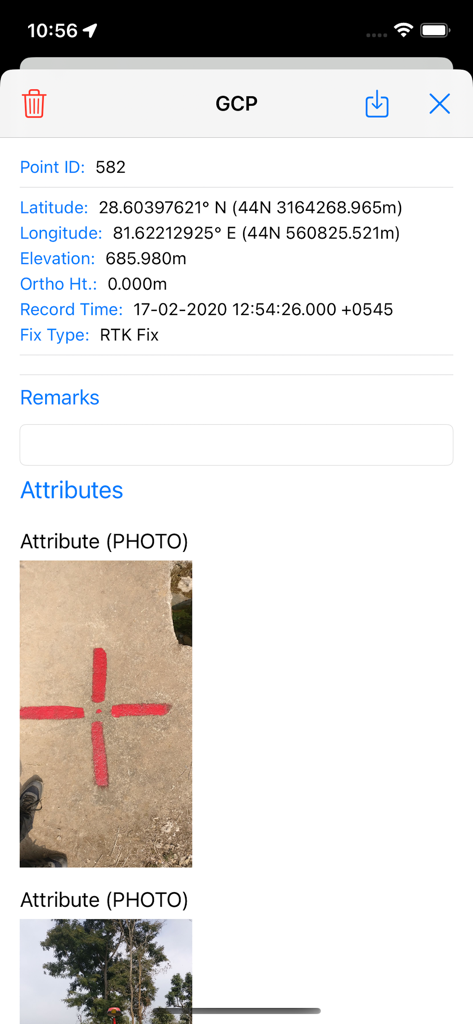
SW Maps - SW Mapsでの地籍管理点の詳細ビュー。座標と物理的な測量マーカーの写真が表示されます
SW Mapsでの地籍管理点の詳細ビュー。座標と物理的な測量マーカーの写真が表示されます

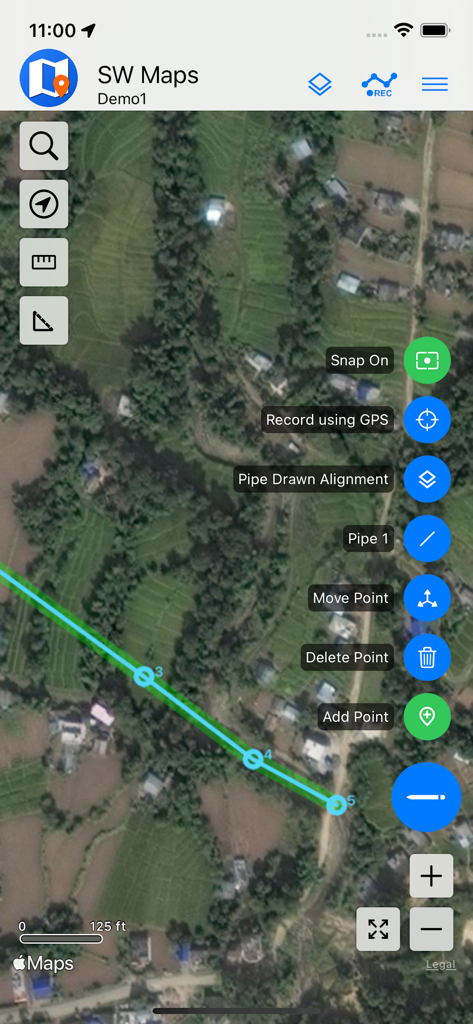
SW Maps - SW MapsでのモバイルGISマッピング。衛星画像上にパイプラインが表示されています
SW MapsでのモバイルGISマッピング。衛星画像上にパイプラインが表示されています

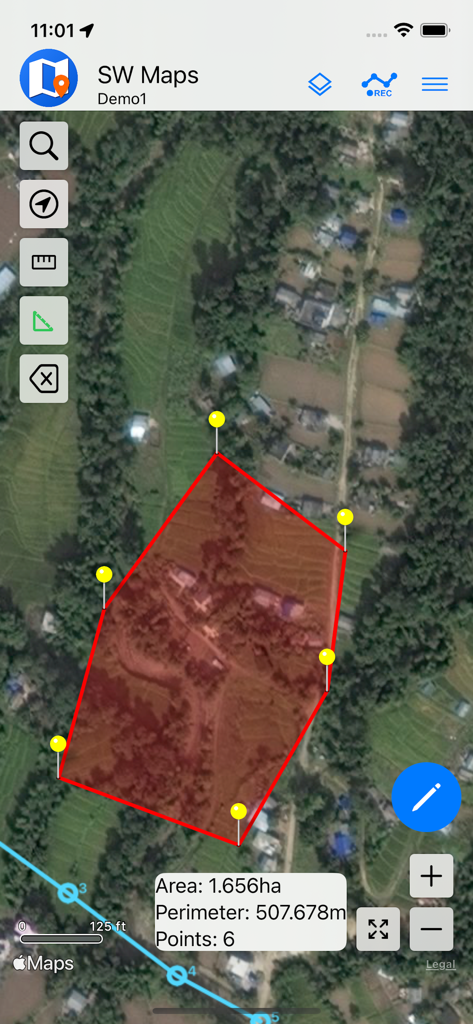
SW Maps - SW Mapsアプリの衛星マップビュー。面積と周囲長が計算された赤いポリゴンが表示され、土地測量用です
SW Mapsアプリの衛星マップビュー。面積と周囲長が計算された赤いポリゴンが表示され、土地測量用です

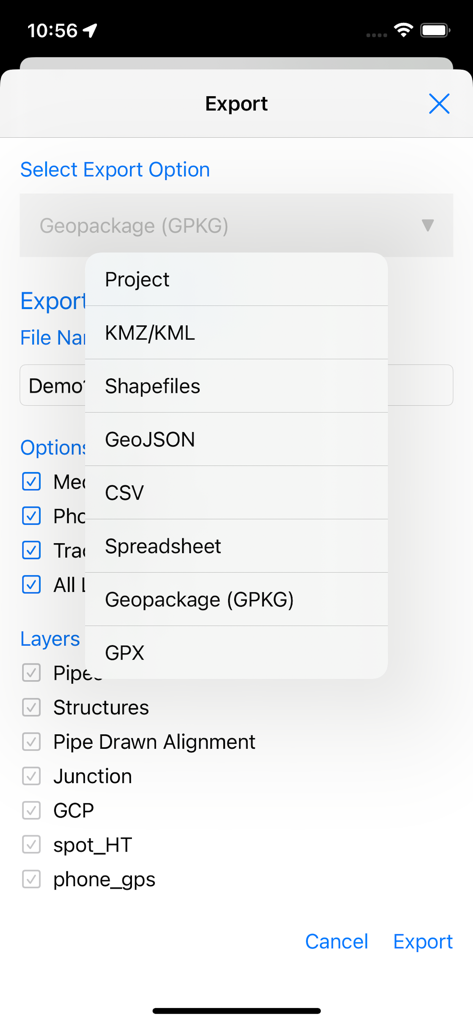
SW Maps - SW Mapsのエクスポート画面に、プロフェッショナルGISファイル形式のリストとレイヤー選択オプションが表示されています
SW Mapsのエクスポート画面に、プロフェッショナルGISファイル形式のリストとレイヤー選択オプションが表示されています

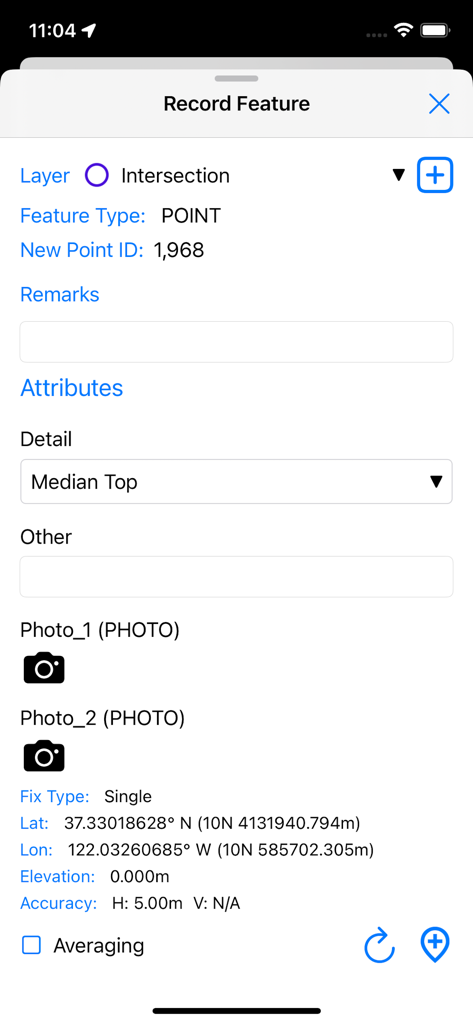
SW Maps - SW MapsでGPS座標とカスタム属性を持つ新しいGISポイントフィーチャーを記録するためのインターフェイス
SW MapsでGPS座標とカスタム属性を持つ新しいGISポイントフィーチャーを記録するためのインターフェイス

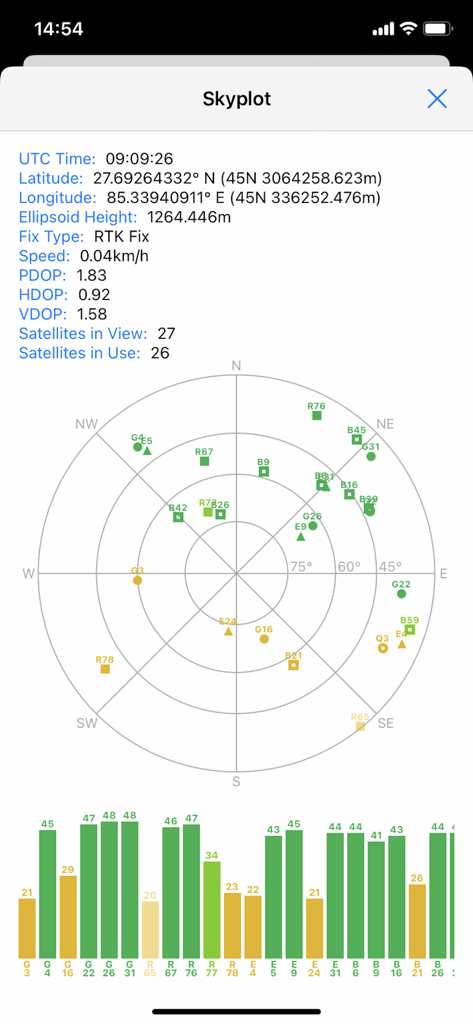
SW Maps - SW Mapsのスカイプロット画面。プロフェッショナルマッピングプロジェクトの衛星位置とGNSS信号品質が表示されています
SW Mapsのスカイプロット画面。プロフェッショナルマッピングプロジェクトの衛星位置とGNSS信号品質が表示されています

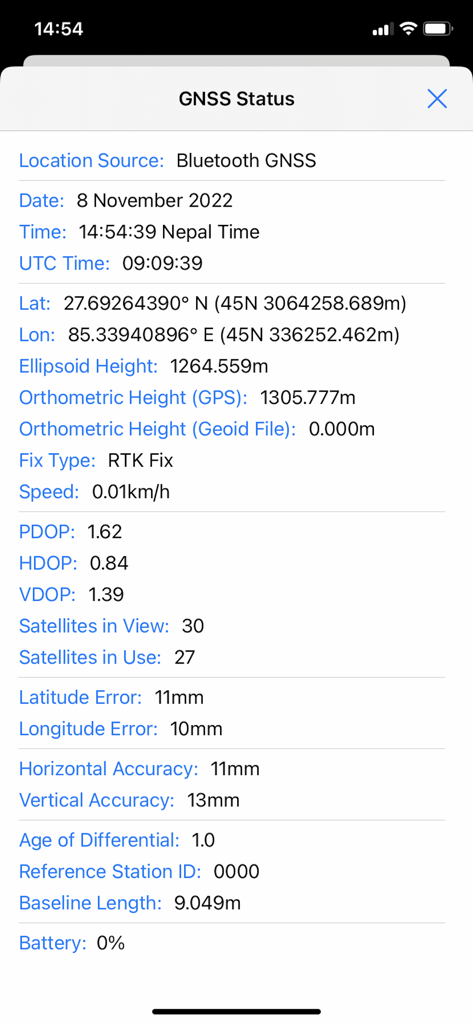
SW Maps - SW MapsのGNSSステータス画面。高精度RTKフィックスと精度メトリックが表示されています

SW MapsのGNSSステータス画面。高精度RTKフィックスと精度メトリックが表示されています

説明

SW Maps is a free GIS and mobile mapping app for collecting, presenting and sharing geographic information. Whether you are conducting a full scale GNSS survey with high precision instruments, need to collect large amount of location based data using nothing but your phone, or just need to view a few shapefiles with labels over a background map on the go, SW Maps has it all covered. Record points, lines, polygons and even photos and have them displayed over your choice of background map, and attach custom attribute data to any feature. Attribute types include text, numbers, an option from a predefined set of choices, photos, audio clips and videos. Conduct high accuracy GPS surveys using external RTK capable receivers over Bluetooth LE. Draw features on the map by adding markers, and measure distance and area. Reuse the layers and attributes of a previous project for another survey, or create templates and share them with other users. Share the collected data with other users as Geopackages, KMZ or shapefiles, or export them to your device storage. Also share and export recorded data as Spreadsheets or CSV files. All data is recorded and exported in the standard WGS84 Geographic coordinate system (EPSG:4326). Features -Online Base maps: Apple Maps or Open Street Map -Support for multiple mbtiles and KML overlays -Shapefile and Geopackage layers, with attribute categorized styling. View shapefiles in any coordinate system supported by the PROJ.4 library. -Add multiple online WMTS, TMS, XYZ or WMS layers and cache tiles for offline use. -Connect to external GPS receivers using Bluetooth for high accuracy surveying using RTK with built-in NTRIP client. Also record data from external receiver for post processing. -Define multiple number of feature layers, each with a set of custom attributes Feature Types: Point, Line, Polygon Attribute Types:Text, Numeric, Drop down Options, Photos, Audio, Video Save as Template for re-use or sharing -Record GPS tracks, with distance measurement -Label features based on attribute values. -Import feature layers from templates or existing projects. -Share or export collected data as KMZ (with embedded photographs) , shapefiles, GeoJSON, Geopackage (GPKG), XLS/ODS spreadsheets or csv files. -Share templates or projects with other users -Supports use of GTX geoid files. To use custom geoids, prepare a GTX file with offsets in meters from WGS84. This product is made in Nepal and is FREE (no Ads). If you find this useful, please let your friends know that you have used a product from Nepal. Spare sometime to visit this wonderful country and know the Nepali people.

Download

ダウンロード: App Store

このページはアプリまたはその開発者の公式ページではなく、情報提供および論評を目的として作成された独立した編集出版物です。明示的に別段の記載がない限り、アプリおよびその開発者は、MWM、Apple、Google Play、アプリのパブリッシャー、またはアプリの開発者と提携、承認、後援、認可、またはその他の公式的な関係はなく、このページのいかなる内容も、アプリがMWMのサービスを使用して開発されたことを意味するものではありません。すべての商標、ロゴ、スクリーンショット、その他のコンテンツはそれぞれの所有者の財産です。








