
このページはアプリまたはその開発者の公式ページではなく、情報提供および論評を目的として作成された独立した編集出版物です。明示的に別段の記載がない限り、アプリおよびその開発者は、MWM、Apple、Google Play、アプリのパブリッシャー、またはアプリの開発者と提携、承認、後援、認可、またはその他の公式的な関係はなく、このページのいかなる内容も、アプリがMWMのサービスを使用して開発されたことを意味するものではありません。すべての商標、ロゴ、スクリーンショット、その他のコンテンツはそれぞれの所有者の財産です。


Teamup Calendar
カオスを秩序に変える。Teamup Calendarは、共有カレンダーの泥沼に陥りがちなチームに、まるで透視能力を与えているかのように見える。誰がいつ何をするのか、そしてそれがどこで、どのように行われるのかを、瞬時に把握できる。
ダウンロード
1M+ユーザー評価
評価数
14.1K開発元
カテゴリ
Business対応言語
20最新バージョン
2.21.0サイズ
35.8 MBリリース日
2016年1月4日プロフェッショナルなチーム向けの効率的なスケジューリングソリューション
Teamup Calendar の詳細分析
詳細なアクセス許可設定
カレンダー管理者は、9段階のアクセス許可レベルを制御でき、個々のユーザーやユーザーグループに対してきめ細やかなアクセスを提供します。
ダブルブッキングの防止
このアプリは、ダブルブッキングを防止する機能を提供し、リソースの競合を避けることができます。
強力なタイムゾーンサポート
本ツールは、強力なタイムゾーンサポートにより、異なるタイムゾーンのユーザーとの共同作業を円滑に進めることができます。
複数サブカレンダーの一元管理
このアプリは、個人やリソースの複数のサブカレンダーを1つのページで表示および更新する機能を提供します。
中央ダッシュボードでの複数カレンダー管理
ユーザーは、中央ダッシュボードから複数のカレンダーを管理することが可能です。
複数サブカレンダーへのイベント割り当て
ユーザーは、1つのイベントを複数のサブカレンダーに割り当てることができ、重複入力の手間を省きます。
ブラウザベースの管理インターフェース
本ツールは、ブラウザベースの管理インターフェースを通じてカレンダーを一元的に管理する機能を提供します。
イベントへのファイル添付
このアプリは、カレンダーイベントに画像やドキュメントを添付する機能を提供します。
イベントごとのコメント機能
このアプリは、カレンダーイベントに関する議論をコメント機能を使用して行うことを可能にします。
カスタムフィールドの追加
ユーザーは、テキスト、数字、選択フィールドなど、複数のフィールドタイプを持つカスタムフィールドをイベントに追加することが可能です。
よくある質問
について知っておくべきこと Teamup Calendar
What is Teamup Calendar?
Teamup Calendar is a shared calendar for groups, designed to organize people, schedule work, manage availability, and share events efficiently. It helps teams and individuals collaborate effectively.
Is Teamup Calendar free to use?
Yes, Teamup Calendar offers a basic version for free. This version works well for small companies, teams, families, clubs, or for initial evaluation of the app.
Can I access Teamup Calendar on my phone?
Yes, Teamup Calendar is accessible via mobile apps and web browsers from any device. The mobile app functions as a companion to the browser-based version.
Can I attach images or documents to events in Teamup Calendar?
Yes, Teamup Calendar allows users to attach images and documents directly to calendar events. This enriches event details and supports better communication among participants.
How are user permissions managed in Teamup Calendar?
Teamup Calendar supports 9 levels of access permissions, which are controlled by the calendar administrator through the browser-based administration interface. This ensures granular user access.
Does Teamup Calendar have a dark mode option?
Yes, Teamup Calendar supports dark mode. This feature allows users to switch to a darker interface theme for improved visibility or personal preference.
Does Teamup Calendar prevent double-bookings?
Yes, Teamup Calendar includes functionality to prevent double-bookings. This feature helps ensure efficient scheduling and avoids conflicts when assigning resources or events.
How do I create a new Teamup Calendar?
To create a new Teamup Calendar, visit https://www.teamup.com on a web browser. The full administration and configuration interface is exclusively available on the web version.
What are the core features of Teamup Calendar?
Teamup Calendar's key features include centralized management, sub-calendar views, customizable access permissions, custom fields, file attachments, and powerful timezone support for global teams.
Does Teamup Calendar support Single Sign-On (SSO)?
Yes, Teamup Calendar offers single sign-on (SSO) as an enterprise-level feature. This streamlines the authentication process for large organizations.
以下のスクリーンショットと説明は、アプリの公式ストアリスティングから直接取得されたものであり、アプリ開発者の所有物です。
アプリストア
スクリーンショット
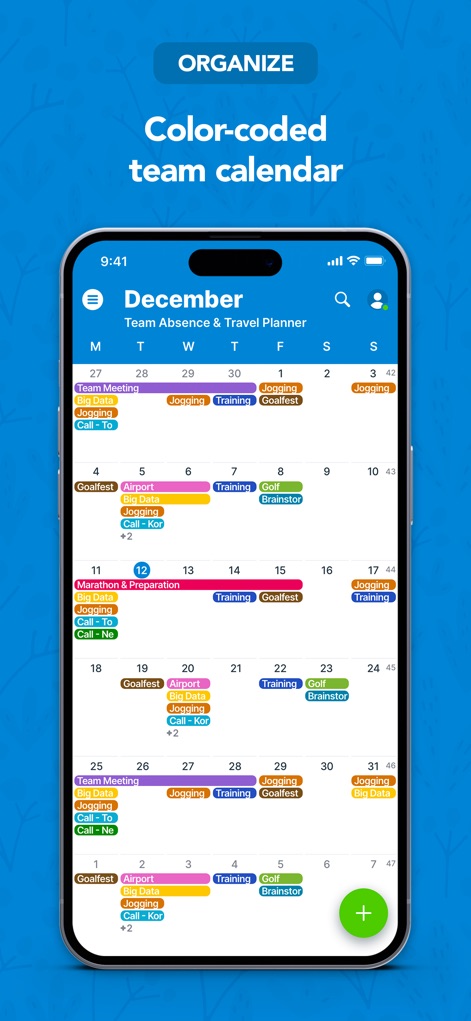
チームのイベントを色分けされた月間カレンダーで視覚的に把握し、各日の予定を効率的に管理できます。
カラーで整理

ユーザーはタイムスロット表示で一日のスケジュールを詳細に確認でき、各イベントの詳細リストで効率的な時間管理が可能です。
スケジュールを管理

イベント詳細画面では、視覚的な理解を深める画像添付機能と、関連するサブカレンダー情報を一目で確認できます。
情報を共有

複数のカレンダービューを切り替えることで、週表示で詳細なスケジュールを確認し、カスタマイズ可能なイベントバーで視覚的な管理を強化します。
多彩なビュー

ダークモードを有効にすることで、目の疲れを軽減しながら、イベントリスト表示で一連の予定を快適に閲覧できます。
快適な表示

ユーザーはサブカレンダーの表示切り替え機能により、特定のチームメンバーやリソースのスケジュールをリスト表示で柔軟にフィルタリングできます。
柔軟なフィルタリング
説明
Download
類似アプリ
似た機能とユーザー体験を持つアプリ

Howbout: shared calendar
Howbout Ltd.
TimeTree: Shared Calendar
TimeTree, Inc.

Cupla: Shared Couples Calendar
Cupla Limited

Chouseisan
Mixtend Inc.

みんなの縦型カレンダー
Funeasy Soft, Inc.
OurCal: Group Calendar Share
ONIN LTD.

게더링 : 함께 쓰는 공유 캘린더
HUSTLERS Corp

不揪?- 儲存、分享課表
HSIN-CHE CHUNG

Palu - Handwriting Calendar -
MetaMoJi Corporation
このページはアプリまたはその開発者の公式ページではなく、情報提供および論評を目的として作成された独立した編集出版物です。明示的に別段の記載がない限り、アプリおよびその開発者は、MWM、Apple、Google Play、アプリのパブリッシャー、またはアプリの開発者と提携、承認、後援、認可、またはその他の公式的な関係はなく、このページのいかなる内容も、アプリがMWMのサービスを使用して開発されたことを意味するものではありません。すべての商標、ロゴ、スクリーンショット、その他のコンテンツはそれぞれの所有者の財産です。