
このページはアプリまたはその開発者の公式ページではなく、情報提供および論評を目的として作成された独立した編集出版物です。明示的に別段の記載がない限り、アプリおよびその開発者は、MWM、Apple、Google Play、アプリのパブリッシャー、またはアプリの開発者と提携、承認、後援、認可、またはその他の公式的な関係はなく、このページのいかなる内容も、アプリがMWMのサービスを使用して開発されたことを意味するものではありません。すべての商標、ロゴ、スクリーンショット、その他のコンテンツはそれぞれの所有者の財産です。

Universal TV Remote ·
リモコンの群れは過去の遺物。本アプリは、スマートフォンをあらゆるTVの絶対的な制御塔へと変貌させ、ユーザーは既存のリモコンを超越した直感的な操作力を実感する。
ダウンロード
12.5M+ユーザー評価
評価数
157.1K開発元
カテゴリ
Utilities対応言語
22最新バージョン
2.1.34サイズ
80.8 MBリリース日
2018年11月9日"Universal TV Remote ·" の主要機能分析
スマートTVとストリーミングデバイスの操作を革新する主要機能
幅広いデバイス互換性
ユーザーは、多様なメーカーとオペレーティングシステムを搭載した幅広いスマートTVモデルを、このアプリ一つで包括的に制御できます。これにより、複数の物理リモコンを管理する必要がなくなります。
直感的なタッチパッド操作
本ツールは、物理的な方向ボタンの代わりにスワイプジェスチャーベースのタッチパッドナビゲーションを提供します。これにより、ユーザーはより流動的かつ直感的にメニューを操作し、目的のコンテンツに集中できます。
よくある質問
について知っておくべきこと Universal TV Remote ·
Which TV brands does Universal TV Remote · support?
Yes, Universal TV Remote · supports hundreds of models with various operating systems. It is compatible with brands like Google TV, Roku, LG, Samsung, Fire TV, Sony, Android TV, Philips, Vizio, and Panasonic.
Does Universal TV Remote · use a touchpad or traditional buttons for navigation?
Universal TV Remote · uses a touchpad with swipe gestures for navigation, which is presented as more convenient than pressing traditional 'down' or 'right' buttons. It also offers screens with traditional button layouts.
Can Universal TV Remote · turn on a Smart TV remotely?
Yes, Universal TV Remote · can turn on a Smart TV using the Wake-on-LAN function. This requires the app to have been connected to the TV previously. A hardware remote is necessary for the initial connection.
How much does a Premium Subscription for Universal TV Remote · cost?
A Premium Subscription for Universal TV Remote · costs $19.99 annually. This price is equivalent to the value that 'Apple's App Store Matrix' determines in USD.
Does the Universal TV Remote · Premium Subscription auto-renew?
Yes, the Universal TV Remote · Premium Subscription automatically renews. Auto-renewal must be turned off at least 24-hours before the current period ends to prevent the next charge.
How can users manage their Universal TV Remote · Premium Subscription?
Users can manage their Universal TV Remote · Premium Subscription, including turning off auto-renewal, by accessing their Account Settings after purchase. Further details are available via an Apple support link.
Can an active Universal TV Remote · Premium Subscription be canceled?
No, an active Universal TV Remote · Premium Subscription period cannot be canceled. Users will be unsubscribed once their current trial or subscription period expires.
以下のスクリーンショットと説明は、アプリの公式ストアリスティングから直接取得されたものであり、アプリ開発者の所有物です。
アプリストア
スクリーンショット
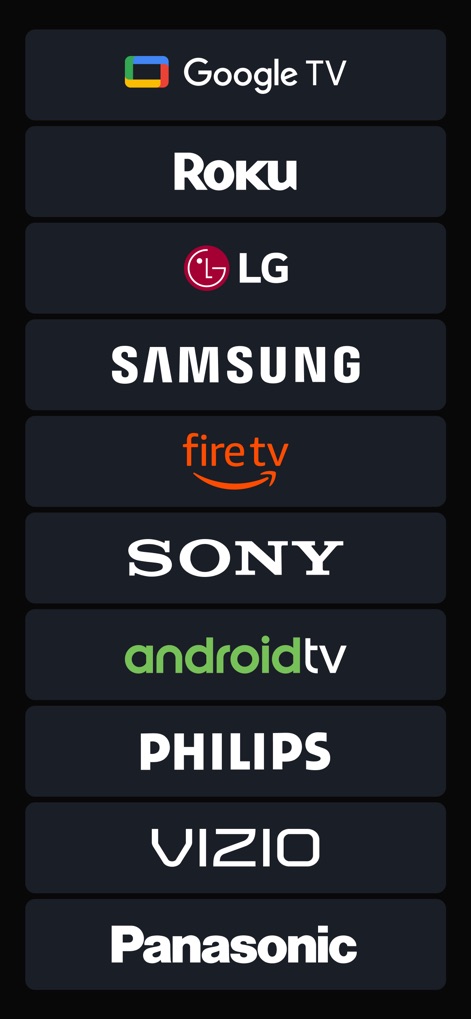
対応デバイス一覧
このアプリは、Google TVやRokuといった複数の主要なTVブランドおよびストリーミングデバイスに対応しており、幅広い互換性を提供します。特に、Google TVのロゴとRokuのロゴが明確に表示されています。

充実した操作機能
Samsung Q60 Series (43)向けのリモコン画面では、ホームボタンとミュートボタンが視覚的に確認できます。さらに、チャンネル選択やメニュー操作を可能にする多数のボタンが配置されています。

Roku専用操作
Roku Ultraに最適化されたリモコンインターフェースでは、画面中央に大きな方向キーとOKボタンが配置されています。また、音量調整ボタンも分かりやすく表示され、直感的な操作が可能です。

ソニー対応リモコン
SONY BRAVIA 4K GB専用のリモコン画面では、直感的な方向パッドと選択ボタンが中央に配置されています。入力切替やメニュー操作がスムーズに行える入力ボタンとガイドボタンも特徴です。

アプリ一覧表示
Roku Ultraにインストールされている様々なアプリのリストが、見やすいタイル形式で表示されています。YouTubeやTEDなどの人気アプリのアイコンが確認でき、簡単に起動できます。

数字キーパッド
Samsung Q60 Series (43)向けのリモコン画面では、チャンネル選択に便利な数字キーパッドが表示されています。また、ホームボタンやミュートボタンも引き続き利用でき、基本的な操作をカバーします。

直感的なタッチパッド
Samsung Q60 Series (43)対応のタッチパッド機能画面では、中央の広いグレー領域でスワイプ操作が可能です。その上部には戻るボタンとホームボタンが配置されており、ナビゲーションが容易です。

LG webOSリモコン
LG webOS TV UN71006LBに最適化されたリモコン画面では、設定ボタンと検索ボタンが上部に配置されています。ウェブブラウジングや入力切り替えが直感的に行えるよう設計されています。
説明
Download
類似アプリ
似た機能とユーザー体験を持つアプリ

The Roku App (Official)
ROKU INC

TV Remote & Smart TV Control
To Ngoc Mai

Universal TV Remote Control .
Apps Venture Inc.

TV Remote, Universal Remote
Hangzhou Yingshitong Technology Co., Ltd.

TV Remote Control “Universo”
Nemo Apps LLC

TV Remote・Universal Control #1
Mihai Turlea

Remote Smart Tv Universal
clement gasner

Remote TV Control TCL Onn App
CEMAL CAGLAR KIRICI

TV Remote Control Universal AI
Anh Ngo
このページはアプリまたはその開発者の公式ページではなく、情報提供および論評を目的として作成された独立した編集出版物です。明示的に別段の記載がない限り、アプリおよびその開発者は、MWM、Apple、Google Play、アプリのパブリッシャー、またはアプリの開発者と提携、承認、後援、認可、またはその他の公式的な関係はなく、このページのいかなる内容も、アプリがMWMのサービスを使用して開発されたことを意味するものではありません。すべての商標、ロゴ、スクリーンショット、その他のコンテンツはそれぞれの所有者の財産です。