
このページはアプリまたはその開発者の公式ページではなく、情報提供および論評を目的として作成された独立した編集出版物です。明示的に別段の記載がない限り、アプリおよびその開発者は、MWM、Apple、Google Play、アプリのパブリッシャー、またはアプリの開発者と提携、承認、後援、認可、またはその他の公式的な関係はなく、このページのいかなる内容も、アプリがMWMのサービスを使用して開発されたことを意味するものではありません。すべての商標、ロゴ、スクリーンショット、その他のコンテンツはそれぞれの所有者の財産です。


VIP Access for iPhone
VIP Accessは、デジタル上のフットプリントを堅固なものに変える。複数のオンラインアカウントを要塞化し、サイバー脅威から遠ざける。
ダウンロード
7.5M+ユーザー評価
評価数
4.6K開発元
カテゴリ
Business対応言語
11最新バージョン
5.2.0サイズ
25.8 MBリリース日
2009年3月31日本アプリが提供する主要な二要素認証機能と、そのビジネスおよび個人利用における影響を分析します。
VIP Access for iPhone: セキュリティ意識の高いユーザー向け評価
強力な二要素認証
オンラインアカウントのセキュリティを大幅に強化し、不正アクセスから保護します。これは、機密性の高い情報や資産を管理するユーザーにとって最も重要な利点です。
VIP対応組織ネットワークとの連携
E*TRADE、Google、Facebookなど、VIPネットワークに参加している数百の組織での認証に利用できるため、幅広いオンラインサービスで一貫したセキュリティを提供します。
プッシュ通知による認証承認
アプリからのプッシュ通知を承認するだけでログインプロセスを完了できるため、手動でコードを入力する手間を省き、迅速かつ手間のかからない認証体験を提供します。
多様な認証方法の提供
ワンタイムセキュリティコード、プッシュ通知承認、チャレンジ応答、生体認証など、複数の認証オプションを提供し、利用者の利便性と組織のセキュリティ要件に柔軟に対応します。
生体認証およびパスコード対応
Touch ID、Face ID、またはデバイスパスコードを使用して認証承認を迅速かつ安全に行うことができ、追加のセキュリティレイヤーとユーザーの利便性を向上させます。
QRコードによるサイト固有のセキュリティコード生成
GoogleやFacebookなどの対応サイトでQRコードをスキャンすることで、特定のサイト用の時間ベースのワンタイムパスワード(TOTP)を生成し、汎用的な2FAソリューションとして機能します。
オフラインでのセキュリティコード生成
ネットワーク接続がない環境でも、ワンタイムセキュリティコードを生成できるため、接続状況に左右されずに認証を完了でき、中断のないアクセスを保証します。
認証情報のデバイス間移行機能
新しいデバイスへの移行時に、QRコードを使用して既存の認証情報を安全かつ容易に転送できるため、セットアップの手間を軽減し、ユーザーの利便性を高めます。
よくある質問
について知っておくべきこと VIP Access for iPhone
What is VIP Access for iPhone?
VIP Access for iPhone is an application that provides strong, two-factor authentication to protect your online accounts and transactions at VIP-enabled organizations. It generates one-time security codes or uses push notifications for secure logins.
How does VIP Access for iPhone provide strong authentication?
VIP Access for iPhone provides strong authentication through dynamically generated one-time security codes, push notifications requiring approval, challenge number entry, or local device authentication like Touch ID or Face ID.
Can VIP Access for iPhone generate security codes offline?
Yes, VIP Access for iPhone can generate security codes even if your mobile device does not have a network or mobile connection. This ensures continuous access to your authenticated accounts.
How do I migrate VIP Access credentials to a new iPhone?
To migrate credentials, generate a migration code on your current device using VIP Access, download the app on your new iPhone, then scan the migration code with the new device. This process resets the app on the old device.
What organizations are supported by VIP Access for iPhone?
VIP Access for iPhone supports various participating organizations, including E*TRADE, Facebook, Google, and Amazon. It works with hundreds of sites within the VIP Network for enhanced security.
How does QR code authentication work in VIP Access for iPhone?
VIP Access for iPhone allows you to scan a QR Code at participating organizations. This generates a site-specific security code every 30 seconds, which you enter along with your password for secure two-factor authentication.
Can I use Touch ID or Face ID with VIP Access for iPhone?
Yes, VIP Access for iPhone supports Touch ID and Face ID for authenticating push notifications. Your mobile device must be capable of these features, and you must have a fingerprint or facial recognition registered on the device.
Can I remove an account from VIP Access for iPhone?
Yes, VIP Access for iPhone allows you to remove account credentials. You can access the 'Manage Credentials' screen where options to edit and remove accounts are presented, as shown by the red minus icons.
What is the purpose of a transaction verification request in VIP Access for iPhone?
A transaction verification request in VIP Access for iPhone provides an additional layer of security by prompting you to confirm specific transaction details, often including location, before approving the action. You enter a number displayed on your screen to verify.
How long is a security code valid in VIP Access for iPhone?
A security code generated by VIP Access for iPhone is typically valid for a short duration, such as 30 seconds. The app displays a countdown timer, indicating the remaining time before the code expires and a new one is generated.
以下のスクリーンショットと説明は、アプリの公式ストアリスティングから直接取得されたものであり、アプリ開発者の所有物です。
アプリストア
スクリーンショット
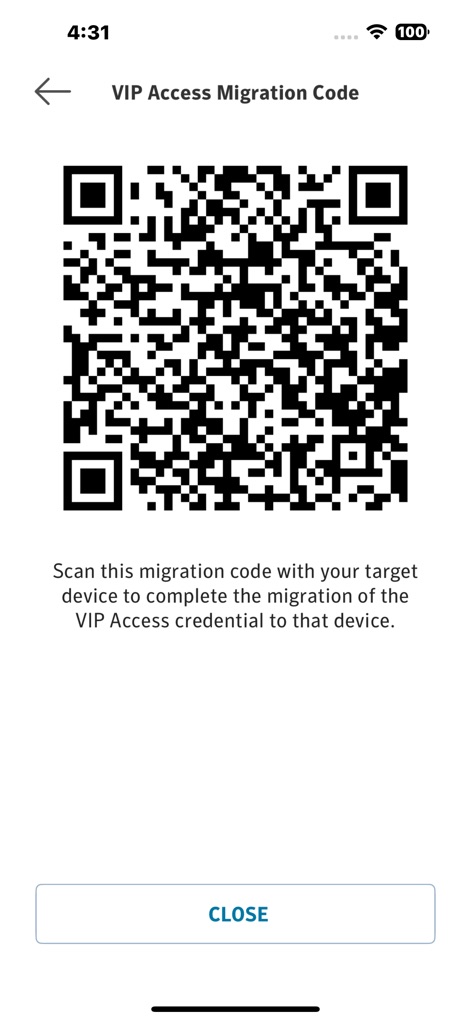
新しいデバイスへのアカウント移行を容易にするQRコードと、その手順を明確に説明するテキストの両方をこの画面で確認できます。
QR移行コード
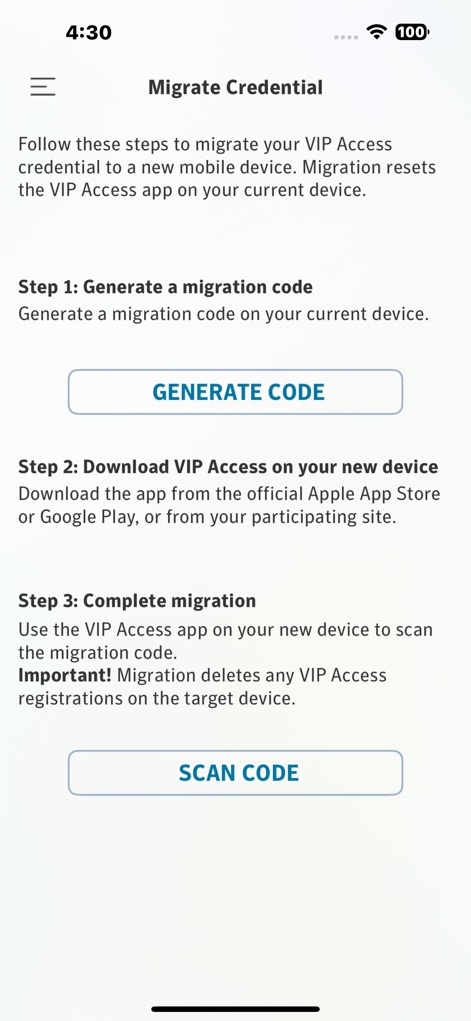
新しいモバイルデバイスへの認証情報移行を促すステップバイステップの指示と、「GENERATE CODE」「SCAN CODE」といった直感的な操作ボタンが、ユーザーの作業をサポートします。
簡単なデバイス移行
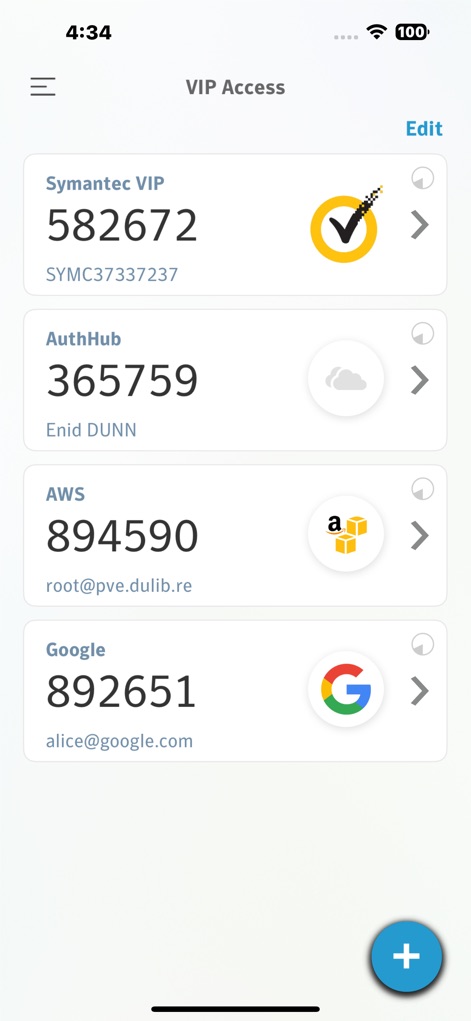
Symantec VIP、AuthHub、AWS、Googleなど、複数のアカウントに対応した認証コードが一覧表示され、それぞれのブランドロゴとアカウント情報で視覚的に識別できます。
複数のアカウント保護
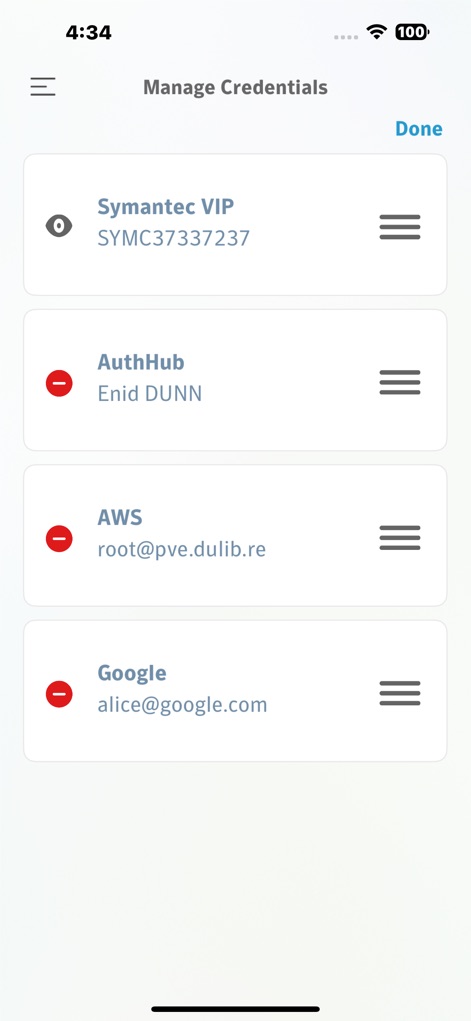
登録済みアカウントの効率的な管理を可能にする削除アイコンと、アカウントの並び替えを直感的に行えるハンバーガーアイコンが、ユーザーに柔軟な操作性を提供します。
認証情報を管理
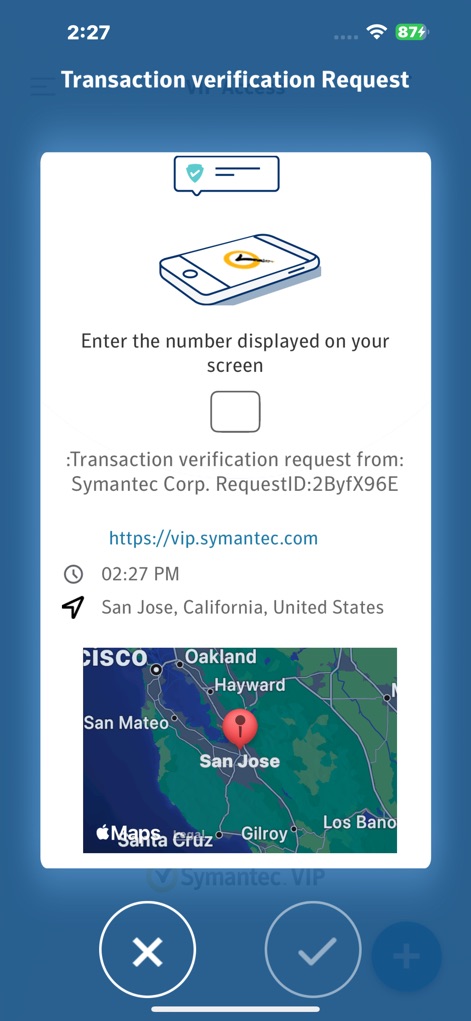
取引詳細と確認コード入力欄に加えて、取引が行われたサンノゼの具体的な位置を示す地図表示が、ユーザーに透明性と安心感を提供します。
取引確認と位置
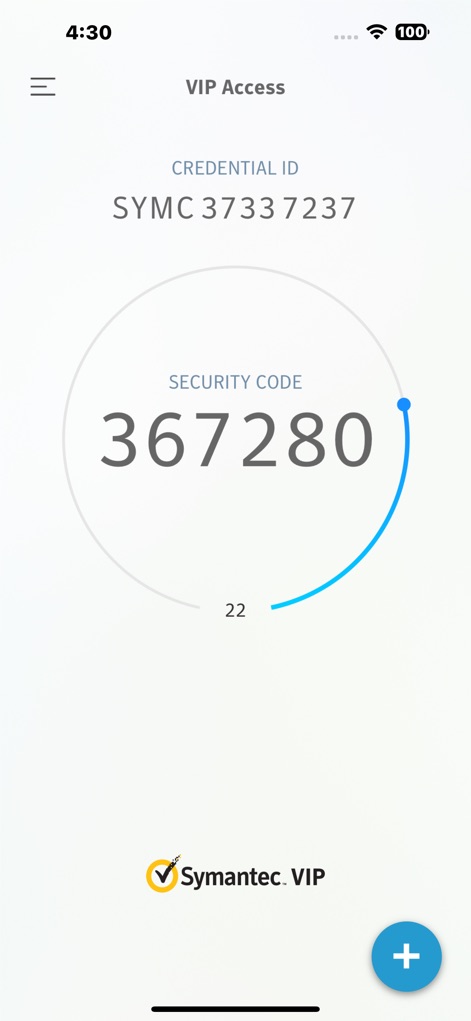
大きく表示されたワンタイムセキュリティコードと、コードが更新されるまでの残り時間を視覚的に示すプログレスバーが、ユーザーに現在の認証状況を明確に伝えます。
即時セキュリティコード
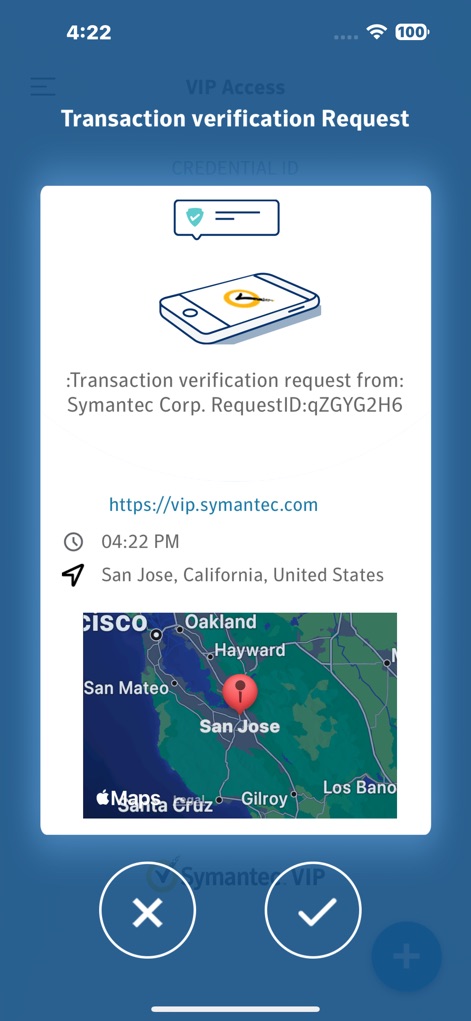
不審な取引を検知した際の承認/拒否ボタンと、取引が行われた場所(サンノゼ)を示す地図表示により、ユーザーは迅速かつ安全に取引の正当性を判断できます。
安全な取引検証
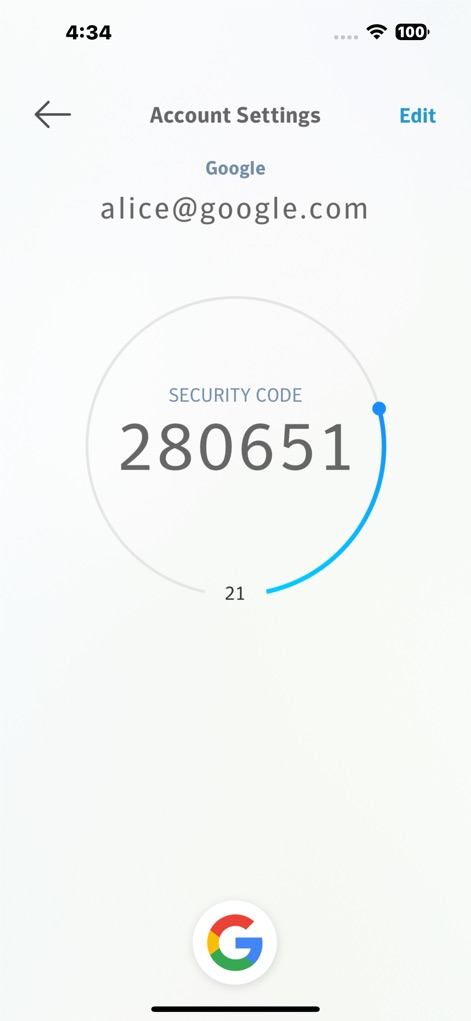
特定のGoogleアカウントのワンタイムセキュリティコードが表示され、下部にはGoogleのロゴが配置されており、ユーザーは対象アカウントを容易に確認できます。
個別アカウントの認証
説明
Download
類似アプリ
似た機能とユーザー体験を持つアプリ

Google Authenticator
Google LLC

Duo Mobile
Duo Security LLC

Authenticator App - 2FA &. MFA
APPLY DIJITAL HIZMETLER TICARET LIMITED SIRKETI

authenticator . app
Mustafa Uz

SafeNet MobilePASS+
Thales DIS (Singapore) Pte Ltd

Čítačka
Tatra banka, a.s.

Authenticator App - SafeAuth
Brilliant App Limited

Authenticator App - 2FA Auth
UNIVERSE DIJITAL HIZMETLER LIMITED SIRKETI

Authenticator App : Scan & 2FA
XSOFT GLOBAL LIMITED
このページはアプリまたはその開発者の公式ページではなく、情報提供および論評を目的として作成された独立した編集出版物です。明示的に別段の記載がない限り、アプリおよびその開発者は、MWM、Apple、Google Play、アプリのパブリッシャー、またはアプリの開発者と提携、承認、後援、認可、またはその他の公式的な関係はなく、このページのいかなる内容も、アプリがMWMのサービスを使用して開発されたことを意味するものではありません。すべての商標、ロゴ、スクリーンショット、その他のコンテンツはそれぞれの所有者の財産です。