
このページはアプリまたはその開発者の公式ページではなく、情報提供および論評を目的として作成された独立した編集出版物です。明示的に別段の記載がない限り、アプリおよびその開発者は、MWM、Apple、Google Play、アプリのパブリッシャー、またはアプリの開発者と提携、承認、後援、認可、またはその他の公式的な関係はなく、このページのいかなる内容も、アプリがMWMのサービスを使用して開発されたことを意味するものではありません。すべての商標、ロゴ、スクリーンショット、その他のコンテンツはそれぞれの所有者の財産です。


Voice Recorder Lite: Record HD
最大100メートル離れた場所からの、高度なノイズリダクションによるクリスタルクリアなサウンドをキャプチャ。講義室でも会議室でも、数百万人のプロフェッショナルや学生が信頼するツールで、オーディオをインスタントに録音、編集、クラウドに同期しましょう。
ダウンロード
6M+ユーザー評価
評価数
280K+開発元
カテゴリ
Business対応言語
10最新バージョン
8.5サイズ
37.9 MBリリース日
2015年1月14日複雑さのないプロフェッショナル録音
ハイファイサウンド、シームレスなクラウド統合、そしてポケットの中にあるスタジオグレードのレコーダーの信頼性を求める学生やプロフェッショナル向けに設計されています。
クリスタルクリアHDオーディオ
内蔵ノイズリダクション技術により、最大100メートル離れた場所からハイファイサウンドをキャプチャ。大規模な講義室や賑やかな会議室に最適です。
シームレスなクラウドワークフロー
録音を二度と失うことはありません。ファイルをDropboxまたはiCloudに自動同期し、電話の着信後も録音が即座に再開されるので安心です。
プロレベルの編集とハードウェア
外出先でオーディオをトリミングし、外部TascamまたはBluetoothマイクを接続して、iPhoneまたはiPadでプロフェッショナルなスタジオセットアップを実現します。
通話中断時の録音継続
通話中も録音を一時停止し、通話終了後に自動的に再開します。重要な会議や講義を中断させません。
よくある質問
について知っておくべきこと Voice Recorder Lite: Record HD
Does Voice Recorder Lite support different audio quality settings?
はい、Voice Recorder Lite は、Low (8KHz)、Medium (22.05KHz)、High (44.1KHz) を含むさまざまなオーディオ品質設定をサポートしており、録音のニーズに合わせて調整できます。
What audio formats can Voice Recorder Lite save recordings in?
Voice Recorder Lite では、複数の形式で録音を保存できます。オーディオファイルとして WAV、CAF、M4A 形式をサポートしています。
Can Voice Recorder Lite record audio in the background?
はい、Voice Recorder Lite はバックグラウンド録音をサポートしており、アプリが画面上でアクティブに開かれていない場合でも、オーディオをキャプチャし続けることができます。
Does Voice Recorder Lite offer audio trimming capabilities?
はい、Voice Recorder Lite にはオーディオトリミング機能が含まれています。ユーザーは録音の特定の部分を選択して、必要に応じてトリミングできます。
How can I share recordings from Voice Recorder Lite?
Voice Recorder Lite では、電子メール、Dropbox (自動アップロード付き)、iCloud Drive、iTunes ファイル共有、Airdrop (iOS および Mac デバイス向け) を含む複数の共有オプションを提供しています。
Is Voice Recorder Lite compatible with external microphones?
はい、Voice Recorder Lite は外部入力デバイスをサポートしています。Bluetooth マイクや、Tascam マイクを含むその他の外部マイクでテストされています。
Does Voice Recorder Lite support auto-uploading recordings to Dropbox?
はい、Voice Recorder Lite は録音を Dropbox に直接自動アップロードすることをサポートしています。ユーザーはアプリの設定でこの機能を有効にできます。
Can Voice Recorder Lite continue recording after a phone call interruption?
はい、Voice Recorder Lite は通話中断処理機能を備えています。電話、またはその他の割り込みが終了すると、録音は自動的に継続されます。
What playback controls does Voice Recorder Lite offer?
Voice Recorder Lite は、早戻し、早送り、再生速度調整オプション (0.5x、1x、2x) を含むコントロールで、迅速なオーディオ再生を提供します。
Is Voice Recorder Lite a universal app for Apple devices?
はい、Voice Recorder Lite はユニバーサルアプリです。iPhone と iPad デバイスの両方をサポートしており、プラットフォーム全体で一貫した機能を提供します。
Does Voice Recorder Lite include noise reduction technology?
はい、Voice Recorder Lite は、録音されたオーディオの明瞭度と品質を向上させるためのコーデックノイズリダクションテクノロジーを組み込んでいます。
Can I convert audio files within the Voice Recorder Lite app?
はい、Voice Recorder Lite ではオーディオファイルの変換が可能です。共有オプションメニューから、録音を MP3 または M4A 形式に変換できます。
以下のスクリーンショットと説明は、アプリの公式ストアリスティングから直接取得されたものであり、アプリ開発者の所有物です。
アプリストア
スクリーンショット
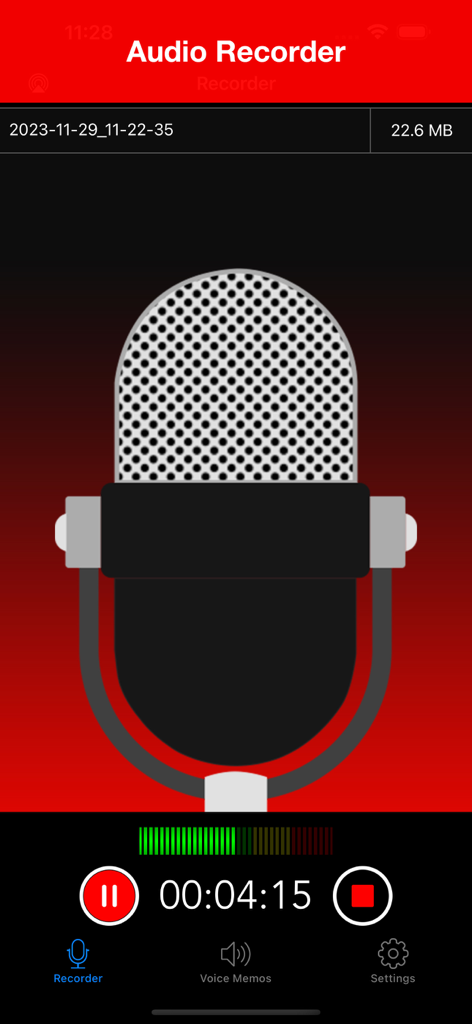
Voice Recorder Liteアプリのインターフェース。大きなマイクアイコンとタイマーが表示されたアクティブなHDオーディオ録音画面。
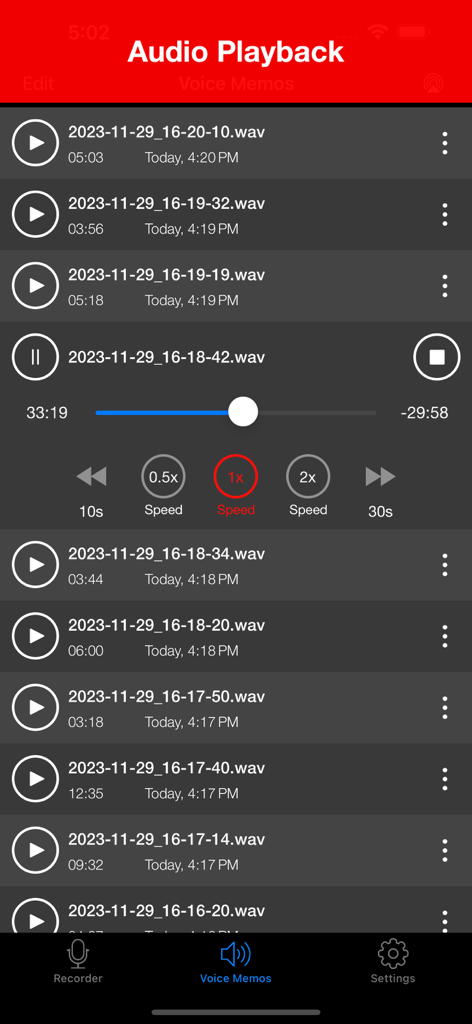
オーディオ録音のリストと、再生速度調整オプション付きの再生コントロールが表示されたインターフェース。
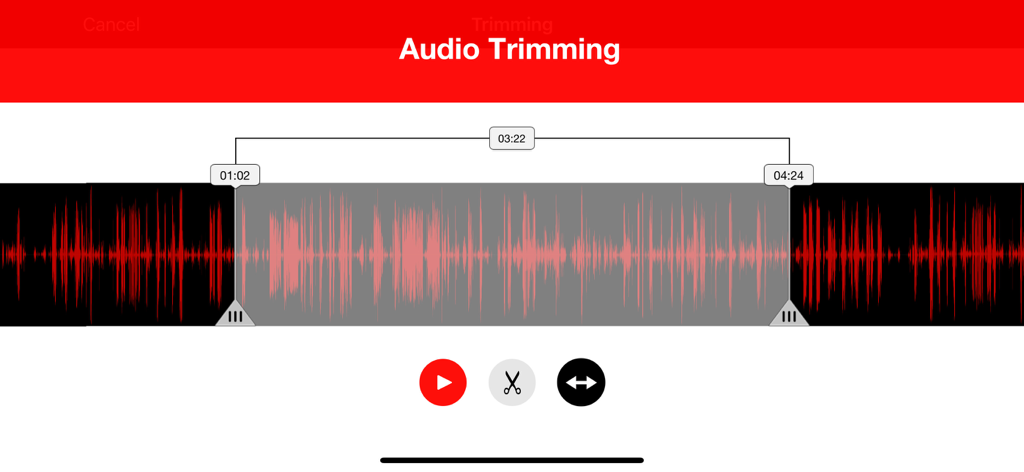
Voice Recorder Liteのオーディオトリミングインターフェース。編集コントロール付きの赤いサウンド波形が表示されています。
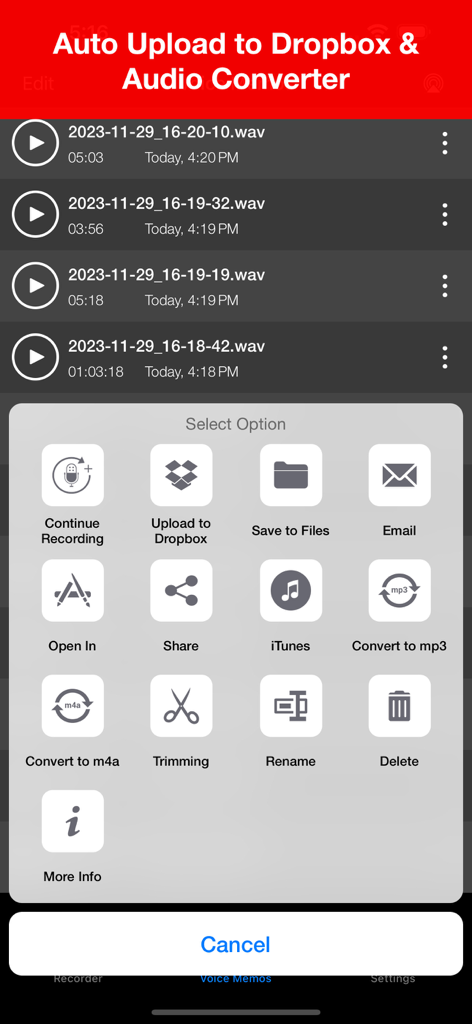
Voice Recorder Liteアプリのインターフェース。Dropboxアップロード、メール、オーディオ変換などの共有および編集オプションのメニューが表示されています。
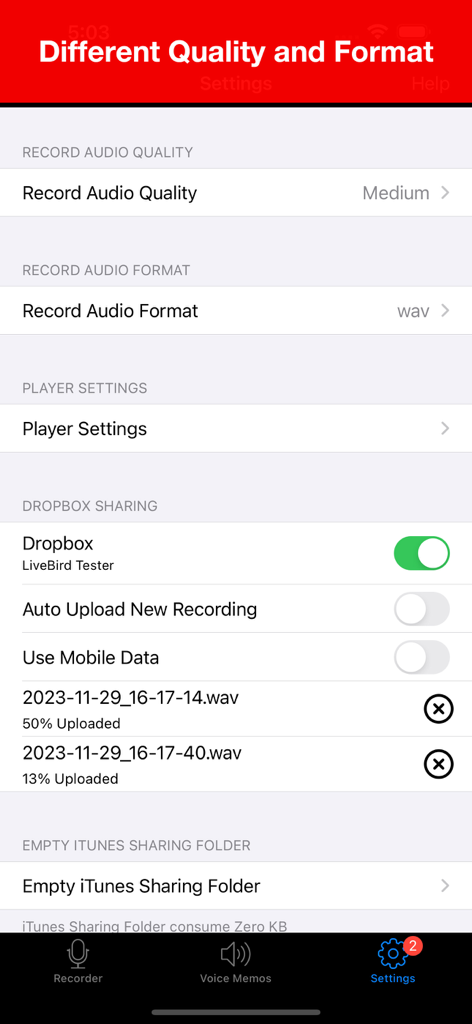
Voice Recorder Liteの設定画面。オーディオ品質、フォーマットオプション、Dropboxクラウド同期が表示されています。
説明
Download
類似アプリ
似た機能とユーザー体験を持つアプリ

PCM Recorder Lite
Kohei Yasui

Voice recorder - Voz
Hieu Nguyen

MOTIV Audio
Shure Incorporated

Voice recorder: Audio editor
Hieu Nguyen

Voice Recorder - Audio Record
LiveBird Technologies Private Limited

Awesome Voice Recorder PRO AVR
Newkline Co., Ltd.

Voice Memos & Sound Recorder
Protection & Security App LLC

Voice Recorder & Memos
SMM service, s.r.o.
Voice Recorder — Audio Memos
Viktor Sukhoy
このページはアプリまたはその開発者の公式ページではなく、情報提供および論評を目的として作成された独立した編集出版物です。明示的に別段の記載がない限り、アプリおよびその開発者は、MWM、Apple、Google Play、アプリのパブリッシャー、またはアプリの開発者と提携、承認、後援、認可、またはその他の公式的な関係はなく、このページのいかなる内容も、アプリがMWMのサービスを使用して開発されたことを意味するものではありません。すべての商標、ロゴ、スクリーンショット、その他のコンテンツはそれぞれの所有者の財産です。