
이 페이지는 앱이나 개발자의 공식 페이지가 아니며, 정보 제공 및 논평을 목적으로 작성된 독립 편집 간행물입니다. 명시적으로 달리 언급되지 않는 한, 해당 앱이나 개발자는 MWM, Apple, Google Play, 앱 퍼블리셔 또는 앱 개발자와 제휴, 보증, 후원, 승인 또는 공식적으로 연결되어 있지 않으며, 이 페이지의 어떤 내용도 해당 앱이 MWM의 서비스를 사용하여 개발되었음을 의미하지 않습니다. 모든 상표, 로고, 스크린샷 및 기타 콘텐츠는 해당 소유자의 자산입니다.


3D modeling: Design my model
이 앱은 아이폰과 아이패드를 3D 모델링 스튜디오로 바꿔버립니다. 당신은 더 이상 데스크톱에 묶여 있지 않습니다. 이동 중에도 3D 객체를 만들고, 조작하고, 다듬을 수 있는 권한을 부여받습니다.
다운로드
2.5M+사용자 평점
총 평가 수
31.0K개발사
카테고리
Graphics & Design지원 언어
18최신 버전
1.10.7크기
107.3 MB출시일
2022년 7월 6일모바일 3D 아티스트와 디자이너를 위한 강력한 온더고 솔루션
앱 분석: 3D modeling: Design my model 주요 기능
OBJ 파일 형식 지원
이 앱은 사용자가 표준 .obj 파일을 가져오고 내보낼 수 있게 해주어, 다른 전문 3D 소프트웨어와의 원활한 데이터 교환 및 협업 워크플로우를 지원합니다.
모바일 최적화 제스처 워크플로우
이 도구는 아이폰 및 아이패드의 터치 제스처를 활용하여 3D 모델의 이동, 회전, 크기 조절 및 다중 선택을 빠르고 직관적으로 처리할 수 있는 워크플로우를 제공합니다.
전문적인 모델링 도구
이 앱은 버텍스, 엣지, 페이스 및 오브젝트 수준에서 병합, 연결, 돌출, 분할, 복제 등 정교한 3D 모델링 작업을 수행할 수 있는 다양한 도구를 갖추고 있습니다.
고급 텍스처 및 UV 기능
사용자가 3D 모델에 직접 텍스처를 칠하고, UV 에디터를 통해 텍스처 배치를 정밀하게 조정하며, 버텍스 컬러를 페인팅하여 시각적 디테일을 풍부하게 만들 수 있습니다.
유기적인 조각 도구
이 앱은 브러시 크기와 강도를 조절할 수 있는 조각 도구를 제공하여, 사용자가 3D 모델을 이동, 밀어내기, 당기기, 부드럽게 하는 등 유기적인 형태를 만들고 다듬을 수 있도록 합니다.
정밀 제어 및 시각화
이 도구는 그리드, 정확한 값 설정, 선택 격리, 와이어프레임 디스플레이 등 3D 작업의 정확성과 시각적 피드백을 향상시키는 다양한 보조 기능을 포함하고 있습니다.
자주 묻는 질문
에 대해 알아야 할 모든 것 3D modeling: Design my model
What is 3D modeling: Design my model?
3D modeling: Design my model is a 3D modeling application for iPhone and iPad. It allows users to design 3D content on the go using gestures, supporting various tools for vertex, edge, face, and object manipulation.
Does 3D modeling: Design my model support Apple Pencil?
Yes, 3D modeling: Design my model supports the Apple Pencil for design. Users can also utilize the app's features with gestures, so the Apple Pencil is optional for functionality.
Can I import and export 3D models in 3D modeling: Design my model?
Yes, the 3D modeling: Design my model app allows users to import and export .obj files. This feature facilitates external workflow integration for 3D content creation and sharing.
What types of tools are available in 3D modeling: Design my model?
3D modeling: Design my model offers vertex, edge, face, object, sculpting, coloring, and display tools. These include functions like extrude, merge, clone, paint textures, and adjust grid settings.
How do I manipulate objects in 3D modeling: Design my model?
You can manipulate objects in 3D modeling: Design my model using gestures to move, rotate, and scale them. The app also allows multi-selection of vertices, edges, faces, and objects via long tap or frame draw.
Does 3D modeling: Design my model provide tutorials for its tools?
Yes, 3D modeling: Design my model provides a video tutorial for every tool within the app. This helps users understand and utilize each feature effectively.
Can I apply materials to my 3D models in 3D modeling: Design my model?
Yes, 3D modeling: Design my model offers 20 materials that users can apply to their objects. The app also includes tools for painting textures and editing texture placement using a UV editor.
Does 3D modeling: Design my model have sculpting capabilities?
Yes, 3D modeling: Design my model includes sculpting tools such as Move, Screen, Push, Pull, and Smooth. Users can adjust the brush size and strength for these tools.
Can I combine or separate objects in the 3D modeling: Design my model app?
Yes, 3D modeling: Design my model provides object tools to combine and separate 3D objects. These tools also include options for cloning, mirroring, smoothing, and dividing objects.
What display options are available in 3D modeling: Design my model?
3D modeling: Design my model offers various display options. These include a settable grid, display info for triangles and edge length, and toggles for wireframe on shaded, shadows, and axis.
다음 스크린샷과 설명은 앱의 공식 스토어 목록에서 직접 가져온 것이며 앱 개발자의 자산입니다.
앱 스토어
스크린샷

사용자는 선택된 가장자리 루프를 사용하여 모델을 정교하게 다듬을 수 있으며, 압출 도구를 통해 형태를 쉽게 확장할 수 있습니다.
정교한 모델링 도구

이 앱은 오토바이 바퀴의 폴리곤 선택을 통해 복잡한 부분을 조작할 수 있게 하며, 결합 도구를 활용하여 여러 객체를 하나로 합칠 수 있습니다.
복잡한 객체 편집
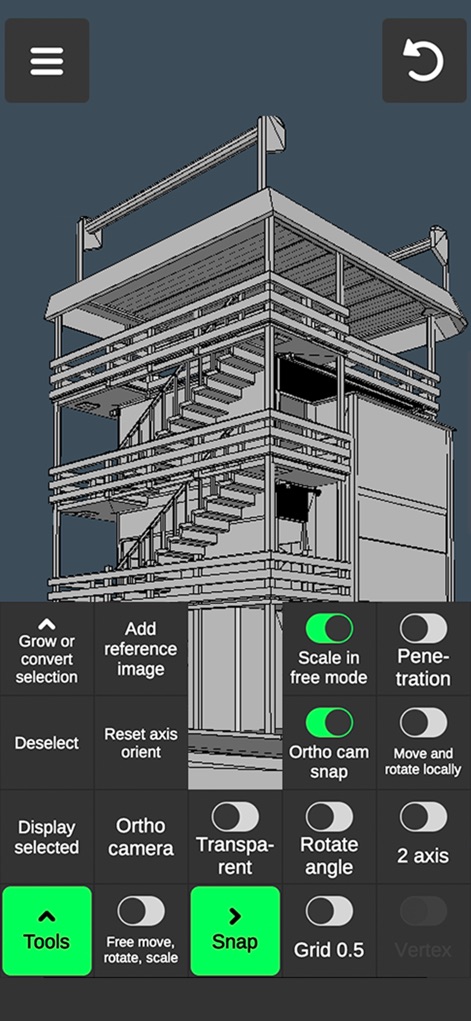
이 도구는 복잡한 건축물 모델링을 위한 다양한 제어 옵션을 제공하며, 직교 카메라와 그리드 스냅 설정을 통해 정밀한 작업을 가능하게 합니다.
고급 제어 및 설정

사용자는 인체 모델의 녹색 와이어프레임 디테일을 확인하면서, 하단의 재질 선택기를 통해 모델에 사실적인 질감을 쉽게 적용할 수 있습니다.
사실적인 재질 표현

이 앱은 로우 폴리 나무 모델의 나뭇잎 영역에 녹색을 할당하여 시각적 구분을 명확히 하며, 색상 팔레트를 통해 원하는 색상을 손쉽게 적용할 수 있습니다.
간편한 색상 적용

이 도구는 로우 폴리 탱크 모델에서 녹색 압출을 통해 새로운 형태를 생성하는 과정을 보여주며, 압출 및 면 그리기 기능을 활용하여 객체를 자유롭게 변형할 수 있습니다.
다이내믹한 형태 변형

사용자는 로우 폴리 고양이 모델의 정점(버텍스)을 정밀하게 선택하여 세밀한 조정을 할 수 있으며, 병합(Merge) 도구를 사용하여 불필요한 부분을 통합할 수 있습니다.
정밀한 버텍스 편집

이 앱은 로우 폴리 탱크 궤도 커버의 특정 부분을 녹색으로 정확히 선택하는 기능을 제공하며, 채우기 도구를 사용하여 선택된 영역에 손쉽게 색상이나 재질을 적용할 수 있습니다.
부분 선택 및 채색
설명
Download





이 페이지는 앱이나 개발자의 공식 페이지가 아니며, 정보 제공 및 논평을 목적으로 작성된 독립 편집 간행물입니다. 명시적으로 달리 언급되지 않는 한, 해당 앱이나 개발자는 MWM, Apple, Google Play, 앱 퍼블리셔 또는 앱 개발자와 제휴, 보증, 후원, 승인 또는 공식적으로 연결되어 있지 않으며, 이 페이지의 어떤 내용도 해당 앱이 MWM의 서비스를 사용하여 개발되었음을 의미하지 않습니다. 모든 상표, 로고, 스크린샷 및 기타 콘텐츠는 해당 소유자의 자산입니다.