
이 페이지는 앱이나 개발자의 공식 페이지가 아니며, 정보 제공 및 논평을 목적으로 작성된 독립 편집 간행물입니다. 명시적으로 달리 언급되지 않는 한, 해당 앱이나 개발자는 MWM, Apple, Google Play, 앱 퍼블리셔 또는 앱 개발자와 제휴, 보증, 후원, 승인 또는 공식적으로 연결되어 있지 않으며, 이 페이지의 어떤 내용도 해당 앱이 MWM의 서비스를 사용하여 개발되었음을 의미하지 않습니다. 모든 상표, 로고, 스크린샷 및 기타 콘텐츠는 해당 소유자의 자산입니다.


Nomad Sculpt
모바일 기기에서 진정한 3D 모델링의 한계를 허물어버립니다. Nomad Sculpt는 복잡한 3D 오브젝트를 손안에서 직접 조작할 수 있는 원초적인 힘을 부여합니다.
다운로드
1M+사용자 평점
총 평가 수
46.3K개발사
카테고리
Graphics & Design지원 언어
23최신 버전
2.8크기
189.4 MB출시일
2020년 8월 4일전문 테크 분석가가 평가한 핵심 기능 및 영향력
Nomad Sculpt: 모바일 3D 조형의 새로운 지평 분석
강력한 파일 호환성
이 도구는 glTF, OBJ, STL, PLY 등 다양한 3D 파일 형식을 지원하여 다른 전문 소프트웨어와의 원활한 데이터 교환을 가능하게 합니다.
직관적인 3D 조형 도구
이 앱은 점토, 평탄화, 스무스, 마스크 등 다채로운 브러시와 정밀한 트림 불리언 커팅 도구를 제공하여 사용자가 복잡한 3D 모델을 생성하고 다듬을 수 있도록 지원합니다.
비파괴 레이어 기반 작업
이 도구는 조형 및 페인팅 작업을 개별 레이어에 기록하여 사용자가 비파괴 방식으로 유연하게 반복 작업을 수행하고 변경 사항을 관리할 수 있게 합니다.
정교한 버텍스 페인팅
이 앱은 색상, 거칠기, 금속성 등 고급 버텍스 페인팅 기능을 포함하며, 사용자가 재질 프리셋을 손쉽게 관리하고 고품질 텍스처를 적용할 수 있도록 돕습니다.
데이터 베이킹 기능
이 앱은 색상, 거칠기, 금속성 같은 버텍스 데이터를 텍스처로 전송하거나 그 반대로도 가능하게 하여, 3D 애셋 최적화 및 렌더링 파이프라인에 기여합니다.
자동 UV 언랩핑
이 기능은 메쉬를 자동으로 언랩하여 텍스처링 및 외부 3D 애플리케이션과의 호환성을 위한 효율적인 UV 맵을 생성합니다. 페이스 그룹을 활용하여 언랩 프로세스를 제어할 수도 있습니다.
동적 토폴로지
이 기능은 브러시 아래에서 메쉬를 로컬로 세분화하여 작업 중에도 자동으로 디테일 수준을 조정할 수 있도록 함으로써, 모델링의 유연성을 높입니다.
멀티레졸루션 조형
이 도구는 사용자가 메쉬의 여러 해상도 수준 사이를 오갈 수 있도록 하여, 광범위한 형태 변경부터 미세한 디테일 작업까지 유연한 작업 흐름을 제공합니다.
효율적인 복셀 리메싱
이 앱은 메쉬를 빠르게 리메시하여 균일한 디테일 수준을 얻을 수 있게 하며, 특히 초기 스케치 및 형태를 다듬는 단계에서 매우 유용합니다.
고품질 PBR 렌더링
이 앱은 물리 기반 렌더링(PBR)을 기본으로 지원하여, 조명과 그림자가 적용된 사실적인 비주얼로 작품을 실시간으로 미리 볼 수 있도록 합니다.
자주 묻는 질문
에 대해 알아야 할 모든 것 Nomad Sculpt
What sculpting tools are available in Nomad Sculpt?
Nomad Sculpt offers various sculpting tools including clay, flatten, smooth, mask, and trim boolean cutting with lasso and rectangle shapes. These tools are designed for detailed organic and hardsurface modeling tasks.
Does Nomad Sculpt support painting models?
Yes, Nomad Sculpt allows users to paint models using vertex painting. This feature includes options for color, roughness, and metalness, with easy management of material presets.
Does Nomad Sculpt include a layer system?
Yes, Nomad Sculpt features a layer system. It records both sculpting and painting operations in separate layers, enabling easier iteration and flexible modifications during the creative process.
What file formats can Nomad Sculpt import and export?
Nomad Sculpt supports importing and exporting models in glTF, OBJ, STL, and PLY file formats. This ensures compatibility with various other 3D software and platforms.
Does Nomad Sculpt have advanced rendering capabilities?
Yes, Nomad Sculpt offers beautiful PBR rendering by default, complete with lighting and shadows. It also includes post-processing options like Screen Space Reflection and Depth of Field.
Is the Quad Remesher tool free in Nomad Sculpt?
No, the Quad Remesher tool in Nomad Sculpt is not included with the base application. It is available as a separate in-app purchase, providing automatic quad-dominant mesh remeshing.
How does dynamic topology function in Nomad Sculpt?
Nomad Sculpt's dynamic topology refines the mesh locally under the brush, providing an automatic level of detail. This feature also automatically updates existing layers.
Is the Nomad Sculpt interface optimized for mobile devices?
Yes, the Nomad Sculpt interface is designed specifically for a mobile experience. It is easy-to-use and offers customization options to suit individual user preferences.
What is voxel remeshing used for in Nomad Sculpt?
Voxel remeshing in Nomad Sculpt quickly remeshes your mesh to achieve a uniform level of detail. It is particularly useful for sketching rough shapes at the beginning of the creation process.
Can brush strokes be customized in Nomad Sculpt?
Yes, Nomad Sculpt allows extensive customization of brush strokes. Users can adjust parameters such as falloff, alphas, tilings, and pencil pressure, and save or load their custom tool presets.
다음 스크린샷과 설명은 앱의 공식 스토어 목록에서 직접 가져온 것이며 앱 개발자의 자산입니다.
앱 스토어
스크린샷

이 앱은 섬세한 수염과 금속 장식 같은 복잡한 디테일을 정밀하게 조형하며, 마스크 및 기즈모 도구로 형태를 완벽하게 제어합니다.
섬세한 인물 조형

사용자는 웅장한 용 모델과 같은 상상의 존재를 구현하며, 스무스 기능으로 섬세한 비늘을 표현하고 마스크로 특정 부위를 보호합니다.
상상력으로 빚어낸 형태

이 앱은 우아한 얼굴선과 부드러운 헤어 표현을 포함한 인체 모델링을 지원하며, 스무스 도구로 표면을 다듬고 마스크로 특정 영역을 분리합니다.
정교한 인체 모델링
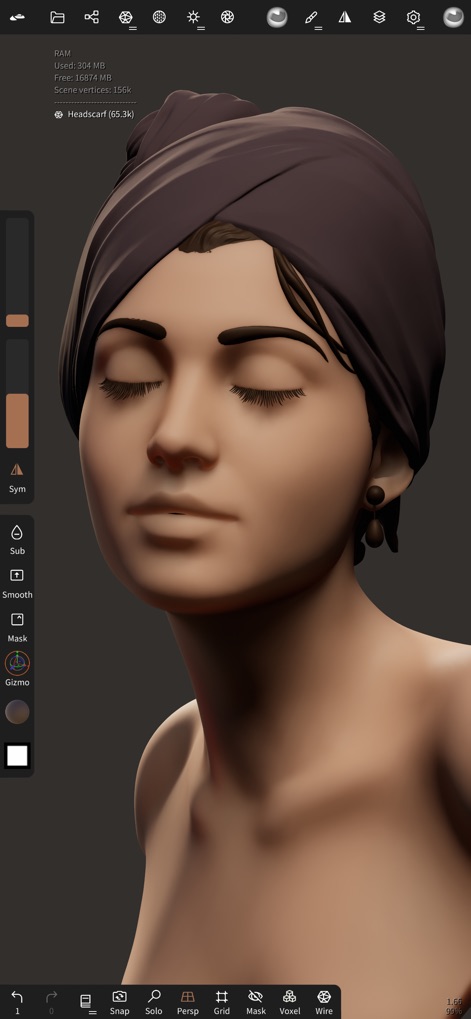
사용자는 사실적인 피부 톤과 헤드스카프의 섬세한 주름을 부여하여 모델의 완성도를 높이며, 정교한 채색과 라이팅 효과를 적용합니다.
사실적인 질감 표현

이 앱은 HDR 이미지를 배경으로 활용하여 모델에 현실적인 주변광을 부여하고, 노출 및 회전 조절을 통해 완벽한 시각적 환경을 조성합니다.
환경 설정으로 몰입감 강화
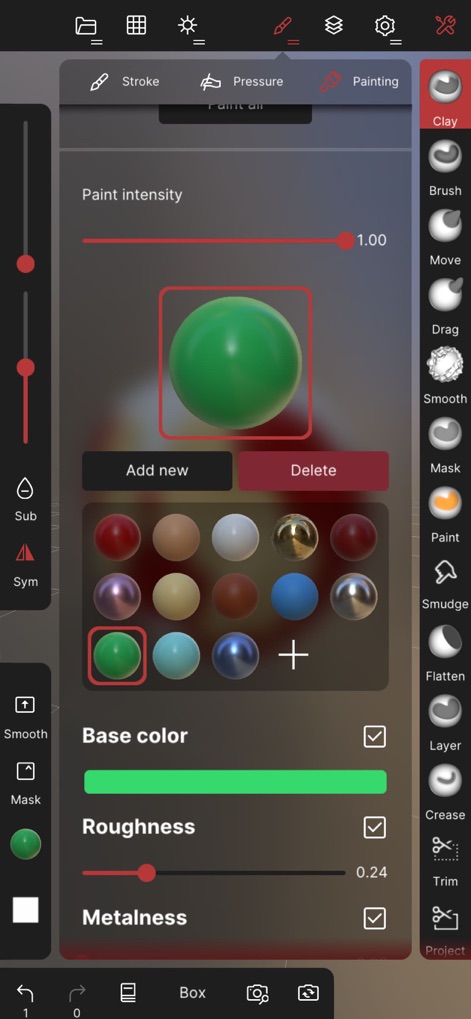
사용자는 다양한 재질 프리셋을 활용하여 모델에 색상, 거칠기, 금속성 같은 PBR 속성을 적용하며, 실시간 구형 미리보기로 즉시 확인할 수 있습니다.
정교한 재질 입히기
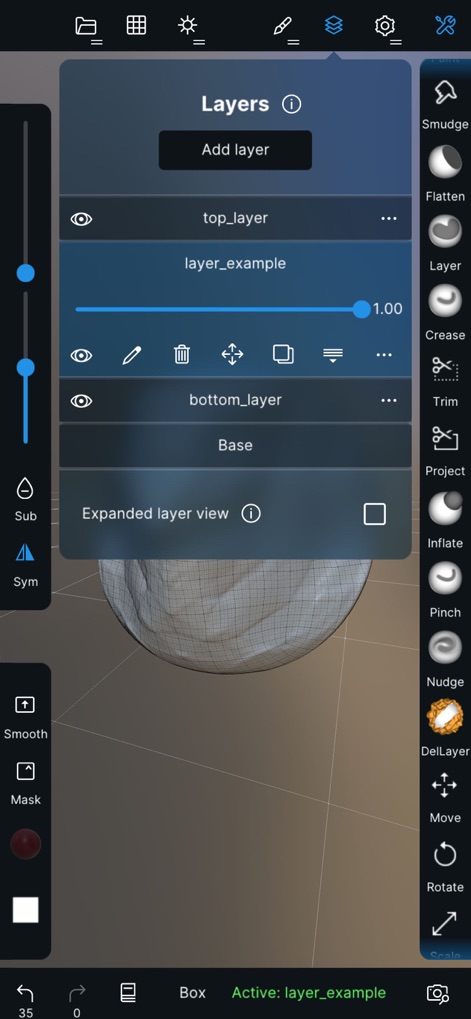
이 도구는 여러 레이어를 통해 조형 및 페인팅 작업을 분리하여 관리할 수 있게 하며, 각 레이어의 가시성 및 내용 확인으로 유연한 반복 작업을 지원합니다.
효율적인 작업 레이어

사용자는 폴오프 곡선을 조절하여 브러시 효과의 강도를 미세하게 조정할 수 있으며, 커스텀 알파 텍스처를 가져와 독창적인 질감을 표현합니다.
강력한 브러시 사용자화
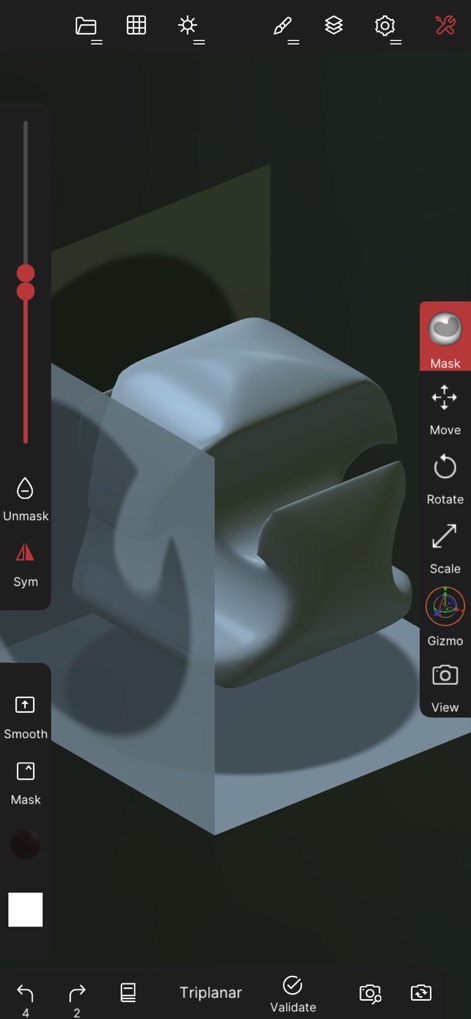
이 앱은 마스크 도구를 사용하여 모델의 특정 영역을 선택하고 보호하며, 기즈모 기능을 활용하여 복잡한 형태를 정확하게 자르고 변형할 수 있습니다.
정확한 형태 편집
설명
Download




이 페이지는 앱이나 개발자의 공식 페이지가 아니며, 정보 제공 및 논평을 목적으로 작성된 독립 편집 간행물입니다. 명시적으로 달리 언급되지 않는 한, 해당 앱이나 개발자는 MWM, Apple, Google Play, 앱 퍼블리셔 또는 앱 개발자와 제휴, 보증, 후원, 승인 또는 공식적으로 연결되어 있지 않으며, 이 페이지의 어떤 내용도 해당 앱이 MWM의 서비스를 사용하여 개발되었음을 의미하지 않습니다. 모든 상표, 로고, 스크린샷 및 기타 콘텐츠는 해당 소유자의 자산입니다.