
이 페이지는 앱이나 개발자의 공식 페이지가 아니며, 정보 제공 및 논평을 목적으로 작성된 독립 편집 간행물입니다. 명시적으로 달리 언급되지 않는 한, 해당 앱이나 개발자는 MWM, Apple, Google Play, 앱 퍼블리셔 또는 앱 개발자와 제휴, 보증, 후원, 승인 또는 공식적으로 연결되어 있지 않으며, 이 페이지의 어떤 내용도 해당 앱이 MWM의 서비스를 사용하여 개발되었음을 의미하지 않습니다. 모든 상표, 로고, 스크린샷 및 기타 콘텐츠는 해당 소유자의 자산입니다.


Affinity Photo 2 for iPad
아이패드의 한계를 잊게 하는 데스크톱급 성능. 이 앱은 당신의 창작물을 제약 없이 확장시킵니다.
다운로드
1M+사용자 평점
총 평가 수
8.0K개발사
카테고리
Photo & Video지원 언어
8최신 버전
2.6.4크기
1.7 GB출시일
2022년 11월 9일이 전문 테크 분석가는 'Affinity Photo 2 for iPad'의 핵심 기능을 평가하고 타겟 사용자에게 미치는 영향력을 분석합니다.
Affinity Photo 2 for iPad: 앱 분석
Apple Pencil 및 iPad 제스처 최적화
이 앱은 Apple Pencil의 압력, 기울기, 각도 감지 기능을 완벽하게 활용하여 높은 정밀도와 자연스러운 창작 경험을 제공하며, iPad 제스처 컨트롤을 통해 작업 흐름을 가속화합니다.
전문적인 리터칭 및 보정 도구
이 앱은 직관적인 선택 브러시, 닷지, 번, 클론, 패치, 주파수 분리 및 전용 리퀴파이 페르소나와 같은 다양한 도구를 제공하여 고품질의 이미지 리터칭과 섬세한 보정을 가능하게 합니다.
무제한 레이어 및 고급 마스킹 지원
이 앱은 무제한 레이어, 레이어 그룹, 조정 레이어, 필터 레이어 및 마스크를 완벽하게 지원하여 복잡한 구성을 생성하고 세밀한 편집 제어를 가능하게 합니다.
비파괴 라이브 효과 및 조정
이 앱은 비파괴 라이브 메쉬 워프 필터 및 기타 라이브 효과 레이어를 포함하여 사용자가 필터, 조정, 효과 및 블렌드 모드를 원본 이미지 손상 없이 유연하게 편집할 수 있도록 합니다.
비파괴 RAW 현상
이 도구는 연결되거나 내장된 RAW 이미지를 비파괴 방식으로 현상할 수 있도록 지원하여 원본 데이터 손상 없이 유연하게 편집할 수 있습니다.
대용량 이미지 지원 및 고성능
이 앱은 100+ 메가픽셀의 대용량 이미지를 원활하게 지원하며, 최대 주사율로 패닝 및 확대/축소가 가능하고, 16비트 및 32비트 채널당 편집을 제공하여 전문가급 성능을 보장합니다.
광범위한 파일 형식 호환성
이 도구는 Adobe Photoshop PSD/PSB 파일뿐만 아니라 JPEG XL, EXR, HDR 및 PDF와 같은 다양한 표준 형식을 열고 편집하고 저장할 수 있어 전문적인 작업 흐름과 협업을 지원합니다.
고급 이미지 병합 기능
이 앱은 Focus Merge, HDR Merge 및 Tone Mapping과 같은 고급 기능을 제공하여 사진작가들이 다양한 이미지를 결합하여 확장된 다이내믹 레인지와 선명도를 가진 결과물을 만들 수 있도록 합니다.
고급 브러시 엔진 및 사용자 정의
이 도구는 방대한 기본 브러시 라이브러리를 포함하며, 사용자가 고급 다이내믹스 제어 기능을 통해 자신만의 맞춤형 브러시를 생성할 수 있도록 하여 창의적인 표현을 확장합니다.
외부 디스플레이 및 iCloud 통합
이 도구는 외부 디스플레이를 지원하여 작업 공간을 확장할 수 있으며, iCloud Drive와 완벽하게 통합되어 파일 관리, 저장 및 공유를 원활하게 수행할 수 있습니다.
자주 묻는 질문
에 대해 알아야 할 모든 것 Affinity Photo 2 for iPad
Is Affinity Photo 2 for iPad a professional photo editor?
Yes, Affinity Photo 2 for iPad is a professional, desktop-grade photo editor used by photographers, graphic designers, and other creators.
Is Affinity Photo 2 for iPad optimized for Apple Pencil?
Yes, Affinity Photo 2 for iPad is fully optimized for Apple Pencil, harnessing its pressure, tilt, and angle sensitivity for precise control.
Does Affinity Photo 2 for iPad support non-destructive RAW editing?
Yes, Affinity Photo 2 for iPad provides non-destructive RAW development for linked or embedded RAW images, allowing full editing flexibility.
Can Affinity Photo 2 for iPad open Adobe Photoshop files?
Yes, Affinity Photo 2 for iPad can open, edit, and save Adobe Photoshop PSD/PSB files, ensuring compatibility with industry-standard formats.
Does Affinity Photo 2 for iPad support unlimited layers?
Yes, Affinity Photo 2 for iPad offers full support for unlimited layers, including layer groups, adjustment layers, filter layers, and masks.
Can Affinity Photo 2 for iPad remove objects from photos?
Yes, Affinity Photo 2 for iPad features tools to remove objects or erase backgrounds, blur photos, add filters, cut, and crop images.
Does Affinity Photo 2 for iPad have panorama stitching?
Yes, Affinity Photo 2 for iPad includes functionality to stitch picture-perfect panoramas, allowing users to create wide-angle images.
Does Affinity Photo 2 for iPad offer advanced lens corrections?
Yes, Affinity Photo 2 for iPad provides advanced lens corrections, including chromatic aberration, defringe, vignette, and noise reduction features.
What advanced image processing features does Affinity Photo 2 for iPad have?
Affinity Photo 2 for iPad offers Focus Merge, HDR Merge, and Tone Mapping for advanced image processing, enhancing detail and dynamic range.
Does Affinity Photo 2 for iPad include retouching tools?
Yes, Affinity Photo 2 for iPad provides quality retouching tools such as dodge, burn, clone, patch, blemish removal, and advanced inpainting.
Does Affinity Photo 2 for iPad feature an object selection tool?
Yes, Affinity Photo 2 for iPad includes an Object Selection Tool designed to speed up editing workflows by precisely selecting objects.
Can Affinity Photo 2 for iPad apply live layer masks?
Yes, Affinity Photo 2 for iPad supports applying non-destructive live layer masks, such as Hue range Masks, for flexible editing.
Does Affinity Photo 2 for iPad support blend modes?
Yes, Affinity Photo 2 for iPad allows experimentation with a range of blend modes, including Normal, Multiply, and Overlay, for creative effects.
Can Affinity Photo 2 for iPad perform full RAW development?
Yes, Affinity Photo 2 for iPad offers a dedicated workspace for full RAW development, with adjustments for exposure, clarity, and white balance.
Does Affinity Photo 2 for iPad support drag and drop assets?
Yes, Affinity Photo 2 for iPad allows users to easily drag and drop from saved assets, such as figures and trees, into their projects.
Can Affinity Photo 2 for iPad flawlessly retouch images?
Yes, Affinity Photo 2 for iPad provides a range of tools for flawless image retouching, including dedicated options for eye and skin retouching.
How does Affinity Photo 2 for iPad stitch panoramas?
Affinity Photo 2 for iPad stitches multiple images into perfect panoramas, providing an intuitive interface for panoramic image creation.
Can Affinity Photo 2 for iPad refine selections precisely?
Yes, Affinity Photo 2 for iPad allows users to precisely refine selections, including intricate details like individual strands of hair.
What file types does Affinity Photo 2 for iPad support?
Affinity Photo 2 for iPad supports popular file types including PSD, PNG, TIFF, JPG, JPEG XL, GIF, SVG, EPS, EXR, HDR, and PDF.
Does Affinity Photo 2 for iPad offer focus merge?
Yes, Affinity Photo 2 for iPad features Focus Merge functionality, allowing users to combine multiple images to achieve extended depth of field.
다음 스크린샷과 설명은 앱의 공식 스토어 목록에서 직접 가져온 것이며 앱 개발자의 자산입니다.
앱 스토어
스크린샷
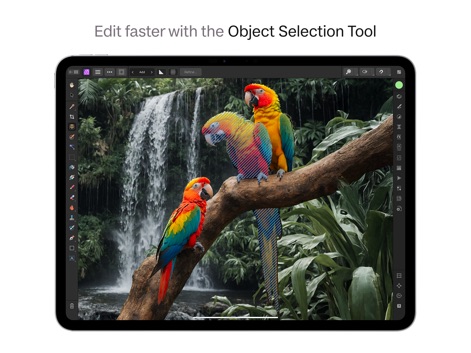
이 앱은 지능형 객체 선택 도구를 통해 앵무새와 같은 피사체를 신속하게 식별하고, 정확한 선택 윤곽으로 복잡한 편집을 용이하게 합니다.
빠른 객체 선택

이 앱은 라이브 색조 범위 마스크 기능을 제공하여 이미지의 특정 색상 영역을 비파괴적으로 조정할 수 있으며, 색상환과 불투명도 슬라이더로 정밀한 제어가 가능합니다.
비파괴 라이브 마스크

사용자는 레이어 간의 상호작용을 위한 다양한 블렌드 모드 옵션을 활용하여 독창적인 이미지 합성을 할 수 있으며, 새와 꽃잎이 어우러진 디자인에서 블렌드 모드 목록을 확인할 수 있습니다.
다양한 블렌드 모드

이 앱은 전용 RAW 현상 워크스페이스를 통해 사용자가 고품질 RAW 이미지를 완벽하게 제어할 수 있도록 하며, 히스토그램과 노출, 화이트 밸런스 등의 정밀한 조정 슬라이더를 제공합니다.
완벽한 RAW 현상

이 앱은 저장된 에셋 패널에서 인물과 같은 요소를 작업 영역으로 간편하게 드래그 앤 드롭하여, 건축물 주변 풍경과 같은 복잡한 이미지를 효율적으로 구성할 수 있습니다.
간편한 에셋 활용

이 앱은 주파수 분리와 같은 고급 리터칭 도구를 제공하여 인물 사진의 피부 질감을 정교하게 보정하며, 레이어 패널에서 피부 리터칭 및 눈 리터칭 그룹을 통해 세부적인 제어가 가능합니다.
정교한 인물 리터칭

사용자는 이 앱을 사용하여 여러 이미지를 완벽하게 이어 붙여 길게 뻗은 산맥과 도로가 포함된 장엄한 파노라마를 생성할 수 있으며, 내비게이터 패널에서 전체 구도를 손쉽게 확인할 수 있습니다.
완벽한 파노라마 스티칭

이 앱은 인물의 곱슬머리와 같은 복잡한 형태를 극도로 정밀하게 선택하고 다듬을 수 있도록 지원하며, 마스크 처리된 영역과 원본 이미지 비교를 통해 완벽한 분리 작업을 수행합니다.
선택 영역 정교화
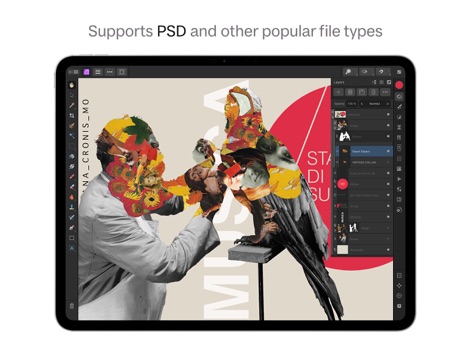
이 도구는 PSD를 비롯한 다양한 인기 파일 형식을 완벽하게 지원하여, 여러 레이어와 스마트 오브젝트로 구성된 복잡한 콜라주 아트워크를 효율적으로 작업할 수 있도록 돕습니다.
폭넓은 파일 형식 지원

사용자는 포커스 병합 기능을 활용하여 여러 장의 이미지에서 초점이 맞는 부분을 결합하여, 깃털의 미세한 질감과 물방울의 선명함까지 모든 디테일을 포착할 수 있습니다.
포커스 병합으로 선명하게
설명
Download
비슷한 앱
유사한 기능과 사용자 경험을 가진 앱
PhotoLayers
handyCloset Inc.

Blend Photos
TAPUNIVERSE LLC

Wand - AI canvas
Wand Technologies Inc.

Superimpose X
Pankaj Goswami

Image Blender
JHND i Sverige AB

Juxtaposer: cut, combine, edit
Pocket Pixels Inc.

Adobe Photoshop: Photo Editor
Adobe Inc.

Matter - 3D Effects
Pixite Inc.

Union - Combine & Edit Photos
Pixite Inc.
이 페이지는 앱이나 개발자의 공식 페이지가 아니며, 정보 제공 및 논평을 목적으로 작성된 독립 편집 간행물입니다. 명시적으로 달리 언급되지 않는 한, 해당 앱이나 개발자는 MWM, Apple, Google Play, 앱 퍼블리셔 또는 앱 개발자와 제휴, 보증, 후원, 승인 또는 공식적으로 연결되어 있지 않으며, 이 페이지의 어떤 내용도 해당 앱이 MWM의 서비스를 사용하여 개발되었음을 의미하지 않습니다. 모든 상표, 로고, 스크린샷 및 기타 콘텐츠는 해당 소유자의 자산입니다.