
이 페이지는 앱이나 개발자의 공식 페이지가 아니며, 정보 제공 및 논평을 목적으로 작성된 독립 편집 간행물입니다. 명시적으로 달리 언급되지 않는 한, 해당 앱이나 개발자는 MWM, Apple, Google Play, 앱 퍼블리셔 또는 앱 개발자와 제휴, 보증, 후원, 승인 또는 공식적으로 연결되어 있지 않으며, 이 페이지의 어떤 내용도 해당 앱이 MWM의 서비스를 사용하여 개발되었음을 의미하지 않습니다. 모든 상표, 로고, 스크린샷 및 기타 콘텐츠는 해당 소유자의 자산입니다.

Alarm & Timer
이 앱은 당신의 시간을 완전히 통제합니다. 복잡한 일정, 은밀한 알람, 심미적 개인화까지, 원하는 대로 모든 것을 정밀하게 조작할 수 있습니다.
다운로드
2.5M+사용자 평점
총 평가 수
35.4K개발사
카테고리
Lifestyle지원 언어
16최신 버전
13.9.0크기
44.5 MB출시일
2016년 1월 5일사용자 맞춤 설정 및 효율적인 시간 관리를 위한 핵심 기능 평가
Alarm & Timer 앱 기능 분석
고급 알람 관리 및 유연한 반복 설정
이 도구는 무제한 알람을 지원하며, 폴더 정리 및 일시 정지 기능으로 알람 목록이 늘어나도 효율적인 관리를 가능하게 합니다. 또한, 특정 날짜, 요일, 월별, 연간 또는 특정 간격(예: 이틀 간격)과 같은 매우 유연한 반복 설정을 통해 사용자 스케줄에 완벽하게 맞출 수 있습니다.
무음 모드에서도 알람 재생 (iOS 26.1+)
iOS 26.1부터 이 응용 프로그램은 장치가 무음 모드에 있더라도 알람 소리를 재생하는 기능을 제공합니다. 이는 중요한 알람을 놓치지 않도록 보장하여, 특히 긴급한 상황에서 높은 신뢰성을 제공합니다.
고급 시각적 사용자 지정
이 앱은 색상, 글꼴, 시간 표시 스타일, 시계 디자인, 초침 움직임, 배경 이미지 등 다양한 시각적 요소를 사용자가 원하는 대로 변경할 수 있도록 지원합니다. 이는 개인의 취향에 맞는 인터페이스를 제공하여 만족도를 높입니다.
화면이 꺼진 상태에서도 타이머 알림
이 앱은 기기 화면이 꺼져 있을 때도 타이머 알림을 받을 수 있게 하여, 사용자가 앱을 계속 주시할 필요 없이 다른 활동에 집중하면서도 중요한 타이밍을 놓치지 않도록 합니다.
다중 타이머 동시 실행
이 응용 프로그램은 사용자가 여러 타이머를 동시에 실행할 수 있게 하여, 복잡한 작업이나 여러 활동을 동시에 추적해야 하는 상황에서 높은 생산성을 제공합니다.
헤드폰 연결 시 조용한 알람
이 앱은 헤드폰이 연결되어 있을 때 알람이 장치 스피커로 재생되지 않도록 하여, 공공장소나 조용한 환경에서 다른 사람에게 방해를 주지 않고 개인적으로 알람을 들을 수 있도록 합니다.
화면 활성화 시 자동 타이머 정지
앱이 화면에 활성화되어 있는 경우, 이 도구는 설정된 지속 시간이나 반복 횟수에 따라 타이머 알람을 자동으로 중지할 수 있습니다. 이는 사용자의 수동 개입을 줄여 편리성을 높입니다.
시간별 차임 기능
이 도구는 매시간 다른 소리로 차임을 재생하는 기능을 제공하여, 사용자가 시간 경과를 시각적으로 확인하지 않고도 인지할 수 있도록 돕습니다. 이는 시간 관리에 유용하게 활용될 수 있습니다.
자주 묻는 질문
에 대해 알아야 할 모든 것 Alarm & Timer
What is the main functionality of the Alarm & Timer app?
The Alarm & Timer app provides an Alarm, Timer, and Stopwatch to help users manage their time effectively. It is designed for simplicity and includes various customizable features.
Does the Alarm & Timer app support alarms and timers even when the screen is off?
Yes, the Alarm & Timer app notifies users with a notification even if the screen is off for both alarms and timers. This ensures timely alerts.
Can I customize alarm sounds in the Alarm & Timer app?
Yes, the Alarm & Timer app allows users to record their own alarm sounds. This feature provides personalized alert options for any created alarm.
What repeat options are available for alarms in the Alarm & Timer app?
The Alarm & Timer app offers flexible repeat options for alarms, including every week, month, year, custom intervals, and patterns. Users can also specify a date for their alarms.
Can I run multiple timers simultaneously with the Alarm & Timer app?
Yes, the Alarm & Timer app allows users to run any number of timers concurrently, ranging from 1 second to 99 hours. Presets and history are also available for quick use.
Does the Alarm & Timer app record lap times?
Yes, the Alarm & Timer app's Stopwatch feature accurately records lap times. Users can also conveniently send a text file of their recorded lap times via email.
How can I customize the clock's appearance in the Alarm & Timer app?
The Alarm & Timer app offers extensive clock customization, including color themes, font styles, 12/24 hour display, various clock face designs, background images, and second hand movement options.
Is the Alarm & Timer app compatible with iOS silent or focus modes for alarms?
Yes, starting with iOS 26.1, the Alarm & Timer app supports AlarmKit, allowing users to hear alarm sounds even when the device is in silent mode or focus mode.
Can I play music from Apple Music or iCloud through the Alarm & Timer app?
No, the Alarm & Timer app allows music playback only from your iPhone/iPad. Music from iCloud and Apple Music is not available for direct playback within the app.
Does the Alarm & Timer app include a skip function for alarms?
Yes, the Alarm & Timer app includes a skip function for alarms. This feature enables users to temporarily disable an upcoming alarm without needing to delete it.
다음 스크린샷과 설명은 앱의 공식 스토어 목록에서 직접 가져온 것이며 앱 개발자의 자산입니다.
앱 스토어
스크린샷

이 앱은 사용자가 아날로그 시계와 디지털 시계를 선택하고, 다양한 배경 색상과 함께 가로 모드 디스플레이를 활용하여 시간을 확인할 수 있도록 합니다.
다채로운 시계 화면
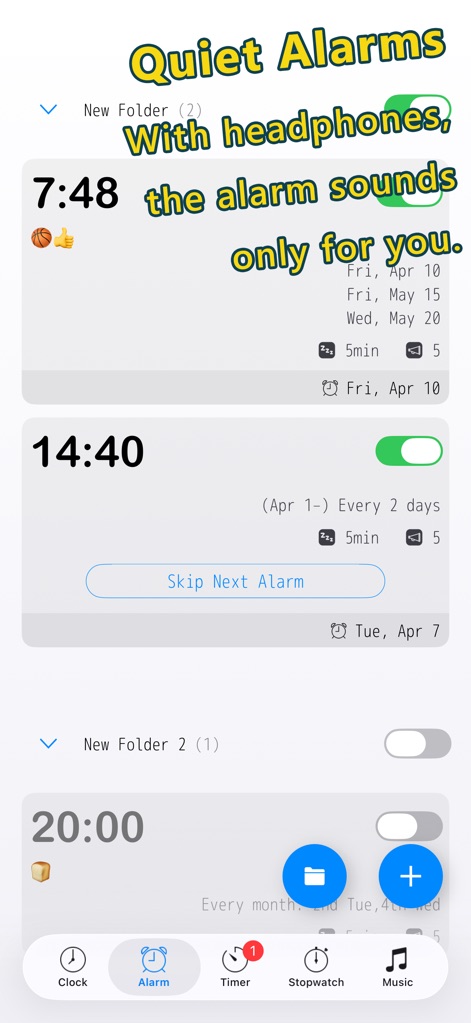
이 앱은 헤드폰 연결 시 사용자에게만 알림이 재생되도록 하여 조용한 알람 경험을 제공하며, 매 2일마다 반복되는 유연한 알람 일정을 설정할 수 있습니다.
나만을 위한 알림
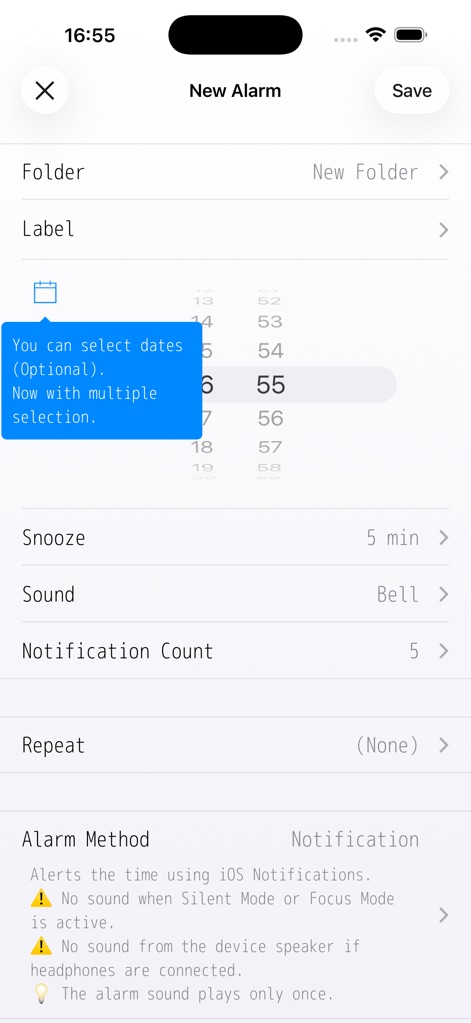
사용자는 알람 소리, 스누즈 시간을 포함한 다양한 알람 설정을 조절할 수 있으며, 여러 날짜를 선택하여 알람을 지정할 수 있습니다.
상세 알람 설정
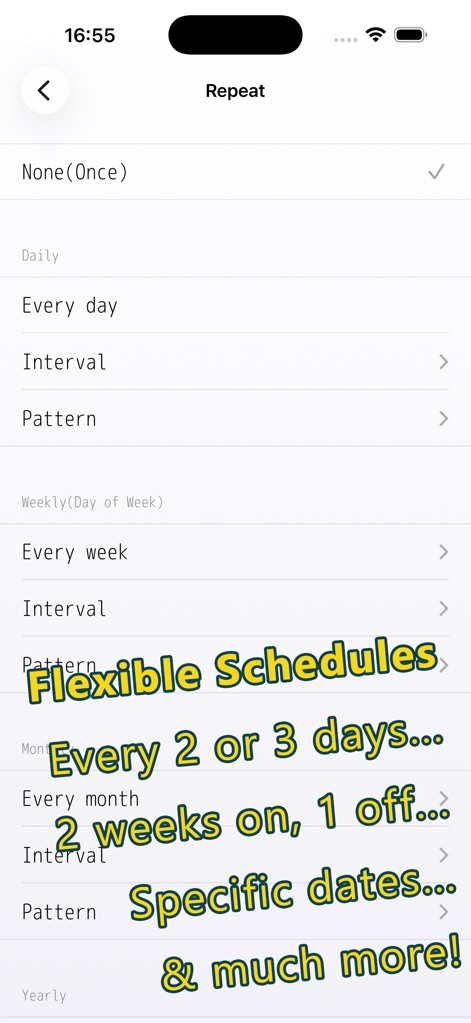
이 앱은 매일, 매주, 매월 또는 매년 반복되는 알람을 설정할 수 있게 하며, 매 2~3일 간격이나 특정 날짜와 같은 세밀한 반복 패턴을 제공합니다.
유연한 반복 설정
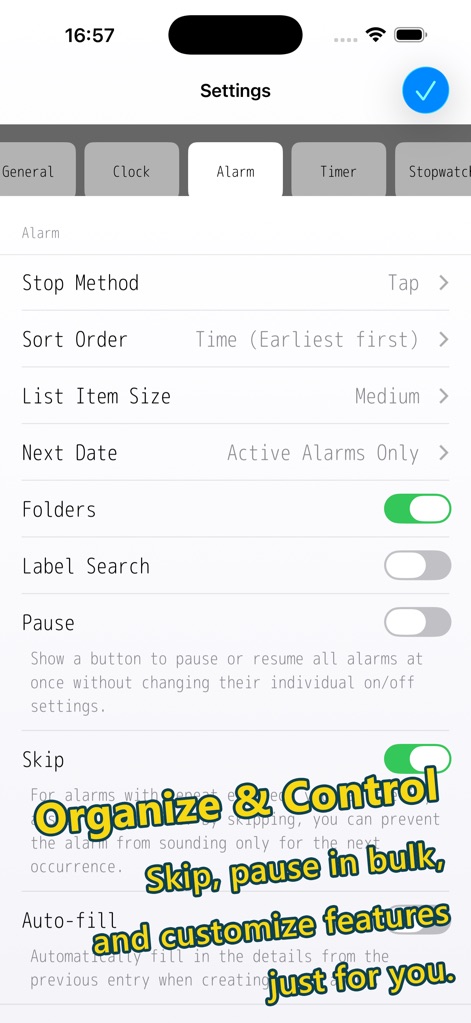
사용자는 알람 폴더를 사용하여 알람을 체계적으로 관리하고, 일시 정지 및 건너뛰기 기능으로 알람 동작을 제어하며, 정렬 순서와 중지 방법을 개인화할 수 있습니다.
알람 관리 및 제어
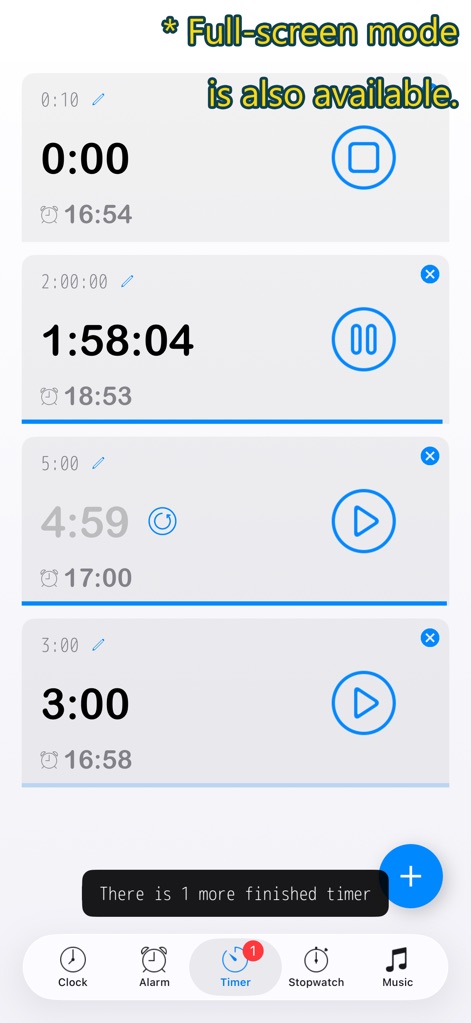
이 도구는 여러 타이머를 동시에 실행할 수 있도록 지원하며, 진행 중인 타이머는 물론 완료된 타이머를 한눈에 확인할 수 있고 전체 화면 모드도 사용할 수 있습니다.
동시 멀티 타이머
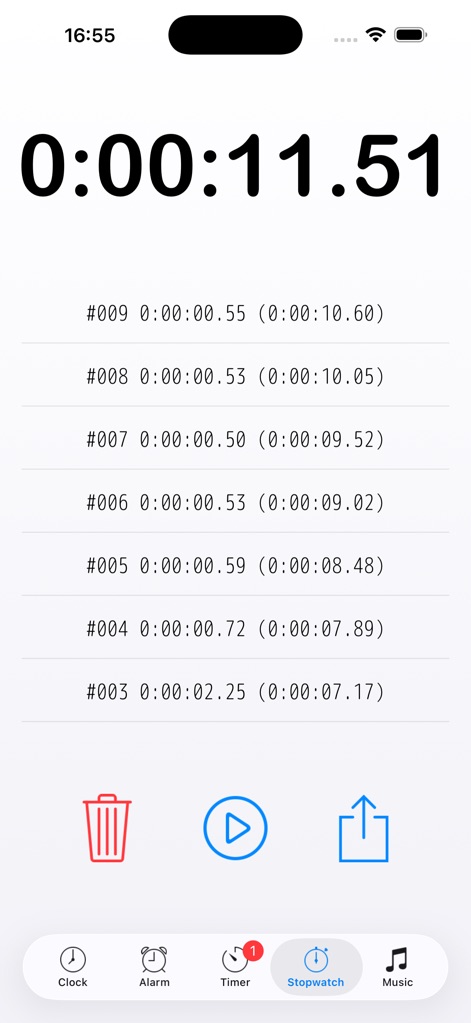
사용자는 스톱워치 기능을 통해 정확한 시간을 측정하고 여러 랩 타임을 기록할 수 있으며, 기록된 데이터를 삭제하거나 공유할 수 있습니다.
정교한 스톱워치
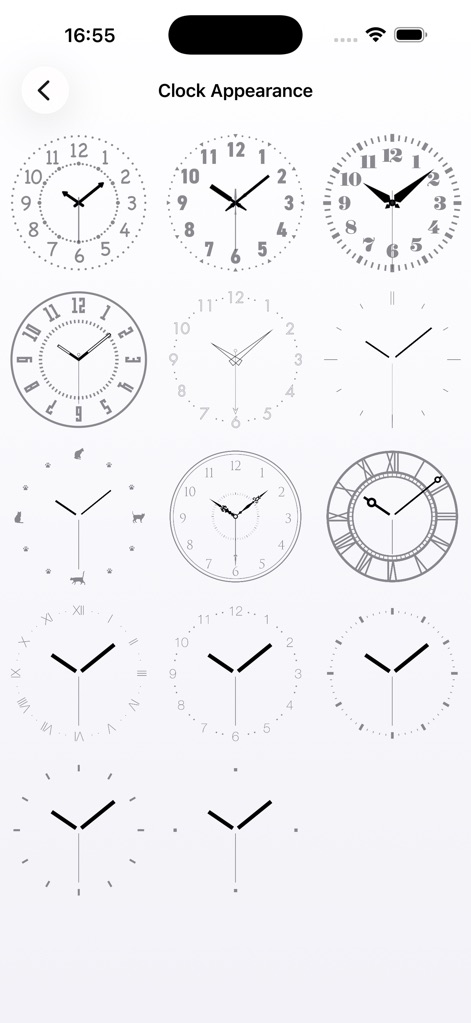
이 앱은 로마 숫자와 아라비아 숫자를 포함한 다양한 아날로그 시계 디자인을 제공하여, 사용자가 취향에 맞게 시각적 스타일을 선택하고 변경할 수 있도록 합니다.
시계 디자인 커스터마이징

사용자는 고양이 실루엣과 발자국이 표시된 독특한 아날로그 시계 디자인과 디지털 시간 표시를 가로 모드에서 함께 볼 수 있어 개성 있는 화면을 연출할 수 있습니다.
개성 있는 시계
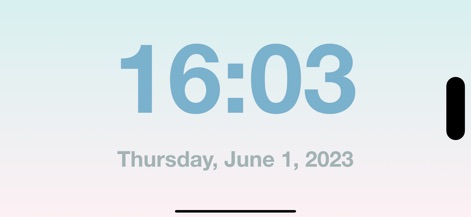
이 앱은 가로 모드에서 크고 선명하게 표시되는 간결한 디지털 시계를 제공하여, 사용자가 최소한의 정보로 시간을 쉽게 확인할 수 있도록 합니다.
간결한 디지털 시계
설명
Download
비슷한 앱
유사한 기능과 사용자 경험을 가진 앱
Nowmusi - Alarm Music & Sounds
"INPEK-ZE" d.o.o. Zenica
Zen Flip Clock - Minimal Timer
Chaoyang Minimal Software Studio
Alarm Clock App: myAlarm Clock
APPMIND - SOFTWARE TECHNOLOGIES LDA
ClockPhone big digital clocks
EVGENII KOSTIN
Smart Alarm Clock-Focus&Sleep
VISONXY LIMITED
Stopwatch & Countdown Timer
Appenvision Ltd
이 페이지는 앱이나 개발자의 공식 페이지가 아니며, 정보 제공 및 논평을 목적으로 작성된 독립 편집 간행물입니다. 명시적으로 달리 언급되지 않는 한, 해당 앱이나 개발자는 MWM, Apple, Google Play, 앱 퍼블리셔 또는 앱 개발자와 제휴, 보증, 후원, 승인 또는 공식적으로 연결되어 있지 않으며, 이 페이지의 어떤 내용도 해당 앱이 MWM의 서비스를 사용하여 개발되었음을 의미하지 않습니다. 모든 상표, 로고, 스크린샷 및 기타 콘텐츠는 해당 소유자의 자산입니다.