
이 페이지는 앱이나 개발자의 공식 페이지가 아니며, 정보 제공 및 논평을 목적으로 작성된 독립 편집 간행물입니다. 명시적으로 달리 언급되지 않는 한, 해당 앱이나 개발자는 MWM, Apple, Google Play, 앱 퍼블리셔 또는 앱 개발자와 제휴, 보증, 후원, 승인 또는 공식적으로 연결되어 있지 않으며, 이 페이지의 어떤 내용도 해당 앱이 MWM의 서비스를 사용하여 개발되었음을 의미하지 않습니다. 모든 상표, 로고, 스크린샷 및 기타 콘텐츠는 해당 소유자의 자산입니다.


ArcGIS Field Maps
업계 최고의 GIS 도구로 모바일 현장 작업자를 지원하세요. 검사를 간소화하고, 실시간 데이터를 캡처하며, 오프라인에서도 원활하게 작업하여 현장과 사무실 간의 격차를 해소하세요.
다운로드
989K+사용자 평점
총 평가 수
200개발사
카테고리
Productivity지원 언어
31최신 버전
25.3.1크기
144.1 MB출시일
2020년 11월 1일전문 현장 운영 간소화
현장 기술자가 고정확도 데이터를 수집하고, 오프라인으로 작업하며, 전체 조직을 동기화 상태로 유지하는 가장 신뢰할 수 있는 도구입니다.
고정확도 데이터 캡처
외부 GNSS 통합 및 스마트 양식을 통해 센티미터 이하의 정밀도를 달성하고 수동 입력 오류를 제거하세요.
중단 없는 오프라인 액세스
중요 지도 데이터를 다운로드하고 원격 지역에서 전체 검사를 수행하며, 연결이 복원되면 자동으로 동기화됩니다.
자주 묻는 질문
에 대해 알아야 할 모든 것 ArcGIS Field Maps
ArcGIS Field Maps는 무엇에 사용되나요?
ArcGIS Field Maps는 현장 작업자를 위한 Esri의 최고 모바일 맵 앱입니다. 대화형 디지털 맵을 사용하여 주변 환경을 이해하고, 자산을 찾고, 데이터를 수집하고, 검사를 수행하도록 돕습니다.
ArcGIS Field Maps에서 오프라인 작업이 가능한가요?
네, ArcGIS Field Maps를 사용하면 미리 생성된 오프라인 맵 영역을 다운로드하거나 기기에서 직접 만들 수 있습니다. 인터넷에 연결되면 편집 내용은 자동으로 또는 수동으로 동기화됩니다.
ArcGIS Field Maps로 고정확도 데이터를 수집할 수 있나요?
네, ArcGIS Field Maps는 외부 GNSS 수신기에 연결하여 고정확도 데이터 수집을 지원합니다. 이를 통해 정밀하게 새 자산 데이터를 생성하거나 기존 자산 데이터를 편집할 수 있습니다.
ArcGIS Field Maps에서 지오펜스 경고를 제공하나요?
네, ArcGIS Field Maps는 사용자가 특정 영역에 진입할 때 알림을 제공하는 지오펜스 경고를 제공합니다. 이 기능은 예를 들어 화재 구역이나 작업 구역에서 안전을 확보하는 데 도움이 됩니다.
ArcGIS Field Maps는 현장 검사를 어떻게 지원하나요?
ArcGIS Field Maps는 사용자가 기록을 디지털 방식으로 문서화하고, 사진 및 비디오를 캡처하고, 스마트 폼을 사용하여 효율적인 데이터 입력 및 자동 계산을 수행할 수 있도록 하여 현장 검사를 지원합니다.
ArcGIS Field Maps에서 실내 매핑을 지원하나요?
네, ArcGIS Field Maps는 층별 정보를 포함하는 실내 맵 내에서 자산 및 위치 보기를 지원합니다. 이를 통해 실내 환경에서 상세한 탐색 및 데이터 수집이 가능합니다.
ArcGIS Field Maps를 사용하려면 ArcGIS 조직 계정이 필요한가요?
네, ArcGIS Field Maps 내에서 데이터를 수집하고 업데이트하려면 ArcGIS 조직 계정이 필요합니다. 그러나 조직에서 공유한 공개 맵은 로그인하지 않고도 볼 수 있습니다.
사용자가 ArcGIS Field Maps에서 맵에 주석을 달 수 있나요?
네, 사용자는 손가락이나 스타일러스를 사용하여 ArcGIS Field Maps에서 맵에 직접 주석을 달 수 있습니다. 이를 통해 개인적인 메모를 작성하고 맵 영역을 표시할 수 있습니다.
ArcGIS Field Maps에서 팀 조정을 위해 사용자 위치를 추적할 수 있나요?
네, ArcGIS Field Maps는 활성화된 경우 사용자 위치를 감독관 및 팀원과 공유할 수 있습니다. 또한 팀원 위치를 볼 수 있어 노력을 조정하고 안전을 확보할 수 있습니다.
ArcGIS Field Maps에서 관리할 수 있는 작업 유형은 무엇인가요?
ArcGIS Field Maps는 손상된 도로 표지판 검사, 넘치는 쓰레기통 식별 또는 쓰레기/폐기물 위치 파악과 같은 다양한 현장 작업을 관리합니다. 사용자는 할당된 작업과 해당 세부 정보를 볼 수 있습니다.
다음 스크린샷과 설명은 앱의 공식 스토어 목록에서 직접 가져온 것이며 앱 개발자의 자산입니다.
앱 스토어
스크린샷
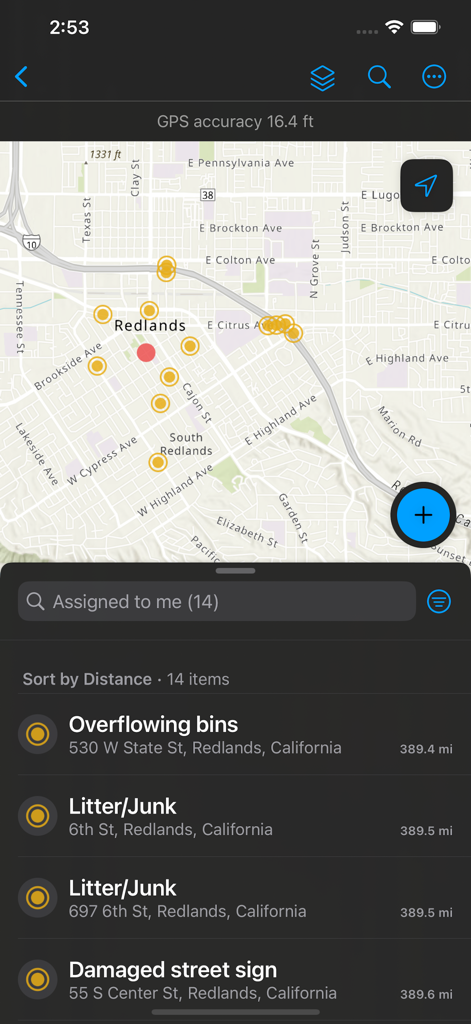
ArcGIS Field Maps 모바일 화면으로, 데이터 포인트와 쓰레기통 넘침, 손상된 표지판과 같은 할당된 현장 작업 목록을 보여주는 지도
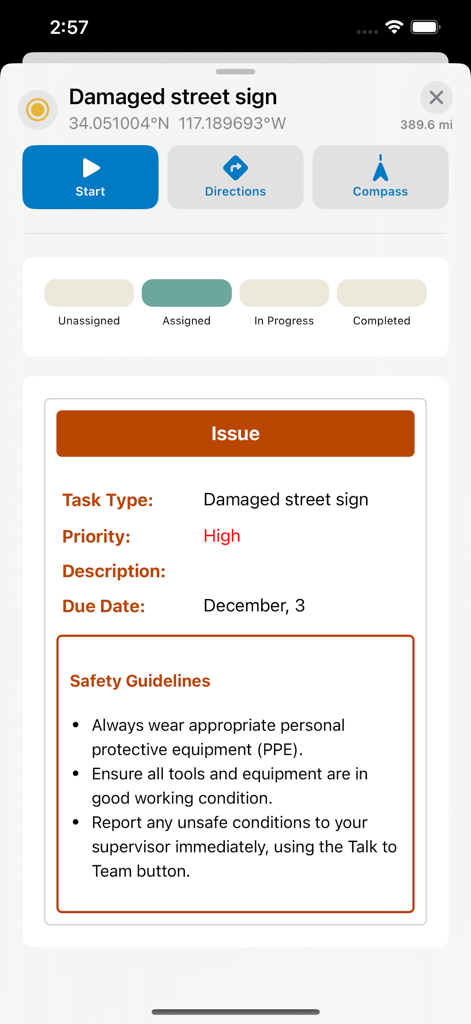
ArcGIS Field Maps 화면으로, GPS 좌표 및 안전 지침과 함께 손상된 도로 표지판에 대한 현장 작업을 보여줌
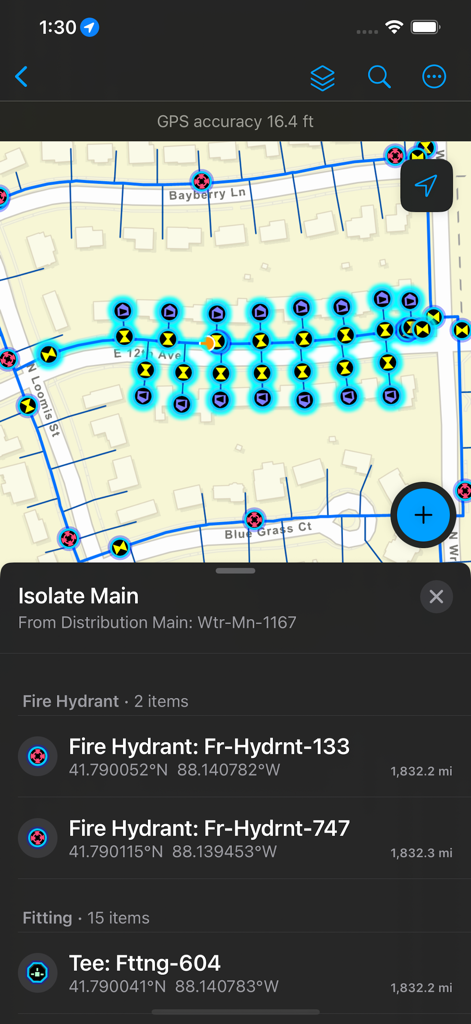
ArcGIS Field Maps 화면으로, 소화전 위치 및 자산 세부 정보와 함께 유틸리티 네트워크 지도를 보여줌
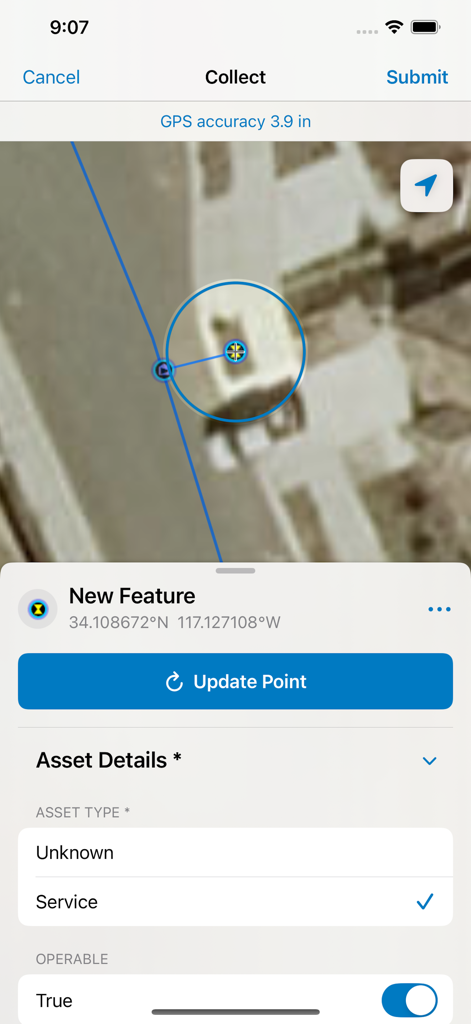
ArcGIS Field Maps 인터페이스로, 자산 세부 정보를 기록하는 스마트 양식 및 높은 GPS 정밀도와 함께 위성 지도 데이터 수집을 보여줌
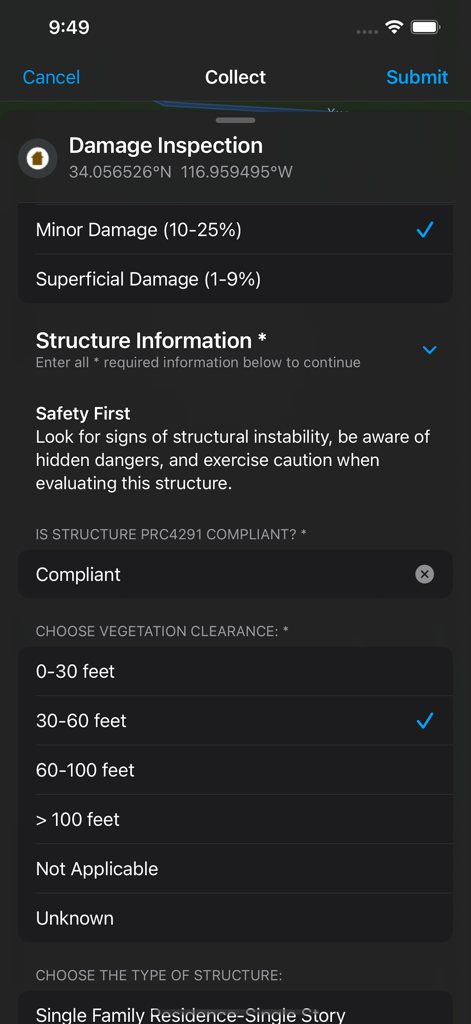
ArcGIS Field Maps 모바일 인터페이스로, 현장 데이터 수집을 위한 디지털 손상 검사 스마트 양식을 보여줌
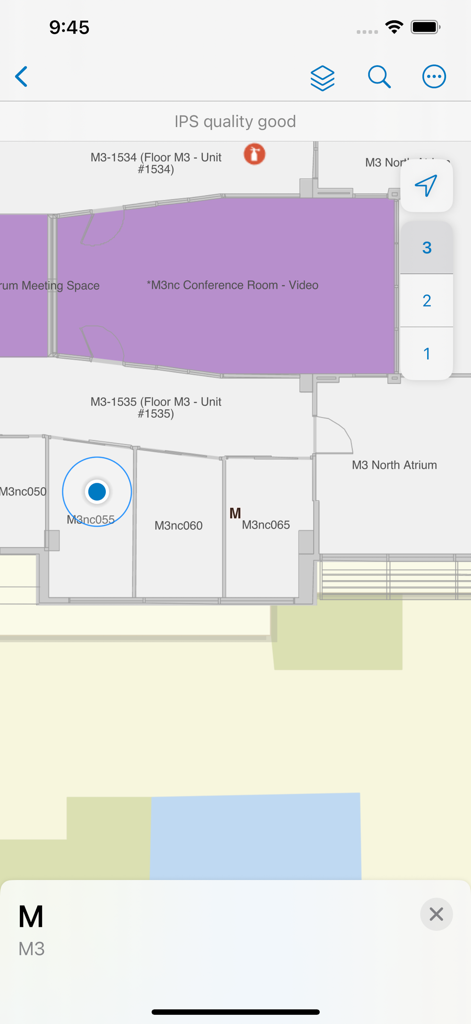
ArcGIS Field Maps 인터페이스로, 방 레이블 및 층 선택 기능과 함께 실내 평면도를 보여줌
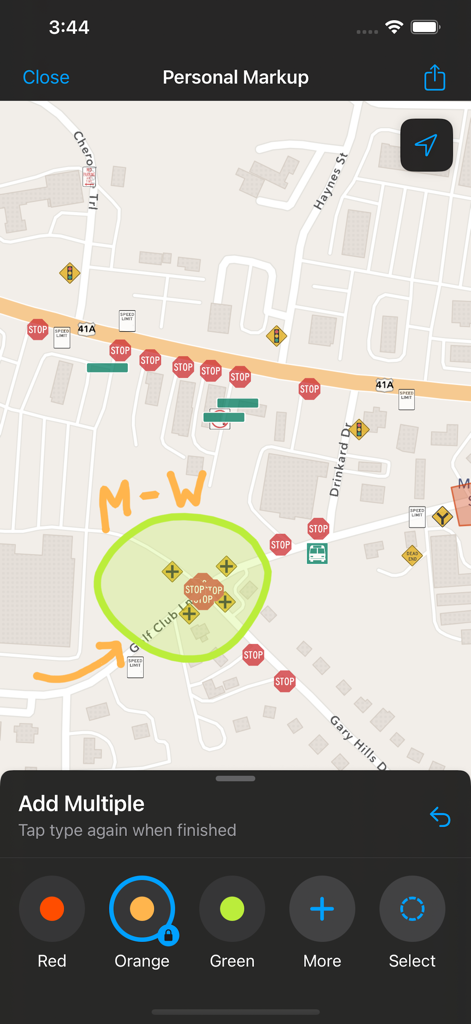
ArcGIS Field Maps 화면으로, 도로 지도에 대한 개인 마크업 주석을 보여줌
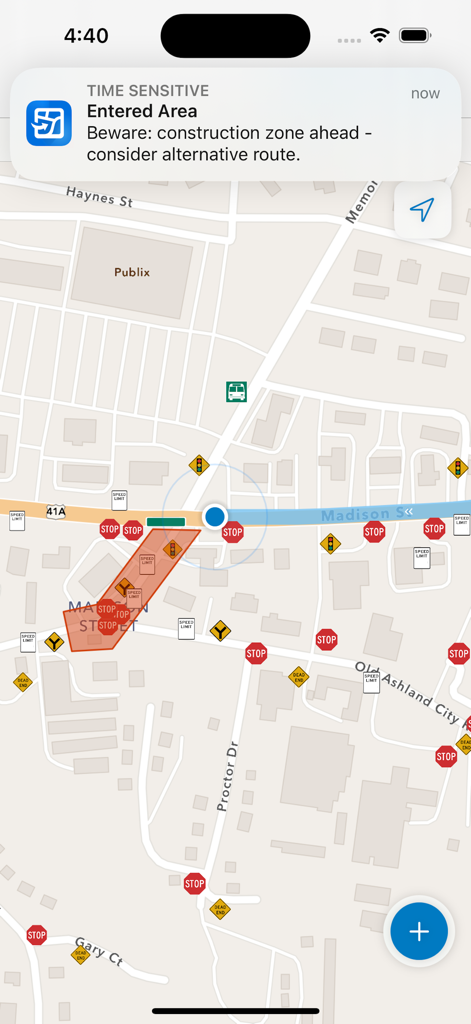
ArcGIS Field Maps 모바일 인터페이스로, 도로 지도상의 건설 구역에 대한 지오펜스 경고를 표시함
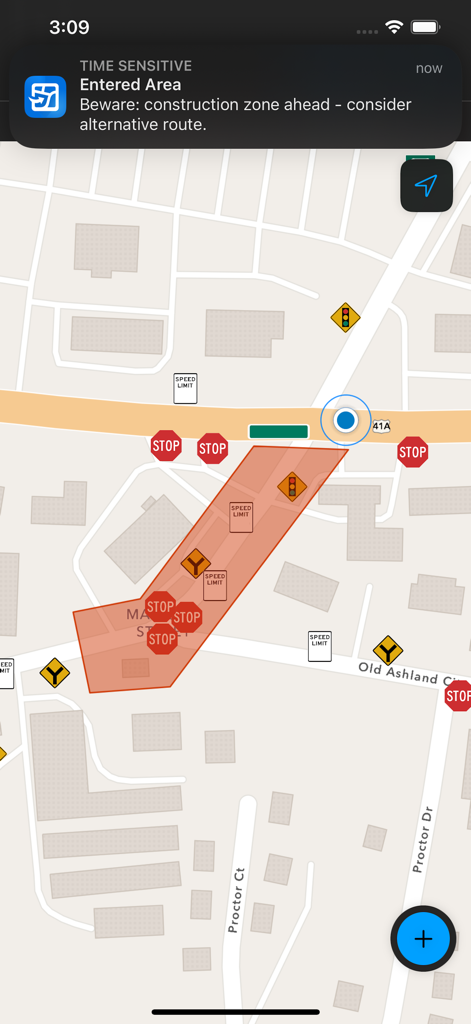
ArcGIS Field Maps 인터페이스로, 지도상의 건설 구역 진입에 대한 지오펜스 알림을 보여줌
설명
Download
비슷한 앱
유사한 기능과 사용자 경험을 가진 앱
MilGPS
Cascode Labs Pty Ltd

SEAiq Pilot VPP
Sakhalin, LLC
Cartograph Maps 3
Harald Meyer

新知卫星地图-路线规划,高清地图导航
Chongqing Xinzhi Space Technology Co., Ltd.

Coordinates – GPS Converter
Mapnitude Company Limited

Mgrs & Utm Map
Vahid Cataltas

DeepStateMap
Heorhii Karpenko

Map Plus
Miocool Inc.
Compass 55. Map & GPS kit.
Kalimex-Consulting s.r.o.
이 페이지는 앱이나 개발자의 공식 페이지가 아니며, 정보 제공 및 논평을 목적으로 작성된 독립 편집 간행물입니다. 명시적으로 달리 언급되지 않는 한, 해당 앱이나 개발자는 MWM, Apple, Google Play, 앱 퍼블리셔 또는 앱 개발자와 제휴, 보증, 후원, 승인 또는 공식적으로 연결되어 있지 않으며, 이 페이지의 어떤 내용도 해당 앱이 MWM의 서비스를 사용하여 개발되었음을 의미하지 않습니다. 모든 상표, 로고, 스크린샷 및 기타 콘텐츠는 해당 소유자의 자산입니다.