
이 페이지는 앱이나 개발자의 공식 페이지가 아니며, 정보 제공 및 논평을 목적으로 작성된 독립 편집 간행물입니다. 명시적으로 달리 언급되지 않는 한, 해당 앱이나 개발자는 MWM, Apple, Google Play, 앱 퍼블리셔 또는 앱 개발자와 제휴, 보증, 후원, 승인 또는 공식적으로 연결되어 있지 않으며, 이 페이지의 어떤 내용도 해당 앱이 MWM의 서비스를 사용하여 개발되었음을 의미하지 않습니다. 모든 상표, 로고, 스크린샷 및 기타 콘텐츠는 해당 소유자의 자산입니다.


Artstudio Pro: Draw, Paint
이 앱은 당신의 아이패드를 전문가급 디지털 스튜디오로 변모시킵니다. 더 이상 데스크톱의 그림자를 밟지 않아도 됩니다.
다운로드
1M+사용자 평점
총 평가 수
16.5K개발사
카테고리
Graphics & Design지원 언어
3최신 버전
5.2.9크기
384.5 MB출시일
2017년 12월 13일전문가를 위한 강력한 iOS/iPadOS 창작 도구 평가
Artstudio Pro: Draw, Paint 앱 심층 분석
고급 브러시 엔진 및 사용자 정의
이 앱은 100가지 이상의 사용자 정의 설정과 150개 이상의 내장 브러시를 포함하는 고급 브러시 엔진을 갖추고 있으며, Apple Pencil에 최적화되어 부드럽고 사실적인 스트로크를 생성하고 대칭 페인팅을 지원하여 사용자가 다양한 예술적 표현을 자유롭게 구현할 수 있게 합니다.
Apple 생태계에 최적화된 성능
이 앱은 Apple Pencil, Metal 기술, iCloud Drive에 최적화되어 있으며 64비트 멀티코어 프로세서를 최대한 활용하여 Apple 기기에서 최상의 성능과 매우 부드러운 작업 흐름을 제공합니다.
강력한 GPU 가속 아트 엔진
이 앱은 강력한 GPU 가속 아트 엔진을 기반으로 하며, 최대 64Mpix의 대형 캔버스 작업과 무제한 레이어를 지원하고 여러 문서를 동시에 열 수 있게 하여 전문가 수준의 복잡한 프로젝트를 효율적이고 부드럽게 처리할 수 있게 합니다.
광범위한 가져오기/내보내기 지원
이 도구는 PNG, JPEG, PSD, TIFF 등 다양한 이미지 형식은 물론 ABR/TPL 브러시, ASE/ACO 색상 견본 등 광범위한 자산 형식을 가져오고 내보낼 수 있도록 지원하여 다른 소프트웨어 및 기존 워크플로우와의 원활한 호환성을 보장합니다.
전문적인 사진 편집 기능
이 앱은 비파괴 조정 레이어, 변형 도구(원근, 뒤틀기), 리터칭 도구 및 실시간 미리 보기가 가능한 수십 가지 필터를 포함한 포괄적인 사진 편집 기능을 제공하여 사용자가 고품질의 사진 조작 및 보정을 정밀하게 수행할 수 있게 합니다.
유연한 레이어 시스템
이 도구는 그룹화, 마스크, 클리핑 마스크, 조정 레이어 및 9가지 비파괴 레이어 효과를 포함하는 새로운 레이어 시스템을 갖추고 있어 사용자가 복잡한 구성을 정밀하게 제어하고 유연한 방식으로 이미지를 편집할 수 있게 합니다.
사용자 정의 가능한 UI 및 워크플로우 향상
이 앱은 색상, 레이어, 브러시 등을 위한 플로팅 패널, 사용자 정의 가능한 빠른 메뉴 및 단축키, 스내핑 및 원근 그리드 보조 기능과 같은 다양한 도구를 제공하여 사용자가 자신의 작업 방식에 맞춰 인터페이스를 조정하고 생산성을 극대화할 수 있도록 지원합니다.
사실적인 색상 안료 혼합
이 앱은 사실적인 색상 안료 혼합 기능을 지원하여 사용자가 디지털 환경에서 전통적인 회화 기법의 느낌을 재현하고 작품에 더 깊이 있고 생생한 색상 표현을 구현할 수 있도록 돕습니다.
자주 묻는 질문
에 대해 알아야 할 모든 것 Artstudio Pro: Draw, Paint
What is Artstudio Pro?
Artstudio Pro is a powerful painting and photo editing application available for iOS and macOS. It serves as the successor to the original ArtStudio app, leveraging advanced technologies for an optimized and smooth workflow experience.
What features does Artstudio Pro offer?
Artstudio Pro offers a GPU-accelerated engine, a flexible layer system, an advanced brush engine, professional photo editing tools, and animation capabilities. It also includes comprehensive import/export options and iCloud integration.
Can Artstudio Pro create animations?
Yes, Artstudio Pro allows users to create animations from layers or groups. It features onion skin, customizable frame duration, and options to export animations to MP4, HEVC, Animated GIF, or PNG formats.
What file formats does Artstudio Pro support for import and export?
Artstudio Pro imports PNG, JPEG, PSD, HEIC, TIFF, GIF, PDF, and most raw image formats. It also supports importing ABR/TPL brushes. Export options include PNG, JPEG, PSD, TIFF, and PDF images.
Does Artstudio Pro support Apple Pencil?
Yes, Artstudio Pro fully supports Apple Pencil. The app's advanced brush engine is optimized to leverage Apple Pencil's capabilities, enabling smooth and realistic-looking strokes during painting and drawing.
What are the limitations of the free version of Artstudio Pro?
The free version of Artstudio Pro has several limitations. These include locked saving, canvas size restricted to the device screen, a maximum of 3 layers, export only to JPG format, and locked animation export functionality.
What are the system requirements for Artstudio Pro on iOS?
Artstudio Pro for iOS requires an iPhone or iPad running iOS 15.0 or above. This ensures the app's powerful features and performance optimizations function correctly on compatible devices.
How many layers can Artstudio Pro handle?
Artstudio Pro supports an unlimited number of layers, allowing for complex and detailed compositions. It also handles large canvas sizes, up to 64 Megapixels, optimized for smooth performance.
Does Artstudio Pro include photo editing tools like Curves?
Yes, Artstudio Pro includes professional photo editing tools, such as Curves. It offers 15 non-destructive adjustments, including Levels, Exposure/Gamma, and Curves, which are visible within the application's UI.
What brush types are available in Artstudio Pro?
Artstudio Pro offers over 150 built-in brushes organized into various categories. These include Pens, Pencils, Oil Painting, Inking, Charcoals, Airbrushes, and Watercolor, as demonstrated in the brushes menu interface.
Does Artstudio Pro support iCloud integration?
Yes, Artstudio Pro features full iCloud integration. This capability allows users to seamlessly save and access their creative projects and files across all their iCloud Drive-enabled devices.
Can Artstudio Pro perform advanced transformations like Warp?
Yes, Artstudio Pro provides advanced transformation options within its professional photo editor. These tools enable basic, perspective, and warp transformations to precisely manipulate images.
Does Artstudio Pro offer non-destructive layer effects?
Yes, Artstudio Pro features a flexible layer system that supports non-destructive layer effects. It also includes layer grouping, masks, clipping masks, and various adjustment layers for advanced editing workflows.
다음 스크린샷과 설명은 앱의 공식 스토어 목록에서 직접 가져온 것이며 앱 개발자의 자산입니다.
앱 스토어
스크린샷
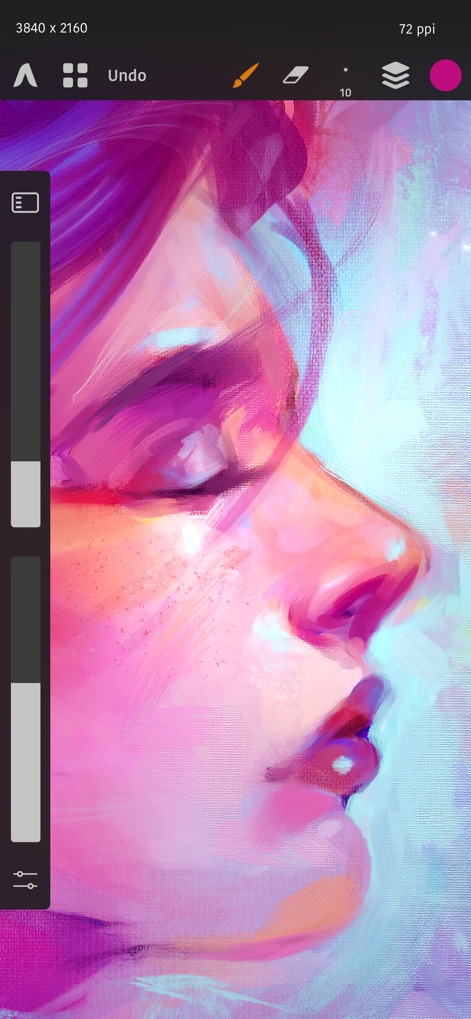
이 앱은 생생한 색감과 정교한 브러시 스트로크를 통해 아티스트가 풍부한 디지털 그림을 완성할 수 있도록 지원하며, 화면 좌측의 조절 슬라이더와 상단의 직관적인 도구 아이콘은 작업 효율성을 극대화합니다.
정밀한 디지털 아트
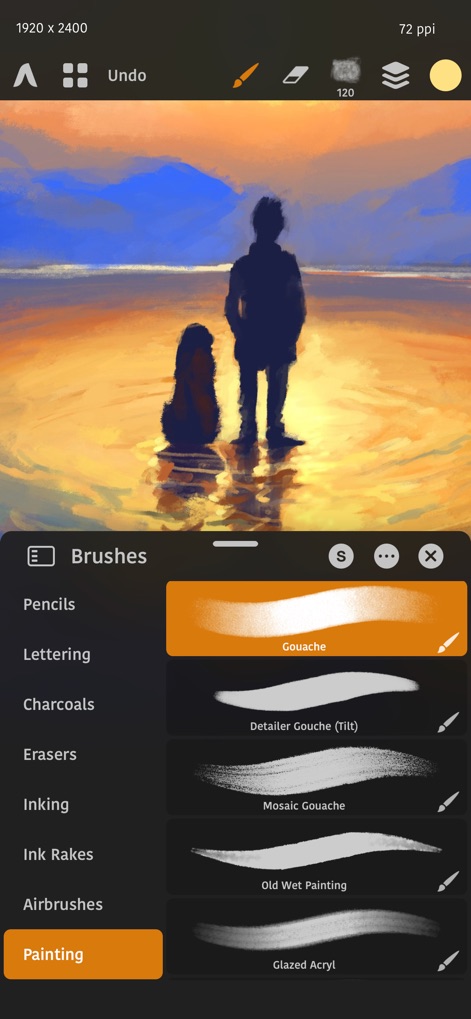
이 도구는 사용자의 창의성을 자극하는 다양한 브러시 컬렉션을 제공하며, 연필과 에어브러시 같은 카테고리로 세분화된 브러시 목록과 상세한 구아슈 브러시 유형은 어떤 스타일의 작업도 가능하게 합니다.
풍부한 브러시 컬렉션
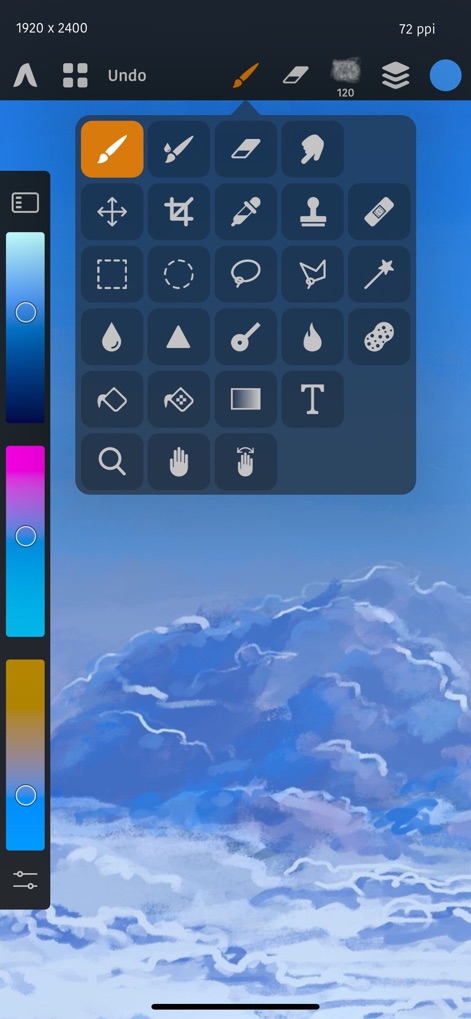
이 앱은 이동 및 자르기 기능부터 채우기와 지우개 도구에 이르는 포괄적인 도구 팔레트를 제공하여 모든 편집 요구를 충족하며, 좌측의 컬러 슬라이더는 사용자가 원하는 색상을 빠르고 직관적으로 선택할 수 있도록 돕습니다.
포괄적인 도구 세트

사용자는 이 앱의 고급 색상 휠 인터페이스를 통해 미묘한 색상 조절이 가능하며, 상단에 배치된 정교한 색상 견본은 현재 선택된 색상을 정확하게 표시하고 관리할 수 있게 합니다.
섬세한 색상 제어

이 강력한 도구는 마스터 및 개별 RGB 채널을 포함하는 커브 조정을 통해 전문적인 색조 보정을 가능하게 하며, 시각적인 히스토그램과 편집 가능한 곡선 그래프는 이미지의 색상과 밝기를 정밀하게 제어할 수 있도록 돕습니다.
전문적인 색조 보정
설명
Download
비슷한 앱
유사한 기능과 사용자 경험을 가진 앱

Sketchbook®
Sketchbook, Inc.

Mental Canvas Draw
Mental Canvas, Inc.

ibis Paint
ibis inc.

ibis Paint X
ibis inc.

Paper: Sketch, Draw & Create
Evernote Corporation

Adobe Fresco: Draw & Paint App
Adobe Inc.

Art Set 4
Lofopi Ltd

MediBang Paint – Drawing & Art
MediBang inc.

Tayasui Sketches
SKETCHES SRL
이 페이지는 앱이나 개발자의 공식 페이지가 아니며, 정보 제공 및 논평을 목적으로 작성된 독립 편집 간행물입니다. 명시적으로 달리 언급되지 않는 한, 해당 앱이나 개발자는 MWM, Apple, Google Play, 앱 퍼블리셔 또는 앱 개발자와 제휴, 보증, 후원, 승인 또는 공식적으로 연결되어 있지 않으며, 이 페이지의 어떤 내용도 해당 앱이 MWM의 서비스를 사용하여 개발되었음을 의미하지 않습니다. 모든 상표, 로고, 스크린샷 및 기타 콘텐츠는 해당 소유자의 자산입니다.