Audio Recorder & Voice Editor

Audio Recorder & Voice Editor

다운로드: App Store
로고: Audio Recorder & Voice Editor

오디오 레코더 및 음성 편집기: 올인원 프로페셔널 스튜디오

고품질 녹음, 세션 예약, 정밀 편집 기능을 제공합니다. 이동 중에도 안전하고 스튜디오급 오디오 관리가 필요한 저널리스트, 학생, 전문가를 위해 설계되었습니다.

개발사

LiveBird Technologies Private Limited

카테고리

Business

다운로드

468K+

사용자 평점

4.4/5

총 평가 수

1K+

지원 언어

26

모든 픽셀의 정밀함

이 인터페이스를 사용하는 468K+ 명의 사용자.

오디오 레코더 및 음성 편집기의 전문 스튜디오 마이크 및 앱 로고

오디오 레코더 및 음성 편집기의 전문 스튜디오 마이크 및 앱 로고

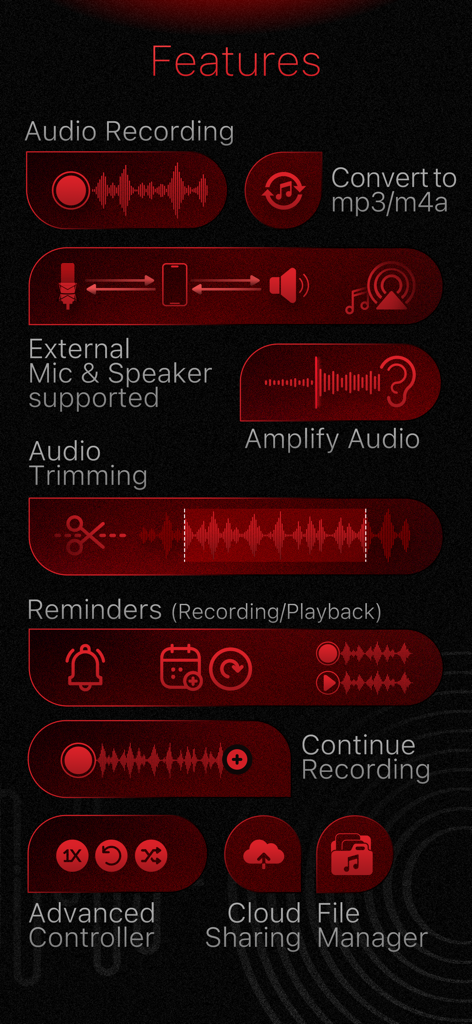
트리밍 및 클라우드 공유를 포함한 오디오 레코더 및 음성 편집기 앱의 전문 기능 시각 목록
트리밍 및 클라우드 공유를 포함한 오디오 레코더 및 음성 편집기 앱의 전문 기능 시각 목록

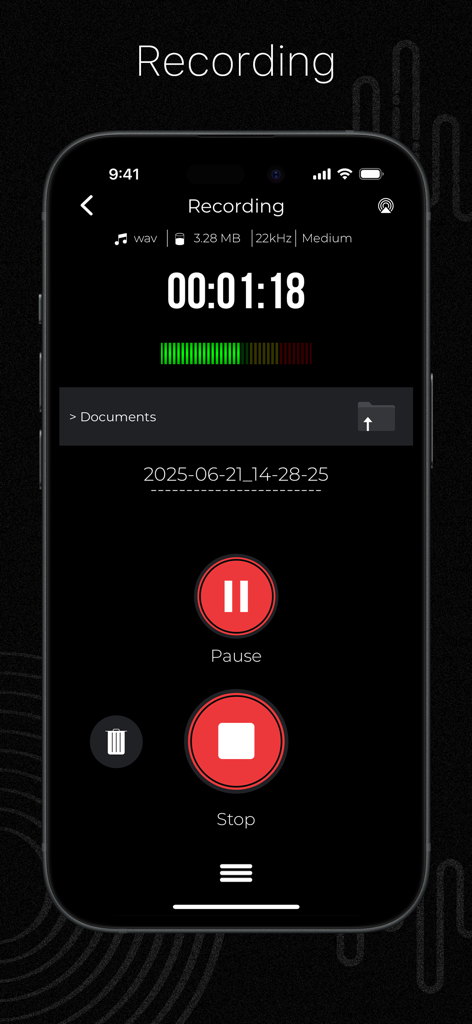
타이머 및 제어 버튼이 있는 활성 녹음 세션을 보여주는 오디오 레코더 앱 인터페이스
타이머 및 제어 버튼이 있는 활성 녹음 세션을 보여주는 오디오 레코더 앱 인터페이스

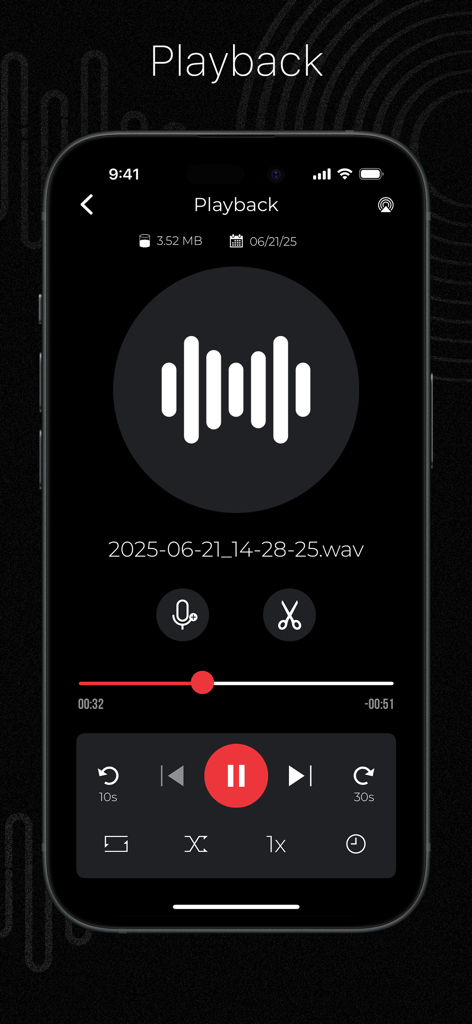
녹음된 WAV 파일에 대한 전문 재생 및 트리밍 컨트롤을 보여주는 오디오 레코더 및 음성 편집기 앱 인터페이스
녹음된 WAV 파일에 대한 전문 재생 및 트리밍 컨트롤을 보여주는 오디오 레코더 및 음성 편집기 앱 인터페이스

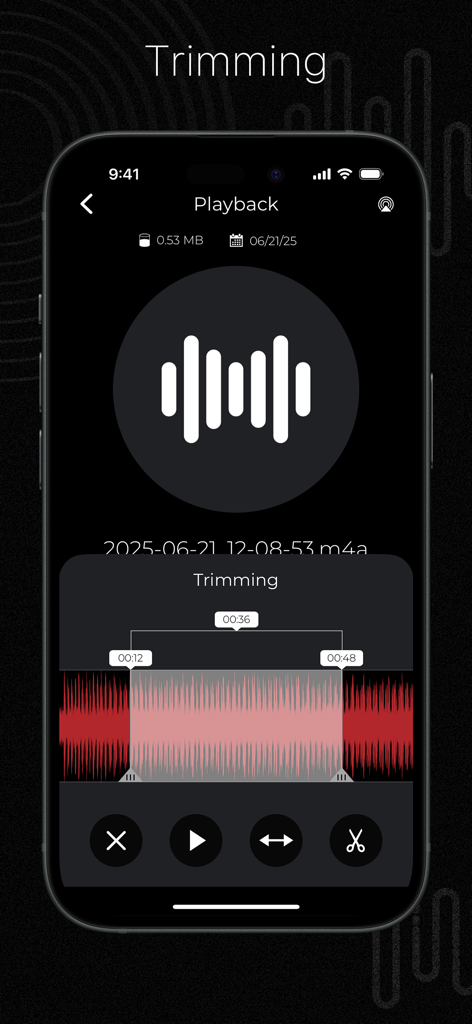
오디오 레코더 및 음성 편집기 앱의 트리밍 기능을 보여주는 iPhone 화면
오디오 레코더 및 음성 편집기 앱의 트리밍 기능을 보여주는 iPhone 화면

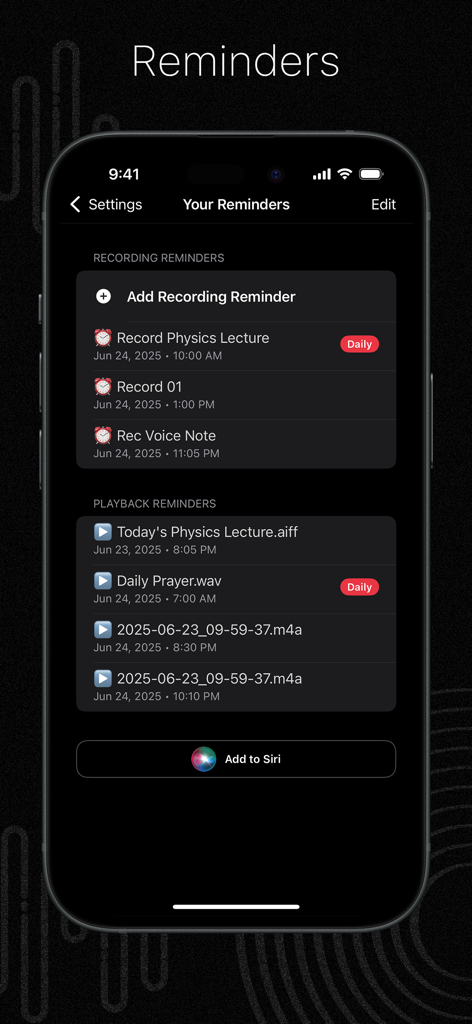
강의 및 음성 메모에 대한 예약 녹음 및 재생 알림을 보여주는 오디오 레코더 앱의 스마트폰 화면
강의 및 음성 메모에 대한 예약 녹음 및 재생 알림을 보여주는 오디오 레코더 앱의 스마트폰 화면

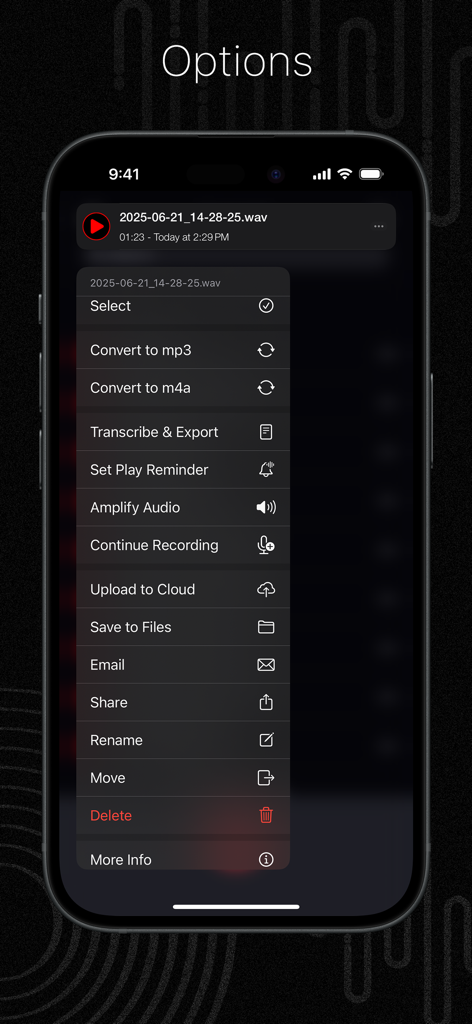
오디오 레코더 앱에서 변환, 전사, 클라우드 업로드와 같은 오디오 파일 옵션을 보여주는 모바일 화면
오디오 레코더 앱에서 변환, 전사, 클라우드 업로드와 같은 오디오 파일 옵션을 보여주는 모바일 화면

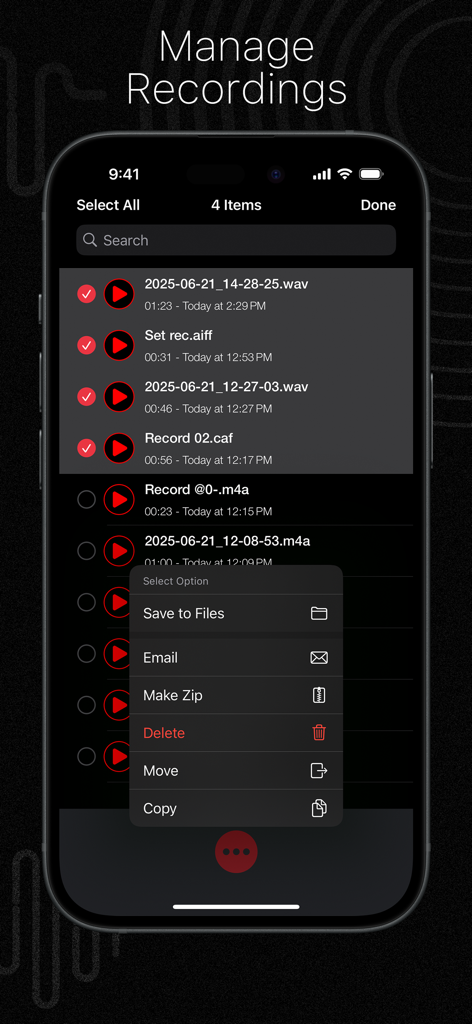
오디오 레코더 및 음성 편집기 앱의 파일 선택 및 구성 옵션을 보여주는 녹음 관리 화면
오디오 레코더 및 음성 편집기 앱의 파일 선택 및 구성 옵션을 보여주는 녹음 관리 화면

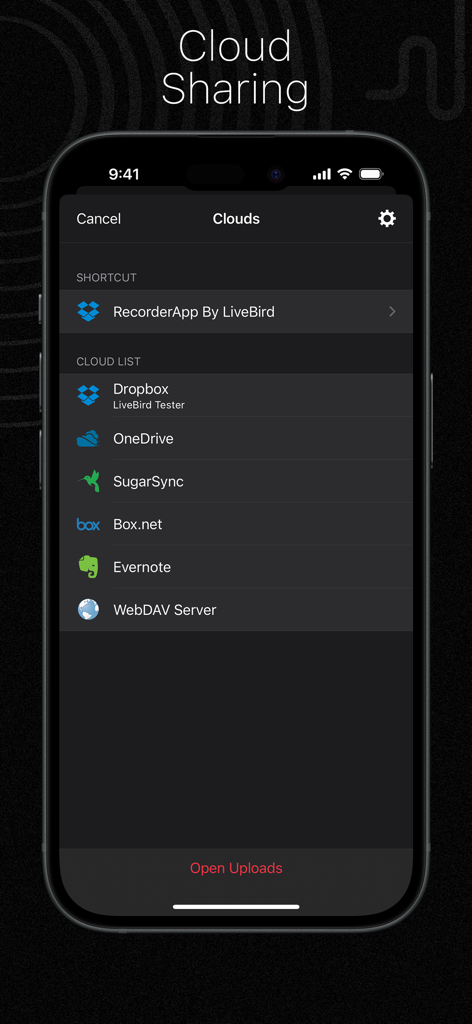
Dropbox 및 OneDrive와 같은 지원 서비스를 나열하는 오디오 레코더 앱의 클라우드 공유 인터페이스
Dropbox 및 OneDrive와 같은 지원 서비스를 나열하는 오디오 레코더 앱의 클라우드 공유 인터페이스

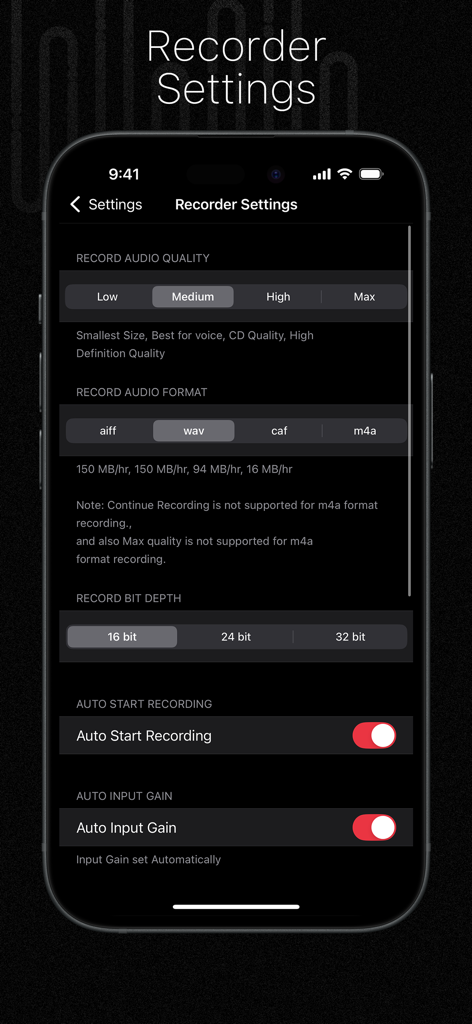
품질, 형식, 비트 깊이에 대한 전문 오디오 레코더 설정을 보여주는 iPhone 화면

품질, 형식, 비트 깊이에 대한 전문 오디오 레코더 설정을 보여주는 iPhone 화면

높은 생산성을 위한 전문 도구

이 앱을 돋보이게 하는 도구, 468K+ 명의 사용자가 선택.

🎙️

프로급 오디오 캡처

최대 32비트 깊이의 고품질 형식(WAV, M4A)으로 녹음하고 외부 블루투스 또는 Tascam 마이크를 지원합니다.

스마트 워크플로우 자동화

무음 감지, 통화 후 자동 재개, 반복 회의 또는 강의 녹음 알림 예약 등으로 효율성을 극대화하세요.

🔒

안전한 관리 및 동기화

암호 잠금 폴더에 민감한 인터뷰를 보호하고 Dropbox, OneDrive 또는 iCloud에 라이브러리를 즉시 동기화하세요.

앱 소개

에 대해 알아야 할 모든 것 Audio Recorder & Voice Editor.

설명

Let’s talk beyond recording—let’s talk sound and time! Audio Recorder App is your all-in-one studio for capturing, editing, and now scheduling every important audio moment. Record podcasts, voice memos, concerts, meetings, and lectures in crystal clarity. Perfect each file with precise trimming and erasing tools, then keep yourself on track with brand-new recording and playback reminders. Save to the cloud or transfer over Wi-Fi/FTP—the choice is yours. # Key Features Record - Unlimited length—tested up to 20 hours. - Auto-resume after calls or interruptions. - Continue into an existing file or start fresh. - Silence detection with auto-pause and auto-resume. - Adjustable input gain; Bluetooth mic support. - One-tap restart or redo. Reminders - Recording Reminders – Schedule recordings ahead of time with flexible repeat options. - Playback Reminders – Get reminders to review any file exactly when you need it. - Manage, edit, or delete reminders anytime. Trim & Edit - Trim – Keep only the parts you want. - Erase – Remove mistakes instantly. Amplify - Boost quiet recordings for louder, clearer sound. Transcribe (Offline) - Convert speech to text using our free companion app "PDF Export"—no internet required. Formats & Quality - Record in AIFF, WAV, CAF, or M4A. - Choose from Low, Medium, High (CD), or Max (HD) quality. - Bit depth options: 16-bit, 24-bit, or 32-bit. Input & Output - Works with built-in, Bluetooth, or external mics (Tascam iM2 supported). - Quick switching between input/output devices. Recording Intervals - Automatically stop recording after a preset time (15, 30, 60 minutes, etc.). Player - Fast forward and rewind controls. - Adjustable playback speed. - Trim directly within the player. - Continuous playback option. - Playback stop timer. - Works with Apple EarPods and Bluetooth devices. File Manager - iCloud support for syncing. - Manage files: copy, move, rename, delete, and zip. - Email multiple recordings at once. - Search and sort files. - View detailed file info. Themes - Choose between Dark or Light mode. Trash Management - Deleted recordings go to Trash and can be restored if needed. Private Recordings - Store sensitive recordings in a secure, password-protected folder. Cloud Storage - Upload to Dropbox, OneDrive, Box.net, SugarSync, Evernote, or WebDAV. - Import from supported cloud services. Wi-Fi Sharing - Access or transfer recordings to your computer using a web browser on the same Wi-Fi network. FTP File Sharing - Map a network drive on your computer for wireless access to your files. Settings - Customize audio format and quality. - Lock the app with a passcode. - Enable Wi-Fi or FTP sharing. Other Highlights - Find recordings using iPhone Spotlight. - Quick actions with 3D Touch support. We hope you’re enjoying everything the Audio Recorder App has to offer. If you love using the app, we’d truly appreciate it if you could leave a rating on the App Store. Your feedback helps us improve and continue delivering the best possible experience.

최신 버전

12.0.1

크기

58.2 MB

출시일

2013년 11월 8일

iPhone을 전문 오디오 스튜디오로 변환하세요

468,000명 이상의 사용자와 함께 손쉽게 고화질 오디오를 녹음, 편집, 예약하세요. 지금 바로 전문적인 워크플로우를 경험하세요.

다운로드: App Store

App information, icons, screenshots, and descriptions displayed on this page are sourced from the Apple App Store and are the property of their respective developers. Download estimates and rankings are based on MWM's proprietary models and may not reflect actual figures. This page is provided for informational and analytical purposes only.

Believe this page infringes your intellectual property? File a dispute