
이 페이지는 앱이나 개발자의 공식 페이지가 아니며, 정보 제공 및 논평을 목적으로 작성된 독립 편집 간행물입니다. 명시적으로 달리 언급되지 않는 한, 해당 앱이나 개발자는 MWM, Apple, Google Play, 앱 퍼블리셔 또는 앱 개발자와 제휴, 보증, 후원, 승인 또는 공식적으로 연결되어 있지 않으며, 이 페이지의 어떤 내용도 해당 앱이 MWM의 서비스를 사용하여 개발되었음을 의미하지 않습니다. 모든 상표, 로고, 스크린샷 및 기타 콘텐츠는 해당 소유자의 자산입니다.


Billit Expenses
프리랜서와 소기업 소유주가 몇 초 만에 관리 업무를 처리할 수 있도록 지원합니다. AI로 영수증을 스캔하고, 청구 가능한 시간을 추적하며, 이동 중에 전문적인 송장을 발송하세요.
다운로드
70K+사용자 평점
총 평가 수
0개발사
카테고리
Business지원 언어
1최신 버전
2.0.4크기
13.7 MB출시일
2023년 11월 11일비즈니스 관리 간소화
송장 발행, 비용 추적, 시간 등록을 손쉽게 처리할 수 있는 프리랜서 및 소기업 소유주를 위한 올인원 모바일 툴킷입니다.
즉각적인 전문 송장 발행
현장에서 고객에게 안전한 디지털 송장을 생성하고 발송하세요. 어디서든 전문적인 이미지를 강화하고 현금 흐름을 가속화하세요.
스마트 영수증 관리
영수증 사진을 찍으면 OCR 기술이 작업을 처리합니다. 종이 영수증의 혼란을 몇 초 만에 구조화된 세금 준비 디지털 데이터로 변환하세요.
자주 묻는 질문
에 대해 알아야 할 모든 것 Billit Expenses
Billit Expenses 앱의 주요 기능은 무엇인가요?
Billit Expenses 앱을 사용하면 디지털 송장을 생성하고 발송하며, 실물 영수증을 디지털 형식으로 처리하고, 프로젝트별 및 고객별 작업 시간을 추적할 수 있습니다.
Billit Expenses 앱으로 송장을 생성하고 발송할 수 있나요?
예, Billit Expenses 앱을 사용하면 스마트폰에서 직접 디지털 송장을 생성하고 발송할 수 있습니다. 신속한 생성을 위해 고객 및 제품 목록에 액세스할 수 있습니다.
Billit Expenses 앱은 어떤 전자 송장 네트워크를 지원하나요?
Billit Expenses 앱은 Peppol 또는 기타 사용 가능한 전자 송장 네트워크를 통해 안전하게 송장을 발송하는 것을 지원합니다.
Billit Expenses 앱은 어떻게 영수증을 디지털화하나요?
Billit Expenses 앱은 실물 영수증을 구조화된 디지털 형식으로 변환합니다. 사용자는 이미지나 문서를 업로드하거나 스마트폰 카메라를 사용하여 영수증을 스캔할 수 있습니다.
Billit Expenses는 영수증 처리를 위해 OCR 기술을 사용하나요?
예, Billit Expenses는 고급 OCR 기술을 활용하여 스캔하거나 업로드된 영수증의 데이터를 구조화된 디지털 형식으로 변환하여 효율적인 처리를 지원합니다.
Billit Expenses를 통해 디지털 영수증을 회계사와 공유할 수 있나요?
예, Billit Expenses를 사용하면 사용자가 디지털 영수증을 Billit 계정으로 보낼 수 있으며, 이를 통해 한 번의 클릭으로 회계사와 공유할 수 있습니다.
Billit Expenses 앱에 시간 추적 기능이 있나요?
예, Billit Expenses 앱에는 시간 등록 기능이 포함되어 있습니다. 타이머 기반 및 수동 입력 모두 지원하며 프로젝트별 및 고객별 작업 시간을 추적할 수 있습니다.
Billit Expenses에서 시간 등록 모듈을 어떻게 활성화하나요?
Billit Expenses에서 시간 등록을 활성화하려면 먼저 Billit 온라인 플랫폼에서 ‘설정 > 일반’을 통해 모듈을 활성화해야 합니다. 다중 사용자 환경에서는 ‘설정 > 사용자’를 통해 사용자 권한을 조정해야 합니다.
Billit Expenses에서 수동으로 시간 항목을 추가할 수 있나요?
예, Billit Expenses 앱은 수동 시간 입력을 지원합니다. 타이머를 시작하는 것을 잊은 경우 초 단위로 시간 항목을 추가할 수 있습니다.
Billit Expenses 모바일 앱에서 생성된 송장은 온라인에서 사용할 수 있나요?
예, Billit Expenses 모바일 앱을 사용하여 생성된 모든 송장은 Billit의 온라인 플랫폼에서 즉시 사용할 수 있어 데이터 동기화를 보장합니다.
Billit Expenses 앱 기능에 대한 가이드는 어디에서 찾을 수 있나요?
Billit Expenses 앱 기능에 대한 정보를 찾는 사용자는 제공된 빠른 시작 가이드(QuickStart Guide)를 참조하여 포괄적인 도움을 받을 수 있습니다.
다음 스크린샷과 설명은 앱의 공식 스토어 목록에서 직접 가져온 것이며 앱 개발자의 자산입니다.
앱 스토어
스크린샷
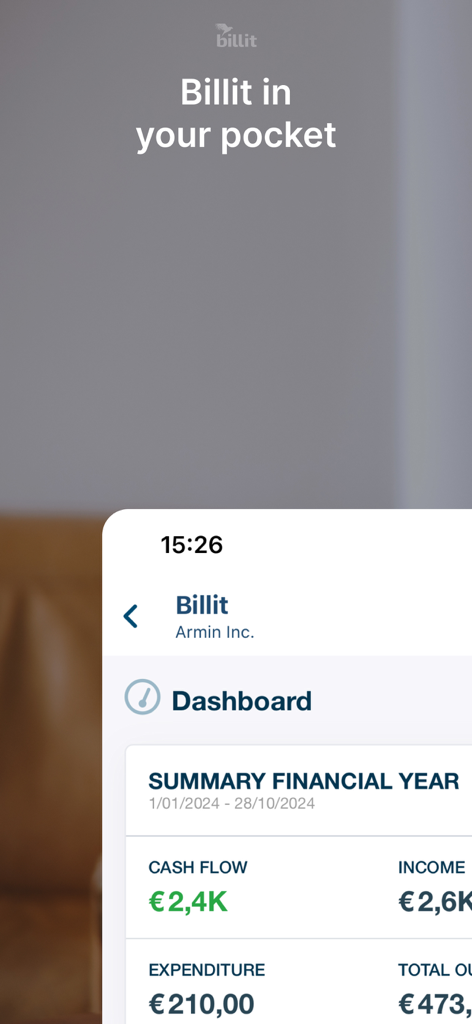
Billit Expenses 모바일 앱 대시보드에 현금 흐름 및 수입 지표와 함께 재무 연도 요약이 표시됩니다.
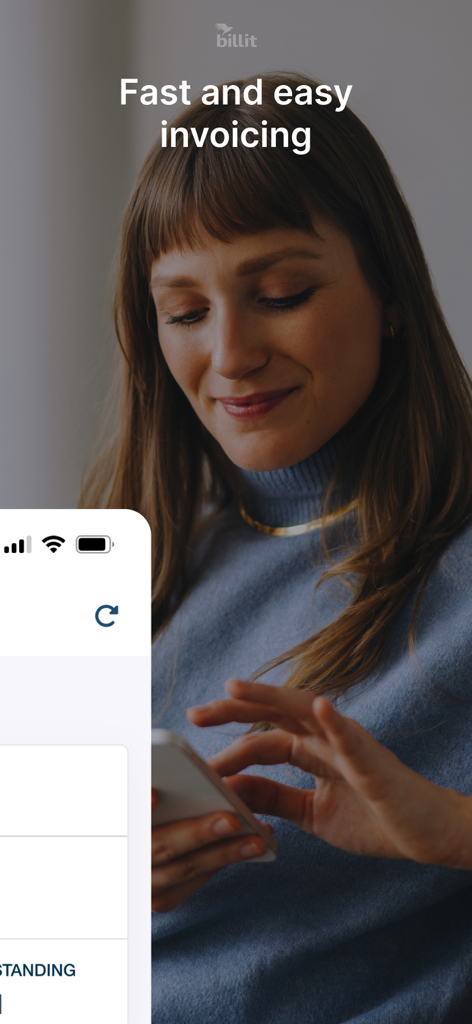
여성이 스마트폰에서 Billit Expenses 앱을 사용하여 빠르고 쉬운 송장 발행을 하는 모습
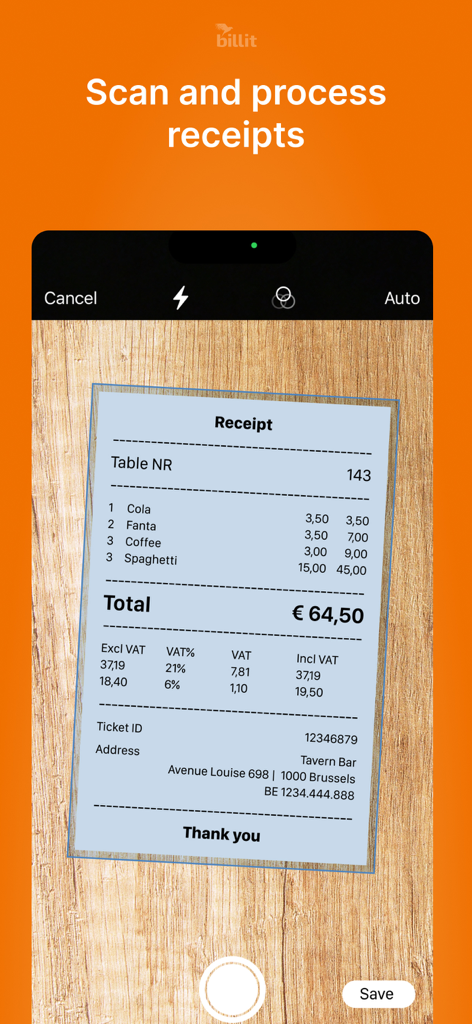
Billit Expenses 앱이 스마트폰 카메라를 사용하여 레스토랑 영수증을 스캔하는 모습
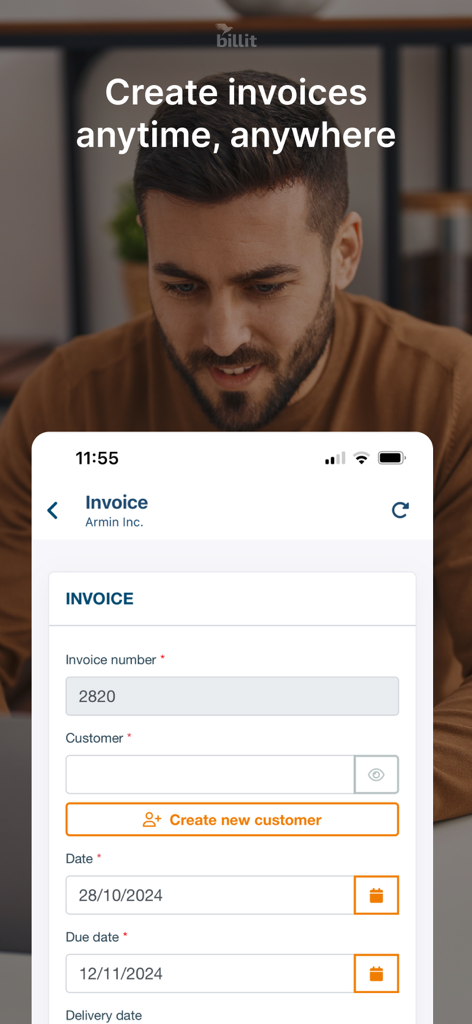
Billit Expenses 앱의 모바일 인터페이스에 새 디지털 송장을 생성하는 양식이 표시됩니다.
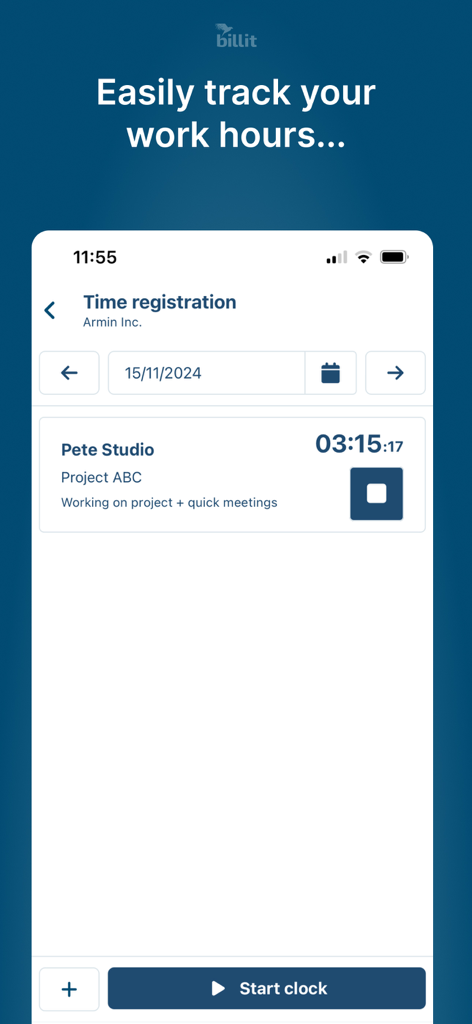
Billit Expenses 모바일 앱 인터페이스에서 청구 가능한 작업 시간 및 프로젝트 시간 등록 추적
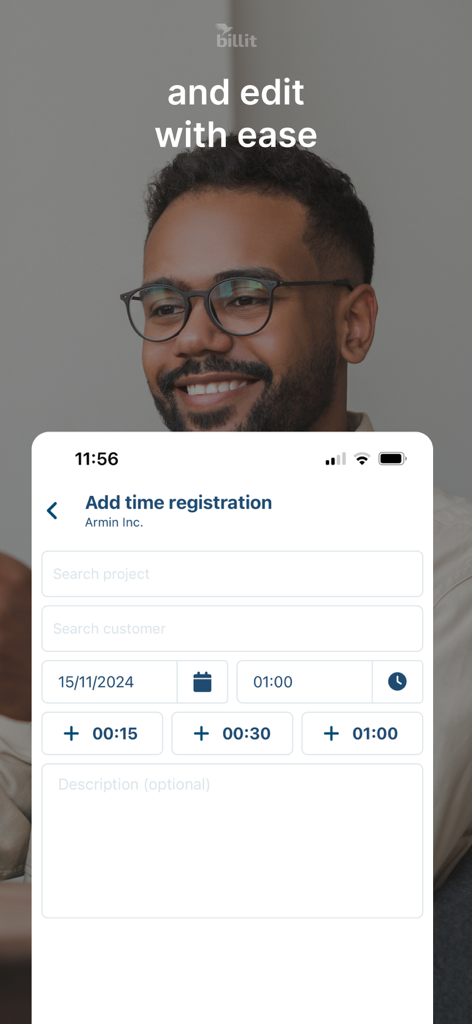
Billit Expenses에서 시간 등록 항목 추가 및 편집을 위한 모바일 앱 인터페이스
설명
Download
비슷한 앱
유사한 기능과 사용자 경험을 가진 앱

Gridwise: Gig Driver Assistant
Gridwise, Inc.

Ualett
Cabicash Solutions, Inc

ServerLife - Tip Tracker
MZBApps LLC

Solo: Your Gig Business App
Solo Technologies, Inc.

Mozen
KODE (ooo)

Foreceipt Receipt Tracker App
Relayin Corporation

Fiverr Workspace
Fiverr International Ltd.
Timesheet IO - Time Tracker
Timesheet - Mobile Time Tracking OG

Self Employed - Accounting
Protection & Security App LLC
이 페이지는 앱이나 개발자의 공식 페이지가 아니며, 정보 제공 및 논평을 목적으로 작성된 독립 편집 간행물입니다. 명시적으로 달리 언급되지 않는 한, 해당 앱이나 개발자는 MWM, Apple, Google Play, 앱 퍼블리셔 또는 앱 개발자와 제휴, 보증, 후원, 승인 또는 공식적으로 연결되어 있지 않으며, 이 페이지의 어떤 내용도 해당 앱이 MWM의 서비스를 사용하여 개발되었음을 의미하지 않습니다. 모든 상표, 로고, 스크린샷 및 기타 콘텐츠는 해당 소유자의 자산입니다.