Chat Backup Assistant: Textify

Chat Backup Assistant: Textify

다운로드: App Store
로고: Chat Backup Assistant: Textify

채팅 백업 도우미: Textify — 대화 복구, 보안, 다시 보기

포렌식 메시지 복구, 생체 인식 잠금 보관, 소중한 추억을 매력적인 이야기로 만드는 창의적인 도구로 디지털 유산을 보호하세요.

개발사

muge deniz

카테고리

Utilities

다운로드

50K+

사용자 평점

4.8/5

총 평가 수

7K+

지원 언어

9

금고 내부 엿보기

이 인터페이스를 사용하는 50K+ 명의 사용자.

삭제된 메시지 복구라는 제목 아래 스마트폰을 들고 놀란 표정의 여성
삭제된 메시지 복구라는 제목 아래 스마트폰을 들고 놀란 표정의 여성

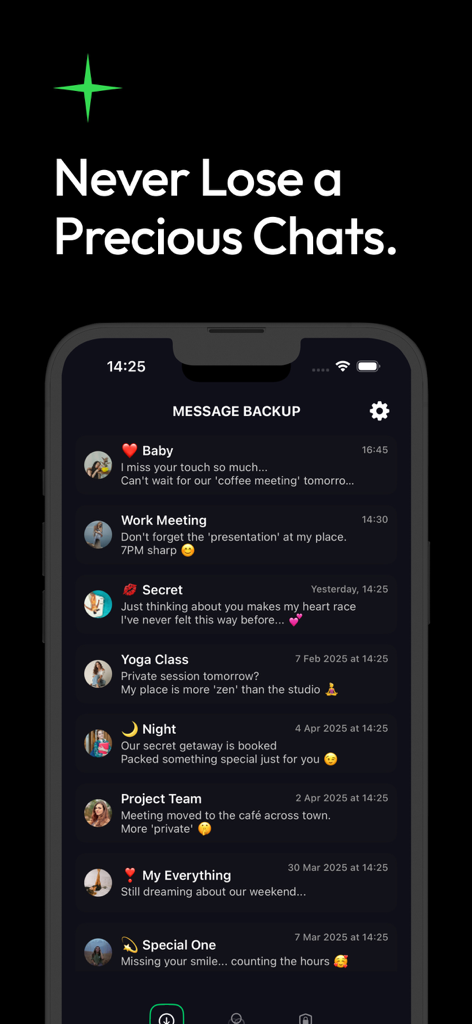
아기, 회의, 비밀 채팅과 같은 카테고리로 구성된 백업된 메시지 목록을 보여주는 모바일 인터페이스
아기, 회의, 비밀 채팅과 같은 카테고리로 구성된 백업된 메시지 목록을 보여주는 모바일 인터페이스

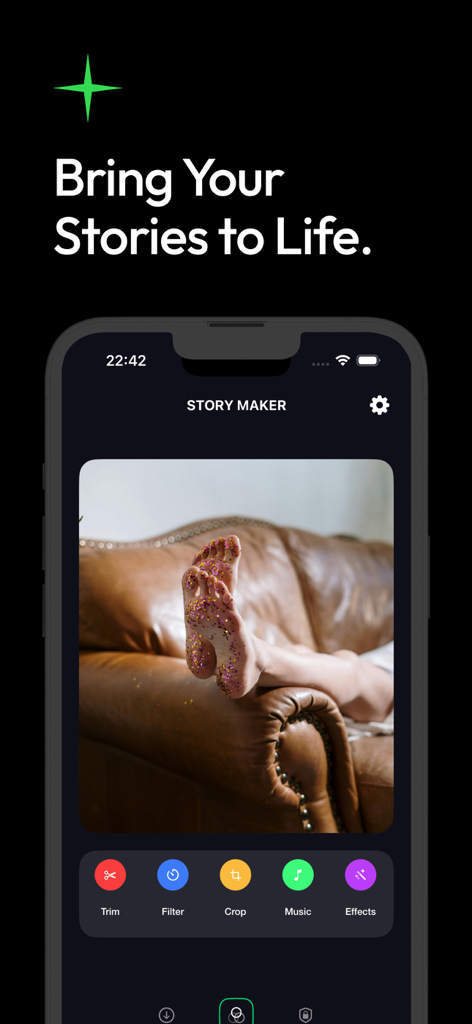
사진 편집 도구와 미디어 효과가 있는 Textify 앱 스토리 메이커 인터페이스
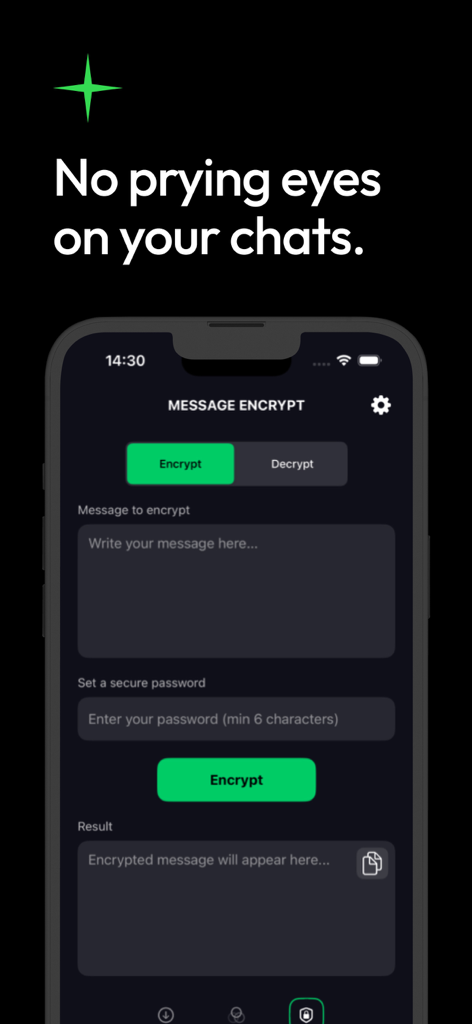
사진 편집 도구와 미디어 효과가 있는 Textify 앱 스토리 메이커 인터페이스

텍스트 입력 및 보안 암호 설정 필드가 있는 메시지 암호화 도구를 보여주는 Textify 앱 화면

텍스트 입력 및 보안 암호 설정 필드가 있는 메시지 암호화 도구를 보여주는 Textify 앱 화면

디지털 대화를 위한 완벽한 보호

이 앱을 돋보이게 하는 도구, 50K+ 명의 사용자가 선택.

🔎

삭제된 순간 복구

중요한 스레드를 잃어버렸나요? 심층 포렌식 스캔을 사용하여 좋아하는 앱에서 삭제된 메시지와 미디어를 손쉽게 복원하세요.

🔒

생체 인식 프라이버시 보호막

FaceID 및 암호화로 엿보는 눈을 멀리하세요. 민감한 대화는 안전하고 중앙 집중식 금고에 잠겨 있습니다.

창의적인 추억 제작자

채팅 미디어를 매력적인 이야기로 변환하세요. 백업한 사진에 음악과 효과를 추가하여 공유하거나 영원히 저장하세요.

앱 소개

에 대해 알아야 할 모든 것 Chat Backup Assistant: Textify.

설명

Chat Backup Assistant: Textify — Your Trusted Partner for Secure Conversation Preservation and Creative Expression Textify is a comprehensive backup and content management solution designed to safeguard your digital communications, protect your privacy, and help you bring your precious memories to life with creativity and ease. It offers a seamless way to secure your chat history while keeping your digital life organized and accessible whenever you need it. 1. Recover Deleted Messages with Confidence Accidental deletions are no longer a concern. Textify’s advanced backup technology enables you to effortlessly recover your chat history, even if the original messages have been deleted from your device. Whether it’s an important conversation or a cherished memory, lost messages are restored quickly and reliably. This process is completely secure, under your control, and designed to give you peace of mind knowing that nothing valuable will ever be permanently lost. Lost a message? Chat Backup Assistant performs a deep forensic scan to recover deleted chats, photos, and media from your favorite messaging apps. Reclaim your memories and important info now. 2. All Your Messages Organized in One Intelligent Archive Say goodbye to chaotic message storage. Textify automatically categorizes and organizes your conversations into a neat, centralized archive. This intelligent organization helps you locate any message quickly—be it casual chats, professional correspondence, or personal notes. Spend less time searching and more time enjoying your conversations with everything just a few taps away. 3. Protect Your Personal Content with Encryption Privacy is your right—and Textify makes sure it stays that way. With built-in encryption, you can safeguard your sensitive messages behind a password, allowing access only to you or trusted individuals you authorize. This layered security approach ensures that your confidential information is shielded from unauthorized access at all times. 4. Enhanced Security Against Unauthorized Access Textify takes your security seriously. Beyond simple backups, it provides robust protection with features like password protection, automatic locking, and biometric authentication options such as face recognition or fingerprint scanning. These measures guarantee that your personal conversations remain private and accessible only to you, no matter what. 5. Transform Your Media Into Meaningful Stories Textify is not just about storing text—it’s about breathing new life into your memories. Use your backed-up photos and videos to create captivating stories with ease. Add music, stickers, text, and special effects using powerful editing tools, and customize your content to reflect your unique style. Turn everyday moments into polished, memorable visuals that you can cherish and share anytime. 6. Easy Editing, Sharing, and Preservation With Textify, you can crop, trim, rotate, resize, and apply filters to your media files effortlessly. Create professional-quality content in just a few taps and share it across your favorite social networks or keep it safely archived for personal enjoyment. Make every memory unforgettable with minimal effort and maximum impact. * Your subscription will continue until you cancel and renew. Subscription payments will be charged to your iTunes account at confirmation of your purchase and upon commencement of each renewal term. * You can cancel a free trial or subscription anytime by cancelling your subscription through your iTunes account settings. This must be done 24 hours before the end of a free trial or subscription period to avoid being charged. The cancellation will take effect the day after the last day of the current subscription period, and you will be downgraded to the free service. * Please note: any unused portion of a free trial period (if offered) will be forfeited when you purchase a premium subscription during the free trial period.

최신 버전

1.3

크기

49.9 MB

출시일

2025년 4월 16일

오늘 대화를 보호하고 모든 추억을 되찾으세요

삭제된 메시지 복구, 개인 채팅 암호화, 디지털 추억을 지속적인 이야기로 만드는 데 Textify를 신뢰하는 50,000명 이상의 사용자와 함께하세요.

다운로드: App Store
FAQ

자주 묻는 질문

에 대해 알아야 할 모든 것 Chat Backup Assistant: Textify

Textify가 삭제된 메시지를 복구할 수 있나요?

네, Chat Backup Assistant: Textify는 삭제된 채팅 기록을 복구할 수 있습니다. 고급 백업 기술은 잃어버린 메시지, 사진 및 미디어를 메시징 앱에서 복원하기 위해 심층 포렌식 스캔을 수행합니다.

Chat Backup Assistant: Textify는 메시지를 어떻게 구성하나요?

Chat Backup Assistant: Textify는 대화를 자동으로 분류하고 깔끔하고 중앙 집중화된 아카이브로 구성합니다. 이러한 지능적인 구성을 통해 사용자는 모든 메시지를 빠르게 찾을 수 있어 검색 시간을 줄일 수 있습니다.

Textify가 개인 정보 보호를 위해 메시지 암호화를 제공하나요?

네, Textify는 민감한 메시지를 보호하기 위해 내장 암호화를 제공합니다. 사용자는 비밀번호로 콘텐츠를 보호하여 기밀 정보가 무단 액세스로부터 보호되도록 할 수 있습니다.

Textify는 채팅을 보호하기 위해 어떤 보안 기능을 포함하나요?

Textify는 비밀번호 보호, 자동 잠금, 얼굴 인식 또는 지문 스캔과 같은 생체 인식 인증 옵션과 같은 강력한 보안 기능을 포함합니다. 이를 통해 개인 대화가 비공개로 유지됩니다.

Chat Backup Assistant: Textify로 백업된 미디어를 사용하여 스토리를 만들 수 있나요?

네, Textify를 사용하면 백업된 사진과 동영상을 매력적인 스토리로 변환할 수 있습니다. 음악, 스티커, 텍스트, 특수 효과를 추가하고 콘텐츠를 사용자 지정하기 위한 강력한 편집 도구를 제공합니다.

미디어 파일에 사용할 수 있는 Textify의 편집 도구는 무엇인가요?

Textify는 미디어 파일에 대한 자르기, 트리밍, 회전, 크기 조정 및 필터를 포함한 사용하기 쉬운 편집 도구를 제공합니다. 사용자는 전문가 수준의 콘텐츠를 만들고 소셜 네트워크에 공유할 수 있습니다.

Chat Backup Assistant: Textify 구독을 어떻게 취소하나요?

사용자는 iTunes 계정 설정을 통해 언제든지 Textify 구독을 취소할 수 있습니다. 요금이 부과되는 것을 방지하려면 무료 평가판 또는 구독 기간이 끝나기 24시간 전에 이 작업을 수행해야 합니다.

무료 평가판 기간 중에 Textify 프리미엄 구독을 조기에 구매하면 어떻게 되나요?

무료 평가판 기간 중에 프리미엄 구독을 구매하면 무료 평가판 기간의 사용하지 않은 부분은 소멸됩니다.

Chat Backup Assistant: Textify는 무엇인가요?

Chat Backup Assistant: Textify는 포괄적인 백업 및 콘텐츠 관리 솔루션입니다. 디지털 커뮤니케이션을 보호하고, 개인 정보를 보호하며, 안전한 채팅 기록 관리 및 창의적인 미디어 편집을 통해 추억을 되살리는 데 도움이 됩니다.

Chat Backup Assistant: Textify는 채팅 백업에 안전한가요?

네, Textify는 암호화, 비밀번호 보호, 자동 잠금 및 생체 인식 인증 옵션을 통해 채팅 백업 보안을 보장합니다. 채팅 기록과 민감한 메시지를 무단 액세스로부터 보호합니다.

App information, icons, screenshots, and descriptions displayed on this page are sourced from the Apple App Store and are the property of their respective developers. Download estimates and rankings are based on MWM's proprietary models and may not reflect actual figures. This page is provided for informational and analytical purposes only.

Believe this page infringes your intellectual property? File a dispute