Documents Pro, Download & Edit

Documents Pro, Download & Edit


다운로드: App Store
로고: Documents Pro, Download & Edit

Documents Pro: 궁극의 올인원 모바일 오피스 제품군

이동 중에 파일을 편집, 다운로드 및 관리하는 7백만 명의 사용자와 함께하세요. 8개의 앱을 하나의 강력한 허브로 대체하여 스프레드시트, 클라우드 스토리지 및 안전한 전송을 어디서든, 오프라인에서도 처리하세요.

개발사

Savy Soda Pty Ltd

카테고리

Productivity

다운로드

1M+

사용자 평점

3.5/5

총 평가 수

112K+

지원 언어

16

모든 픽셀에 담긴 효율성

이 인터페이스를 사용하는 1M+ 명의 사용자.

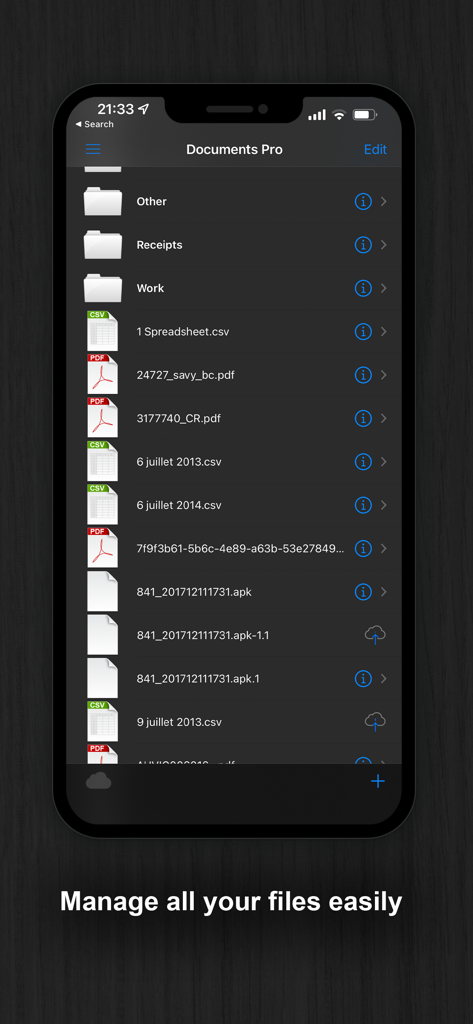
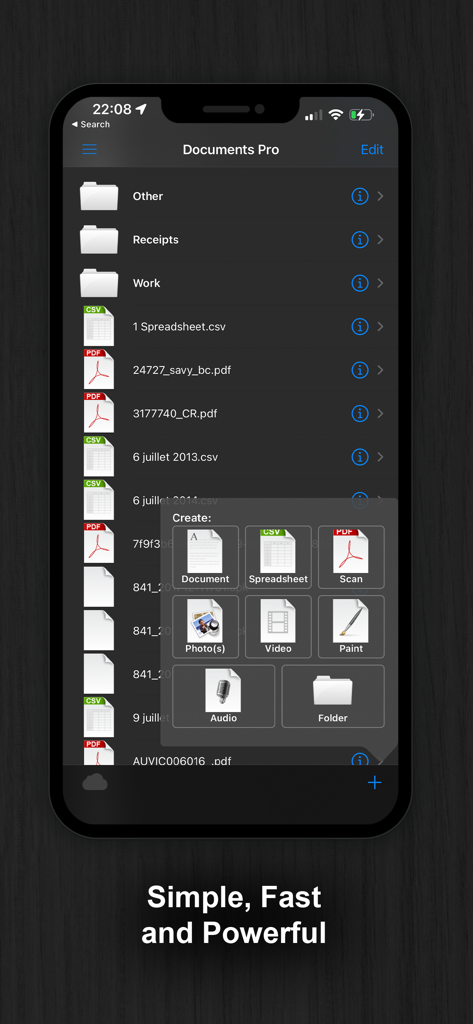
폴더와 PDF, CSV와 같은 다양한 파일 유형을 다크 모드 테마로 보여주는 모바일 파일 관리자 인터페이스.

폴더와 PDF, CSV와 같은 다양한 파일 유형을 다크 모드 테마로 보여주는 모바일 파일 관리자 인터페이스.

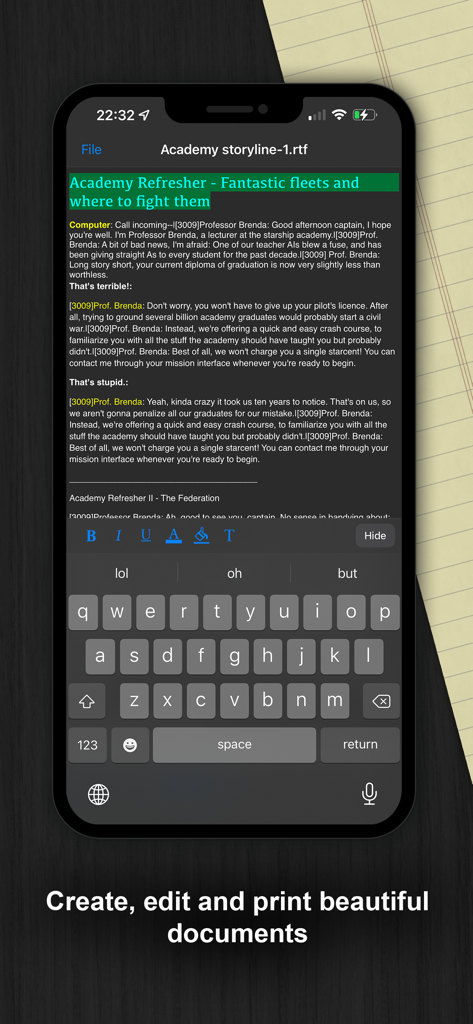
다크 모드에서 Documents Pro 앱의 모바일 텍스트 편집 인터페이스

다크 모드에서 Documents Pro 앱의 모바일 텍스트 편집 인터페이스

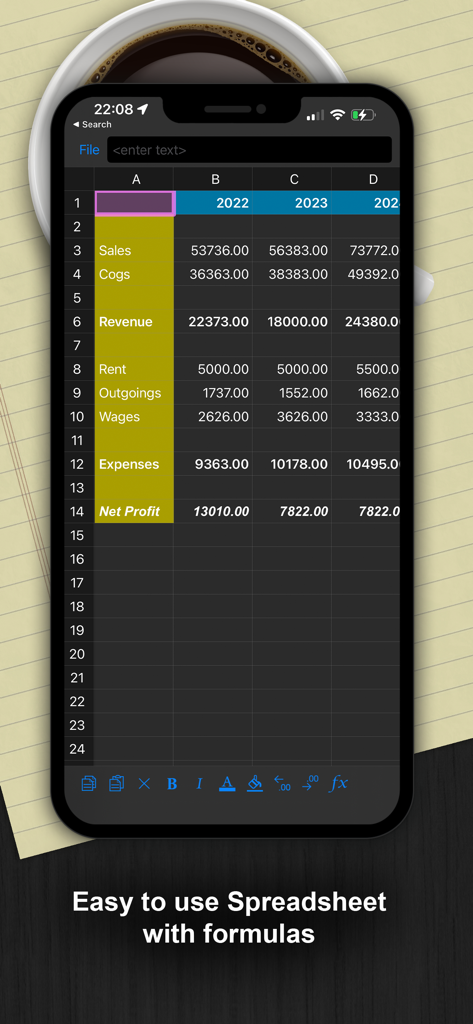
금융 데이터와 수식을 보여주는 다크 모드 모바일 스프레드시트 인터페이스

금융 데이터와 수식을 보여주는 다크 모드 모바일 스프레드시트 인터페이스

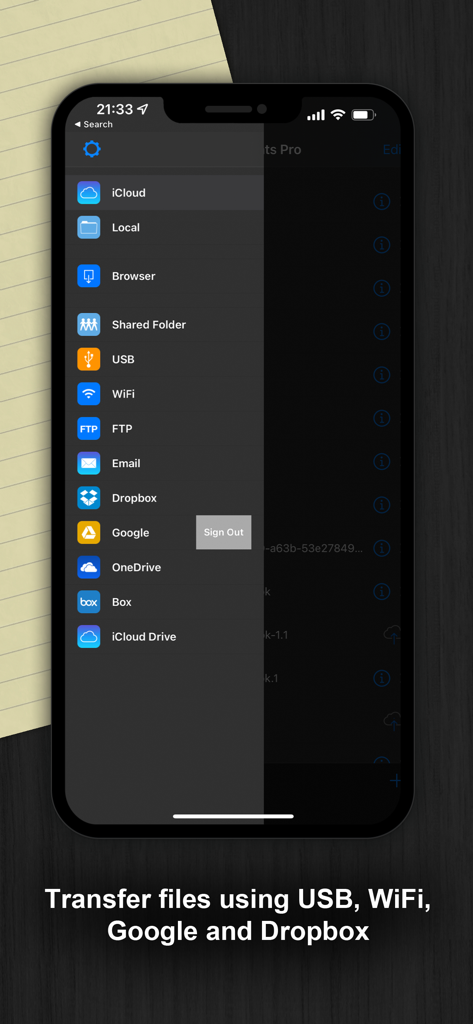
USB, WiFi, Dropbox를 포함한 파일 전송 및 클라우드 스토리지 옵션을 보여주는 Documents Pro 앱 사이드바.

USB, WiFi, Dropbox를 포함한 파일 전송 및 클라우드 스토리지 옵션을 보여주는 Documents Pro 앱 사이드바.

파일 구성 및 생성 옵션을 보여주는 Documents Pro 앱 인터페이스

파일 구성 및 생성 옵션을 보여주는 Documents Pro 앱 인터페이스

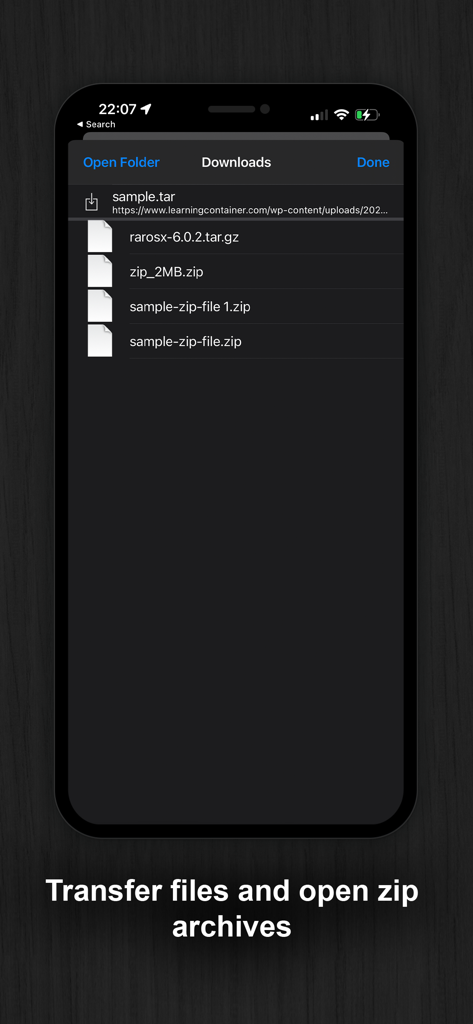
다운로드한 zip 및 tar 아카이브 목록을 보여주는 앱 화면

다운로드한 zip 및 tar 아카이브 목록을 보여주는 앱 화면

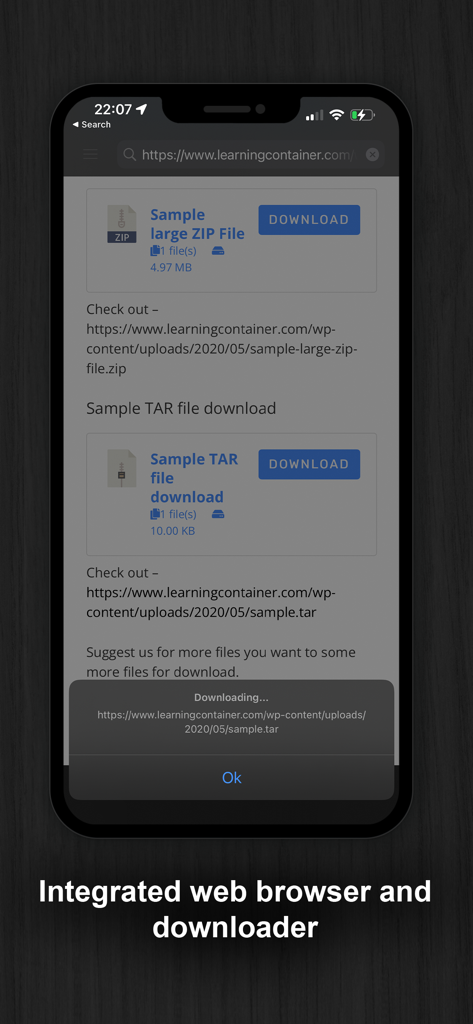
통합 웹 브라우저 및 파일 다운로더 도구를 특징으로 하는 Documents Pro 앱의 스크린샷.

통합 웹 브라우저 및 파일 다운로더 도구를 특징으로 하는 Documents Pro 앱의 스크린샷.

궁극의 포켓 오피스

이 앱을 돋보이게 하는 도구, 1M+ 명의 사용자가 선택.

☁️

통합 클라우드 허브

Dropbox, Google Drive, OneDrive에 한 곳에서 접속하세요. 앱 전환을 멈추고 단일의 안전한 대시보드에서 모든 클라우드 스토리지를 관리하세요.

📊

전문가용 모바일 편집

전체 수식 지원으로 스프레드시트를 작성하고, 문서를 작성하고, PDF를 미리 보세요. 오프라인에서도 완벽하게 작동하는 완전한 오피스 제품군입니다.

📡

무선 데스크톱 동기화

기기를 WiFi HD로 변환하세요. 복잡한 소프트웨어나 케이블 없이 브라우저만 사용하여 iPhone과 PC 또는 Mac 간에 파일을 전송하세요.

앱 소개

에 대해 알아야 할 모든 것 Documents Pro, Download & Edit.

설명

• Free Pro Mobile Office and File Manager • • Trusted by Over 7 Million iOS Users • Built on top of the acclaimed documents iPhone suite. Documents PRO is the most comprehensive file manager and mini office suite for the iPhone. View and edit many types of files including documents, spreadsheets, photos, and media. Easily copy and share files using WiFi, dropbox, SkyDrive, and Google Docs. DOCUMENTS PRO FREE EDITION by SavySoda™ - Take your documents anywhere - Works with Dropbox™ Works with iCloud™ Works with Microsoft OneDrive™ Works with Google Drive™ Works with Box™ DOCUMENTS PRO DETAILS The ultimate All-In-One Mobile Office Suite for the iPhone. 8 Premium Apps in One. Most essential productivity & business apps in one easy to use, high quality package. Transfer documents to/from your iPhone via FTP or WiFi, Google, or Email. Edit & View many types of documents on the fly. A powerful, top value, must have app for any iPhone. INCLUDES - Latest iSpreadsheet (mobile spreadsheet app) - Integrated FTP Server and WiFi HD (mobile hard drive) - Text Editor (Easy to use text pad) - Google Sync (Upload & Download directly to Google) - Photo Album (Photo manager) - Direct Email (Email any documents to anyone) - Pixi Sound Recorder (High Quality Sound Recorder) - Integrated Preview (Preview any known document) GENERAL FEATURES - Full Portrait & Landscape Support - Smooth all black interface - Formatting & Formulas in Spreadsheet - Works online or offline - Folder Management WIFI HD - Transfer Files between iPhone, iPod, Mac, PC, or any network device with a Browser - Easy to use, no additional software necessary - Can be used as file server Google Docs Connection - Upload & Download directly to your google docs account Direct Email - Email files as attachments to anyone - Select email from contacts iSpreadsheet - Full CSV support - Formatting - Formulas - Selection Assist - Multi Touch Interface - Beautiful Smooth UI File Preview: - View any file, PDF Reader - Microsoft Word: .doc, .docx - Microsoft Excel: .xls, .xlsx - Microsoft PowerPoint: .ppt, .pptx - Images: .jpg, .jpeg, .tif, .gif, .svg - iWork: Pages, Number, Keynote - Adobe Acrobat: .pd - Web Pages: .htm, .html - Web Archive: .mht - Audio: .mp3, .wav Pixi Sound Recorder: - 44.1khz high quality recording - Scrolling - Playback Text Editor - Wide screen or normal view text editing Photo Album - Take photos - Resize, Zoom - Preview in Slide Show Direct Email - Email documents to anyone - Access to address book More Apps: http://www.savysoda.com Note on Auto-Renewing Subscription - Documents Pro contains optional in-app subscription to activate premium services - "1 Month, 3 Month and 1 Year Premium Subscription". Premium subscription adds support for more file types. The active work area is increased and all ads from the Application are removed. Biometric security features are unlocked by the premium subscription feature. The price of subscription in local currency is displayed in Extra Features page in app. 1 Month Subscription USD 99 cents. 3 Month Subscription USD 1.99. 12 Month Subscription USD 2.99. Subscriptions are auto-renewable and can be cancelled through User Account Settings. Payment will be charged to iTunes Account at confirmation of purchase. Account will be charged for renewal within 24-hours prior to the end of the current period, and identify the cost of the renewal. No cancellation of the current subscription is allowed during active subscription period. There is also a 7 day free trial for the membership; the free trial period is not transferrable and any remaining free time is cancelled if a paying subscription starts. EULA: www.documentsforios.com/eula.html Privacy Policy: www.documentsforios.com/privacypolicy.html

최신 버전

18.0

크기

44.3 MB

출시일

2009년 5월 21일

하나의 앱으로 워크플로우를 마스터하세요

앱 중복을 버리고 더 스마트한 올인원 모바일 오피스를 선택한 7백만 명 이상의 사용자와 함께하세요. 오늘부터 전문가처럼 파일을 편집, 동기화 및 관리하세요.

다운로드: App Store
FAQ

자주 묻는 질문

에 대해 알아야 할 모든 것 Documents Pro, Download & Edit

Documents Pro란 무엇인가요?

Documents Pro는 iPhone용 종합 모바일 오피스 제품군 및 파일 관리자입니다. 사용자가 다양한 파일 형식을 보고, 편집하고, 관리할 수 있게 하여 올인원 생산성 도구 역할을 합니다.

Documents Pro 앱으로 파일을 관리할 수 있나요?

네, Documents Pro를 사용하면 문서, 스프레드시트, PDF를 포함한 모든 파일을 쉽게 관리할 수 있습니다. 폴더 관리 기능을 제공하며 다양한 파일 형식을 지원합니다.

Documents Pro로 문서를 편집할 수 있나요?

네, Documents Pro를 사용하면 다양한 문서를 만들고, 편집하고, 인쇄할 수 있습니다. 텍스트 편집기, 스프레드시트를 위한 iSpreadsheet가 포함되어 있으며 앱 내에서 많은 파일 형식을 직접 편집할 수 있습니다.

Documents Pro는 어떤 클라우드 서비스를 파일 전송에 지원하나요?

Documents Pro는 Dropbox, iCloud, Microsoft OneDrive, Google Drive 및 Box와 통합됩니다. 사용자는 애플리케이션 내에서 이러한 인기 있는 클라우드 서비스로 문서를 전송하고 가져올 수 있습니다.

Documents Pro로 파일을 전송하는 방법은 무엇인가요?

Documents Pro는 FTP, WiFi, Google 및 이메일을 통해 파일 전송을 용이하게 합니다. 또한 포괄적인 파일 관리를 위해 USB 및 Dropbox, OneDrive와 같은 다양한 클라우드 서비스를 통한 연결도 지원합니다.

Documents Pro에 수식이 포함된 스프레드시트 애플리케이션이 포함되어 있나요?

네, Documents Pro에는 전체 CSV 지원, 서식 지정 및 수식이 포함된 모바일 스프레드시트 앱인 iSpreadsheet가 포함되어 있습니다. 쉬운 데이터 조작을 위한 멀티터치 인터페이스를 제공합니다.

Documents Pro Premium 구독은 어떤 기능을 제공하나요?

Documents Pro의 Premium 구독은 더 많은 파일 형식 지원, 활성 작업 영역 증가, 애플리케이션에서 모든 광고 제거, 생체 인식 보안 기능 잠금 해제 기능을 제공합니다.

Documents Pro Premium 구독 비용은 얼마인가요?

Documents Pro Premium 구독은 1개월에 99센트 USD, 3개월에 1.99달러 USD, 12개월에 2.99달러 USD입니다. 현지 통화 가격은 앱 내에 표시됩니다.

Documents Pro Premium의 무료 체험 기간이 있나요?

네, Documents Pro는 Premium 멤버십에 대해 7일 무료 체험 기간을 제공합니다. 이 무료 체험 기간은 양도할 수 없으며, 유료 구독이 시작되면 남은 무료 시간은 취소됩니다.

Documents Pro에서 볼 수 있는 파일 형식은 무엇인가요?

Documents Pro는 PDF, Microsoft Word(.doc, .docx), Excel(.xls, .xlsx), PowerPoint(.ppt, .pptx), 이미지(JPG, GIF), iWork(Pages, Number), 오디오(MP3, WAV)를 포함한 다양한 파일 형식을 볼 수 있습니다.

Documents Pro에 통합 웹 브라우저 및 다운로더가 포함되어 있나요?

네, Documents Pro에는 다운로더 역할도 하는 통합 웹 브라우저가 있습니다. 이를 통해 사용자는 웹을 검색하고 앱 인터페이스 내에서 다양한 파일을 직접 다운로드할 수 있습니다.

Documents Pro에서 zip 아카이브를 열고 관리할 수 있나요?

네, Documents Pro는 zip 아카이브를 열고 관리할 수 있습니다. 사용자는 파일을 전송한 다음 애플리케이션 환경 내에서 이러한 압축 파일을 직접 열 수 있습니다.

Documents Pro의 개인 정보 보호 정책은 어디에서 찾을 수 있나요?

Documents Pro의 개인 정보 보호 정책은 온라인에서 액세스할 수 있습니다. 사용자는 개인 데이터가 어떻게 처리되는지 이해하기 위해 www.documentsforios.com/privacypolicy.html에서 전체 정책을 검토할 수 있습니다.

App information, icons, screenshots, and descriptions displayed on this page are sourced from the Apple App Store and are the property of their respective developers. Download estimates and rankings are based on MWM's proprietary models and may not reflect actual figures. This page is provided for informational and analytical purposes only.

Believe this page infringes your intellectual property? File a dispute