
이 페이지는 앱이나 개발자의 공식 페이지가 아니며, 정보 제공 및 논평을 목적으로 작성된 독립 편집 간행물입니다. 명시적으로 달리 언급되지 않는 한, 해당 앱이나 개발자는 MWM, Apple, Google Play, 앱 퍼블리셔 또는 앱 개발자와 제휴, 보증, 후원, 승인 또는 공식적으로 연결되어 있지 않으며, 이 페이지의 어떤 내용도 해당 앱이 MWM의 서비스를 사용하여 개발되었음을 의미하지 않습니다. 모든 상표, 로고, 스크린샷 및 기타 콘텐츠는 해당 소유자의 자산입니다.


Scanner App: Genius Scan
종이 문서의 혼란은 이제 끝입니다. 이 앱은 당신의 스마트폰을 전용 스캐너보다 더 날카로운 디지털 파트너로 각성시킵니다.
다운로드
12.5M+사용자 평점
총 평가 수
2.6M개발사
카테고리
Business지원 언어
20최신 버전
8.9크기
93.1 MB출시일
2010년 6월 22일'Scanner App: Genius Scan' 심층 분석
효율성, 편리함, 보안을 중시하는 전문가를 위한 문서 스캐닝 솔루션
스마트 스캐닝
이 앱은 문서 자동 감지, 배경 제거, 왜곡 보정 및 그림자 제거 기능을 통해 빠르고 선명한 스캔 결과를 제공합니다. 또한, 여러 페이지를 한 번에 스캔하는 일괄 스캔 기능을 지원하여 사용자의 시간을 절약해 줍니다.
PDF 생성 및 편집
이 도구는 여러 스캔을 하나의 다중 페이지 PDF로 만들 수 있으며, 기존 문서를 병합하거나 분할하는 기능을 제공합니다. 사용자는 사진이나 PDF를 가져와 편집할 수도 있습니다.
보안 및 개인 정보 보호
이 앱은 Face ID 잠금 및 PDF 암호화를 통해 민감한 문서에 대한 보안을 강화합니다. 모든 문서 처리가 기기 내에서 이루어져 개인 정보 보호에 기여합니다.
OCR (텍스트 인식)
이 기능은 스캔한 문서에서 텍스트를 추출하고 검색 가능한 PDF를 생성할 수 있게 합니다. 명함 스캔 및 연락처 생성 기능은 비즈니스 사용자의 생산성을 향상시킵니다.
문서 구성 및 관리
이 앱은 문서 태그 지정, 메타데이터 및 콘텐츠 검색 기능을 통해 사용자가 문서를 쉽게 찾고 관리할 수 있도록 돕습니다. 스마트 문서 이름 변경 기능으로 체계적인 파일 관리가 가능합니다.
다양한 클라우드 및 내보내기
이 앱은 이메일, Box, Dropbox, Google Drive, OneDrive 등 다양한 클라우드 서비스로 문서를 내보낼 수 있는 유연성을 제공하여 사용자가 문서를 쉽게 공유하고 보관할 수 있게 해줍니다.
자주 묻는 질문
에 대해 알아야 할 모든 것 Scanner App: Genius Scan
What is Scanner App: Genius Scan?
Genius Scan is a mobile document scanner app that quickly scans paper documents on the go. It exports them as multi-page PDF files and provides powerful tools for organizing, sharing, and archiving documents directly from your device.
Does Genius Scan offer smart scanning features?
Yes, Genius Scan offers smart scanning features. These include automatic document detection, background removal, distortion correction, shadow removal, and defect cleanup. It also applies various filters such as black & white or photo to the scans.
Can Genius Scan create multi-page PDF documents?
Yes, Genius Scan creates multi-page PDF documents. Users can also merge and split existing documents, as well as import photos and other PDF files directly into the app for editing and organization.
Is Genius Scan free to use?
Yes, Genius Scan is free to use for an unlimited duration. Users can optionally subscribe to the Genius Scan Plus plan for additional premium features or Genius Cloud for backup and synchronization services.
What are the security features of Genius Scan?
Genius Scan ensures security and privacy through on-device document processing, Face ID locking for app access, and PDF password encryption. Documents are processed locally on the user's device.
Does Genius Scan support OCR (Optical Character Recognition)?
Yes, Genius Scan supports OCR (Optical Character Recognition) functionality. It provides text extraction from scans, the creation of searchable PDF documents, and business card scanning to generate new contacts. OCR is a premium feature.
Can I export scanned documents from Genius Scan to cloud services?
Yes, Genius Scan supports exporting scanned documents to various cloud services. These include Box, Dropbox, Evernote, Google Drive, iCloud Drive, OneDrive, OneNote, FTP, SugarSync, and any WebDAV compatible service.
How does Genius Scan help organize documents?
Genius Scan helps organize documents through tagging, metadata and content search. It also features smart document renaming with custom templates and offers backup and multi-device synchronization via Genius Cloud.
Does Genius Scan automatically detect documents for scanning?
Yes, Genius Scan automatically detects paper documents in front of the device’s camera. It then intelligently crops the document, cleans up the scan, and corrects distortion to produce crisp, legible results.
Are there any subscription plans for Scanner App: Genius Scan?
Yes, Genius Scan offers subscription plans. The Genius Scan Plus plan unlocks premium features, and Genius Cloud provides backup and multi-device synchronization. Both subscriptions are optional and auto-renewable.
다음 스크린샷과 설명은 앱의 공식 스토어 목록에서 직접 가져온 것이며 앱 개발자의 자산입니다.
앱 스토어
스크린샷
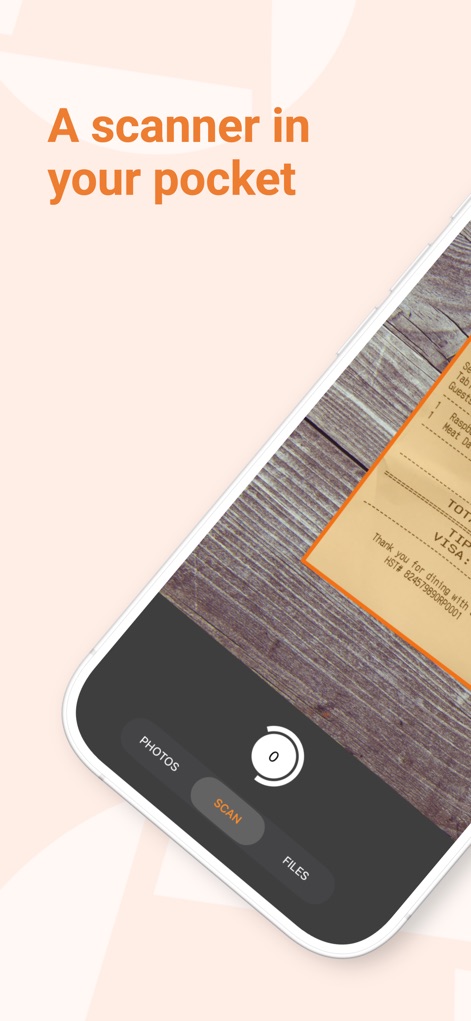
주머니 속 스캐너
이 앱은 기기의 카메라로 문서를 자동으로 감지하고, 배경 제거 및 가장자리 강조 기능으로 선명한 스캔 결과를 제공합니다.
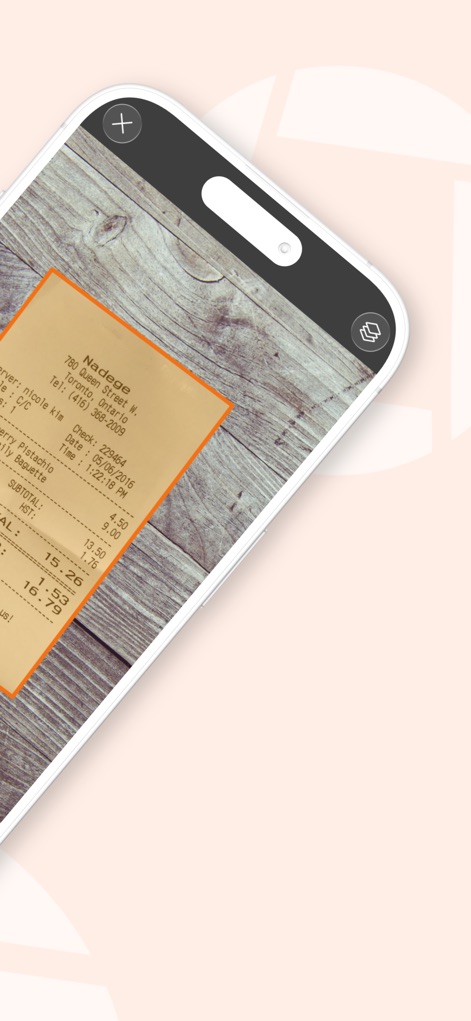
스마트한 자동 감지
이 도구는 영수증을 자동으로 인식하여 완벽하게 잘라내고, 사용자는 상단의 자르기/회전 아이콘을 통해 스캔된 문서를 세밀하게 조정할 수 있습니다.
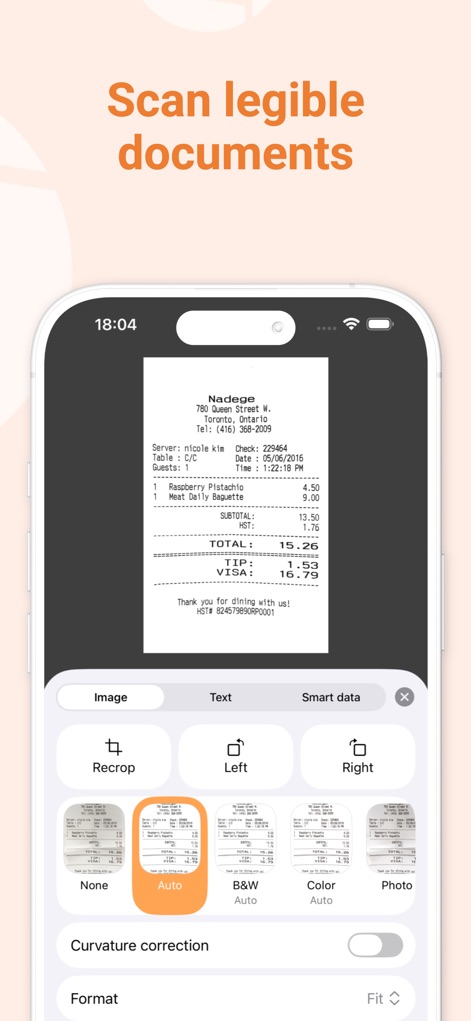
선명한 문서 스캔
스캔 후 왜곡 보정 및 다양한 필터 적용 기능으로, 사용자는 원본에 가까운 선명하고 읽기 쉬운 문서를 만들 수 있습니다.
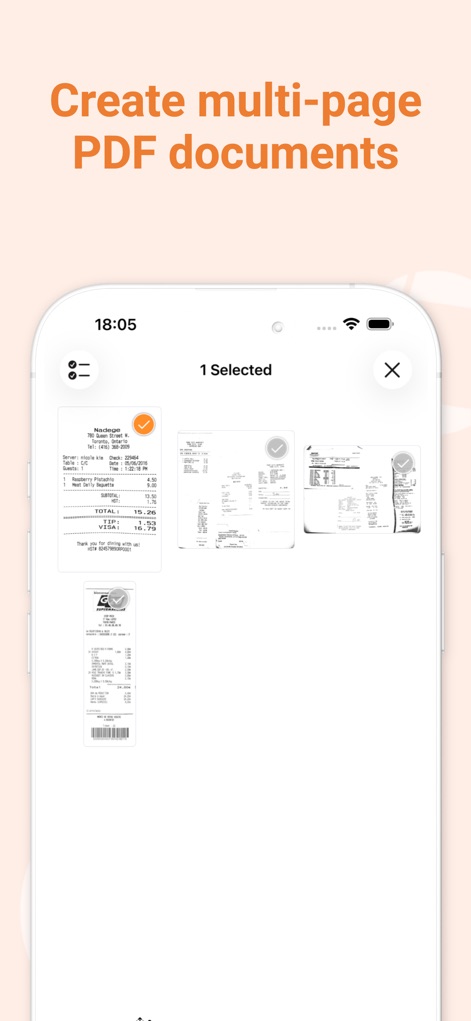
다중 페이지 PDF 생성
이 앱은 여러 문서를 하나의 PDF 파일로 합치고, 간편한 선택 및 병합 기능을 통해 사용자가 효율적으로 문서를 관리할 수 있게 돕습니다.
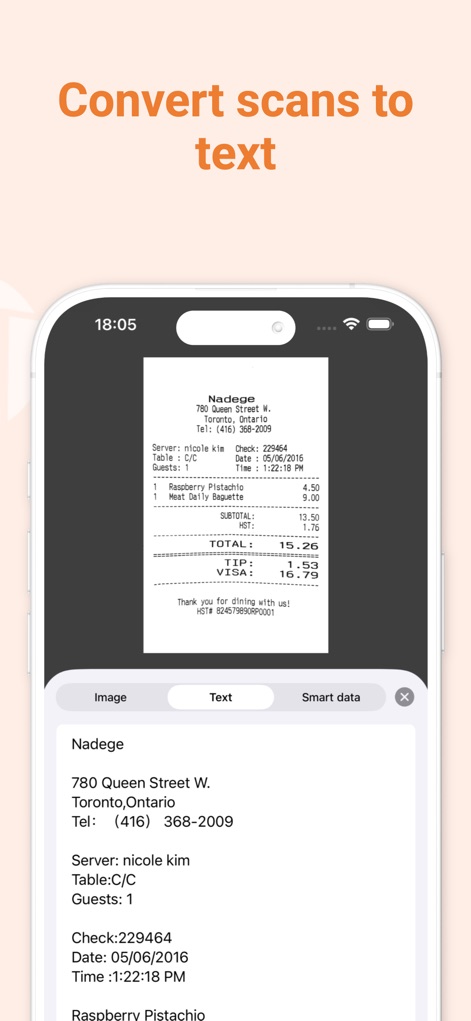
텍스트로 변환하기
이 앱은 스캔된 문서에서 텍스트를 추출하는 OCR 기능을 제공하며, 사용자는 'Text' 탭에서 추출된 텍스트 내용을 즉시 확인할 수 있습니다.
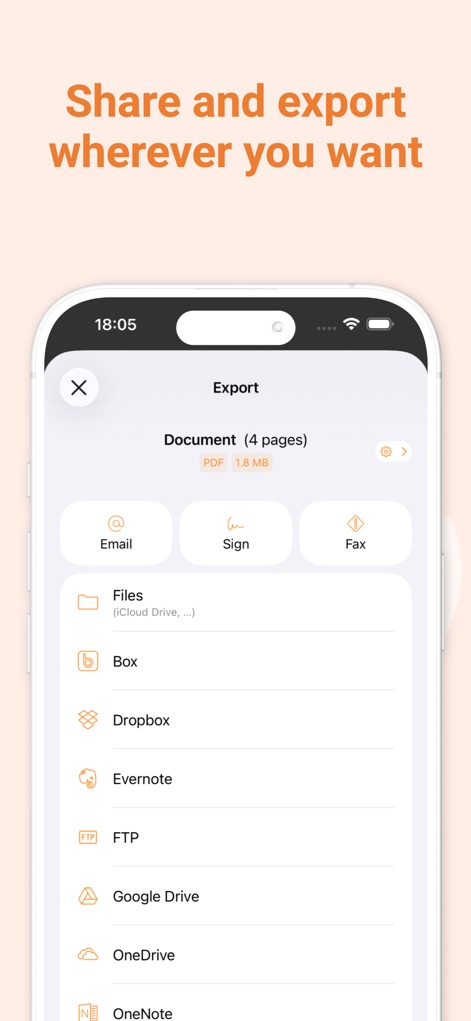
간편한 문서 공유
이 앱은 이메일, 클라우드 저장 서비스(예: Dropbox, Google Drive)를 포함한 다양한 방법으로, 사용자가 문서를 쉽고 안전하게 내보내고 공유할 수 있도록 지원합니다.
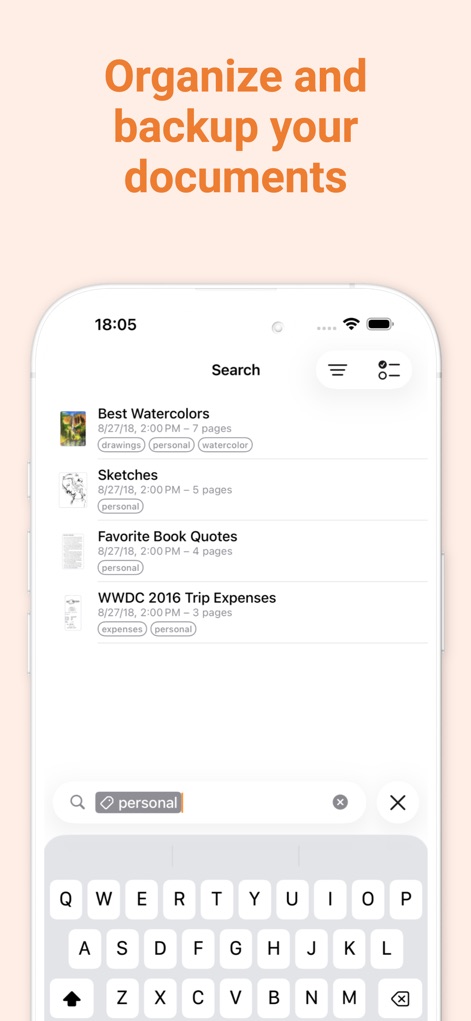
체계적인 문서 관리
사용자는 'personal'과 같은 태그를 활용한 검색 기능과 문서 목록 정렬 옵션을 통해 수많은 문서를 효율적으로 분류하고 신속하게 찾아볼 수 있습니다.

빠르고 안전하게
이 도구는 크고 명확한 카메라 아이콘으로 스캔 기능을 직관적으로 나타내며, 'Private' 및 'Secure' 문구를 통해 사용자 데이터 보안을 강조합니다.
설명
Download
비슷한 앱
유사한 기능과 사용자 경험을 가진 앱

PDF PRO Scan Image & Documents
Balzo srl

The PDF Scanner, PDF editor HQ
NEXT K.U.M. LTD

CamScanner - PDF Scanner App
INTSIG Information Co., Ltd

Adobe Scan: PDF & OCR Scanner
Adobe Inc.

WPS Office: PDF, Docs, Sheets
KINGSOFT OFFICE SOFTWARE CORPORATION LIMITED

iLovePDF - PDF Editor & Scan
ILOVEPDF S.L.

Microsoft Lens: PDF Scanner
Microsoft Corporation

Clear Scan: Doc Scanner App
INDY MOBILE APP COMPANY LIMITED

Document Scanner by Lufick
Lufick
이 페이지는 앱이나 개발자의 공식 페이지가 아니며, 정보 제공 및 논평을 목적으로 작성된 독립 편집 간행물입니다. 명시적으로 달리 언급되지 않는 한, 해당 앱이나 개발자는 MWM, Apple, Google Play, 앱 퍼블리셔 또는 앱 개발자와 제휴, 보증, 후원, 승인 또는 공식적으로 연결되어 있지 않으며, 이 페이지의 어떤 내용도 해당 앱이 MWM의 서비스를 사용하여 개발되었음을 의미하지 않습니다. 모든 상표, 로고, 스크린샷 및 기타 콘텐츠는 해당 소유자의 자산입니다.