
이 페이지는 앱이나 개발자의 공식 페이지가 아니며, 정보 제공 및 논평을 목적으로 작성된 독립 편집 간행물입니다. 명시적으로 달리 언급되지 않는 한, 해당 앱이나 개발자는 MWM, Apple, Google Play, 앱 퍼블리셔 또는 앱 개발자와 제휴, 보증, 후원, 승인 또는 공식적으로 연결되어 있지 않으며, 이 페이지의 어떤 내용도 해당 앱이 MWM의 서비스를 사용하여 개발되었음을 의미하지 않습니다. 모든 상표, 로고, 스크린샷 및 기타 콘텐츠는 해당 소유자의 자산입니다.


Drawing ▫
이 앱은 당신의 내면의 예술가를 해방시키는 파괴적인 힘을 발휘합니다. 아이폰과 아이패드에서 평범한 스크롤러를 창의적인 선구자로 바꿉니다.
다운로드
2.5M+사용자 평점
총 평가 수
17.2K개발사
카테고리
Productivity지원 언어
1최신 버전
4.13.1크기
177.8 MB출시일
2019년 11월 29일다양한 사용자층을 위한 다재다능한 창작 플랫폼 분석
소프트웨어 분석: Drawing ▫ 앱
종합적인 드로잉 및 페인팅 도구
이 앱은 40가지 이상의 맞춤형 브러시 도구와 수백만 가지의 색상을 제공하며, 브러시 크기 및 불투명도 조절 기능을 통해 사용자가 다양한 스타일의 드로잉 및 페인팅을 자유롭게 표현할 수 있도록 합니다.
특화된 컬러링 기능 (컬러링 데스크)
이 도구는 사용자 정의 만다라 생성, 20개 이상의 독특한 컬러링 페이지 카테고리, 40개 이상의 사전 설정된 팔레트 및 사용자 정의 팔레트 기능을 갖추고 있어, 사용자가 다채로운 컬러링 경험을 즐길 수 있게 해줍니다.
어린이 전용 창작 공간 (키즈 데스크)
이 플랫폼은 펜, 연필, 마커, 글리터 등 10가지 이상의 드로잉 도구와 마법 같은 패턴 브러시, 50개 이상의 교육용 컬러링 페이지를 제공하여 어린 사용자들이 재미있고 창의적인 방식으로 예술을 탐구할 수 있도록 돕습니다.
유연한 이미지 가져오기 및 편집
이 앱은 갤러리에서 사진을 가져오거나 새로운 사진을 촬영하여 그림에 삽입할 수 있도록 하며, 사진을 회전 및 확대/축소하는 기능을 제공하여 사용자가 기존 이미지를 활용한 독창적인 작품을 만들 수 있게 합니다.
정밀한 세부 작업 도구
이 도구는 직선을 그릴 수 있는 자 기능과 미세한 디테일을 그릴 때 유용한 확대/축소 기능을 포함하여, 사용자가 작품의 정교함을 높일 수 있도록 지원합니다.
고급 입력 장치 지원
이 앱은 Apple Pencil 및 iPhone의 3D 터치 감도를 지원하며, 펜, 연필, 수채화 도구 등에서 각도와 압력 감지를 통해 사용자가 더욱 자연스럽고 정교한 드로잉 경험을 할 수 있도록 합니다.
손쉬운 작품 공유 및 저장
이 플랫폼은 완성된 작품을 갤러리에 저장하고 다양한 소셜 네트워크에 즉시 공유할 수 있는 기능을 제공하며, 사용자가 자신의 창작 과정을 녹화하여 공유할 수도 있게 합니다.
필수적인 실행 취소 및 지우개
이 앱은 작업 중 발생한 실수를 쉽게 되돌릴 수 있는 실행 취소/다시 실행 옵션과 드로잉 수정에 필수적인 지우개 도구를 제공하여, 사용자가 효율적으로 작업할 수 있도록 돕습니다.
자주 묻는 질문
에 대해 알아야 할 모든 것 Drawing ▫
What is DrawingApp?
DrawingApp is a mobile application for iPhone and iPad designed for creating drawing art. It offers tools for sketching, typing, painting, and drawing, enabling users to bring creative ideas to life.
Which devices does DrawingApp support?
DrawingApp supports both iPhone and iPad devices. It also offers support for Apple Pencil on iPad Pro and 3D Touch sensitivity for iPhones.
Can I use Apple Pencil with DrawingApp?
Yes, DrawingApp supports Apple Pencil for iPad Pro. It provides angle and pressure sensitivity with tools like Water Color, Pencil, and Pen.
How many brushes are available in DrawingApp's Sketch Desk?
DrawingApp's Sketch Desk offers over 40 handcrafted style paintbrushes and various tools like a ruler and eraser. It also provides millions of colors.
Can I import photos into DrawingApp?
Yes, DrawingApp allows users to import pictures and photos to enhance their drawings in the Sketch Desk and to draw on photos in the Doodle Desk.
What features does DrawingApp's Doodle Desk include?
DrawingApp's Doodle Desk allows users to draw, sketch, paint, customize colors, import and rotate photos, adjust brush size/opacity, and utilize undo/redo options. Users can also record and share artwork.
Does DrawingApp offer custom color options?
Yes, DrawingApp provides extensive color customization. In Doodle Desk, users can customize colors, and in Coloring Desk, they can create custom palettes by combining any colors.
Can I create custom mandalas in DrawingApp?
Yes, DrawingApp features a Coloring Desk with a specific mandala creation mode. This allows users to bring their unique designs to life as custom mandalas.
How many coloring pages are in DrawingApp's Kids Desk?
DrawingApp's Kids Desk includes over 50 educational coloring pages. It also provides more than 10 drawing tools, shapes, and magical pattern brushes for children.
What are the subscription options for DrawingApp Premium?
DrawingApp Premium offers a weekly subscription at $4.99 USD (with a 3-day free trial), a monthly subscription for $7.99 USD, or a yearly subscription for $29.99 USD. A one-time lifetime purchase is $35.99.
Does DrawingApp Premium include a free trial?
Yes, DrawingApp Premium offers a 3-day free trial with its weekly subscription option. Subscription payments begin after the trial unless canceled at least 24-hours prior.
What benefits does DrawingApp Premium provide?
Upgrading to DrawingApp Premium grants unlimited access to Sketch Desk, Coloring Desk, Kids Desk, and Doodle Desk. Premium also removes all ads and watermarks from the app.
Can I adjust brush opacity in DrawingApp?
Yes, DrawingApp allows users to change brush opacity settings. This feature is available in the Doodle Desk, and visually confirmed by an opacity slider.
Where can I find DrawingApp's Privacy Policy?
DrawingApp's Privacy Policy is available at the link provided in the app description: http://drawingapp.me/privacy-policy.html.
Can I share my artwork created with DrawingApp?
Yes, DrawingApp enables users to save artworks to their gallery and share them instantly to any social network. The Doodle Desk also includes a record and share artwork option.
다음 스크린샷과 설명은 앱의 공식 스토어 목록에서 직접 가져온 것이며 앱 개발자의 자산입니다.
앱 스토어
스크린샷
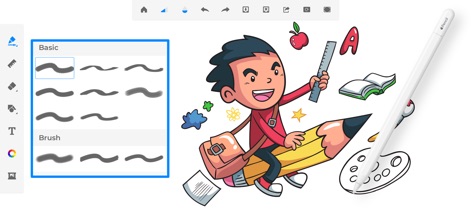
이 앱은 40가지가 넘는 수작업 브러시와 Apple Pencil 지원을 통해 실제와 같은 드로잉 경험을 제공합니다.
다양한 브러시 선택

사용자는 이 앱의 정교한 컬러 휠 인터페이스를 활용하여 수백만 가지 색상 중에서 원하는 색상을 선택하고 사용자 지정할 수 있습니다.
무한한 색상 팔레트
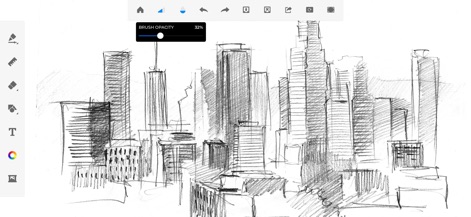
이 도구는 브러시 불투명도 조절 기능을 제공하여 도시 스카이라인의 스케치와 같이 정밀하고 세밀한 작품을 제작할 수 있도록 돕습니다.
섬세한 불투명도 조절

이 앱은 다양한 질감 브러시와 모양 브러시를 포함하여 사용자의 예술적 표현을 위한 풍부한 선택지를 제공합니다.
독특한 질감과 모양

새로운 Kids Desk 기능은 어린이를 위한 전용 드로잉 환경과 10가지 이상의 다양한 그리기 도구를 제공합니다.
어린이를 위한 창의성

Doodle Desk는 생동감 넘치는 낙서 예술을 위한 전용 공간을 제공하며, 사용자 친화적인 최소한의 도구로 창의력을 발휘할 수 있게 합니다.
즉흥적인 낙서 스케치

새로운 Coloring Book 기능은 매력적인 일러스트레이션을 위한 다양한 카테고리와 풍부한 미리 설정된 색상 팔레트를 제공합니다.
몰입형 컬러링 경험

이 앱은 사진을 가져와 그 위에 그림을 그릴 수 있는 기능을 통해 개인화된 그림과 창의적인 주석을 추가할 수 있습니다.
사진 위에 그리기

새로운 Photo Pad는 사진을 쉽게 향상시킬 수 있는 기능을 제공하며, 다양한 스티커와 패턴 옵션으로 꾸밀 수 있습니다.
사진을 예술로 바꾸기
설명
Download
비슷한 앱
유사한 기능과 사용자 경험을 가진 앱

Sketchbook®
Sketchbook, Inc.

Mental Canvas Draw
Mental Canvas, Inc.

ibis Paint
ibis inc.

ibis Paint X
ibis inc.

Paper: Sketch, Draw & Create
Evernote Corporation

Adobe Fresco: Draw & Paint App
Adobe Inc.

Art Set 4
Lofopi Ltd

MediBang Paint – Drawing & Art
MediBang inc.

Tayasui Sketches
SKETCHES SRL
이 페이지는 앱이나 개발자의 공식 페이지가 아니며, 정보 제공 및 논평을 목적으로 작성된 독립 편집 간행물입니다. 명시적으로 달리 언급되지 않는 한, 해당 앱이나 개발자는 MWM, Apple, Google Play, 앱 퍼블리셔 또는 앱 개발자와 제휴, 보증, 후원, 승인 또는 공식적으로 연결되어 있지 않으며, 이 페이지의 어떤 내용도 해당 앱이 MWM의 서비스를 사용하여 개발되었음을 의미하지 않습니다. 모든 상표, 로고, 스크린샷 및 기타 콘텐츠는 해당 소유자의 자산입니다.