
이 페이지는 앱이나 개발자의 공식 페이지가 아니며, 정보 제공 및 논평을 목적으로 작성된 독립 편집 간행물입니다. 명시적으로 달리 언급되지 않는 한, 해당 앱이나 개발자는 MWM, Apple, Google Play, 앱 퍼블리셔 또는 앱 개발자와 제휴, 보증, 후원, 승인 또는 공식적으로 연결되어 있지 않으며, 이 페이지의 어떤 내용도 해당 앱이 MWM의 서비스를 사용하여 개발되었음을 의미하지 않습니다. 모든 상표, 로고, 스크린샷 및 기타 콘텐츠는 해당 소유자의 자산입니다.

DWG FastView-CAD Viewer&Editor
대부분의 모바일 CAD는 그저 장난감에 불과했다. DWG FastView는 당신의 손에 현장 작업의 지휘봉을 쥐여준다.
다운로드
25M+사용자 평점
총 평가 수
65.7K개발사
카테고리
Productivity지원 언어
23최신 버전
5.18.8크기
368.5 MB출시일
2011년 8월 18일DWG FastView-CAD Viewer&Editor 앱 주요 기능 분석
모바일 환경에서 CAD 및 3D 모델 작업을 위한 핵심 역량 평가
광범위한 3D 모델 지원 및 고급 뷰어
이 앱은 다양한 산업 표준 3D 모델(BIM, Revit, Solidworks 등 40개 이상 형식)을 모바일에서 정확하게 열람하고, 조립품 미리보기, 확대/축소, 회전, 단면, 분해, 측정, 주석 추가 등의 고급 기능을 활용할 수 있도록 지원합니다. 2D/3D 모드 전환 및 다양한 뷰 옵션도 지원합니다.
모바일 CAD 편집 및 측정 도구
이 도구는 이동 중에도 AutoCAD와 완벽하게 호환되는 DWG 및 DXF 파일을 열람, 생성, 편집할 수 있도록 합니다. 이동, 복사, 회전, 축척, 색상 변경, 객체 측정, 레이어 관리, 고급 그리기 및 편집 도구(자르기, 간격 띄우기, 치수 기입, 텍스트 찾기) 등 실제 CAD 작업을 모바일 기기에서 수행할 수 있게 해줍니다.
AutoCAD 파일 완벽 호환
이 앱은 AutoCAD의 DWG 및 DXF 파일 형식과 완벽하게 호환되어, 기존의 CAD 도면을 오류 없이 열람, 편집 및 저장할 수 있도록 보장합니다. 이를 통해 사용자들은 데스크톱 환경에서 작업하던 파일을 모바일에서도 끊김 없이 활용할 수 있습니다.
도면 내보내기 및 형식 변환
이 도구는 CAD 도면을 PDF, BMP, JPG, PNG와 같은 다양한 이미지 및 문서 형식으로 내보낼 수 있으며, PDF 문서를 DWG 파일로 변환하는 기능도 제공합니다. 이 기능을 통해 사용자들은 협업 및 공유를 용이하게 하고, 필요에 따라 문서 형식을 유연하게 전환할 수 있습니다.
오프라인 작업 및 클라우드 연동
이 앱은 인터넷 연결 없이도 도면을 로컬 작업 공간에 저장하고 작업할 수 있도록 하며, Dropbox, OneDrive, Google Drive 등 주요 클라우드 저장 서비스와 연동하여 언제 어디서든 도면에 접근하고 공유할 수 있도록 합니다. 별도의 등록 절차 없이 앱을 즉시 사용할 수 있습니다.
정밀 좌표 기반 드로잉
이 도구는 2D (절대, 상대, 극좌표) 및 3D (구면, 원통 좌표)를 포함한 다양한 좌표계를 지원하여, 사용자가 점을 정밀하게 이동하고 객체를 정확하게 그릴 수 있도록 돕습니다. 이를 통해 고도로 정확한 설계 작업이 모바일 환경에서도 가능합니다.
자주 묻는 질문
에 대해 알아야 할 모든 것 DWG FastView-CAD Viewer&Editor
What is DWG FastView?
DWG FastView is a cross-platform CAD software fully compatible with AutoCAD (DWG, DXF). It allows users to view, edit, measure, and dimension CAD drawings, and supports over 40 formats of 3D designs.
Is registration required to use DWG FastView?
No, registration is not required to use DWG FastView. Users can download and immediately use the app without needing to create an account.
What 3D modeling file formats does DWG FastView support?
DWG FastView supports over 40 3D design software models including BIM, Revit, Solidworks, NX, CATIA, Inventor, SolidEdge, ACIS, and Pro/E, with file types such as .rvt, .sldprt, .stp, and .step.
Can DWG FastView export CAD drawings to other formats?
Yes, DWG FastView supports exporting CAD drawings to PDF, BMP, JPG, and PNG formats. Users can also convert PDF files back to DWG format within the app.
Does DWG FastView work offline?
Yes, DWG FastView allows users to save their work in a local workspace for offline access. Drawings can also be opened, viewed, and edited from cloud services when an internet connection is available.
What is the subscription model for DWG FastView?
DWG FastView offers auto-renewing subscriptions, billed either monthly or annually. Payment is charged to the user's iTunes/App Store account upon confirmation of purchase.
How do I cancel my DWG FastView auto-renewing subscription?
Users can cancel their auto-renewing subscription by turning off the feature in their iTunes/App Store account settings. This must be done at least 24 hours before the current subscription period ends to avoid being billed.
What 3D features are available in DWG FastView?
DWG FastView offers 3D model assembly part preview, scaling, rotation, sectioning, and explosion. It also includes 3D measurement, annotation, PMI display/hiding, color matching, and multiple views.
Can DWG FastView access files from cloud storage?
Yes, DWG FastView can open, view, edit, and share drawings from various cloud services including Dropbox, OneDrive, Google Drive, Box, and WebDAV, provided there is an internet connection.
Does DWG FastView allow users to create new layers in CAD drawings?
Yes, DWG FastView allows users to create new layers within CAD drawings. This functionality is part of its comprehensive tools for real CAD work on mobile devices.
다음 스크린샷과 설명은 앱의 공식 스토어 목록에서 직접 가져온 것이며 앱 개발자의 자산입니다.
앱 스토어
스크린샷

정밀한 2D 도면 편집
이 앱은 정밀한 2D CAD 도면을 보여주며, 사용자는 거리 측정 및 다양한 편집 도구를 활용하여 작업을 수행할 수 있습니다.

복잡한 3D 모델 탐색
이 도구는 CATIA 및 SolidWorks와 같은 다양한 3D CAD 파일을 지원하며, 모델의 분해도와 PMI 정보를 명확하게 표시합니다.

건축물 3D 뷰어
사용자는 정교한 3D 건축 모델을 탐색하고, 모델 단면 보기 및 측정 기능을 통해 상세한 분석을 할 수 있습니다.

DWG 파일 간편 변환
이 앱은 DWG 도면을 PDF 형식으로 변환할 수 있으며, BMP 및 JPG와 같은 다양한 이미지 형식으로도 내보내기를 지원합니다.

모바일에서 직접 편집
사용자는 직관적인 터치 제스처로 도면 객체를 이동할 수 있으며, 삭제 및 회전과 같은 다양한 편집 기능을 활용할 수 있습니다.
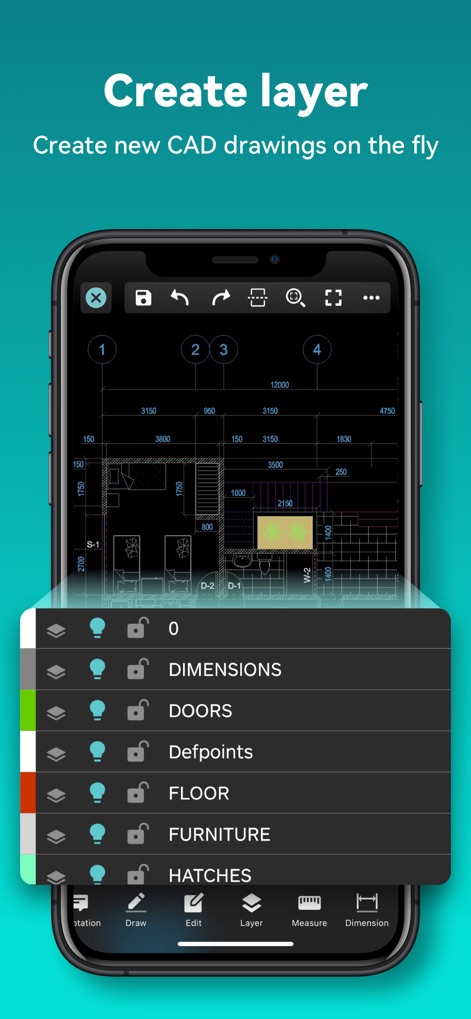
효과적인 레이어 관리
이 앱은 사용자가 도면 레이어를 쉽게 생성하고, 각 레이어를 잠그거나 숨기는 기능을 통해 효율적으로 관리할 수 있도록 돕습니다.

클라우드 연동 작업
사용자는 클라우드 서비스를 통해 DWG 및 PDF 파일에 접근하고, JPG 이미지와 같은 다양한 형식의 파일을 저장하고 동기화할 수 있습니다.
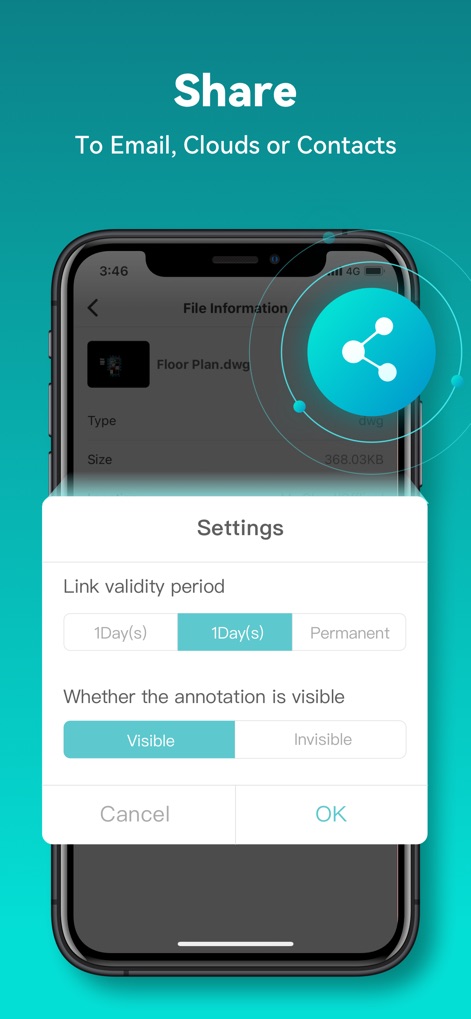
안전한 파일 공유
이 도구는 파일 공유 시 링크 유효 기간을 설정할 수 있게 하며, 주석의 표시 여부를 제어하여 정보 보안을 강화합니다.
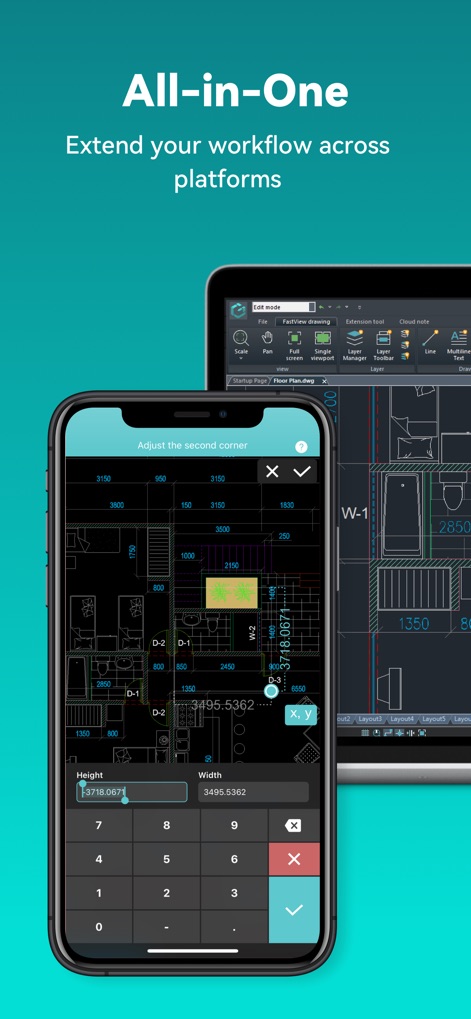
다중 플랫폼 호환성
이 앱은 모바일과 태블릿 간의 원활한 작업을 지원하며, 사용자는 정밀한 좌표 입력을 통해 정확한 도면 수정을 할 수 있습니다.
설명
Download
비슷한 앱
유사한 기능과 사용자 경험을 가진 앱

Shapr 3D CAD modeling
Shapr 3D Zartkoruen Mukodo Reszvenytarsasag

CAD快速看图-dwg手机快速看图,设计图纸工程建筑
Shanghai Tantian Network Technology Co.,Ltd.

CAD快速看图-CAD手机看图软件
存旺 姜

ZWCAD Mobile - Mobile CAD
ZWCAD Software Co.,Ltd.

CAD快速看图- 手机快速查看cad图纸
嘉欣 朱

Draft Paper
Giles Goddard

CAD FastView King: DWG Viewer
镇源 余

AutoCAD
Autodesk

CAD Reader-View & Measure DWG
Beijing Honghu Yuntu Technology Co., Ltd.
이 페이지는 앱이나 개발자의 공식 페이지가 아니며, 정보 제공 및 논평을 목적으로 작성된 독립 편집 간행물입니다. 명시적으로 달리 언급되지 않는 한, 해당 앱이나 개발자는 MWM, Apple, Google Play, 앱 퍼블리셔 또는 앱 개발자와 제휴, 보증, 후원, 승인 또는 공식적으로 연결되어 있지 않으며, 이 페이지의 어떤 내용도 해당 앱이 MWM의 서비스를 사용하여 개발되었음을 의미하지 않습니다. 모든 상표, 로고, 스크린샷 및 기타 콘텐츠는 해당 소유자의 자산입니다.