
이 페이지는 앱이나 개발자의 공식 페이지가 아니며, 정보 제공 및 논평을 목적으로 작성된 독립 편집 간행물입니다. 명시적으로 달리 언급되지 않는 한, 해당 앱이나 개발자는 MWM, Apple, Google Play, 앱 퍼블리셔 또는 앱 개발자와 제휴, 보증, 후원, 승인 또는 공식적으로 연결되어 있지 않으며, 이 페이지의 어떤 내용도 해당 앱이 MWM의 서비스를 사용하여 개발되었음을 의미하지 않습니다. 모든 상표, 로고, 스크린샷 및 기타 콘텐츠는 해당 소유자의 자산입니다.


eBoox - fb2 ePub book reader
이 앱은 독서를 귀찮은 일에서 벗어나게 합니다. 사용자는 오래된 방식의 디지털 독서가 제공하는 온갖 불필요한 번잡함 없이, 읽는 행위 그 자체에 집중할 수 있습니다.
다운로드
2.5M+사용자 평점
총 평가 수
77.6K개발사
카테고리
Books지원 언어
12최신 버전
2.23.2크기
177.3 MB출시일
2019년 12월 23일다양한 포맷을 지원하는 독서 경험의 새로운 기준
eBoox - fb2 ePub 북 리더 심층 분석
광고 없는 독서 환경
이 앱은 사용자에게 방해 없는 독서 경험을 제공하기 위해 완전한 광고 없는 환경을 지원합니다.
광범위한 전자책 포맷 지원
이 도구는 EPUB, MOBI, DOC, TXT, FB2 등 다양한 전자책 포맷을 지원하며, 심지어 ZIP 파일 내의 전자책도 읽을 수 있게 해줍니다.
온라인 자동 동기화 및 무료 웹 리더
사용자는 자신의 전자책과 독서 진행 상황을 온라인으로 자동 동기화할 수 있으며, 무료 웹 전자책 리더를 통해 어떤 기기에서든 접근할 수 있습니다.
개인 맞춤형 독서 설정
이 앱은 글꼴, 여백, 텍스트 크기, 화면 밝기, 페이지 스크롤 방식 등 다양한 맞춤형 설정을 제공하여 사용자가 자신에게 가장 편안한 독서 환경을 조성할 수 있도록 돕습니다.
직관적이고 사용자 친화적인 인터페이스
이 도구는 귀엽고 단순하면서도 유용한 사용자 인터페이스를 제공하여, 사용자가 쉽고 즐겁게 앱을 탐색하고 사용할 수 있습니다.
효율적인 독서 도구 제공
이 앱은 북마크, 3가지 색상의 하이라이트, 상호 작용 링크 및 메모와 같은 효과적인 독서 도구를 갖추고 있어 사용자의 독서 효율성을 높여줍니다.
다양한 전자책 가져오기 옵션
사용자는 iTunes, 이메일, 웹 브라우저, 클라우드 저장소(iCloud, Google Drive, Dropbox 등) 또는 AirDrop을 통해 전자책을 손쉽게 앱으로 가져올 수 있습니다.
다크 모드 및 오프라인 독서
이 앱은 눈의 피로를 줄여주는 다크 모드와 인터넷 연결 없이도 언제 어디서든 독서가 가능한 오프라인 독서 기능을 제공합니다.
자주 묻는 질문
에 대해 알아야 할 모든 것 eBoox - fb2 ePub book reader
What e-book formats does eBoox support?
eBoox supports EPUB, MOBI, DOC, DOCX, TXT, FB2, PRC, RTF, ODT, HTML, AZW, AZW3, and ZIP files. It also offers beta support for PDF documents, ensuring wide compatibility for your entire e-book library.
Is the eBoox e-reader application ad-free?
Yes, eBoox is completely ad-free. The application description clearly states this, ensuring users have an uninterrupted and pleasant reading experience without any advertisements.
Does eBoox sync reading progress across multiple devices?
Yes, eBoox offers online auto SYNC for ebooks and reading progress. This feature allows users to continue reading seamlessly on different devices, maintaining their place, bookmarks, and quotes via cloud services.
What reading customization options are available in eBoox?
eBoox offers extensive reading customization, including adjustable fonts, fields, text size, screen brightness, and page scrolling. It also features a dark mode and allows users to choose from multiple background colors for a personalized reading experience.
How can I add my own books to eBoox?
Users can add books to eBoox by uploading them via iTunes, importing from email or web browsers, or connecting to cloud storages like iCloud, Google Drive, Dropbox, and Yandex.Disk. AirDrop sharing is also supported.
Does eBoox provide a free web e-reader for online access?
Yes, eBoox offers a free web e-reader. This allows users to access and read their books directly through a web browser, extending the reading experience beyond the mobile application.
Can users highlight text and add notes in eBoox?
Yes, eBoox includes features for highlighting text with three colors, adding interactive links, and creating notes. Users can also save and share their highlights directly within the application.
Is there a way to transfer data from the old eBoox app to the new version?
Yes, users can transfer books, progress, quotes, and bookmarks from the old eBoox app to the upgraded version. Install the new app, run it, and wait for data transfer. Sync can also back up data.
다음 스크린샷과 설명은 앱의 공식 스토어 목록에서 직접 가져온 것이며 앱 개발자의 자산입니다.
앱 스토어
스크린샷
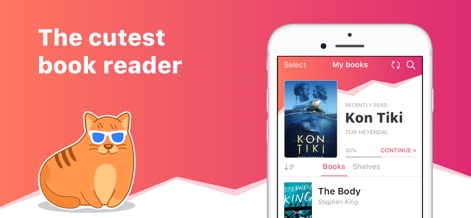
이 앱은 독자들이 귀여운 마스코트와 함께 개인화된 독서 목록에서 최근 읽은 책과 다음 읽을 책을 쉽게 탐색할 수 있도록 합니다.
사랑스러운 메인 화면
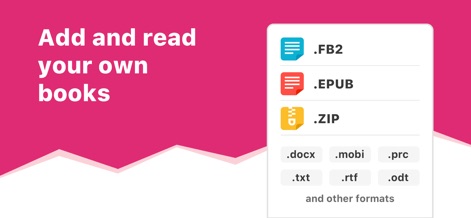
이 도구는 사용자가 FB2 및 EPUB와 같은 주요 형식뿐만 아니라 DOCX 및 TXT를 포함한 광범위한 파일 유형을 가져와 읽을 수 있도록 지원합니다.
다양한 형식 지원
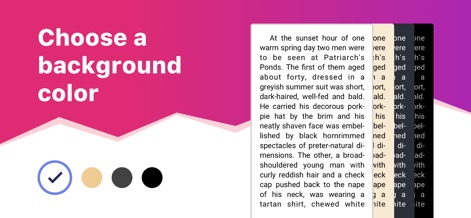
사용자는 독서 편의성을 위해 책 배경색을 흰색, 베이지색, 회색 또는 검은색 중에서 자유롭게 선택하여 시각적 환경을 최적화할 수 있습니다.
배경색 맞춤 설정

이 앱은 독자가 텍스트를 손쉽게 강조 표시하고, 강조 표시된 구절을 다양한 공유 옵션을 통해 다른 사람들과 공유할 수 있게 합니다.
하이라이트 저장 및 공유
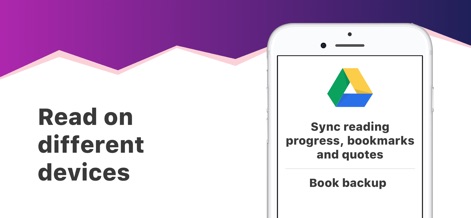
독자는 Google Drive와 같은 클라우드 서비스를 통해 독서 진행 상황과 북마크를 동기화하여 여러 기기에서 원활한 독서 경험을 보장할 수 있습니다.
기기 간 동기화
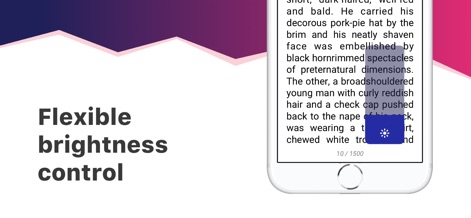
이 도구는 독자가 독서 중에 화면 밝기를 즉시 조정할 수 있는 직관적인 슬라이더 컨트롤을 제공하여 눈의 피로를 줄입니다.
유연한 밝기 조절

사용자는 글꼴 선택 및 크기부터 여백 및 줄 간격에 이르기까지 다양한 설정 옵션을 통해 독서 경험을 세밀하게 제어할 수 있습니다.
세련된 맞춤 설정

이 앱은 사랑스러운 고양이 마스코트와 생기 넘치는 이모지로 표현된 따뜻하고 친근한 미학을 통해 사용자에게 즐거운 경험을 선사합니다.
따뜻한 사용자 경험
설명
Download
비슷한 앱
유사한 기능과 사용자 경험을 가진 앱

PureLibro: ebook reader
添欢 谢

Summit Reader
三英 郑

Readingo
哲魁 左

YACReader - Comic Reader
Luis Ángel San Martín

KRed Reader
Kingjet Network Co., Ltd.

Epub Reader -read epub,chm,txt
俊杰 阮

Yomu EBook Reader
Beat Raess

KyBook 3 Ebook Reader
Konstantin Bukreev

KyBook 2 Ebook Reader
Konstantin Bukreev
이 페이지는 앱이나 개발자의 공식 페이지가 아니며, 정보 제공 및 논평을 목적으로 작성된 독립 편집 간행물입니다. 명시적으로 달리 언급되지 않는 한, 해당 앱이나 개발자는 MWM, Apple, Google Play, 앱 퍼블리셔 또는 앱 개발자와 제휴, 보증, 후원, 승인 또는 공식적으로 연결되어 있지 않으며, 이 페이지의 어떤 내용도 해당 앱이 MWM의 서비스를 사용하여 개발되었음을 의미하지 않습니다. 모든 상표, 로고, 스크린샷 및 기타 콘텐츠는 해당 소유자의 자산입니다.