Exif Metadata Editor & IPTC

Exif Metadata Editor & IPTC

다운로드: App Store
로고: Exif Metadata Editor & IPTC

Exif 메타데이터 편집기 및 IPTC: 사진 데이터 및 개인 정보 관리

공유하기 전에 EXIF 및 IPTC 태그를 편집하고, 전문 저작권을 관리하며, 숨겨진 GPS 데이터를 제거하는 필수 모바일 도구.

다운로드: App Store

개발사

Andres Piza Buckmann

카테고리

Photo & Video

다운로드

34K+

사용자 평점

4.3/5

총 평가 수

800

지원 언어

5

메타데이터 집중 분석

이 인터페이스를 사용하는 34K+ 명의 사용자.

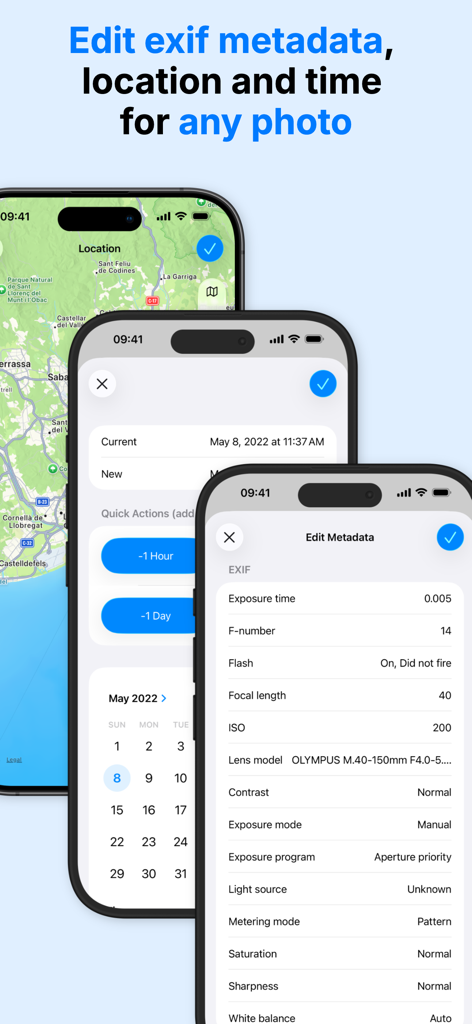
사진 EXIF 메타데이터 위치 및 날짜 편집을 보여주는 iPhone 화면
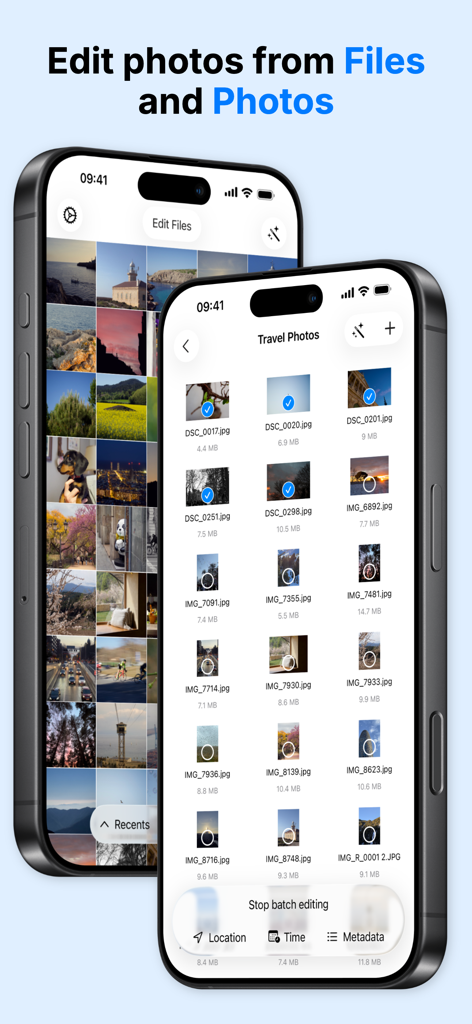
사진 EXIF 메타데이터 위치 및 날짜 편집을 보여주는 iPhone 화면

파일 및 사진 앱에서 메타데이터 및 위치 편집을 위해 사진 일괄 선택을 보여주는 인터페이스
파일 및 사진 앱에서 메타데이터 및 위치 편집을 위해 사진 일괄 선택을 보여주는 인터페이스

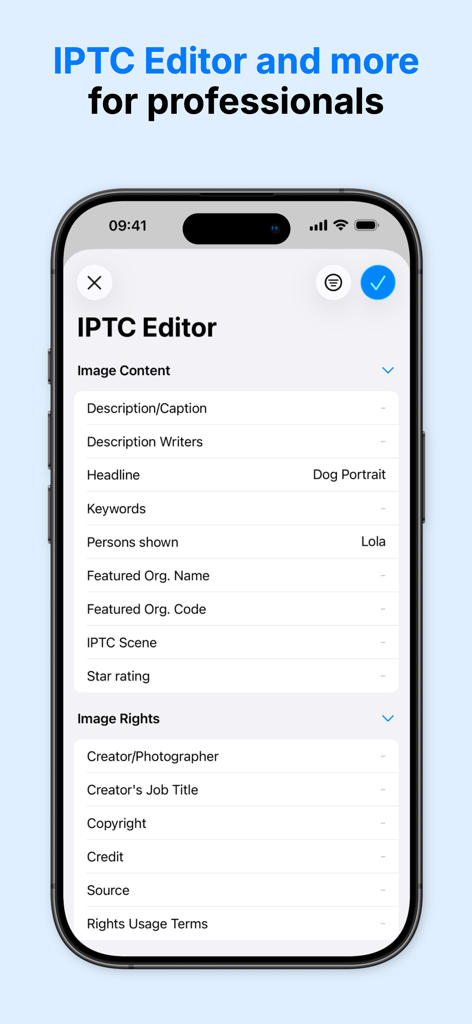
이미지 콘텐츠 및 권리 메타데이터 필드가 있는 IPTC 편집기 인터페이스를 보여주는 스마트폰 화면
이미지 콘텐츠 및 권리 메타데이터 필드가 있는 IPTC 편집기 인터페이스를 보여주는 스마트폰 화면

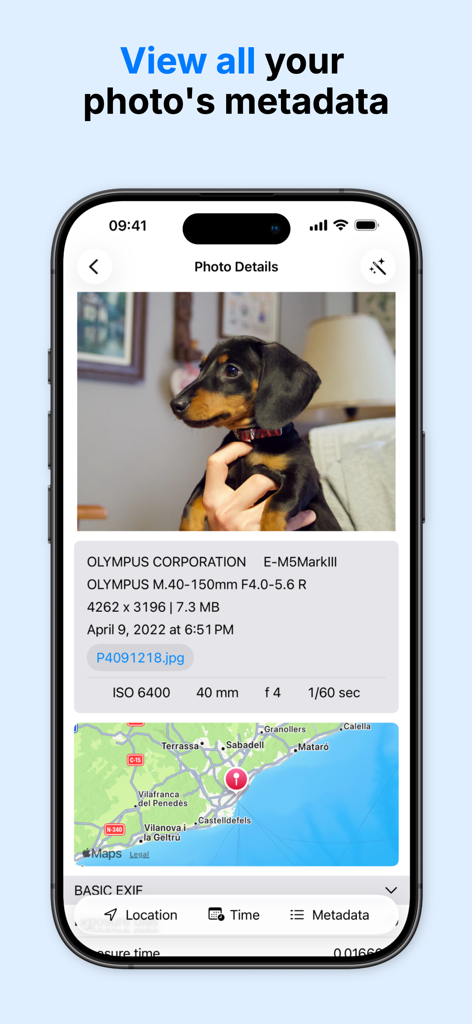
카메라 설정 및 GPS 위치 지도를 포함한 사진 기술 세부 정보를 보여주는 인터페이스
카메라 설정 및 GPS 위치 지도를 포함한 사진 기술 세부 정보를 보여주는 인터페이스

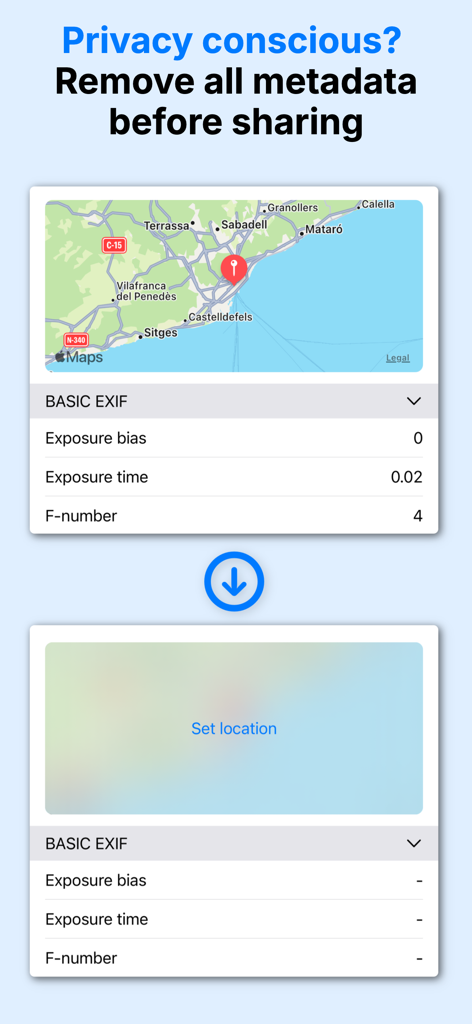
사용자 개인 정보를 보호하기 위해 사진에서 EXIF 메타데이터 및 GPS 좌표 제거 시연
사용자 개인 정보를 보호하기 위해 사진에서 EXIF 메타데이터 및 GPS 좌표 제거 시연

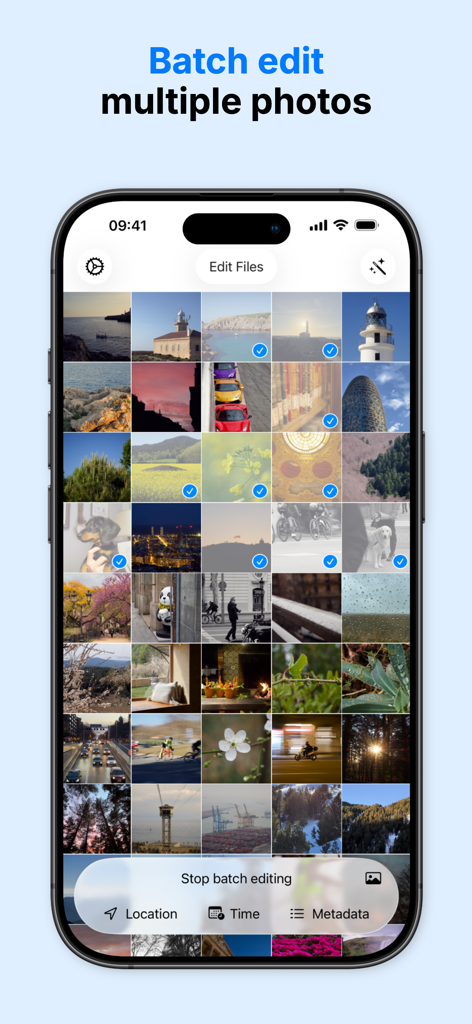
위치 및 시간과 같은 메타데이터의 일괄 편집을 위해 여러 사진이 선택된 모바일 앱의 인터페이스
위치 및 시간과 같은 메타데이터의 일괄 편집을 위해 여러 사진이 선택된 모바일 앱의 인터페이스

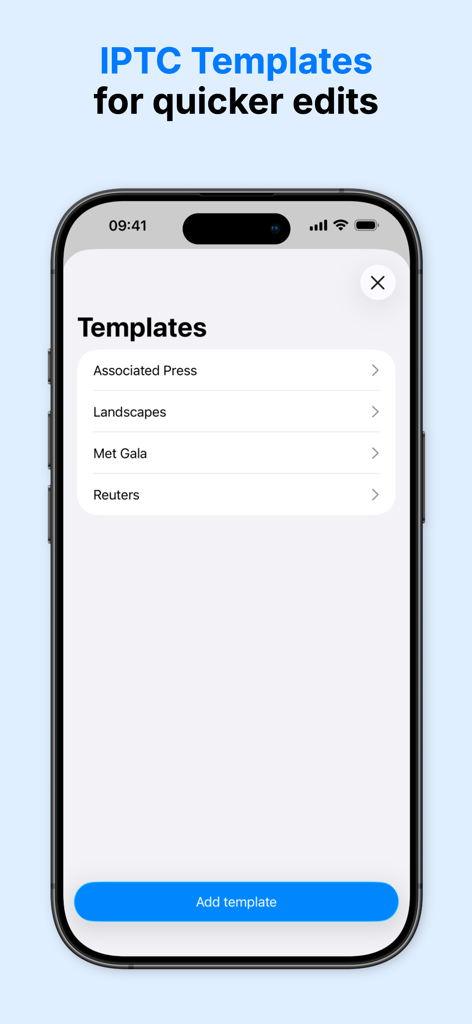
빠른 사진 편집 및 전문 워크플로우를 위한 IPTC 메타데이터 템플릿을 보여주는 인터페이스
빠른 사진 편집 및 전문 워크플로우를 위한 IPTC 메타데이터 템플릿을 보여주는 인터페이스

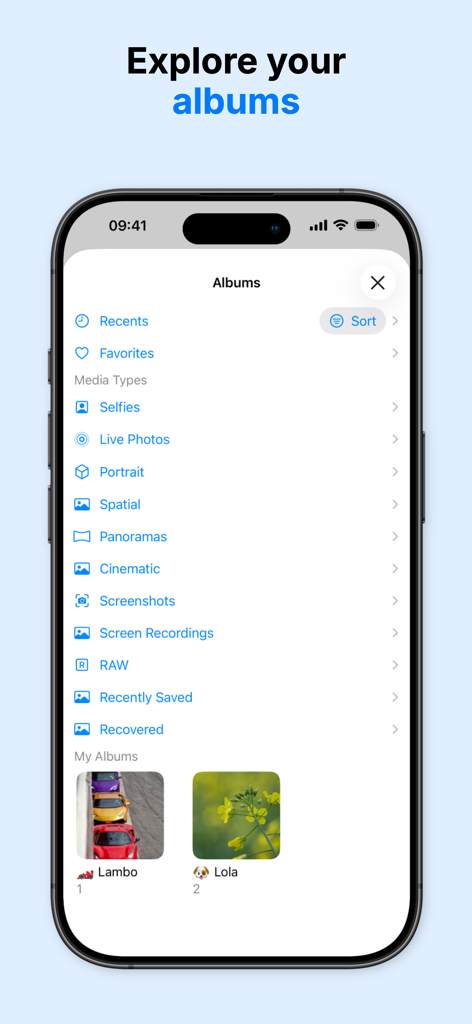
쉬운 메타데이터 관리를 위한 사진 앨범 및 미디어 카테고리 목록을 보여주는 iPhone 화면

쉬운 메타데이터 관리를 위한 사진 앨범 및 미디어 카테고리 목록을 보여주는 iPhone 화면

이미지 데이터 마스터하기

이 앱을 돋보이게 하는 도구, 34K+ 명의 사용자가 선택.

🏷️

에이전시 준비 IPTC 표준

작품을 보호하고 에이전시 제출을 간소화하기 위해 전문 템플릿을 사용하여 저작권, 아티스트 크레딧 및 키워드 태그를 적용합니다.

🛡️

절대적인 개인 정보 보호

소셜 미디어나 앱에서 이미지를 공유하기 전에 GPS 좌표 및 민감한 EXIF 데이터를 즉시 제거하여 디지털 발자국을 보호합니다.

🗓️

효율적인 일괄 구성

시간대를 수정하고, 필름 스캔에 지오태그를 지정하거나, 라이브러리의 수백 개 사진에 대한 메타데이터를 동시에 업데이트하여 시간을 절약합니다.

앱 소개

에 대해 알아야 할 모든 것 Exif Metadata Editor & IPTC.

설명

Looking to set the GPS location to a photo? Quickly editing the date? Remove all the metadata before sharing it to protect your privacy? Metadata Editor makes it easy for you, the perfect photography companion! Metadata Editor has a simple and modern interface to help you make the changes very quickly. You can quickly see an overview of your photos' more important metadata values, as well as a full list of all the values contained in your photo. Metadata Editor is a great EXIF editor to work on your photos, whether you are an amateur photographer, a professional one or you are a photo investigator looking to perform forensic analysis of photos (osint). FEATURES View: - Browse all your photos in iCloud Photo Library - Access and edit photos stored in Files app - See camera details like model, lens, ISO, aperture, and shutter speed - Check the location of your photo in an interactive map - View your photos by album - View all the raw metadata contained in your photo Edit: - Edit photos from both Photos Library and Files app - Add, change or remove the location of a photo - Copy the location of one photo to another photo - Geotag your photos for easier discoverability when looking at your photos in a map - Batch edit multiple photos at once. Perfect for photo organization - Modify the date and time - Correct time zone errors after a trip - Edit the raw metadata values - Edit EXIF, PNG and TIFF metadata - Complete IPTC editor for professional photographers - Templates to save your most common IPTC metadata edits - Limited video editing support Professional Features: - Copyright and artist information management - Keyword tagging for stock photo submissions - Caption and description fields for agency requirements - Camera owner name for equipment tracking - Custom IPTC metadata templates for consistent workflow - Preserve original files while creating edited versions - Export-ready metadata for client deliverables Protect your privacy: - Remove the GPS location of a photo - Completely strip metadata from a photo and remove exif information - Set the location of a photo to a completely different location Essential when you want to share your photos with a person, app or website and don't want to give them any information that can be used to track you. WHO IS METADATA EDITOR FOR? - People who want to make their photo library perfect, by having all photos complete with the right metadata and precise location. - Professional photographers that need to edit their photos right on the field with an iPhone or iPad before sending them to an agency. - Photojournalists preparing images with IPTC standards for wire services and publications. - Stock photographers managing copyright, keywords, and descriptions for multiple photo libraries. - Users that care about their privacy and want to avoid getting tracked when sharing photos with strangers or shady apps. - Photographers that shoot with analog or film cameras and want to add metadata for their pictures. EDITABLE METADATA Edit 50+ metadata fields including GPS coordinates, EXIF camera settings, IPTC keywords, TIFF image details, and PNG metadata. Note: The app is free to download and use, but some features may require premium access. CONTACT If you need help or have any questions about the app, please do not hesitate to contact us at www.andrespiza.com or from the Settings app inside the app. We will gladly help you! UNLIMITED ACCESS AND SUBSCRIPTION TERMS Your Metadata Editor unlimited access subscription will automatically renew unless auto-renew is turned off at least 24 hours before the end of the current period. You can go, on your iPhone, to Settings > Apple Account > Subscriptions to manage your subscription and turn auto-renew off. Your Apple Account will be charged when the purchase is confirmed. Terms and Conditions: https://www.andrespiza.com/apps/metadata-editor/terms-of-use/ Privacy Policy: https://www.andrespiza.com/apps/metadata-editor/privacy-policy/

최신 버전

3.2.0

크기

59.4 MB

출시일

2022년 5월 20일

정확하게 사진 메타데이터를 관리하세요

수천 명의 전문 사진 작가 및 개인 정보 보호를 중시하는 제작자에 동참하세요. 이동 중에 위치를 안전하게 보호하고, IPTC 데이터를 관리하며, 디지털 아카이브를 완벽하게 만드세요.

다운로드: App Store
FAQ

자주 묻는 질문

에 대해 알아야 할 모든 것 Exif Metadata Editor & IPTC

Exif Metadata Editor & IPTC 앱은 무엇인가요?

Metadata Editor는 사진의 메타데이터를 보거나 편집하고 삭제할 수 있는 iOS 앱입니다. EXIF, IPTC, PNG, TIFF 메타데이터를 지원하여 사용자가 사진 세부 정보 및 개인 정보를 관리하는 데 도움을 줍니다.

Metadata Editor로 EXIF 데이터를 편집할 수 있나요?

네, Metadata Editor는 전용 EXIF 편집기 역할을 합니다. 사용자는 EXIF, PNG, TIFF 메타데이터를 편집할 수 있으며, 여기에는 ISO, 조리개, 셔터 속도와 같은 카메라 세부 정보도 포함됩니다.

Metadata Editor는 사용자의 개인 정보를 어떻게 보호하나요?

Metadata Editor는 GPS 위치를 삭제하고, 모든 메타데이터를 완전히 제거하며, 공유 전에 사진에서 EXIF 정보를 제거하여 사용자의 개인 정보를 보호합니다. 이를 통해 추적을 방지할 수 있습니다.

Metadata Editor로 사진의 위치를 수정할 수 있나요?

네, Metadata Editor를 사용하면 사진의 위치를 추가, 변경 또는 삭제할 수 있습니다. 또한 사진 간에 위치 데이터를 복사하고 이미지에 지오태그를 지정하여 검색 가능성을 높이는 기능도 지원합니다.

Metadata Editor는 사진 일괄 편집을 지원하나요?

네, Metadata Editor는 여러 사진을 동시에 일괄 편집할 수 있습니다. 이 기능은 사진 정리 및 전체 이미지 컬렉션에 일관된 메타데이터 변경을 적용하는 데 효율적입니다.

Metadata Editor는 무료 앱인가요?

네, Metadata Editor는 무료로 다운로드하여 사용할 수 있습니다. 하지만 프로 도구나 무제한 액세스와 같은 일부 고급 기능에는 프리미엄 구독이 필요할 수 있습니다.

Exif Metadata Editor & IPTC는 어떤 전문 기능을 제공하나요?

Metadata Editor는 저작권 및 아티스트 정보 관리, 스톡 사진 키워드 태그 지정, 캡션/설명 필드, 일관된 워크플로우를 위한 사용자 지정 IPTC 메타데이터 템플릿과 같은 전문 기능을 제공합니다.

Metadata Editor로 사진의 날짜와 시간을 편집할 수 있나요?

네, Metadata Editor를 사용하면 사진의 날짜와 시간을 수정할 수 있습니다. 또한 시간대 오류를 수정하는 기능도 포함되어 있어 여행 후 유용합니다.

Exif Metadata Editor & IPTC는 동영상 편집 기능을 제공하나요?

Metadata Editor 앱은 제한적인 동영상 편집 지원을 제공합니다. 핵심 기능은 EXIF 및 IPTC 필드를 포함한 사진의 포괄적인 메타데이터 관리에 중점을 둡니다.

Metadata Editor 구독은 어떻게 관리하나요?

Metadata Editor 무제한 액세스 구독은 iPhone의 설정 앱을 통해 관리할 수 있습니다. Apple 계정 > 구독으로 이동하여 활성 구독을 확인하고 자동 갱신을 해제하세요.

App information, icons, screenshots, and descriptions displayed on this page are sourced from the Apple App Store and are the property of their respective developers. Download estimates and rankings are based on MWM's proprietary models and may not reflect actual figures. This page is provided for informational and analytical purposes only.

Believe this page infringes your intellectual property? File a dispute