
이 페이지는 앱이나 개발자의 공식 페이지가 아니며, 정보 제공 및 논평을 목적으로 작성된 독립 편집 간행물입니다. 명시적으로 달리 언급되지 않는 한, 해당 앱이나 개발자는 MWM, Apple, Google Play, 앱 퍼블리셔 또는 앱 개발자와 제휴, 보증, 후원, 승인 또는 공식적으로 연결되어 있지 않으며, 이 페이지의 어떤 내용도 해당 앱이 MWM의 서비스를 사용하여 개발되었음을 의미하지 않습니다. 모든 상표, 로고, 스크린샷 및 기타 콘텐츠는 해당 소유자의 자산입니다.

Ferrite Recording Studio
팟캐스터, 저널리스트, 성우를 위해 설계된 수상 경력에 빛나는 모바일 스튜디오로 워크플로우를 간소화하세요. 효율적인 녹음부터 자동 무음 제거 기능이 포함된 고급 멀티트랙 편집까지, 이야기가 있는 곳 어디에서나 방송 수준의 콘텐츠를 제작할 수 있습니다.
다운로드
625K+사용자 평점
총 평가 수
100개발사
카테고리
Music지원 언어
5최신 버전
3.2.2크기
24.9 MB출시일
2015년 11월 5일어디서나 프로덕션의 힘을 발휘하세요
Ferrite는 단순한 녹음기와 복잡한 데스크톱 소프트웨어 사이의 간극을 메워주며, 모바일 워크플로우에 최적화된 전문가급 스튜디오를 제공합니다.
데스크톱의 성능, 터치의 간편함
직관적인 제스처로 멀티트랙 프로젝트를 손쉽게 관리하세요. 기존 마우스로는 따라올 수 없는 정밀함과 속도로 클립을 자르고, 크롭하고, 크로스페이드할 수 있습니다.
자동으로 완성되는 전문가급 품질
지루한 편집 시간을 대폭 단축하세요. Strip Silence를 사용하여 공백을 즉시 제거하고, 자동 더킹(Automatic Ducking)으로 배경 음악과 음성의 밸런스를 완벽하게 맞출 수 있습니다.
자주 묻는 질문
에 대해 알아야 할 모든 것 Ferrite Recording Studio
Ferrite Recording Studio는 무엇인가요?
Ferrite Recording Studio는 팟캐스트, 라디오 저널리즘, 강의, 연설 및 보이스오버 제작을 위해 설계된 수상 경력이 있는 앱입니다. 간편한 녹음과 다재다능한 멀티트랙 편집을 결합하여 전문적인 오디오 제작을 위한 강력한 도구를 제공합니다.
Ferrite Recording Studio는 멀티트랙 편집 기능을 제공하나요?
네, Ferrite는 멀티트랙 편집을 지원하여 사용자가 여러 오디오 클립을 정렬하고, 볼륨 및 패닝을 조정하며, 페이드 및 크로스페이드를 적용할 수 있습니다. 이를 통해 포괄적인 팟캐스트 또는 방송 패키지 제작이 가능합니다.
Ferrite Recording Studio에서 프로젝트 길이에 제한이 있나요?
네, Ferrite의 무료 버전은 녹음 및 편집 프로젝트 길이에 제한이 있습니다. Pro 버전으로 업그레이드하면 최대 24시간 길이의 프로젝트를 편집할 수 있습니다.
Ferrite Recording Studio에서 이펙트를 사용하여 오디오 품질을 향상시킬 수 있나요?
네, Ferrite Recording Studio는 전문적인 결과를 위해 오디오 품질을 향상시키기 위해 인앱 구매를 통해 노이즈 감소, 자동 레벨링, EQ, 노이즈 게이트 및 다이내믹 레인지 압축과 같은 고급 기능을 제공합니다.
Ferrite Recording Studio는 오디오 녹음을 어떻게 지원하나요?
Ferrite는 원탭 활성화와 몇 시간 동안 지속되는 세션을 처리할 수 있는 기능으로 간소화된 녹음을 제공합니다. 사용자는 순간을 북마크하고, 라이브 미터로 레벨을 모니터링하며, iCloud 및 Dropbox와 같은 다양한 소스에서 오디오를 가져올 수 있습니다.
Ferrite Recording Studio에서 오디오 프로젝트를 어떻게 구성할 수 있나요?
네, Ferrite는 녹음을 정리하기 위해 스마트 폴더와 템플릿을 생성할 수 있습니다. 사용자는 제목, 북마크, 사람 및 챕터별로 검색하고 파일 형식 및 사용자 지정 태그별로 필터링할 수 있습니다.
Ferrite Recording Studio는 오디오 설정 자동화를 지원하나요?
네, Ferrite는 오디오 자동화를 지원하여 사용자가 시간에 따라 볼륨, 패닝 및 효과 설정을 자동화할 수 있습니다. 이는 동적인 사운드 제어를 위해 개별 트랙과 최종 믹스에 적용됩니다.
Ferrite Recording Studio에서 녹음에서 무음을 제거하는 데 도움이 되나요?
네, Ferrite Recording Studio에는 'Strip Silence' 및 'Tighten Audio'와 같은 기능이 포함되어 있습니다. Strip Silence는 무음 부분을 제거하고, Tighten Audio는 편집 시간을 절약하기 위해 어색한 휴지 및 간격을 자동으로 제거합니다.
Ferrite에서 팟캐스트에 챕터 및 커버 아트를 추가할 수 있나요?
네, Ferrite를 사용하면 사용자가 커버 아트를 추가하고 MP3 챕터를 생성하여 팟캐스트를 준비할 수 있습니다. 이는 청취자를 위한 오디오 콘텐츠를 구성하는 데 도움이 되고 전문적인 마무리를 더합니다.
Ferrite Recording Studio에는 실행 취소/다시 실행 기능이 있나요?
네, Ferrite Recording Studio는 광범위한 실행 취소/다시 실행 기록을 제공합니다. 이를 통해 사용자는 앱을 종료하고 나중에 다시 열더라도 변경 사항을 되돌릴 수 있습니다.
다음 스크린샷과 설명은 앱의 공식 스토어 목록에서 직접 가져온 것이며 앱 개발자의 자산입니다.
앱 스토어
스크린샷
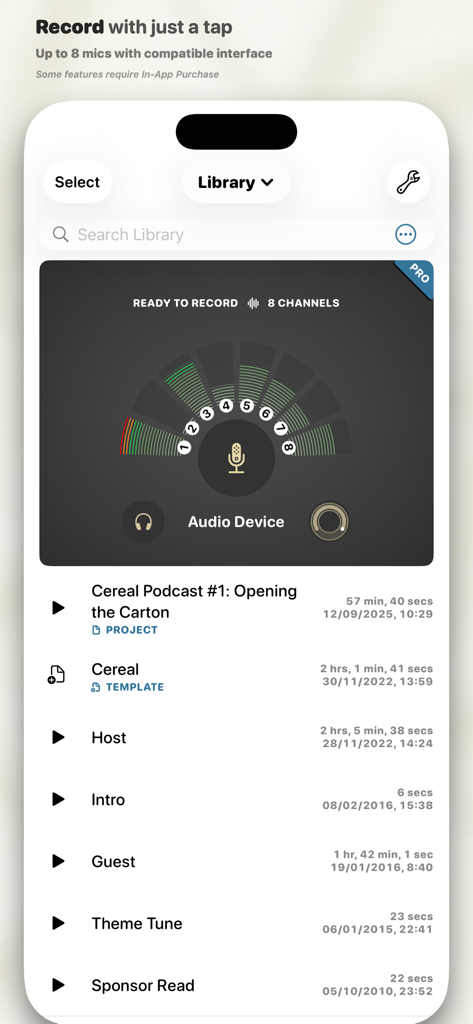
팟캐스트 프로젝트 목록과 8채널 오디오 레벨 미터가 표시된 Ferrite Recording Studio 앱 인터페이스
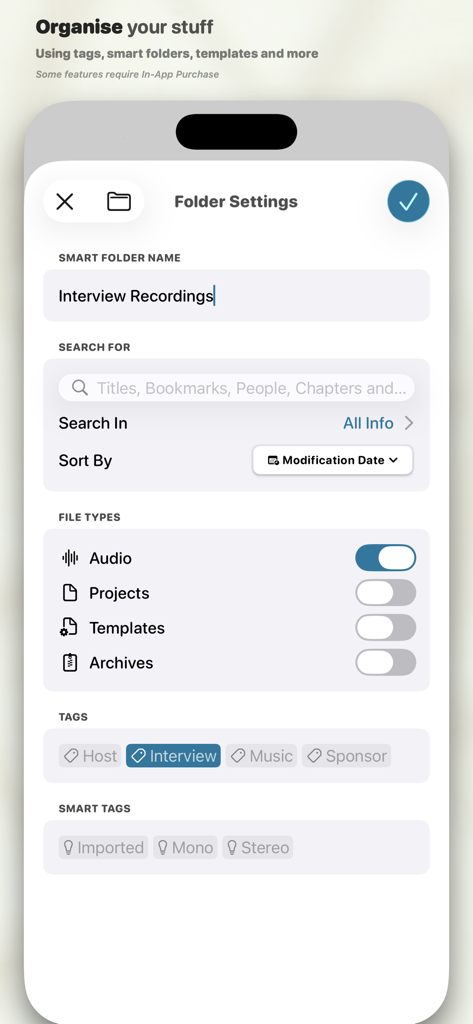
인터뷰 녹음 태그가 포함된 스마트 폴더 설정을 보여주는 Ferrite Recording Studio 인터페이스
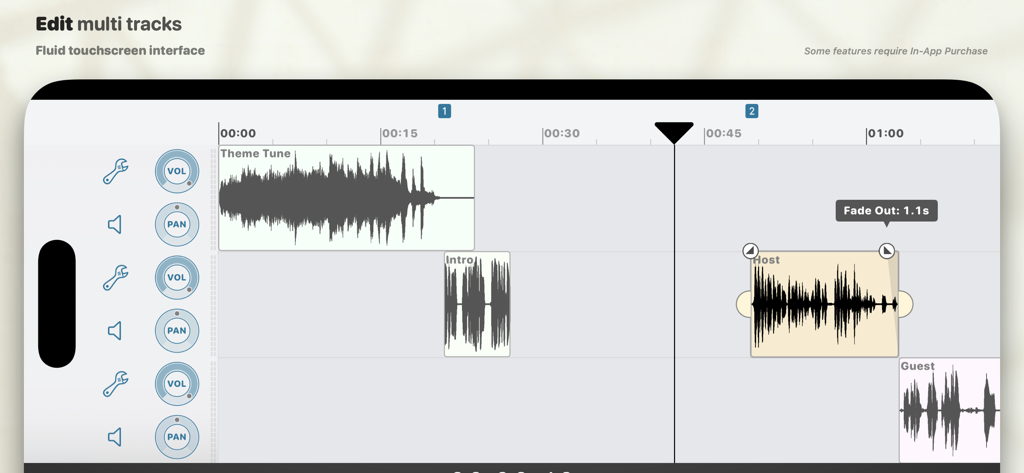
테마곡, 호스트, 게스트의 파형 클립과 볼륨 및 팬 컨트롤이 표시된 Ferrite Recording Studio의 멀티트랙 오디오 편집 타임라인
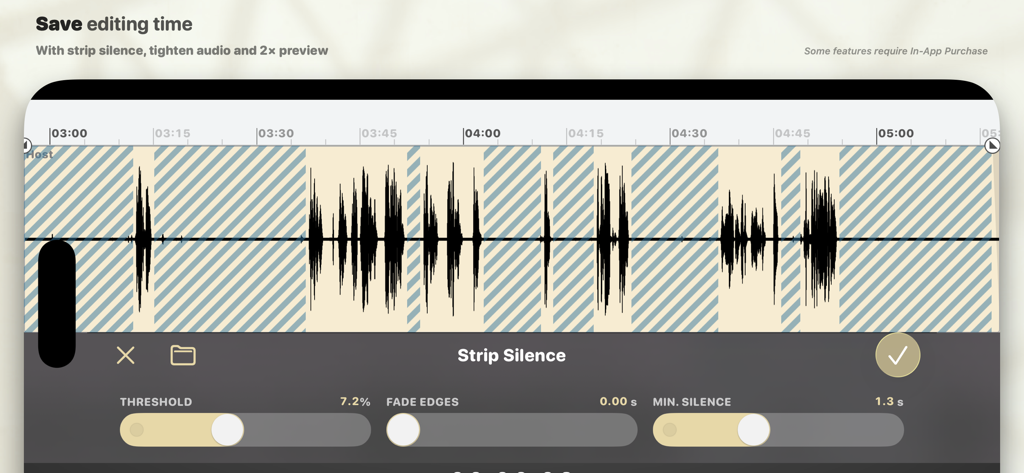
오디오 녹음에서 무음 공백을 자동으로 제거하는 Ferrite Recording Studio 앱의 Strip Silence 기능
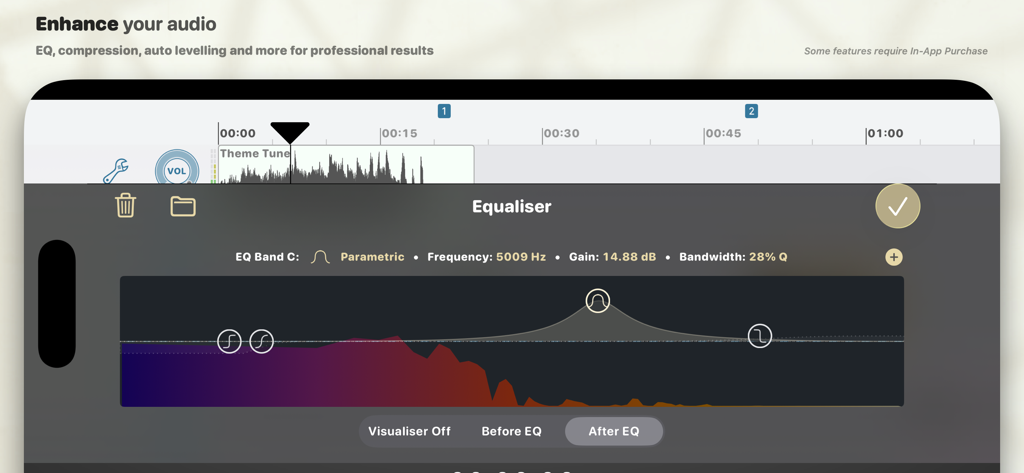
모바일 오디오 편집을 위한 Ferrite Recording Studio의 전문 파라메트릭 이퀄라이저 도구
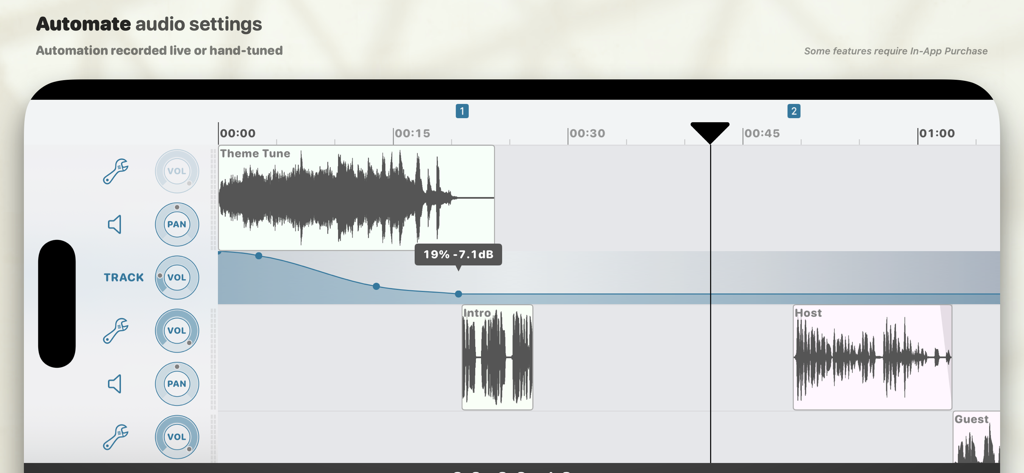
전문 팟캐스트 제작을 위한 볼륨 자동화 곡선이 표시된 멀티트랙 오디오 편집 인터페이스
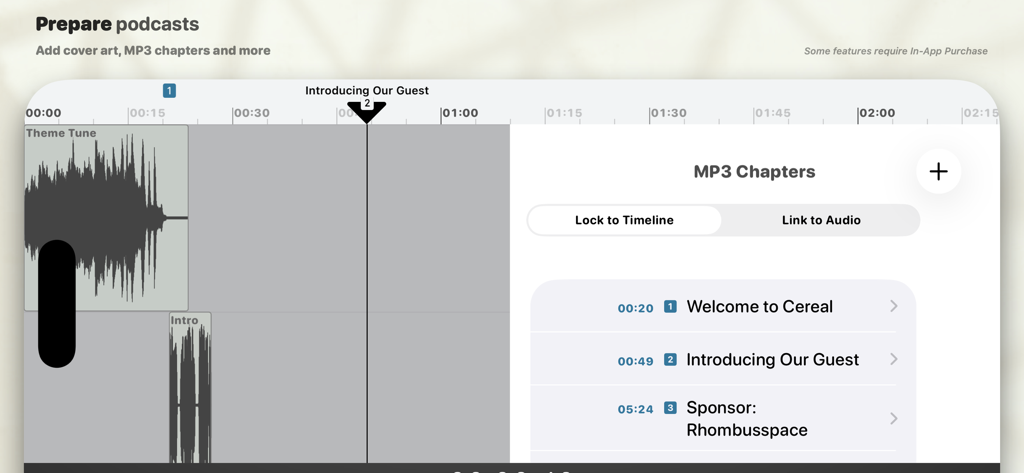
팟캐스트 에피소드의 타임스탬프 제목이 포함된 MP3 챕터 편집 도구를 보여주는 Ferrite Recording Studio 인터페이스
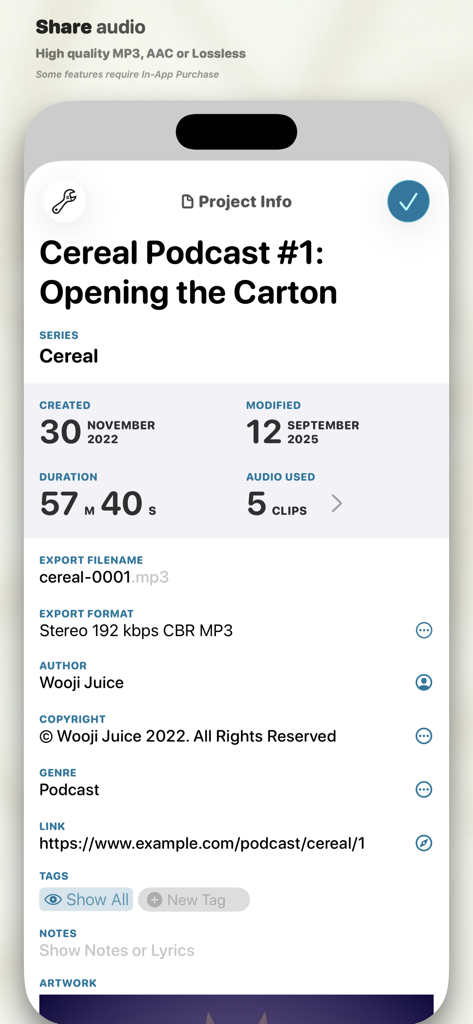
팟캐스트 메타데이터 및 내보내기 설정이 표시된 Ferrite Recording Studio의 프로젝트 정보 화면
설명
Download
비슷한 앱
유사한 기능과 사용자 경험을 가진 앱

WavePad音频和音乐编辑器
NCH Software

Audio Editor - Music editor
苏娟 陈

SoundLab - Audio Editor
孛 刘

Microphone Live-Voice Recorder
Arpenik Katikyan

WavePad Music and Audio Editor
NCH Software

Audio Editor - AudioLab, Mixer
Innovation Software Development 360 LLC

au editor - audio cutter
龙刚 李

Audio Editor: Video to Audio
文 夏

Audio Editor:Music Editor
燕倩 费
이 페이지는 앱이나 개발자의 공식 페이지가 아니며, 정보 제공 및 논평을 목적으로 작성된 독립 편집 간행물입니다. 명시적으로 달리 언급되지 않는 한, 해당 앱이나 개발자는 MWM, Apple, Google Play, 앱 퍼블리셔 또는 앱 개발자와 제휴, 보증, 후원, 승인 또는 공식적으로 연결되어 있지 않으며, 이 페이지의 어떤 내용도 해당 앱이 MWM의 서비스를 사용하여 개발되었음을 의미하지 않습니다. 모든 상표, 로고, 스크린샷 및 기타 콘텐츠는 해당 소유자의 자산입니다.