
이 페이지는 앱이나 개발자의 공식 페이지가 아니며, 정보 제공 및 논평을 목적으로 작성된 독립 편집 간행물입니다. 명시적으로 달리 언급되지 않는 한, 해당 앱이나 개발자는 MWM, Apple, Google Play, 앱 퍼블리셔 또는 앱 개발자와 제휴, 보증, 후원, 승인 또는 공식적으로 연결되어 있지 않으며, 이 페이지의 어떤 내용도 해당 앱이 MWM의 서비스를 사용하여 개발되었음을 의미하지 않습니다. 모든 상표, 로고, 스크린샷 및 기타 콘텐츠는 해당 소유자의 자산입니다.


Files - File Manager & Browser
모바일 사파리의 한계를 초월하여, 이 앱은 당신의 iOS 기기를 전능한 데이터 요새로 탈바꿈시킵니다. 웹의 모든 데이터를 오프라인으로 끌어내어 개인의 디지털 아카이브를 구축하고, 어떤 파일이든 장악할 수 있는 절대적인 권한을 부여합니다. 표준 iOS가 감히 제공하지 못하는 진정한 파일 마스터의 힘을 경험하게 됩니다.
다운로드
2.5M+사용자 평점
총 평가 수
41.3K개발사
카테고리
Productivity지원 언어
1최신 버전
8.3.1크기
34.0 MB출시일
2010년 1월 8일고급 iOS 파일 관리 및 웹 브라우징 기능 평가
Files - 파일 관리자 및 브라우저 앱 분석
내장 웹 브라우저
이 앱은 탭 탐색, 오프라인 보기 웹페이지 저장, 북마크 관리, 통합 검색 및 User-Agent 문자열 스푸핑과 같은 고급 기능을 갖춘 내장 웹 브라우저를 제공합니다.
강력한 파일 관리자
이 도구는 .pdf, .doc, .xls 등 다양한 파일 형식을 지원하는 전체 화면 문서 뷰어를 포함하며, 파일 이동, 이름 변경, 삭제, 검색, RAR 및 ZIP 아카이브 압축 해제 등의 강력한 파일 관리 기능을 제공합니다.
효율적인 다운로드 관리자
이 앱은 중단된 다운로드를 안정적으로 재개하고, 실시간 진행률 및 속도 표시기, 빠른 다운로드 속도를 제공하여 사용자가 효율적으로 파일을 다운로드할 수 있게 해줍니다.
Dropbox 통합
이 도구는 Dropbox와의 원활한 통합을 제공하여 사용자가 파일을 업로드, 다운로드 및 관리하고, 필요에 따라 파일을 동기화하며 장치에 보관할 수 있도록 합니다.
고급 PDF 뷰어
이 앱은 대용량 PDF 파일을 원활하게 처리하고, 텍스트 검색 기능 및 파일 내 링크 이동 기능을 갖춘 고급 PDF 뷰어를 통해 사용자가 문서를 효율적으로 검토할 수 있도록 돕습니다.
다중 파일 전송 옵션
이 도구는 HTTP 및 FTP 프로토콜, iTunes USB 파일 공유, Wi-Fi 네트워크를 통한 컴퓨터-장치 간 파일 전송, 이메일 첨부 전송 등 다양한 파일 전송 방법을 지원합니다.
패스코드 잠금
이 앱은 앱 내 파일 및 데이터에 대한 무단 접근을 방지하기 위해 사용자가 패스코드를 설정하여 개인 정보를 보호할 수 있도록 지원합니다.
앱 간 문서 교환
이 도구는 다른 앱(예: 이메일 앱)이 파일을 Files 앱에 직접 저장할 수 있도록 하여, 다양한 소스에서 문서를 중앙 집중식으로 관리하는 워크플로우를 개선합니다.
백그라운드 다운로드
이 앱은 백그라운드 다운로드를 지원하여 사용자가 다른 작업을 하는 동안에도 파일 다운로드가 계속되도록 하여 생산성을 향상시킵니다.
내장 사진 뷰어
이 도구는 폴더 내 이미지 간 이동, 핀치 제스처로 확대/축소, 사진 앨범에 이미지 저장 기능 등 기본적인 사진 뷰어 기능을 제공합니다.
자주 묻는 질문
에 대해 알아야 할 모든 것 Files - File Manager & Browser
What is Files App?
Files App is a mobile application for iPhone and iPod touch, serving as a web browser and file manager. It enables users to save documents for offline access and view various file types.
Can Files App download audio or video content?
No, Files App does not support the downloading of audio or video content. Its primary function is to save and manage documents, images, and web pages for offline viewing.
How do I download files from the web using Files App?
To download files from the web using Files App, navigate to the desired link in the built-in browser. Then, tap and hold on the link to activate the download option.
What file formats does Files App support for viewing?
Files App supports full-screen viewing of .pdf, .doc, .xls, .ppt, .txt, .html, and .rtf file formats. It also allows for extraction of RAR archives and unzipping ZIP files.
Does Files App integrate with Dropbox?
Yes, Files App offers full Dropbox integration. Users can upload, download, and manage their Dropbox files directly within the application, including syncing content to their device.
How can I secure my files in Files App?
Files App provides a passcode lock feature to secure your documents. This ensures that unauthorized users cannot access your saved files and personal data within the application.
Does Files App include a web browser for offline viewing?
Yes, Files App integrates a web browser enabling users to save web pages with images for offline viewing. It also features tabbed browsing, bookmarks, and integrated search.
다음 스크린샷과 설명은 앱의 공식 스토어 목록에서 직접 가져온 것이며 앱 개발자의 자산입니다.
앱 스토어
스크린샷

이 앱의 내장 웹 브라우저를 통해 사용자는 웹에서 파일을 직접 다운로드할 수 있습니다. 다운로드 옵션 팝업과 명확한 파일 URL이 표시됩니다.
웹에서 파일 다운로드

이 앱은 내장 웹 브라우저를 제공하여 사용자가 웹 콘텐츠를 탐색하고 파일을 미리 볼 수 있게 합니다. 하단의 '브라우저' 탭과 '검색' 필드를 통해 웹 탐색이 용이합니다.
통합 웹 브라우징

이 앱의 다운로드 관리자는 여러 파일의 동시 다운로드 진행 상황을 명확하게 보여줍니다. 'iphone_user_guide.pdf'와 같은 파일 목록과 실시간 다운로드 속도 및 진행률 표시줄이 특징입니다.
효율적인 다운로드 관리
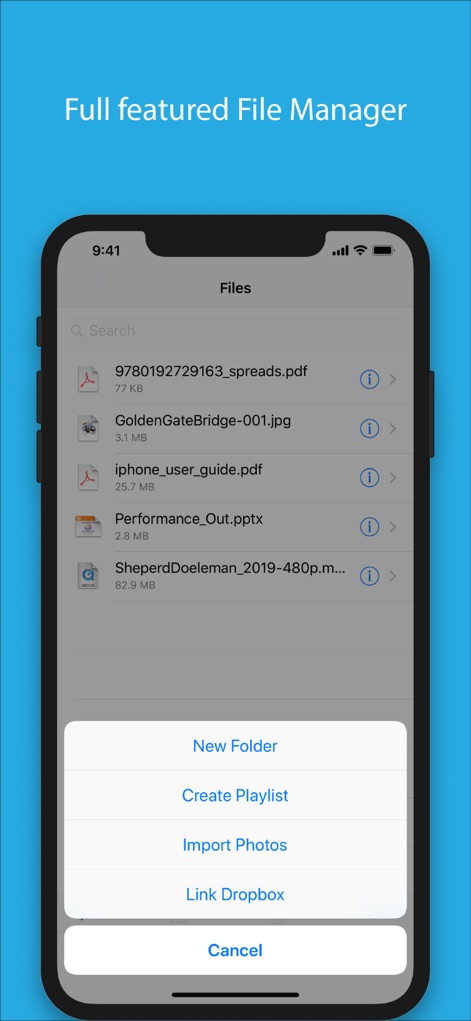
이 도구의 파일 관리 기능은 다양한 파일을 체계적으로 정리하고 쉽게 접근할 수 있도록 돕습니다. '새 폴더' 생성 옵션과 'Dropbox 연결' 기능을 통해 파일 구성이 편리합니다.
강력한 파일 관리
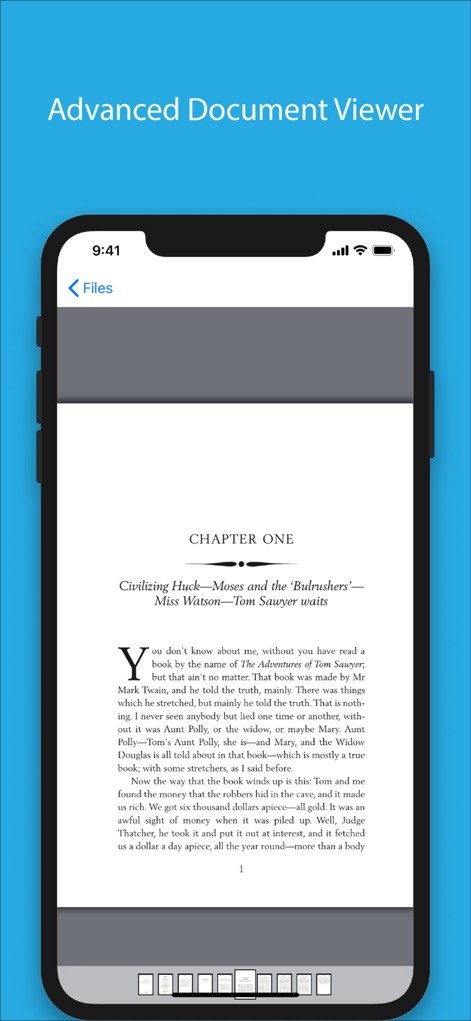
이 앱은 다양한 문서 형식에 대한 고급 뷰어를 제공하여 원활한 읽기 경험을 보장합니다. 'CHAPTER ONE' 텍스트와 하단의 페이지 탐색 지점을 통해 사용자는 콘텐츠를 쉽게 탐색할 수 있습니다.
탁월한 문서 보기
설명
Download



이 페이지는 앱이나 개발자의 공식 페이지가 아니며, 정보 제공 및 논평을 목적으로 작성된 독립 편집 간행물입니다. 명시적으로 달리 언급되지 않는 한, 해당 앱이나 개발자는 MWM, Apple, Google Play, 앱 퍼블리셔 또는 앱 개발자와 제휴, 보증, 후원, 승인 또는 공식적으로 연결되어 있지 않으며, 이 페이지의 어떤 내용도 해당 앱이 MWM의 서비스를 사용하여 개발되었음을 의미하지 않습니다. 모든 상표, 로고, 스크린샷 및 기타 콘텐츠는 해당 소유자의 자산입니다.