Final Cut Pro for iPad

Final Cut Pro for iPad

다운로드: App Store
로고: Final Cut Pro for iPad

Final Cut Pro for iPad: 어디서든 사용할 수 있는 전문 프로덕션 스튜디오

차세대 크리에이터를 위해 설계된 터치 우선 인터페이스로 창의력을 발휘하세요. 조그 휠로 정밀하게 편집하고, 라이브 멀티캠으로 촬영하고, AI의 강력한 기능으로 이동 중에도 영상을 영화 같은 걸작으로 바꿔보세요.

개발사

Apple Inc.

카테고리

Photo & Video

다운로드

1M+

사용자 평점

4.3/5

총 평가 수

4K+

지원 언어

7

나의 모바일 프로덕션 스위트

이 인터페이스를 사용하는 1M+ 명의 사용자.

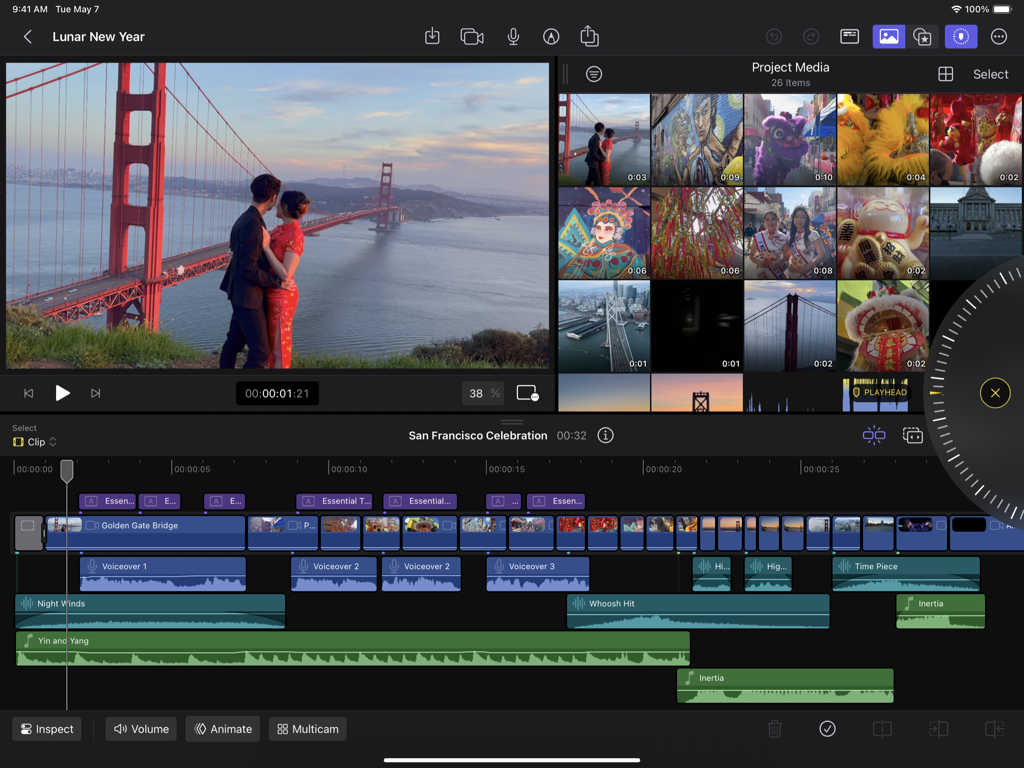
Final Cut Pro for iPad 인터페이스에 마그네틱 타임라인과 정밀 조그 휠이 있는 비디오 프로젝트가 표시됨

Final Cut Pro for iPad 인터페이스에 마그네틱 타임라인과 정밀 조그 휠이 있는 비디오 프로젝트가 표시됨

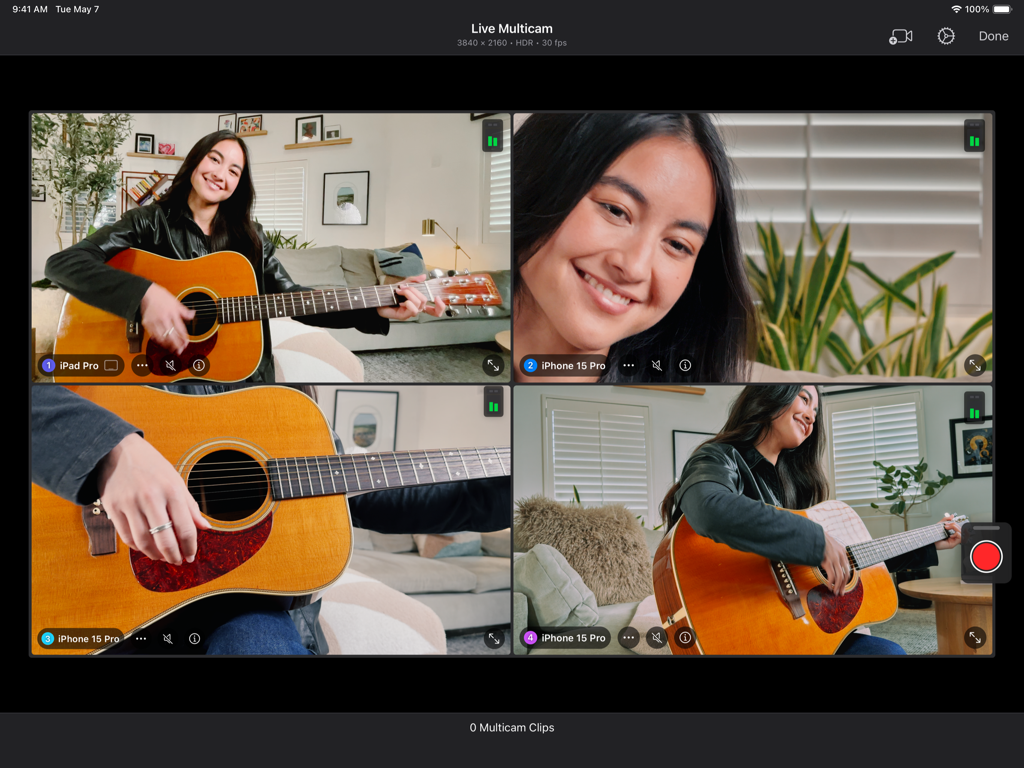
Final Cut Pro for iPad 인터페이스에 기타를 연주하는 여성의 네 가지 동시 카메라 각도가 표시되는 라이브 멀티캠 기능이 표시됨.

Final Cut Pro for iPad 인터페이스에 기타를 연주하는 여성의 네 가지 동시 카메라 각도가 표시되는 라이브 멀티캠 기능이 표시됨.

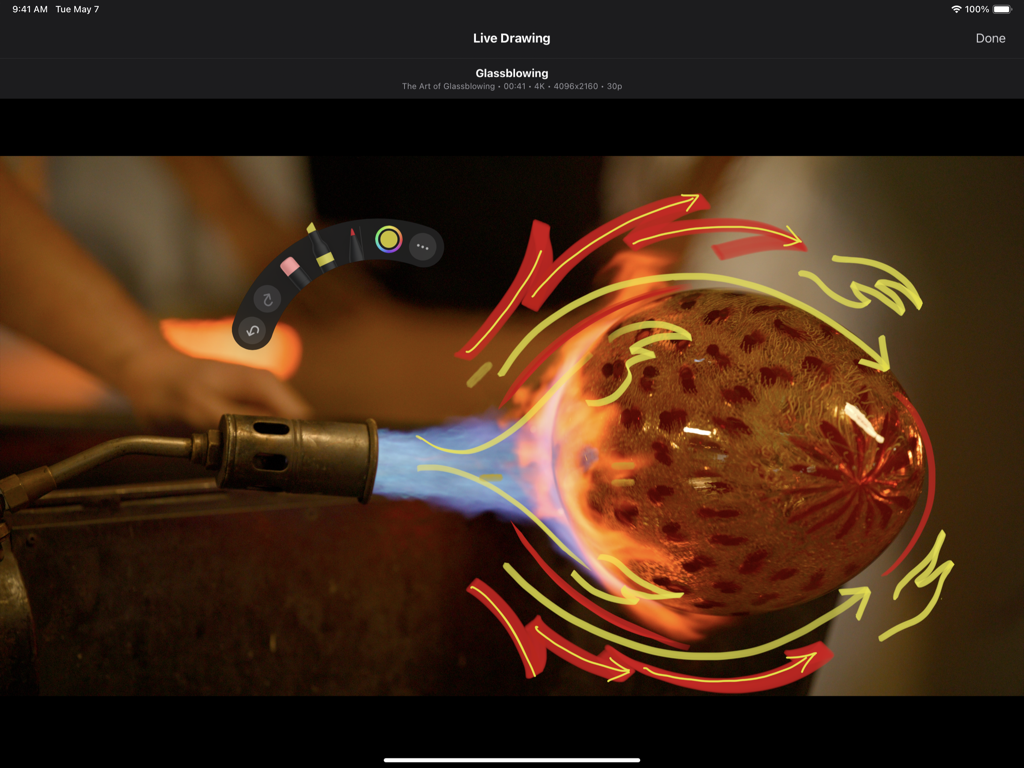
Final Cut Pro for iPad의 라이브 그리기 기능을 사용한 손그림 애니메이션

Final Cut Pro for iPad의 라이브 그리기 기능을 사용한 손그림 애니메이션

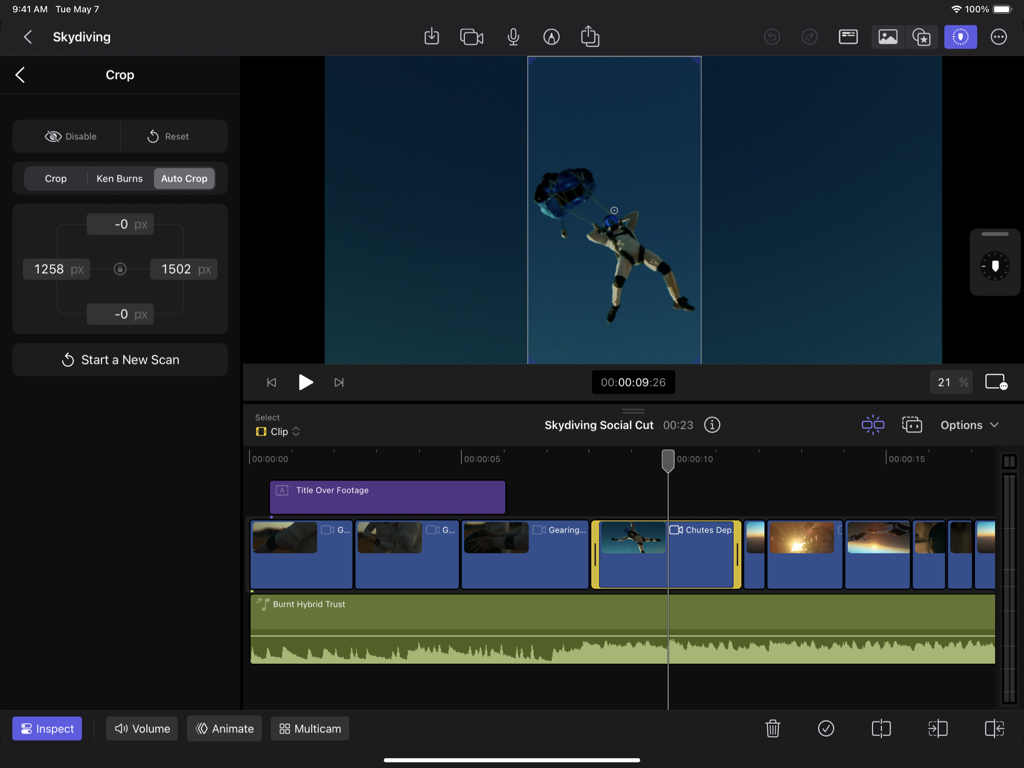
사용자가 Final Cut Pro for iPad의 자동 자르기 AI 기능을 사용하여 스카이다이빙 비디오를 편집하여 세로 콘텐츠를 만드는 중

사용자가 Final Cut Pro for iPad의 자동 자르기 AI 기능을 사용하여 스카이다이빙 비디오를 편집하여 세로 콘텐츠를 만드는 중

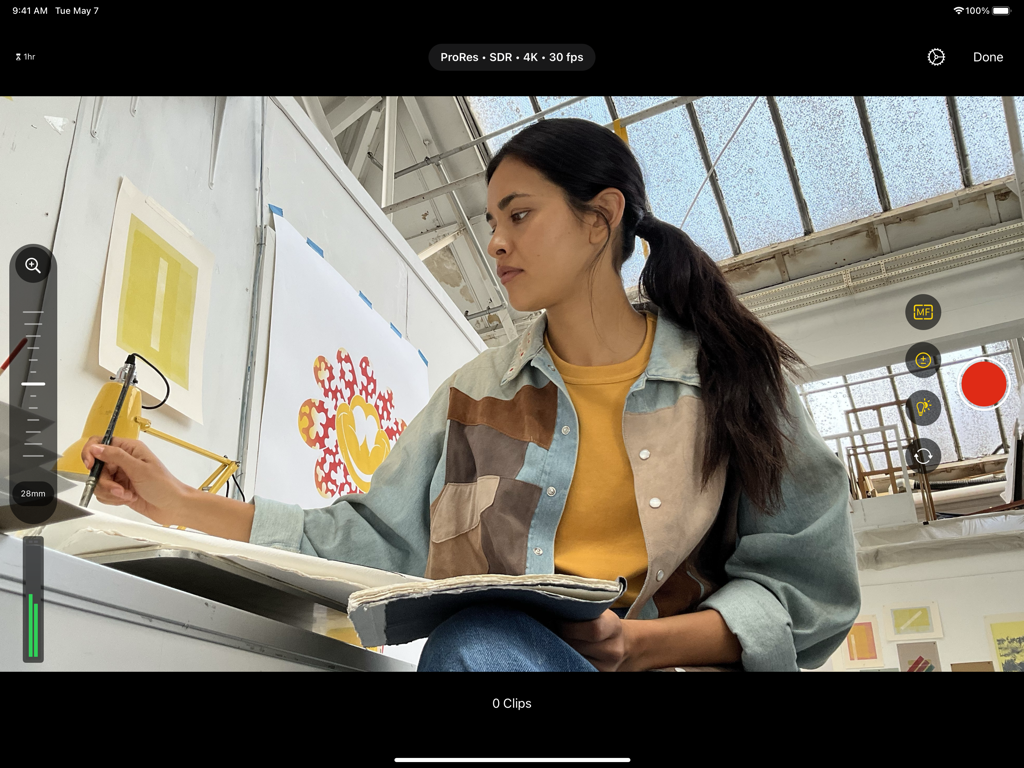
Final Cut Pro for iPad 프로 카메라 인터페이스에 4K 비디오 녹화 설정과 스튜디오에 있는 크리에이터가 표시됨

Final Cut Pro for iPad 프로 카메라 인터페이스에 4K 비디오 녹화 설정과 스튜디오에 있는 크리에이터가 표시됨

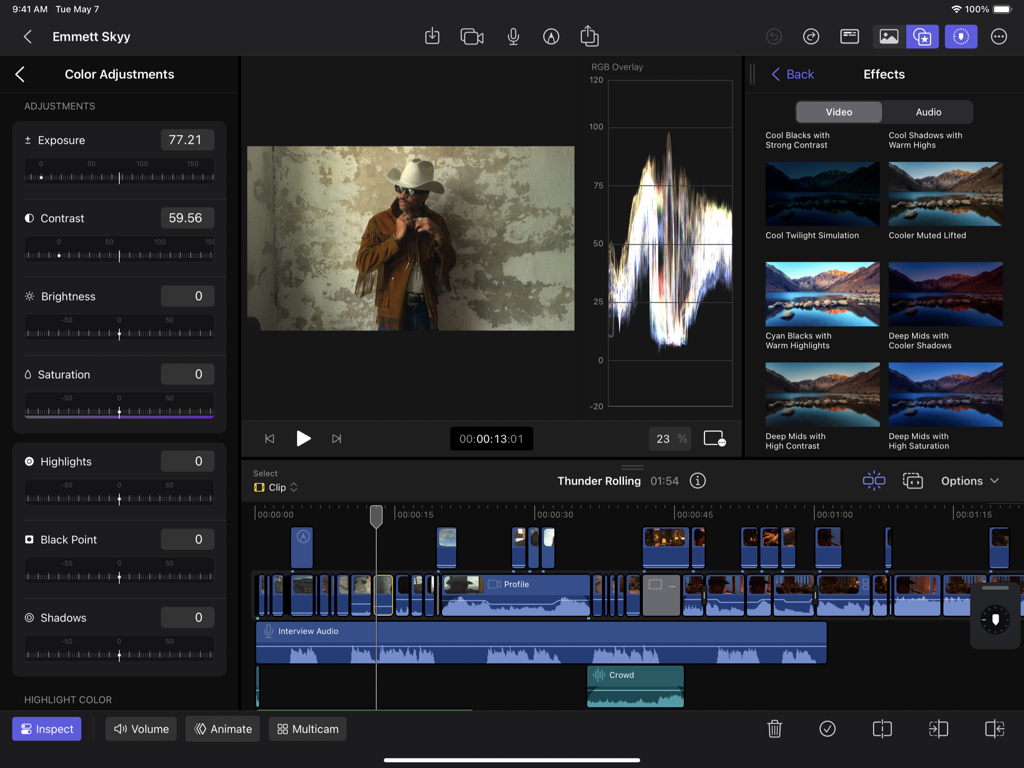
Final Cut Pro for iPad 인터페이스에 색상 조정 컨트롤과 비디오 편집 타임라인이 표시됨

Final Cut Pro for iPad 인터페이스에 색상 조정 컨트롤과 비디오 편집 타임라인이 표시됨

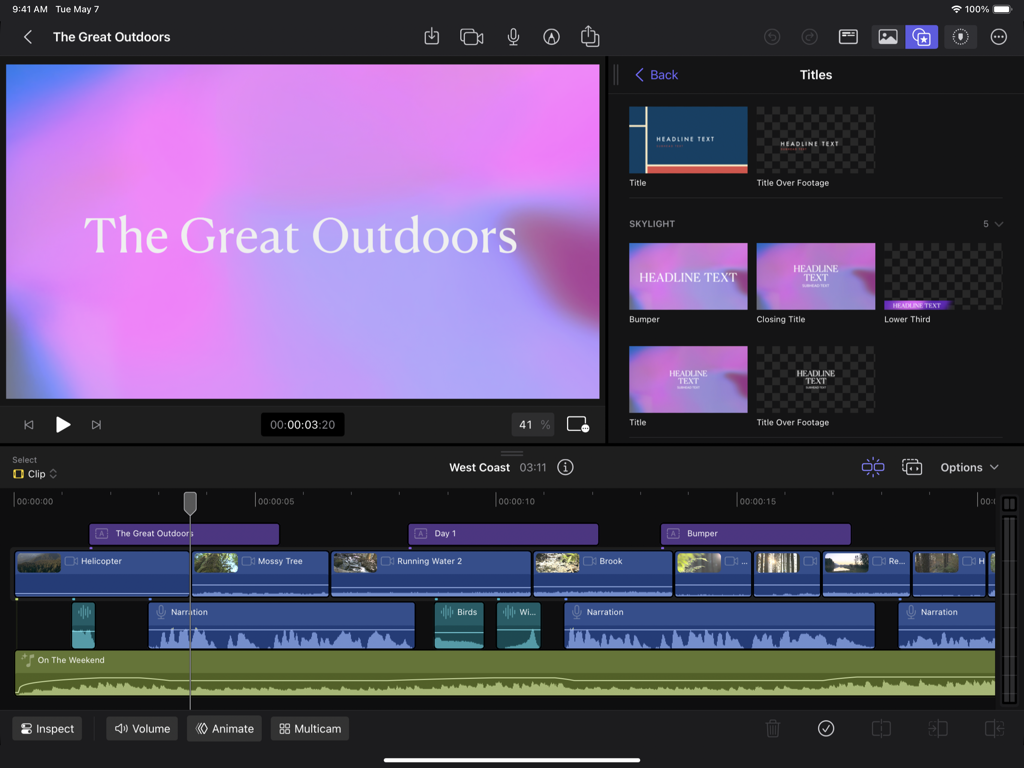
iPad의 전문 비디오 편집 인터페이스에 마그네틱 타임라인과 제목 라이브러리가 표시됨

iPad의 전문 비디오 편집 인터페이스에 마그네틱 타임라인과 제목 라이브러리가 표시됨

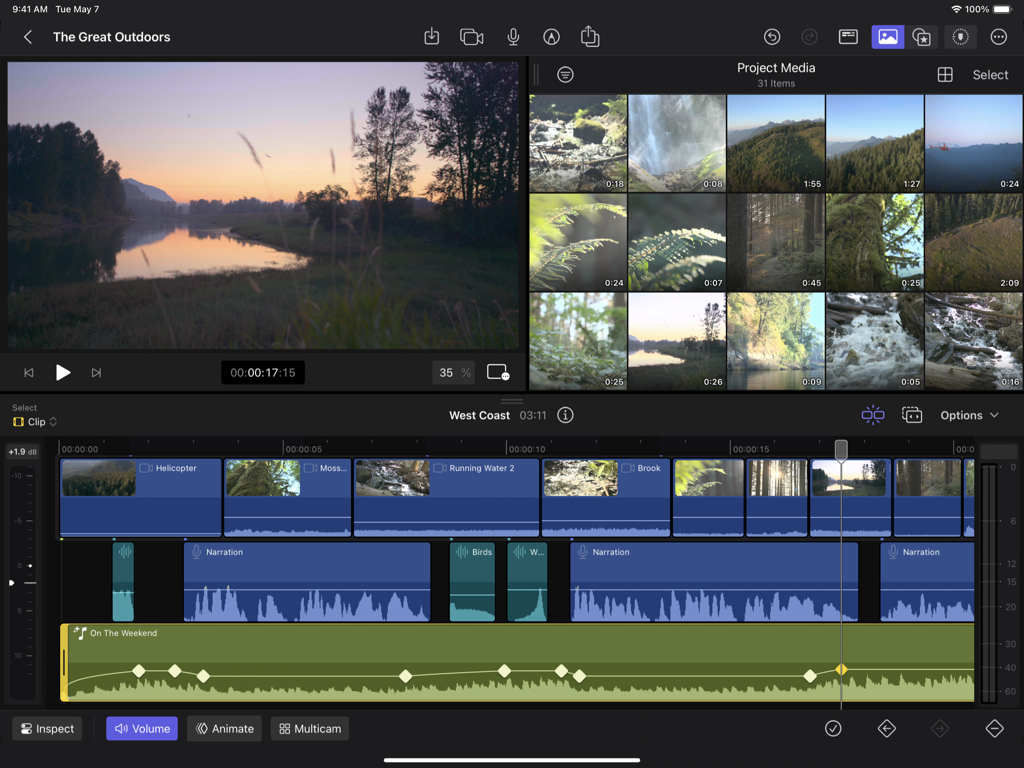
Final Cut Pro for iPad의 전문 비디오 편집 인터페이스에 미디어 라이브러리 및 미리 보기 창과 함께 여러 비디오 및 오디오 트랙이 있는 마그네틱 타임라인이 표시됨.

Final Cut Pro for iPad의 전문 비디오 편집 인터페이스에 미디어 라이브러리 및 미리 보기 창과 함께 여러 비디오 및 오디오 트랙이 있는 마그네틱 타임라인이 표시됨.

어디서든 사용할 수 있는 프로 스튜디오 성능

이 앱을 돋보이게 하는 도구, 1M+ 명의 사용자가 선택.

🎬

직관적인 멀티터치 편집

마그네틱 타임라인으로 복잡한 프로젝트를 탐색하고, 촉각적인 조그 휠을 사용하여 손끝이나 Apple Pencil만으로 프레임 단위의 정밀한 편집을 수행하세요.

📱

무선 라이브 멀티캠

최고의 백팩형 스튜디오를 위해 최대 4대의 iPhone 또는 iPad를 무선으로 동기화하고 모니터링하여 iPad에서 전체 프로덕션을 감독하세요.

🤖

Fast Cut AI 인텔리전스

시간이 많이 걸리는 수동 작업을 없애주는 강력한 AI 도구를 사용하여 배경을 즉시 제거하거나 TikTok 및 Reels용으로 푸티지를 재구성하세요.

앱 소개

에 대해 알아야 할 모든 것 Final Cut Pro for iPad.

설명

Final Cut Pro reimagines video creation for iPad with a touch-first interface for creators, professionals, and students. Capture with the built-in pro camera using manual controls to dial in your shot or seamlessly connect, record, and sync up to four iPhones or iPads with Live Multicam. Navigate complex projects with Multi-Touch and edit with precision using the jog wheel and Magnetic Timeline. Add a personal touch with Live Drawing to create handwritten animations directly on top of your footage. Choose from a vast library of graphics, effects, and music to polish your projects. Final Cut Pro for iPad puts the power of a production studio at your fingertips. Unleash your creativity with a touch-first interface optimized for iPad • Navigate the Magnetic Timeline and complex projects with intuitive Multi-Touch gestures • View, edit, and move your media with frame accuracy using the jog wheel • Draw, highlight, and write directly on top of your footage with Live Drawing using Apple Pencil or Apple Pencil Pro • Skim your footage without ever touching the screen with Apple Pencil hover* • Create stunning videos with an HDR workflow on the Liquid Retina XDR or Ultra Retina XDR display** • Connect a keyboard to access powerful key commands and make precise edits with Apple Pencil or Apple Pencil Pro Preview, record, and sync up to four iPhones or iPads with Live Multicam • Quickly start a Live Multicam session by connecting to any iPhone or iPad running the Final Cut Camera app • Remotely preview and initiate recording on all your connected devices right in Final Cut Pro for iPad • Dial in each angle’s ISO, shutter speed, white balance, manual focus, and more directly on iPad • Monitor your video with focus peaking, audio meters, and zebras to ensure your multicam clips look and sound great • Instantly edit your multicam clips with preview media that is automatically synced in the media browswer • Save time in post with background media transfer that seamlessly replaces preview media with originals as you work Capture the perfect shot with the built-in pro camera mode • Easily record in a range of video resolutions, frame rates, and formats including ProRes*** • Set your exposure with ISO and shutter speed controls • Adjust your white balance using presets or set a custom color temperature • Accurately pull focus and capture sharp footage with focus peaking Speed up workflows with Fast Cut AI features powered by the Apple Neural Engine • Automatically improve the color and brightness of your videos with Enhance Light and Color • Remove the background behind a subject without using a green screen with Scene Removal Mask • Intelligently analyze and adjust footage for vertical, square, and other aspect ratios with Auto Crop • Reduce or remove background noise with Voice Isolation Finish videos with a spectacular library of pro content • Customize your video with dynamic titles, lower thirds, bumpers, and transitions • Apply beautiful color presets to dial in the perfect look • Score your videos with soundtracks that dynamically adjust to the length of your edit Share your final video or send your project to Final Cut Pro for Mac • Send your project to Final Cut Pro for Mac for additional tools including Magnetic Mask, advanced color correction, and third-party content options**** Unlock pro editing tools to take your iMovie for iOS projects to the next level • Import projects created in iMovie for iOS to take advantage of the advanced editing tools in Final Cut Pro for iPad***** Upgrading to the latest iPadOS is recommended * Requires iPad models with M2 chip or later, or iPad mini (A17 Pro) ** Requires iPad Pro (M4 chip) or iPad Pro 12.9-inch (5th generation or later) *** Requires iPad Pro (M4 chip), iPad Pro 12.9-inch (6th generation or later), or iPad Pro 11-inch (4th generation or later) **** Requires Final Cut Pro 11 or later ***** Requires iMovie for iOS 3.0 or later

최신 버전

2.3

크기

961.8 MB

출시일

2023년 5월 23일

제한 없이 편집할 준비가 되셨나요?

차세대 전문 크리에이터에 합류하세요. Final Cut Pro for iPad를 다운로드하고 영감이 떠오르는 곳 어디든 최고의 아이디어를 영화 같은 현실로 만들어 보세요.

다운로드: App Store
FAQ

자주 묻는 질문

에 대해 알아야 할 모든 것 Final Cut Pro for iPad

Final Cut Pro: Create Video란 무엇인가요?

Final Cut Pro: Create Video는 터치 우선 인터페이스로 iPad에서 비디오 제작을 재구상합니다. 전문가, 크리에이터 및 학생에게 강력한 편집 도구, 멀티 카메라 녹화 및 지능형 기능을 제공합니다.

Final Cut Pro for iPad는 여러 카메라에 연결할 수 있나요?

예, Final Cut Pro for iPad는 Live Multicam 기능을 제공하여 사용자가 Final Cut Camera 앱이 실행 중인 최대 4대의 iPhone 또는 iPad를 연결하고 동기화하여 동시에 녹화할 수 있습니다.

Final Cut Pro for iPad는 그리기용 Apple Pencil을 지원하나요?

예, Final Cut Pro for iPad는 Live Drawing을 지원합니다. 사용자는 Apple Pencil 또는 Apple Pencil Pro를 사용하여 영상 위에 직접 손글씨 애니메이션과 주석을 만들 수 있습니다.

Final Cut Pro for iPad는 배경 제거를 어떻게 처리하나요?

Final Cut Pro for iPad에는 Scene Removal Mask 기능이 포함되어 있습니다. 이 지능형 도구는 녹색 화면 없이도 피사체 뒤의 배경을 자동으로 제거합니다.

Final Cut Pro for iPad는 비디오 종횡비를 자동으로 조정할 수 있나요?

예, Final Cut Pro for iPad에는 Auto Crop 기능이 포함되어 있습니다. 이 기능은 영상을 지능적으로 분석하여 세로, 정사각형 및 기타 종횡비에 맞게 조정합니다.

Final Cut Pro for iPad는 비디오 색상과 밝기를 자동으로 조정하나요?

예, Final Cut Pro for iPad는 Enhance Light and Color 기능을 제공합니다. 이 도구는 최적의 시각적 품질을 위해 비디오의 색상과 밝기를 자동으로 향상시킵니다.

Final Cut Pro for iPad에서 Mac으로 프로젝트를 전송할 수 있나요?

예, 사용자는 Final Cut Pro for iPad 프로젝트를 Final Cut Pro for Mac으로 보낼 수 있습니다. 추가 도구를 사용하려면 Mac에 Final Cut Pro 12.0이 필요합니다.

Final Cut Pro for iPad는 iMovie 프로젝트를 가져올 수 있나요?

예, Final Cut Pro for iPad는 iMovie for iOS에서 만든 프로젝트를 가져올 수 있습니다. 이를 통해 사용자는 Final Cut Pro for iPad의 고급 편집 도구를 활용할 수 있습니다.

Final Cut Pro for iPad는 어떤 종류의 내장 콘텐츠를 제공하나요?

Final Cut Pro for iPad는 역동적인 타이틀, 하단 자막, 범퍼, 전환, 색상 사전 설정 및 편집 길이에 따라 동적으로 조정되는 사운드트랙을 포함한 멋진 프로 콘텐츠를 제공합니다.

Final Cut Pro for iPad는 오디오에서 배경 소음을 제거할 수 있나요?

예, Final Cut Pro for iPad에는 Voice Isolation 기능이 포함되어 있습니다. 이 기능은 원치 않는 배경 소음을 줄이거나 제거하여 비디오의 오디오 선명도를 향상시킵니다.

Final Cut Pro for iPad는 HDR 워크플로우에 특정 iPad 모델이 필요한가요?

예, Final Cut Pro for iPad의 HDR 워크플로우에는 iPad Pro (M5), iPad Pro (M4) 또는 iPad Pro 12.9인치 (5세대 이상) 모델이 필요합니다.

Final Cut Pro for iPad에서 조그 휠은 어떻게 작동하나요?

Final Cut Pro for iPad의 조그 휠은 사용자가 프레임 정확도로 미디어를 보고, 편집하고, 이동할 수 있도록 합니다. 터치 우선 인터페이스 내에서 정밀 편집을 향상시킵니다.

Final Cut Pro for iPad에는 수동 카메라 컨트롤이 있나요?

예, Final Cut Pro for iPad에는 내장 프로 카메라가 있습니다. Live Multicam 세션 중에 ISO, 셔터 속도, 화이트 밸런스 및 수동 초점을 포함한 샷을 조정하기 위한 수동 컨트롤을 제공합니다.

Final Cut Pro for iPad는 기술 도구로 멀티 카메라 비디오를 모니터링할 수 있나요?

예, Final Cut Pro for iPad는 초점 피킹, 오디오 미터 및 제브라를 사용하여 멀티 카메라 비디오를 모니터링합니다. 이러한 도구는 멀티캠 클립이 전문적으로 보이고 들리도록 합니다.

App information, icons, screenshots, and descriptions displayed on this page are sourced from the Apple App Store and are the property of their respective developers. Download estimates and rankings are based on MWM's proprietary models and may not reflect actual figures. This page is provided for informational and analytical purposes only.

Believe this page infringes your intellectual property? File a dispute