
이 페이지는 앱이나 개발자의 공식 페이지가 아니며, 정보 제공 및 논평을 목적으로 작성된 독립 편집 간행물입니다. 명시적으로 달리 언급되지 않는 한, 해당 앱이나 개발자는 MWM, Apple, Google Play, 앱 퍼블리셔 또는 앱 개발자와 제휴, 보증, 후원, 승인 또는 공식적으로 연결되어 있지 않으며, 이 페이지의 어떤 내용도 해당 앱이 MWM의 서비스를 사용하여 개발되었음을 의미하지 않습니다. 모든 상표, 로고, 스크린샷 및 기타 콘텐츠는 해당 소유자의 자산입니다.


Filmmaker Pro - Video Editor
모바일에서 '전문가 수준'이라는 허울을 벗겨냅니다. 이 앱은 사용자 데이터 도둑질 없이, 스튜디오의 모든 권한을 당신의 손안에 밀어 넣습니다.
다운로드
12.5M+사용자 평점
총 평가 수
358.8K개발사
카테고리
Photo & Video지원 언어
13최신 버전
12.6.4크기
1.1 GB출시일
2016년 4월 7일Filmmaker Pro - 비디오 편집기 심층 분석
모바일 전문가를 위한 개인 정보 보호 중심 비디오 편집 도구의 주요 기능 탐구
개인 정보 보호 및 로컬 처리
이 앱은 모든 데이터 처리를 기기 내에서 로컬로 수행하며, 사용자 데이터를 수집하거나 저장하지 않습니다. 모든 AI 모델이 앱 번들에 포함되어 있어 개인 정보 보호를 최우선으로 합니다.
무제한 트랙 편집
사용자는 무제한의 비디오 클립, 오디오 트랙, 보이스오버 및 텍스트 오버레이를 추가하여 복잡하고 풍부한 편집을 구현할 수 있습니다.
크로마 키 (그린 스크린)
이 도구는 크로마 키 기능을 제공하여 사용자가 그린 스크린 효과를 활용해 다양한 배경을 합성하고 창의적인 비디오를 제작할 수 있게 해줍니다.
키프레임 애니메이션
이 앱은 키프레임 애니메이션 기능을 갖추고 있어 사용자가 오브젝트의 움직임, 크기, 투명도 등을 정밀하게 제어하여 역동적인 효과를 만들 수 있습니다.
모션 트래킹
이 도구는 모션 트래킹 기능을 제공하여 사용자가 움직이는 개체에 텍스트, 그래픽 또는 효과를 자동으로 따라붙게 할 수 있습니다.
4K 비디오 지원
이 앱은 iPhone SE 이상 및 iPad Pro에서 4K 비디오 편집을 지원하여 고해상도 콘텐츠 제작을 가능하게 합니다.
음성-텍스트 자동 자막
이 앱은 음성을 텍스트로 변환하여 자동으로 자막을 생성하는 기능을 제공하며, 이는 콘텐츠 접근성을 높이고 시청자 참여를 유도합니다.
전문가급 색상 보정
이 앱은 밝기, 대비, 채도, 노출, 화이트 밸런스 등 상세한 비디오 색상 보정 기능을 통해 사용자가 영상의 미학적 품질을 완벽하게 제어할 수 있도록 합니다.
고급 텍스트 애니메이션
이 도구는 17가지 고급 텍스트 애니메이션 옵션을 제공하여 사용자가 영상에 동적이고 시각적으로 매력적인 텍스트 효과를 추가할 수 있습니다.
전문가용 전환 효과
이 도구는 46가지 전문가급 전환 효과 옵션을 갖추고 있어 사용자가 영상 간의 흐름을 부드럽고 세련되게 연결할 수 있습니다.
자주 묻는 질문
에 대해 알아야 할 모든 것 Filmmaker Pro - Video Editor
Does Filmmaker Pro collect or store user data?
No, Filmmaker Pro does not collect or store any user data. All processing occurs locally on the device, and all AI models are included within the app bundle.
Does Filmmaker Pro support 4K video editing?
Yes, Filmmaker Pro supports 4K video editing. This feature is available on iPhone SE and later models, as well as all iPad Pro devices.
What video editing features are available in Filmmaker Pro?
Filmmaker Pro offers a wide range of video editing capabilities, including trimming, splitting, duplicating clips, adjusting playback speed, volume control, reverse video, 46 transitions, 30 filters, video grading, and real-time effects playback.
Does Filmmaker Pro - Video Editor have a green screen feature?
Yes, Filmmaker Pro includes Chroma Key (Green Screen) functionality. This feature allows users to perform green screen effects directly within the app.
How many royalty-free music tracks are included with Filmmaker Pro?
Filmmaker Pro offers 256 royalty-free music tracks and a Sound Effects Collection for use in your projects. Users can trim audio tracks and adjust playback speed.
Does Filmmaker Pro offer Picture-in-Picture effects?
Yes, Filmmaker Pro provides Picture-in-Picture (PiP) functionality. This includes support for Picture-in-Picture Video, Picture-in-Picture Photo, and Picture-in-Picture GIF effects.
Are there text animation options in Filmmaker Pro?
Filmmaker Pro provides 17 premium text animation options, 9 standard text animation options, and a "Stroke Path" animation for drawing text on videos. Users can curve text and adjust its duration.
Does Filmmaker Pro - Video Editor have an auto-save feature?
Yes, Filmmaker Pro includes an auto-save feature. This ensures that all edits made within the app are continuously saved and not lost during usage.
Is motion tracking available in Filmmaker Pro?
Yes, Filmmaker Pro offers motion tracking. This advanced video editing feature is included to allow users to track movement within their videos.
Does Filmmaker Pro support audio ducking?
Yes, Filmmaker Pro includes audio ducking. This feature allows users to automatically reduce the volume of background audio when a voiceover or other primary audio track is present.
Does Filmmaker Pro include face editing tools?
Yes, Filmmaker Pro offers various face editing tools, including options to adjust nose, lips, eyes, and eyebrows for pose, size, slimness, and width.
How does the Filmmaker Pro All Access Subscription work?
The All Access Subscription in Filmmaker Pro is billed monthly or annually, based on the selected plan. Subscriptions auto-renew unless cancelled 24 hours before the current period ends.
How do I cancel my Filmmaker Pro subscription?
You can manage your Filmmaker Pro subscription and turn off auto-renewal by accessing your Account Settings after purchase through iTunes.
다음 스크린샷과 설명은 앱의 공식 스토어 목록에서 직접 가져온 것이며 앱 개발자의 자산입니다.
앱 스토어
스크린샷
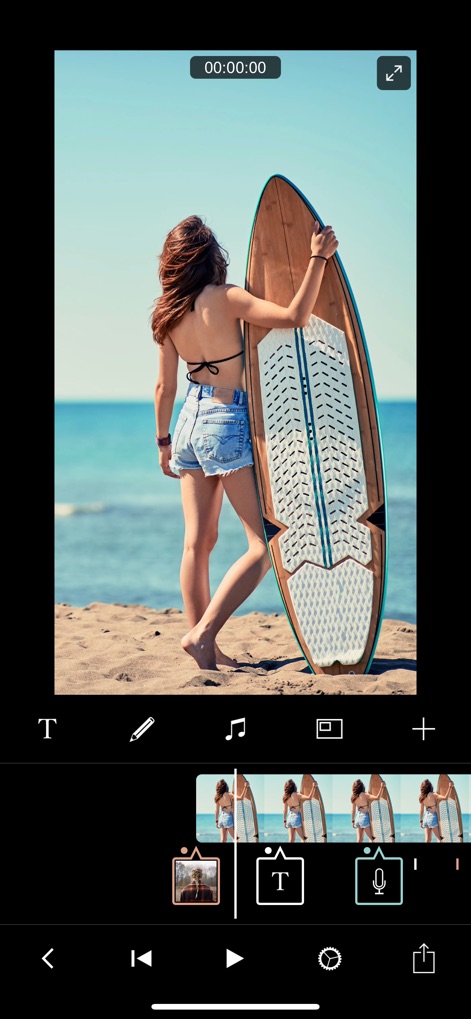
직관적인 타임라인 편집
사용자는 색상으로 구분된 타임라인에서 비디오 클립과 텍스트 오버레이를 쉽게 관리하고 재배치할 수 있습니다.
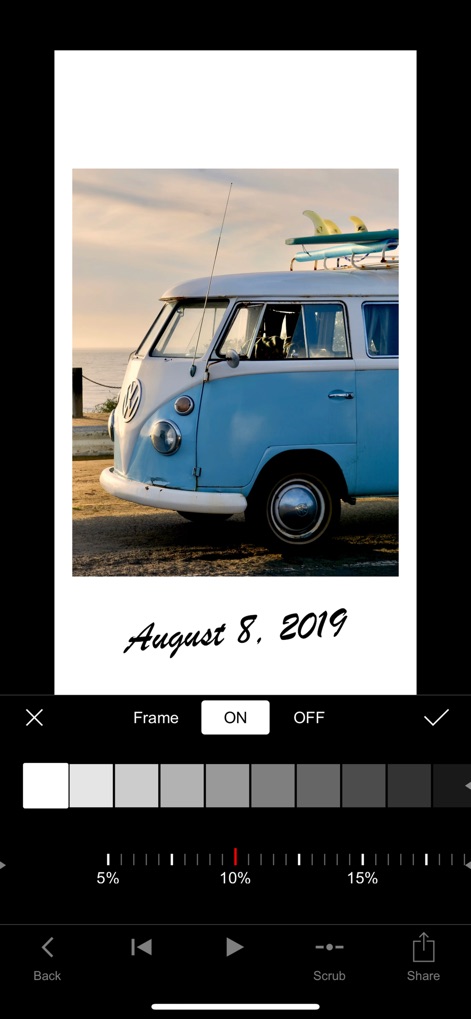
감성적인 프레임 효과
이 앱은 이미지에 감성적인 프레임을 추가하여 시각적 깊이를 더하고, 슬라이더를 통해 프레임 강도를 세밀하게 조정할 수 있습니다.

방대한 로열티 프리 음원
사용자는 에피데믹 사운드와 같은 제휴 서비스를 통해 트렌딩 음악을 탐색하고, 다양한 장르별 음원 라이브러리에서 프로젝트에 적합한 배경 음악을 선택할 수 있습니다.

다채로운 텍스트 스타일
사용자는 다양한 캡션 스타일을 미리 보고 선택할 수 있으며, 이 도구는 영화 및 스크립트 폰트 컬렉션과 같은 전문적인 텍스트 애니메이션 옵션을 제공합니다.

개성 있는 텍스트 오버레이
사용자는 비디오 위에 'YOLO'와 같은 텍스트 오버레이를 추가하고, 스페셜 및 영화 폰트 카테고리에서 개성 있는 글꼴을 선택하여 역동적인 시각 효과를 연출할 수 있습니다.
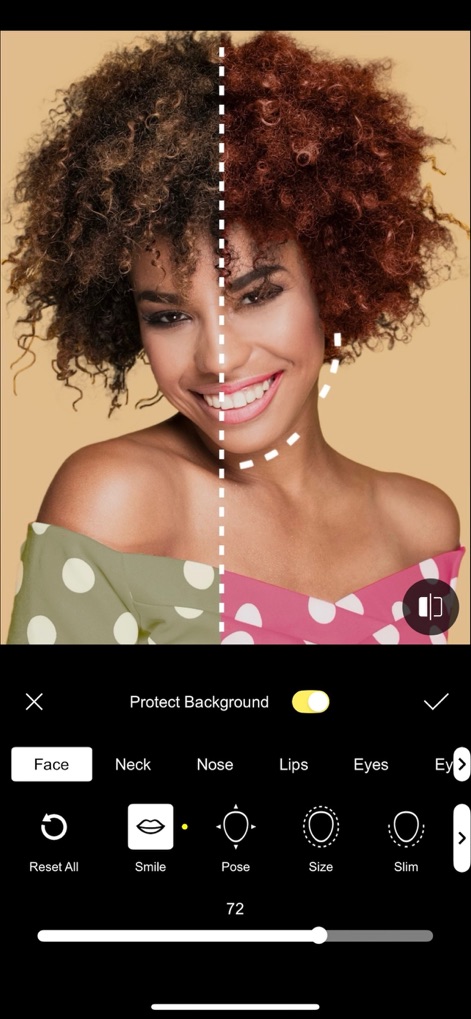
정교한 얼굴 보정
이 앱은 분할 화면 미리보기를 통해 얼굴 보정 전후를 비교할 수 있으며, '스마일' 및 '사이즈'와 같은 세부적인 얼굴 특징 조정 기능을 제공합니다.
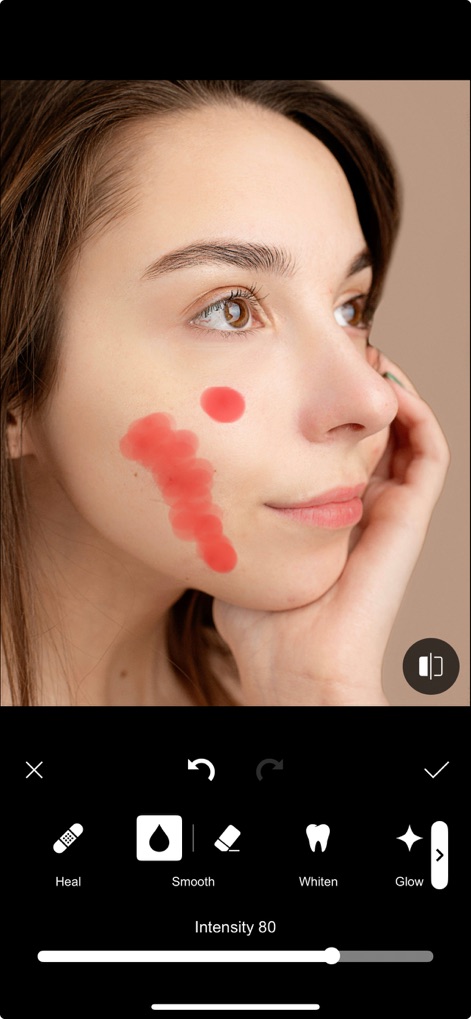
피부 보정 및 복원
사용자는 '힐' 도구를 사용하여 피부의 결점을 제거하고, '스무스' 및 '화이트닝' 옵션을 통해 피부 톤을 매끄럽고 밝게 보정할 수 있습니다.

전문적인 오디오 컨트롤
이 도구는 타임라인에서 오디오 페이드 인/아웃 포인트를 시각적으로 조절할 수 있으며, '페이드 덕스' 기능을 통해 배경 음악 볼륨을 자동으로 조절하여 음성 해설을 돋보이게 합니다.

생동감 있는 화면 분할
사용자는 PiP 기능을 활용하여 주 비디오 위에 보조 비디오 클립을 삽입하고, '사이즈' 조절 및 '페이드' 효과를 통해 완벽하게 통합된 화면을 연출할 수 있습니다.

매력적인 스티커 및 그래픽
이 앱은 '좋아요' 및 '구독'과 같은 다양한 애니메이션 스티커를 제공하여 비디오에 활력을 더하고, 사용자는 그래픽 요소를 쉽게 추가하여 콘텐츠를 풍부하게 만들 수 있습니다.
설명
Download
비슷한 앱
유사한 기능과 사용자 경험을 가진 앱

VN: AI Video Editor
Ubiquiti Labs, LLC

Splice - Video Editor & Maker
Bending Spoons Apps ApS

Blurrr-Music video editor
TBPS INTERNATIONAL TECHNOLOGY PTE. LTD.

Node Video
小为 罗

Time Cut: Smooth Slow Motion
立亚 林

LumaFusion
Luma Touch LLC

Slow Motion Video Fx Editor
Brain Craft Ltd

WEILO - My Last Video Editor
vimosoft

Video Effects Editor: Riveo
Forge and Form GmbH
이 페이지는 앱이나 개발자의 공식 페이지가 아니며, 정보 제공 및 논평을 목적으로 작성된 독립 편집 간행물입니다. 명시적으로 달리 언급되지 않는 한, 해당 앱이나 개발자는 MWM, Apple, Google Play, 앱 퍼블리셔 또는 앱 개발자와 제휴, 보증, 후원, 승인 또는 공식적으로 연결되어 있지 않으며, 이 페이지의 어떤 내용도 해당 앱이 MWM의 서비스를 사용하여 개발되었음을 의미하지 않습니다. 모든 상표, 로고, 스크린샷 및 기타 콘텐츠는 해당 소유자의 자산입니다.