
이 페이지는 앱이나 개발자의 공식 페이지가 아니며, 정보 제공 및 논평을 목적으로 작성된 독립 편집 간행물입니다. 명시적으로 달리 언급되지 않는 한, 해당 앱이나 개발자는 MWM, Apple, Google Play, 앱 퍼블리셔 또는 앱 개발자와 제휴, 보증, 후원, 승인 또는 공식적으로 연결되어 있지 않으며, 이 페이지의 어떤 내용도 해당 앱이 MWM의 서비스를 사용하여 개발되었음을 의미하지 않습니다. 모든 상표, 로고, 스크린샷 및 기타 콘텐츠는 해당 소유자의 자산입니다.


Floating Clock-Timer&Stopwatch
멀티태스킹의 미궁 속에서 시간을 장악하는 가장 확실한 방법은, 시계를 모든 것 위에 띄우는 것이다. 더 이상 작업 전환으로 시간을 낭비하는 일은 없어야 한다.
다운로드
1M+사용자 평점
총 평가 수
1.6K개발사
카테고리
Reference지원 언어
16최신 버전
1.5.2크기
14.9 MB출시일
2020년 12월 23일주요 기능 및 사용자 영향도 평가
Floating Clock-Timer&Stopwatch 앱 분석
플로팅 시간 표시
이 도구는 사용자가 다른 애플리케이션을 사용하는 동안에도 화면 상단에 시간을 계속 표시하여, 멀티태스킹 효율성을 높이고 중요한 시간을 놓치지 않도록 지원합니다.
크로스 플랫폼 호환성
이 앱은 iPhone, iPad 및 Mac 등 다양한 Apple 기기에서 원활한 사용 환경을 제공하여 사용자들이 언제 어디서든 시간 관리 기능을 활용할 수 있게 해줍니다.
타이머
이 앱은 사용자가 설정한 특정 시간 간격을 세밀하게 카운트다운하여, 작업 집중, 운동 세션 또는 요리와 같은 활동을 관리하는 데 도움을 줍니다.
스톱워치
이 도구는 사용자가 특정 활동의 시작부터 끝까지 경과 시간을 정확하게 측정할 수 있도록 스톱워치 기능을 제공합니다.
플립 시계 위젯
이 앱은 사용자가 시각적으로 매력적인 플립 시계 위젯을 홈 화면이나 알림 센터에 추가할 수 있게 하여, 빠르고 편리하게 시간을 확인할 수 있도록 합니다.
밀리초 단위 표시
이 앱은 밀리초 단위까지 시간을 표시할 수 있는 기능을 제공하여, 매우 정밀한 시간 측정이 필요한 사용자들에게 유용합니다.
자주 묻는 질문
에 대해 알아야 할 모든 것 Floating Clock-Timer&Stopwatch
What is the Floating Clock app?
Floating Clock is a time application that displays a floating clock, timer, or stopwatch on top of all other applications. It is available on iPhone, iPad, and Mac devices.
Can I display the Floating Clock over other apps?
Yes, the Floating Clock app can display time, a timer, or a stopwatch as a floating overlay on any app interface. This allows you to monitor time while using other applications.
What features does Floating Clock-Timer&Stopwatch include?
Floating Clock-Timer&Stopwatch features a floating clock, stopwatch, timer, millisecond switch, custom display styles, and a flip clock widget. It supports full customization of colors, fonts, and animation.
Is Floating Clock available on Mac?
Yes, Floating Clock is available on Mac, in addition to iPhone and iPad. It offers a consistent time management experience across Apple devices.
Can I customize the display style of Floating Clock?
Yes, Floating Clock offers custom display styles. Users can fully customize text fonts, text colors, background colors, and animation. More color options are also available.
Does Floating Clock have Apple Watch control?
Yes, Floating Clock supports remote control with Apple Watch. You can tap to start/pause and press to restart the timer or stopwatch directly from your Apple Watch.
Does Floating Clock offer a widget?
Yes, Floating Clock includes a flip clock widget. This allows users to display the clock directly on their home screen for quick access and visual appeal.
How does the Unlimited Access Subscription work for Floating Clock?
The Unlimited Access Subscription for Floating Clock is billed monthly or annually. It provides access to all features and content. A one-time payment option is also available.
How do I cancel my Floating Clock subscription?
You can manage your Floating Clock subscription and turn off auto-renewal by going to your Account Settings after purchase. Cancellation must occur 24 hours prior to the current period's end.
What happens if I subscribe during a free trial for Floating Clock?
If you subscribe to Floating Clock before your free trial ends, the remainder of your free trial period will be forfeited upon purchase confirmation. Subscriptions start immediately after the trial ends.
Where can I find the privacy policy for Floating Clock?
The privacy policy for Floating Clock is available at the URL: https://iandrew.space/apps/policy_floating.html. This document outlines how your data is handled.
다음 스크린샷과 설명은 앱의 공식 스토어 목록에서 직접 가져온 것이며 앱 개발자의 자산입니다.
앱 스토어
스크린샷

다른 앱 위에서 작은 파란색 플로팅 창으로 타이머(00:01:3)가 표시되어, 사용자가 동시에 여러 작업을 수행할 수 있습니다.
어디서든 플로팅 디스플레이

이 앱은 전체 화면 모드를 지원하여, 사용자가 큰 글꼴과 명확한 배경으로 현재 시각(11:05:03)과 타이머(00:00)를 한눈에 확인할 수 있도록 합니다.
전체 화면 모드

깔끔한 인터페이스에서 현재 시각(06:48:13)을 보여주며, 하단에는 시계, 스톱워치, 타이머 탭과 함께 플로팅 기능 활성화 버튼이 명확하게 표시됩니다.
기본 시계 인터페이스

사용자는 시간, 분, 초를 정밀하게 조절하는 숫자 선택기와, 타이머 완료 시 알림을 받을 수 있는 'Alert' 토글 버튼을 통해 맞춤형 타이머를 설정할 수 있습니다.
정교한 타이머 설정

스톱워치 화면은 'Reset' 버튼과 'Pause' 버튼을 직관적으로 제공하여, 사용자가 시간 측정을 손쉽게 시작하고 일시 중지하며 초기화할 수 있습니다.
간편한 스톱워치 기능
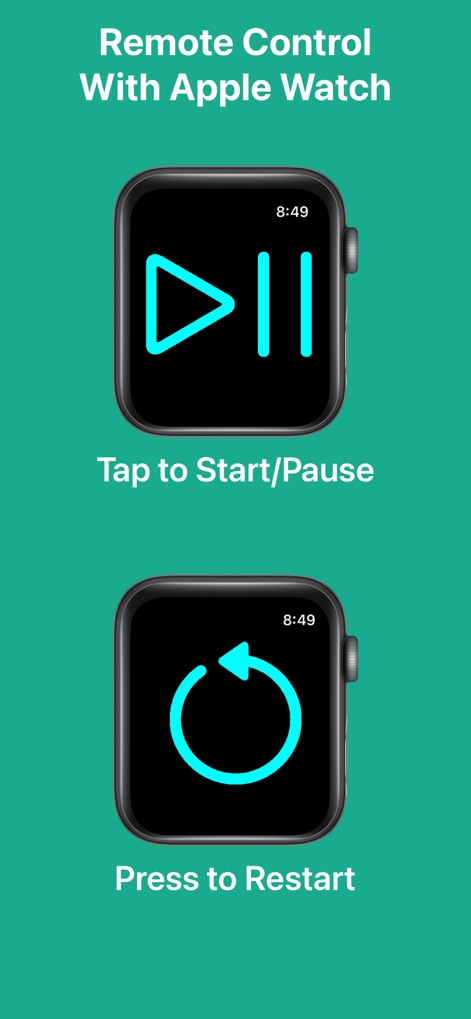
사용자는 Apple Watch를 통해 재생/일시 정지 아이콘과 새로고침 아이콘을 활용하여 타이머와 스톱워치를 원격으로 제어하고 초기화할 수 있습니다.
Apple Watch 원격 제어

사용자는 텍스트 색상 슬라이더와 폰트 선택지를 사용하여 시계의 외관을 완벽하게 개인화하고, 자신만의 스타일을 표현할 수 있습니다.
완벽한 맞춤형 디자인

이 앱은 세로 모드와 가로 모드를 모두 지원하여, 사용자가 어떤 방향으로든 시계(11:04:45)를 편리하게 확인하고 인터페이스를 조작할 수 있습니다.
가로/세로 화면 지원

이 앱은 그리드, 스펙트럼, 슬라이더를 포함한 다양한 색상 선택 도구를 제공하여, 사용자가 배경색과 텍스트 색상을 자유롭게 변경할 수 있습니다.
다채로운 색상 옵션

사용자는 홈 화면에 플립 시계 스타일의 위젯(09:07 PM)을 추가하여, 앱을 열지 않고도 현재 시간을 쉽고 빠르게 확인할 수 있습니다.
편리한 위젯 기능
설명
Download

이 페이지는 앱이나 개발자의 공식 페이지가 아니며, 정보 제공 및 논평을 목적으로 작성된 독립 편집 간행물입니다. 명시적으로 달리 언급되지 않는 한, 해당 앱이나 개발자는 MWM, Apple, Google Play, 앱 퍼블리셔 또는 앱 개발자와 제휴, 보증, 후원, 승인 또는 공식적으로 연결되어 있지 않으며, 이 페이지의 어떤 내용도 해당 앱이 MWM의 서비스를 사용하여 개발되었음을 의미하지 않습니다. 모든 상표, 로고, 스크린샷 및 기타 콘텐츠는 해당 소유자의 자산입니다.