
이 페이지는 앱이나 개발자의 공식 페이지가 아니며, 정보 제공 및 논평을 목적으로 작성된 독립 편집 간행물입니다. 명시적으로 달리 언급되지 않는 한, 해당 앱이나 개발자는 MWM, Apple, Google Play, 앱 퍼블리셔 또는 앱 개발자와 제휴, 보증, 후원, 승인 또는 공식적으로 연결되어 있지 않으며, 이 페이지의 어떤 내용도 해당 앱이 MWM의 서비스를 사용하여 개발되었음을 의미하지 않습니다. 모든 상표, 로고, 스크린샷 및 기타 콘텐츠는 해당 소유자의 자산입니다.


Split Screen - Floating Apps
멀티태스킹? 이제 화면 속 화면으로 비웃어라. Split Screen은 아이폰과 아이패드 사용자에게 제약 없는 시각적 자유를 부여한다.
다운로드
250k+사용자 평점
총 평가 수
4.8K개발사
카테고리
Productivity지원 언어
26최신 버전
1.2.3크기
39.8 MB출시일
2024년 5월 5일생산성 및 콘텐츠 소비 강화를 위한 다중 작업 도구 평가
Split Screen - Floating Apps 주요 기능 분석
PiP (화면 속 화면) 플로팅 디스플레이
이 앱은 사용자가 다른 앱을 사용하면서도 원하는 콘텐츠를 작은 부동 창으로 띄워 지속적으로 볼 수 있게 해줍니다.
브라우저 모드를 통한 다중 웹 탐색
이 도구는 사용자가 부동 창에서 여러 웹 페이지를 탐색하면서 다른 작업을 동시에 수행할 수 있도록 지원합니다.
미디어 콘텐츠 (사진/비디오) 동시 시청
사용자는 미디어 모드를 통해 부동 창에서 사진을 보거나 비디오를 시청하면서 다른 작업을 할 수 있습니다.
다양한 문서 파일 (PDF, TXT, WORD, PPT) 열람
이 앱은 읽기 모드를 통해 사용자가 PDF, TXT, WORD, PPT와 같은 문서 파일을 부동 창에서 편리하게 열람할 수 있도록 합니다.
실용적인 타이머 기능
이 도구는 타이머 모드를 제공하여 사용자가 시계, 카운트다운, 스톱워치 기능을 부동 창에서 활용하며 시간 관리를 할 수 있게 해줍니다.
읽기 모드의 유연한 페이지 넘김
이 앱은 읽기 모드에서 수동 및 자동 페이지 넘김 기능을 지원하여 사용자에게 더욱 편리한 독서 경험을 제공합니다.
자주 묻는 질문
에 대해 알아야 할 모든 것 Split Screen - Floating Apps
What is Split Screen - Floating Apps?
Split Screen - Floating Apps is a PiP (Picture in Picture) floating display app for iPhone and iPad. It displays various content types, including documents, media, timers, and browser windows, in a mini floating window.
What types of files can Split Screen - Floating Apps display?
Split Screen - Floating Apps displays PDF, TXT, WORD, and PPT files in its Read Mode. This mode supports both manual and automatic page turning for documents.
Can Split Screen - Floating Apps multitask with web pages?
Yes, Split Screen - Floating Apps enables multitasking with web pages through its Browser Mode. This mode allows users to display any content via a mini window on their phone screen.
Does Split Screen - Floating Apps include a countdown timer?
Yes, Split Screen - Floating Apps includes a countdown timer. This feature is part of its Timer Mode, alongside clock and stopwatch functionalities, displayed in a floating window.
How much does a Split Screen - Floating Apps subscription cost?
A Split Screen - Floating Apps subscription costs $0.99 USD for 1 month or $6.99 USD for 1 year. These are auto-renewal terms charged to your iTunes Account.
How do I cancel the auto-renewal for Split Screen - Floating Apps?
To cancel auto-renewal for Split Screen - Floating Apps, manually turn it off in your iTunes & App Store account management settings. This must be done at least 24 hours prior to the current subscription period's end.
Where can I find the Privacy Policy for Split Screen - Floating Apps?
The Privacy Policy for Split Screen - Floating Apps is available at https://5season.top/pip/my-privacy. This document details the app's data handling practices.
다음 스크린샷과 설명은 앱의 공식 스토어 목록에서 직접 가져온 것이며 앱 개발자의 자산입니다.
앱 스토어
스크린샷
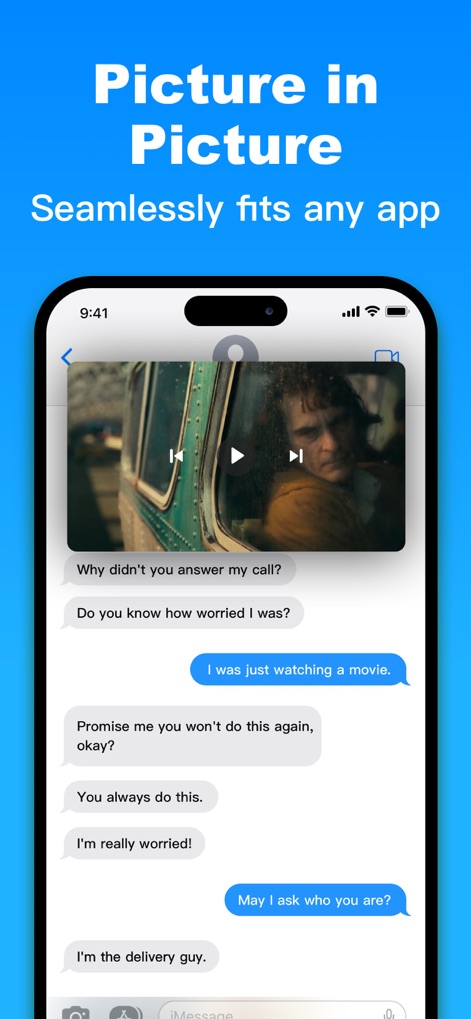
이 앱은 메시징 앱에서 비디오를 화면 속 화면 모드로 재생하여, 사용자가 끊김 없이 대화를 이어가면서도 좋아하는 콘텐츠를 시청할 수 있도록 돕습니다.
화면 속 화면
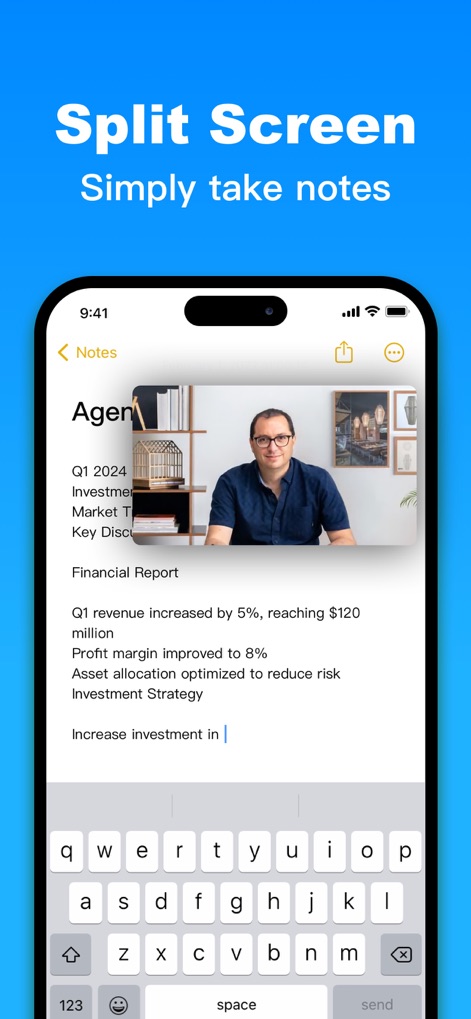
이 앱은 노트 앱에서 이미지 자료를 플로팅 창으로 띄워, 사용자가 핵심 정보를 참고하며 효율적으로 메모를 작성할 수 있게 합니다.
분할 화면 메모

이 앱은 웹페이지를 플로팅 모드로 띄워, 사용자가 설정 화면을 탐색하면서도 필요한 정보를 동시에 검색하고 확인할 수 있도록 지원합니다.
플로팅 웹 브라우저
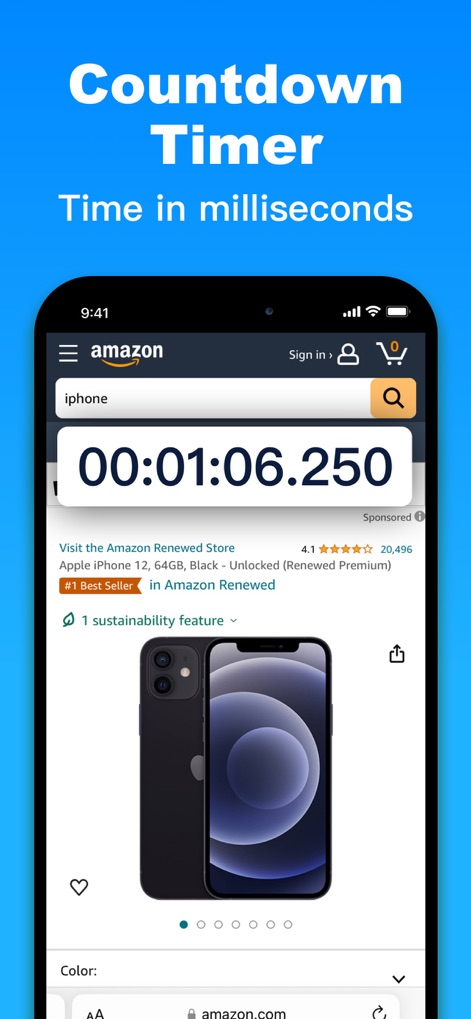
이 앱은 밀리초 단위의 카운트다운 타이머를 플로팅 창으로 제공하여, 사용자가 온라인 쇼핑 중에도 중요한 시간을 정확하게 관리하고 확인할 수 있게 합니다.
카운트다운 타이머
설명
Download

이 페이지는 앱이나 개발자의 공식 페이지가 아니며, 정보 제공 및 논평을 목적으로 작성된 독립 편집 간행물입니다. 명시적으로 달리 언급되지 않는 한, 해당 앱이나 개발자는 MWM, Apple, Google Play, 앱 퍼블리셔 또는 앱 개발자와 제휴, 보증, 후원, 승인 또는 공식적으로 연결되어 있지 않으며, 이 페이지의 어떤 내용도 해당 앱이 MWM의 서비스를 사용하여 개발되었음을 의미하지 않습니다. 모든 상표, 로고, 스크린샷 및 기타 콘텐츠는 해당 소유자의 자산입니다.