
이 페이지는 앱이나 개발자의 공식 페이지가 아니며, 정보 제공 및 논평을 목적으로 작성된 독립 편집 간행물입니다. 명시적으로 달리 언급되지 않는 한, 해당 앱이나 개발자는 MWM, Apple, Google Play, 앱 퍼블리셔 또는 앱 개발자와 제휴, 보증, 후원, 승인 또는 공식적으로 연결되어 있지 않으며, 이 페이지의 어떤 내용도 해당 앱이 MWM의 서비스를 사용하여 개발되었음을 의미하지 않습니다. 모든 상표, 로고, 스크린샷 및 기타 콘텐츠는 해당 소유자의 자산입니다.

Fotor - AI Photo Editor
이 앱은 복잡한 편집 작업을 명령 한마디로 종결시킵니다. 이제 단순한 터치 대신 말 한마디로 이미지의 모든 것을 지배하는 권능을 손에 넣으십시오.
다운로드
12.5M+사용자 평점
총 평가 수
237.7K개발사
카테고리
Photo & Video지원 언어
16최신 버전
11.1.10크기
296.5 MB출시일
2011년 7월 24일Fotor - AI Photo Editor: 주요 기능 분석
테크 분석가가 평가한 AI 기반 사진 편집 앱의 핵심 기능
AI 배경 제거 및 교체
이 도구는 클릭 한 번으로 이미지에서 피사체를 추출하고, 사용자가 원하는 배경으로 교체하여 개성 넘치는 사진을 만들 수 있게 해줍니다.
AI 헤드샷 및 아바타 생성
이 도구는 사용자가 셀카를 기반으로 링크드인 및 다른 소셜 미디어 플랫폼을 위한 전문적인 헤드샷과 독특한 AI 아바타를 생성할 수 있게 해줍니다.
AI 인물 사진 보정
이 앱은 AI 리터치 기능을 통해 자연스럽고 섬세한 피부 보정 및 잡티 제거로 완벽한 피부를 연출하여 세련된 외모를 손쉽게 만들 수 있도록 돕습니다.
AI 에이전트 및 사진 화질 개선
이 앱은 AI 에이전트를 통해 사용자의 음성 또는 텍스트 명령을 이해하고 여러 편집을 동시에 적용하여 시간과 노력을 절약하며, AI 사진 화질 개선 기능을 통해 흐릿하고 저해상도 이미지를 즉시 선명하게 만듭니다.
텍스트-이미지 AI 아트 생성
이 앱은 텍스트 설명을 기반으로 멋진 이미지를 생성하여, 사용자가 원하는 아이디어를 몇 초 만에 현실로 변환하고 독창적인 시각 콘텐츠를 만들 수 있도록 지원합니다.
AI 매직 지우개
이 도구는 주변 인물, 워터마크, 건물 등 원치 않는 요소를 빠르게 제거하고 원본 배경과 자연스럽게 어우러지게 하여 깔끔한 이미지를 만듭니다.
AI 배경 확장
이 앱은 AI 확장 기능을 통해 사진의 피사체와 배경을 확장하여 다양한 크기에 맞추고 균형 잡힌 효과를 얻을 수 있도록 돕습니다.
AI 스타일 변환
이 도구는 사용자의 셀카를 트렌디한 3D 카툰, 애니메이션 또는 반 고흐, 모네 스타일의 예술 작품으로 쉽게 변환하여 창의적이고 독특한 콘텐츠를 만들 수 있게 해줍니다.
콜라주 및 디자인 템플릿
이 앱은 콜라주 메이커로 다양한 순간을 조합하고, 전문적인 디자인 템플릿을 사용하여 소셜 미디어 게시물, 전단지, 포스터를 손쉽게 만들 수 있도록 돕습니다.
오래된 사진 복원 및 색상화
이 도구는 오래된 가족 사진을 복원하고 색상화하여 생생하고 고화질의 이미지로 변환함으로써 소중한 추억을 되살릴 수 있게 해줍니다.
자주 묻는 질문
에 대해 알아야 할 모든 것 Fotor - AI Photo Editor
What is the Fotor AI Agent and how does it work?
The Fotor AI Agent is an all-in-one AI photo editing toolbox that understands verbal or typed commands. Users upload a photo and describe desired edits, and the AI Agent applies multiple changes automatically.
Can Fotor's Magic Eraser remove unwanted objects from photos?
Yes, Fotor's Magic Eraser tool quickly removes unwanted elements like bystanders, watermarks, or buildings from photos. It seamlessly blends the edited area with the original background.
Does Fotor offer an AI Headshot feature for professional profiles?
Yes, Fotor offers an AI Headshot feature to create professional PFPs and avatars. These are suitable for platforms like LinkedIn and other social media.
How does Fotor enhance blurry or low-quality photos?
Fotor enhances photos using its AI Photo Enhancer to instantly clarify blurry images. It fixes grainy, pixelated, and low-resolution images with one tap.
Can Fotor generate images from text descriptions?
Yes, Fotor can generate stunning images from text. Users type a description, choose a style, and the app transforms ideas into reality in seconds.
How do I remove or change the background of an image in Fotor?
Fotor's Bg Remover extracts the subject from images with one click. Users can then replace the background to create highly personalized photos or use AI Backgrounds for product photos.
What are the subscription options for Fotor Pro?
Fotor Pro offers monthly or yearly subscription plans. The subscription automatically renews unless turned off at least 24 hours before the current period expires.
Does Fotor provide AI tools for skin retouching and blemish removal?
Yes, Fotor offers AI Retouch to achieve flawless skin. It provides natural and delicate skin smoothing and blemish removal for a refined appearance.
Can I change outfits or hairstyles in Fotor using AI?
Yes, Fotor's AI Replace tool allows instant changes to outfits, hairstyles, and colors. This feature helps users find their best style.
Can Fotor transform selfies into cartoon or anime styles?
Yes, Fotor includes trendy 3D Cartoon and Anime AI art effects. Users can easily transform their selfies into vibrant cartoon comics.
다음 스크린샷과 설명은 앱의 공식 스토어 목록에서 직접 가져온 것이며 앱 개발자의 자산입니다.
앱 스토어
스크린샷

스튜디오급 인물 사진
이 앱은 AI 리터치를 통해 피부를 보정하고, 주얼리와 의상의 디테일을 살려 스튜디오급 인물 사진을 완성합니다.
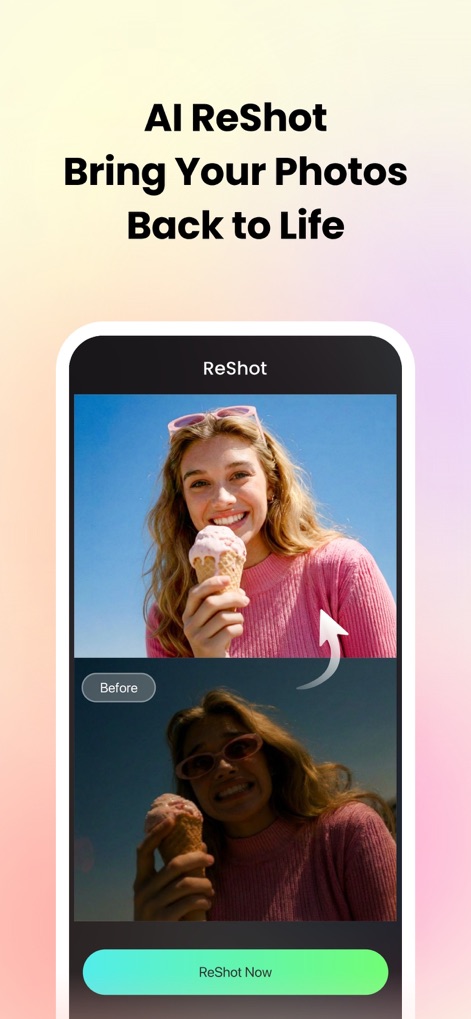
사진에 새 생명
사용자는 AI 사진 향상 기능을 활용하여 어둡고 흐릿한 이미지를 선명하고 밝은 결과물로 변화시키고, 전반적인 이미지 품질을 크게 개선할 수 있습니다.
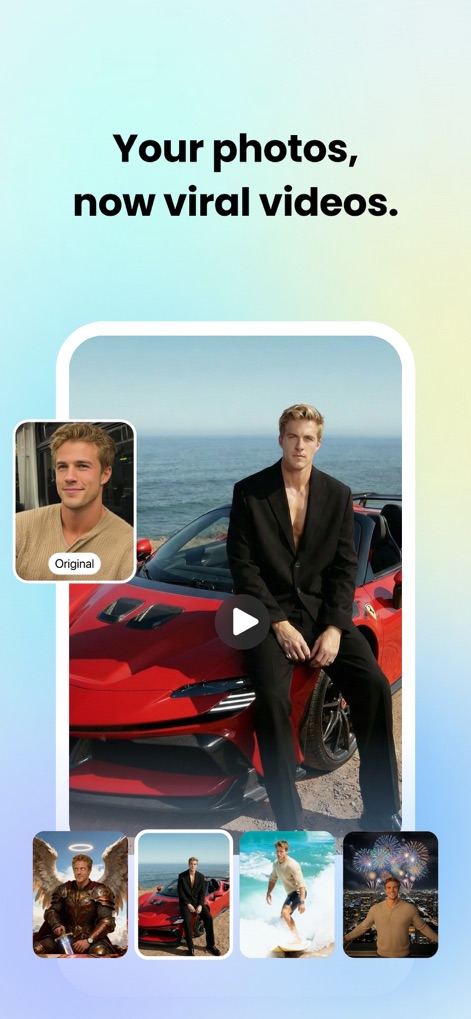
AI 이미지 변환
이 도구는 원본 인물 사진을 기반으로 사용자가 원하는 다양한 스타일의 AI 생성 이미지를 만들어, 예를 들어 해변 배경이나 판타지 아바타 등 여러 테마로 변신을 시도할 수 있습니다.
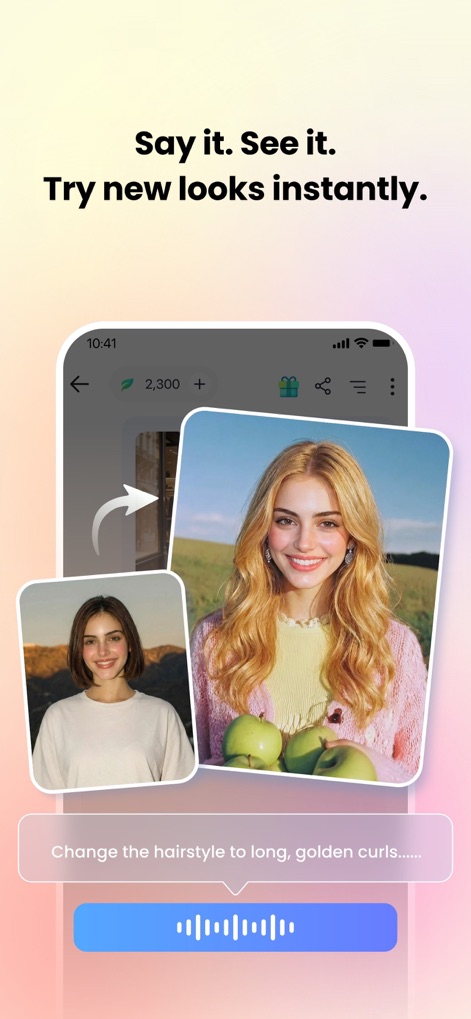
AI 헤어스타일 즉시 변신
사용자는 음성 또는 텍스트 명령으로 '긴 금발 컬'과 같은 원하는 헤어스타일을 설명하여, 짧은 머리에서 긴 머리로 손쉽게 변화된 모습을 미리 볼 수 있습니다.
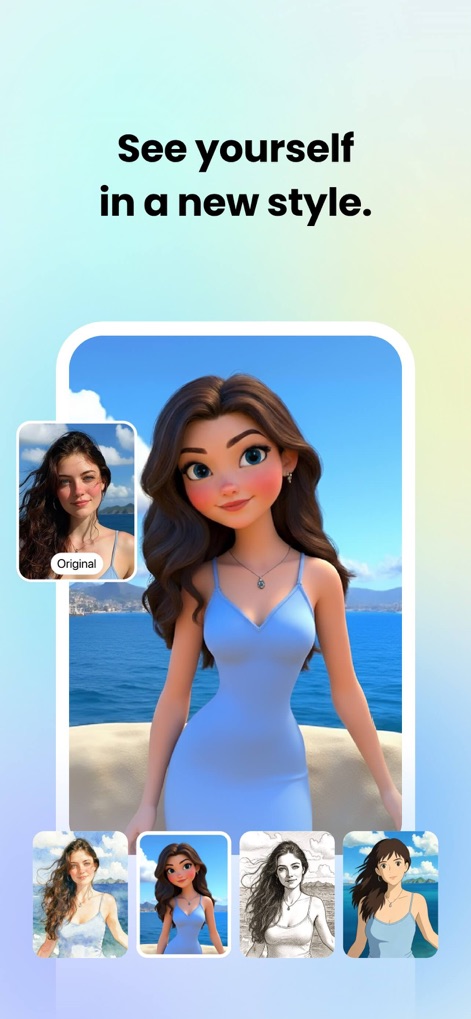
새로운 나를 발견
이 앱은 원본 셀카 사진을 사용하여, 3D 카툰 스타일이나 일본 애니메이션풍 아트 효과를 적용하여 사용자의 이미지를 완전히 새로운 모습으로 변환합니다.
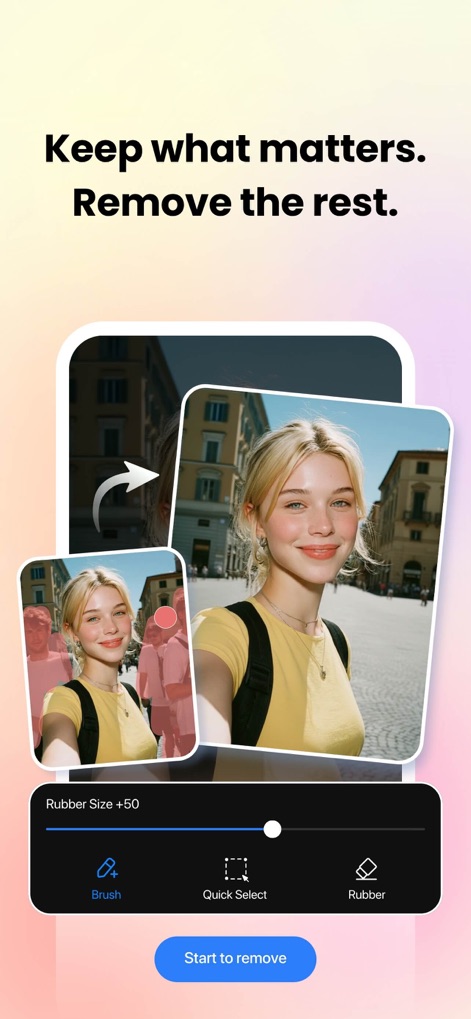
불필요한 요소 제거
사용자는 매직 이레이저 기능을 활용하여 배경에 있는 '인물'과 같은 불필요한 요소를 쉽고 빠르게 제거하고, 깔끔하게 정리된 '인물 중심의 이미지'를 얻을 수 있습니다.
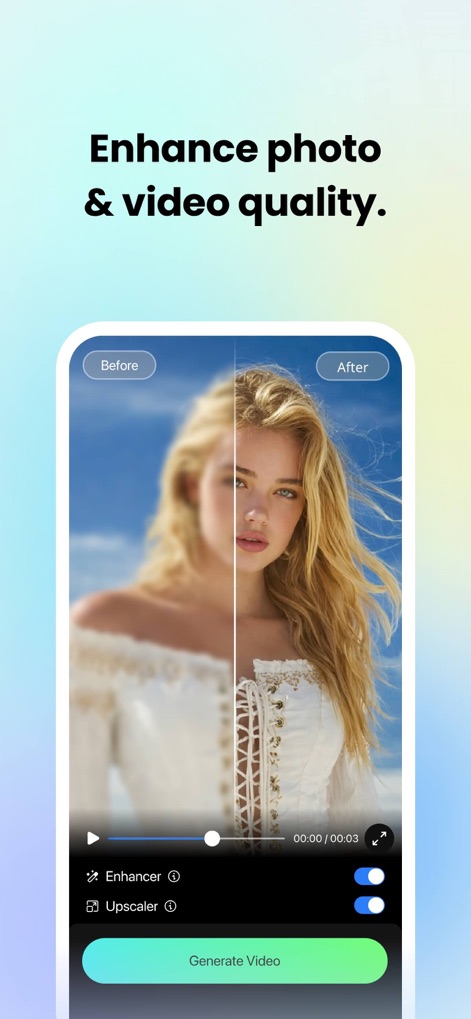
사진 품질 향상
이 도구는 AI 기반 '향상' 및 '업스케일러' 기능을 통해 흐릿하고 저해상도인 사진과 비디오를 선명하고 고품질의 결과물로 탈바꿈시켜줍니다.
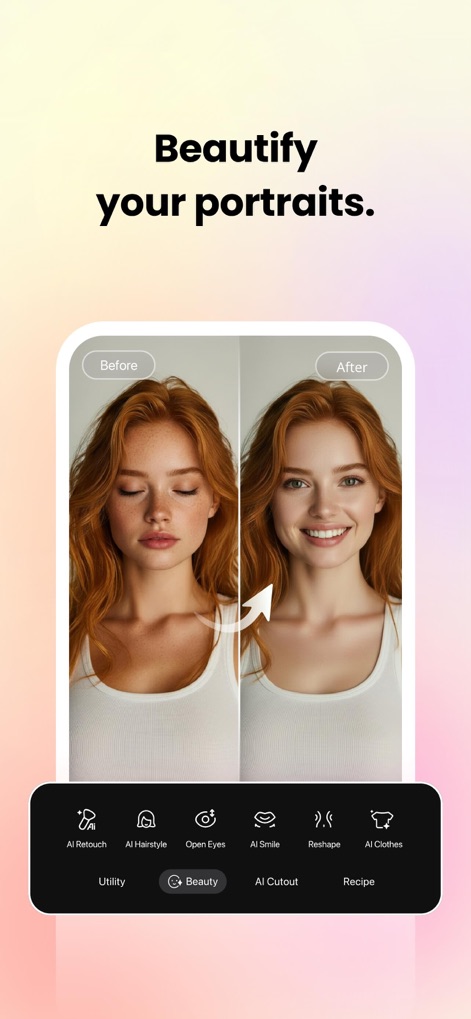
인물 사진 보정
사용자는 AI 리터치 기능을 사용하여 '피부 결점'을 자연스럽게 보정하고, '눈을 뜨고 미소를 짓는' 표정 변화를 적용하여 인물 사진을 더욱 매력적으로 만들 수 있습니다.
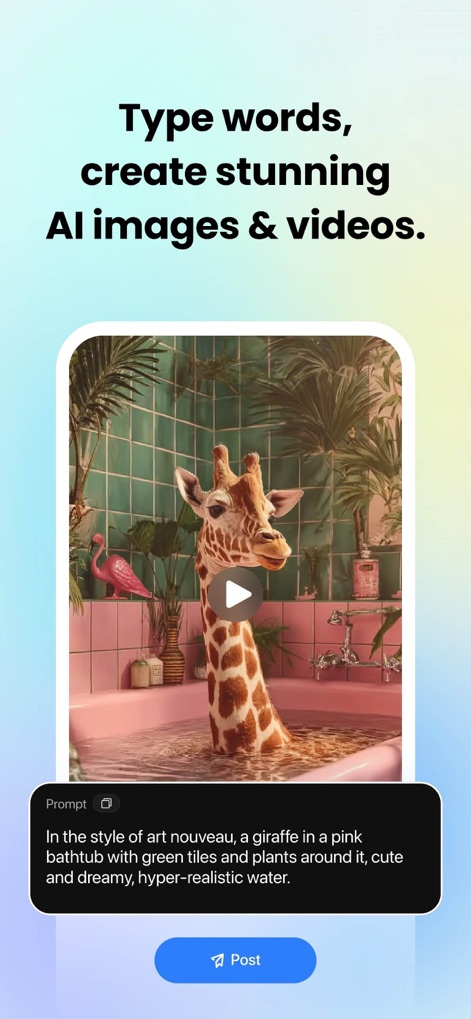
텍스트로 이미지 생성
사용자는 '아르누보 스타일의 기린'처럼 구체적인 텍스트 프롬프트를 입력하여, '핑크색 욕조와 초록색 타일'과 같은 상세한 배경 요소를 포함한 놀라운 AI 생성 이미지를 즉시 만들 수 있습니다.
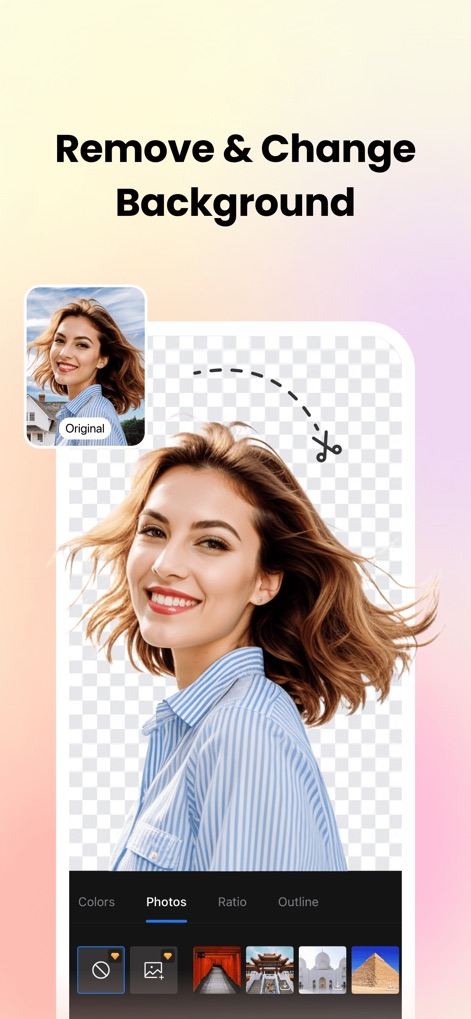
배경 제거 및 변경
이 도구는 '원본 이미지'에서 인물이나 피사체를 정확하게 분리하고, 투명한 배경으로 만든 후 '다양한 새로운 배경'으로 교체하여 독특한 맞춤형 사진을 손쉽게 만들 수 있습니다.
설명
Download
비슷한 앱
유사한 기능과 사용자 경험을 가진 앱

ElevenLabs: AI Voice Generator
Eleven Labs Inc.

Viggle AI: Meme Maker
WarpEngine Canada Inc.

可灵AI - AI图片&视频创作工具
Beijing Kwai Technology Co., Ltd.

Leonardo.Ai - Image Generator
Leonardo Interactive Pty Ltd

Reface: Face Swap AI Photo App
NEOCORTEXT, INC.

Shedevrum
DIRECT CURSUS COMPUTER SYSTEMS TRADING LLC

Remove Objects
TAPUNIVERSE LLC

Zaps Collages
Turnip Media Private Limited

Carat - Create Anything
Paradot Corp.
이 페이지는 앱이나 개발자의 공식 페이지가 아니며, 정보 제공 및 논평을 목적으로 작성된 독립 편집 간행물입니다. 명시적으로 달리 언급되지 않는 한, 해당 앱이나 개발자는 MWM, Apple, Google Play, 앱 퍼블리셔 또는 앱 개발자와 제휴, 보증, 후원, 승인 또는 공식적으로 연결되어 있지 않으며, 이 페이지의 어떤 내용도 해당 앱이 MWM의 서비스를 사용하여 개발되었음을 의미하지 않습니다. 모든 상표, 로고, 스크린샷 및 기타 콘텐츠는 해당 소유자의 자산입니다.