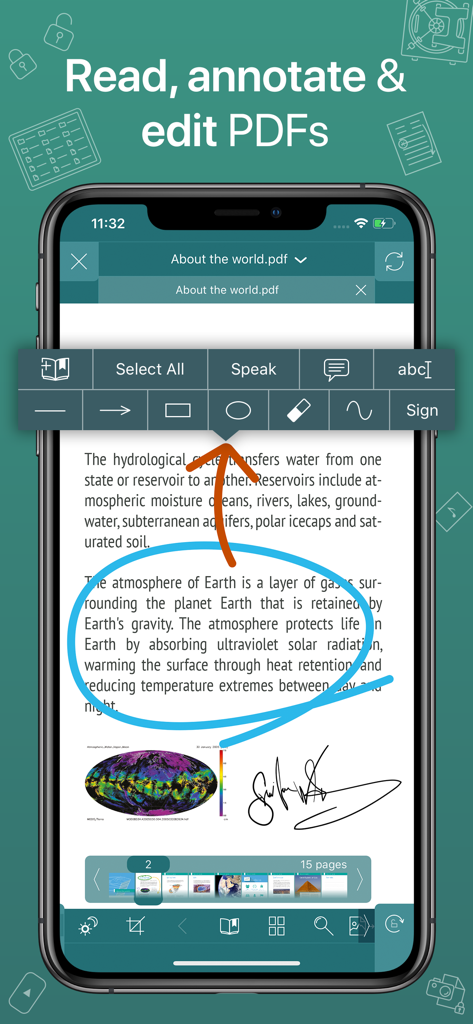
주석 및 서명 도구가 있는 GoodReader PDF 편집기를 보여주는 iPhone 스크린샷
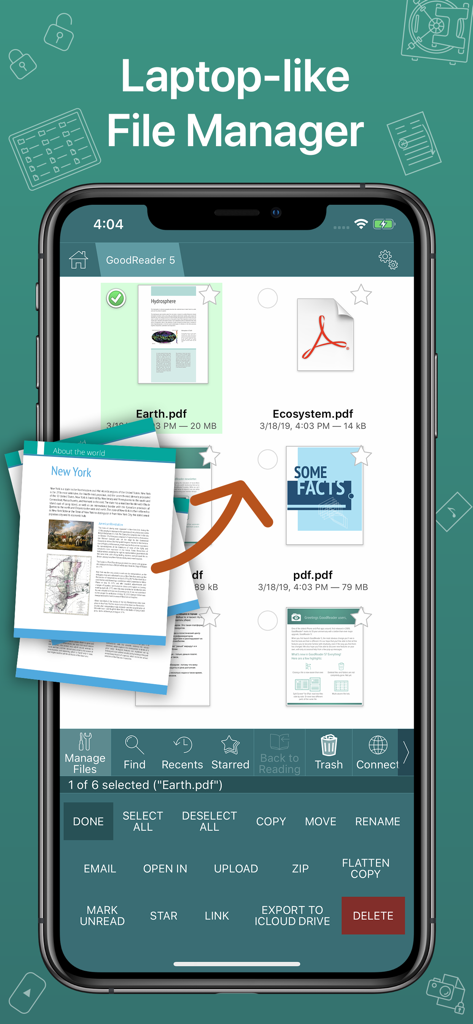
전문 파일 관리 도구가 있는 PDF 문서용 노트북과 유사한 파일 관리자를 보여주는 GoodReader 모바일 앱 인터페이스.
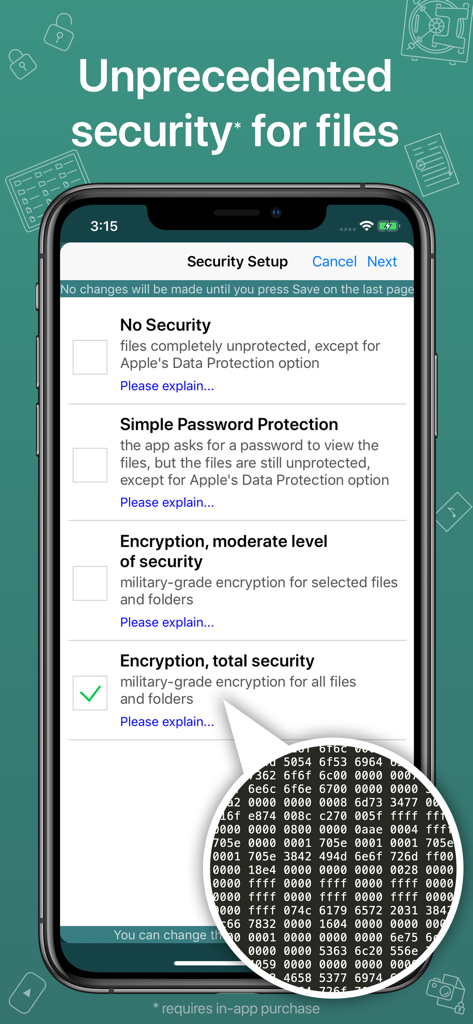
파일 및 폴더에 대한 군사 등급 암호화 옵션을 보여주는 GoodReader 앱 보안 설정 화면
전문가를 위한 최고의 생산성 허브
이 앱을 돋보이게 하는 도구, 848K+ 명의 사용자가 선택.
📂
데스크톱 수준의 파일 관리
iOS 기기에 전문가용 파일 시스템을 도입하세요. 복잡한 계층 구조를 구성하고 사무실 서버, SMB, FTP 또는 주요 클라우드 제공업체와 손쉽게 동기화하세요.
🖋️
탁월한 주석 및 읽기 기능
단순한 보기 그 이상을 경험하세요. PDF Reflow를 사용하여 가로 스크롤을 없애고 고급 도구를 활용하여 즉시 서명, 마크업, 공동 작업 요약 공유가 가능합니다.
🛡️
군사 등급 데이터 보안
독립적인 AES-256 암호화로 민감한 고객 정보를 보호하세요. 표준 장치 잠금 이상의 보호 계층으로 기밀 파일을 안전하게 유지하세요.
앱 소개
에 대해 알아야 할 모든 것 GoodReader PDF Editor & Viewer.
설명
First released in 2009, GoodReader® is truly a veteran of the App Store.
In the modern app business, it's not easy to stay relevant that long. We're proud to say that after 13 years and counting, we've been delivering wonderful updates with extraordinary new features. And we're going to keep doing that!
GoodReader is a perfect combination of document-reading and file-managing capabilities. It's your one-stop shop for all your document needs on your iOS device.
Use the app once, and you'll be hooked. Soon you'll be wondering how you ever managed to work without it.
-= File Reading =-
PDF, TXT, MS Office, iWork, HTML, pictures, music & audio-books, videos. This is what you can view in GoodReader, plus you can also annotate PDF files and edit TXT files.
-= PDF Reading and Annotating =-
PDF files is where GoodReader truly shines. Reading experience is so superior, it's hard to describe. To rephrase one of our customers' review, "try it, and you'll see." While you're at it, give our PDF Reflow feature a try. You'll be surprised how much better PDF reading goes when you don't have to scroll left/right all the time, for every single line of text.
Annotating PDFs is another star feature of our app. Adding notes and drawings, highlighting text, and then sharing your annotated files or annotation summaries will be your main productivity and collaboration asset.
-= File Management =-
While reading files is a big part of GoodReader, it's not all it can do. It can also serve as a central hub for all your files, even those that can't be opened by GoodReader itself. It's like bringing your personal computer experience to your mobile device — easily managing huge collections of files and folders will make you forget you don't have your laptop around.
-= Connecting =-
Dropbox, OneDrive, Google Drive, Box.com, WebDAV, SMB, AFP, FTP, SFTP — these are all accessible from inside GoodReader. Download, upload, and sync (*) individual files or huge folder collections.
-= Security =-
With GoodReader, your data security steps up to the level previously only dreamt of. With Pro Pack® (*), our new set of professional-level super-features, you'll get AES-256, a military-grade encryption, for all your data, at a price of a cup of coffee! And it's completely independent from the built-in Apple's Data Protection, so even if a hacker steals and unlocks your device, your data will still be protected by another strong layer of security, our own.
-= Split-Screen =-
This wonderful feature allows you to split (*) an iPad screen in half, to read two files side-by-side. And even two different parts of the same file!
(*): This feature requires a subscription to Pro Pack®, sold separately from inside the app as an in-app purchase.
최신 버전
5.19.1220
크기
49.1 MB
출시일
2014년 5월 7일
오늘 귀하의 모바일 생산성을 마스터하세요
군사 등급 보안과 엘리트 문서 관리를 위해 GoodReader를 신뢰하는 70,000명 이상의 전문가들과 함께하세요. 귀하의 사무실, 어디든.
FAQ
자주 묻는 질문
에 대해 알아야 할 모든 것 GoodReader PDF Editor & Viewer
GoodReader PDF Editor & Viewer란 무엇인가요?
GoodReader는 문서 읽기 및 파일 관리 기능을 결합한 iOS 앱입니다. 다양한 파일 형식을 보고, PDF를 주석 처리하며, 포괄적인 파일 정리를 지원하여 디지털 문서의 중앙 허브 역할을 합니다.
GoodReader에서 PDF 파일에 주석을 달 수 있나요?
네, GoodReader를 사용하면 PDF 파일에 주석을 달 수 있습니다. 메모 및 그림 추가, 텍스트 강조 표시, 주석이 달린 파일 또는 주석 요약 공유 등의 기능이 포함됩니다.
GoodReader는 어떤 파일 형식을 보기 위해 지원하나요?
GoodReader는 PDF, TXT, MS Office, iWork, HTML, 사진, 음악 및 오디오북, 비디오 보기를 지원합니다. 사용자는 앱 내에서 TXT 파일을 편집할 수도 있습니다.
GoodReader는 파일 관리 기능을 제공하나요?
네, GoodReader는 중앙 파일 관리 허브 역할을 합니다. 사용자가 파일을 관리, 정리 및 액세스할 수 있게 하여 모바일 장치에서 개인용 컴퓨터 경험을 효과적으로 제공합니다.
GoodReader는 어떤 클라우드 스토리지 서비스와 통합되나요?
GoodReader는 Dropbox, OneDrive, Google Drive, Box.com, WebDAV, SMB, AFP, FTP 및 SFTP와 통합됩니다. 사용자는 이러한 서비스와 파일을 다운로드, 업로드 및 동기화할 수 있습니다.
GoodReader는 파일에 대한 고급 보안 기능을 제공하나요?
네, GoodReader는 고급 보안 기능을 제공합니다. Pro Pack은 Apple의 내장 데이터 보호와 별도로 모든 사용자 데이터에 대해 AES-256 군사 등급 암호화를 제공합니다.
GoodReader의 AES-256 암호화는 무료인가요?
아니요, GoodReader의 AES-256 군사 등급 암호화는 별도의 구독이 필요한 Pro Pack의 일부입니다. 이는 인앱 구매로 판매됩니다.
GoodReader에서 두 개의 파일을 동시에 볼 수 있나요?
네, GoodReader는 Split-Screen 모드를 제공하여 iPad 화면에서 두 개의 파일을 나란히 볼 수 있습니다. 또한 동일한 파일의 두 부분을 동시에 보는 것도 지원합니다.
GoodReader에서 구독 없이 Split-Screen을 사용할 수 있나요?
아니요, GoodReader의 Split-Screen 기능은 Pro Pack 구독이 필요합니다. 이 팩은 인앱 구매로 별도 판매됩니다.
GoodReader는 앱 스토어에서 얼마나 오래 사용할 수 있었나요?
GoodReader는 2009년에 처음 출시되어 13년 이상 지속적인 개발 및 업데이트를 거친 앱 스토어의 베테랑입니다.
App information, icons, screenshots, and descriptions displayed on this page are sourced from the Apple App Store and are the property of their respective developers. Download estimates and rankings are based on MWM's proprietary models and may not reflect actual figures. This page is provided for informational and analytical purposes only.
Believe this page infringes your intellectual property? File a dispute