
이 페이지는 앱이나 개발자의 공식 페이지가 아니며, 정보 제공 및 논평을 목적으로 작성된 독립 편집 간행물입니다. 명시적으로 달리 언급되지 않는 한, 해당 앱이나 개발자는 MWM, Apple, Google Play, 앱 퍼블리셔 또는 앱 개발자와 제휴, 보증, 후원, 승인 또는 공식적으로 연결되어 있지 않으며, 이 페이지의 어떤 내용도 해당 앱이 MWM의 서비스를 사용하여 개발되었음을 의미하지 않습니다. 모든 상표, 로고, 스크린샷 및 기타 콘텐츠는 해당 소유자의 자산입니다.


GoPro Quik
산만한 영상들을 응집력 있는 서사로 엮어내는 힘을 제공합니다.
다운로드
25M+사용자 평점
총 평가 수
2.6M개발사
카테고리
Photo & Video지원 언어
12최신 버전
13.31크기
276.7 MB출시일
2012년 10월 8일GoPro Quik 앱 분석: 주요 기능 심층 평가
본 앱은 활동적인 라이프스타일을 즐기며 영상 및 사진을 신속하게 편집하고 공유하려는 사용자들을 위해 설계된 강력한 도구입니다. 아래에서는 주요 기능들을 통해 사용자 경험에 미치는 영향력을 분석합니다.
무제한 클라우드 스토리지
이 앱은 사용자가 촬영한 모든 GoPro 영상 및 기타 카메라 영상(프리미엄 구독 시 최대 500GB)에 대해 100% 품질로 무제한 클라우드 스토리지를 제공하여 소중한 순간을 안전하게 보관하고 언제든 접근할 수 있게 해줍니다.
GoPro 자동 감지 및 전송
이 도구는 연결된 GoPro 카메라를 자동으로 감지하고 유선 USB 연결을 통해 영상을 빠르고 쉽게 전송하여 사용자의 워크플로우를 간소화합니다.
자동 하이라이트 비디오 생성
이 앱은 사용자의 베스트 샷을 찾아 음악에 맞춰 동기화하고 전환 효과를 추가하여 자동으로 공유 가능한 비디오를 생성함으로써 편집 과정을 대폭 단축합니다.
자동 업로드 및 기기 간 동기화
이 도구는 앱으로 가져온 사진, 비디오 및 편집본을 클라우드에 자동으로 업로드하여 백업하고, 여러 기기 간에 동기화하여 끊김 없는 크로스 플랫폼 편집 및 콘텐츠 관리를 가능하게 합니다.
프리미엄 편집 도구
이 앱은 사용자가 색상과 조명을 조절하고, 비디오 길이를 자르고, 스티커를 추가하는 등 다양한 기능을 통해 영상을 다음 단계로 끌어올릴 수 있는 고급 편집 도구를 제공합니다.
비트 싱크
이 기능은 사용자의 비디오 클립, 전환 효과 및 기타 효과를 음악의 비트에 맞춰 자동으로 동기화하여 다이내믹하고 전문적인 느낌의 영상을 만들 수 있게 해줍니다.
360도 영상 변환 (리프레임)
이 도구는 사용자가 360도 영상에서 수많은 시점을 실험하고 최고의 장면을 선택하며, 키프레임 클릭 한 번으로 시네마틱 전환을 생성하여 기존 비디오 또는 사진으로 내보낼 수 있게 해줍니다.
프레임 추출
이 앱은 사용자가 어떤 비디오에서든 원하는 프레임을 캡처하여 고해상도 사진으로 얻을 수 있는 기능을 제공하여, 영상 속 한 순간을 정지 이미지로 활용할 수 있게 합니다.
자주 묻는 질문
에 대해 알아야 할 모든 것 GoPro Quik
How does GoPro Quik create automatic highlight videos?
The GoPro Quik app automatically identifies your best shots, syncs them to music, adds transitions, and generates a shareable highlight video. This feature requires a Premium or Premium+ Subscription.
What cloud storage options does GoPro Quik offer?
GoPro Quik offers unlimited cloud storage for all GoPro footage with a Premium or Premium+ subscription. Premium includes up to 100GB for other cameras, while Premium+ provides up to 500GB.
Does GoPro Quik synchronize content across devices?
Yes, GoPro Quik synchronizes content across devices. Photos, videos, and edits automatically upload to the cloud after import, ensuring backup and seamless cross-platform editing and management. This requires a subscription.
What editing capabilities does the GoPro Quik app provide?
The GoPro Quik app provides premium editing tools to adjust color, light, and video length, add stickers, utilize Beat Sync, apply cinematic themes, filters, text overlays, and adjust frames. Many features require a Premium/Premium+ subscription.
Can I save still images from videos using GoPro Quik?
Yes, GoPro Quik allows you to save high-resolution still images from any video. The Frame Grab feature lets you capture a specific frame as a photo.
How does GoPro Quik handle 360-degree video?
GoPro Quik transforms 360-degree footage into traditional video or photos using its Reframe feature. Users can choose views, create cinematic transitions with keyframes, and then export for editing and sharing.
Can I control my GoPro camera with the Quik app?
Yes, the GoPro Quik app allows you to control your GoPro camera directly from your phone. It also automatically detects connected GoPro cameras for fast footage transfer.
Is GoPro Fusion content supported by Quik cloud storage?
No, GoPro Quik cloud storage does not support content captured with GoPro Fusion. Cloud storage is available for other GoPro cameras and limited file types from non-GoPro devices.
다음 스크린샷과 설명은 앱의 공식 스토어 목록에서 직접 가져온 것이며 앱 개발자의 자산입니다.
앱 스토어
스크린샷
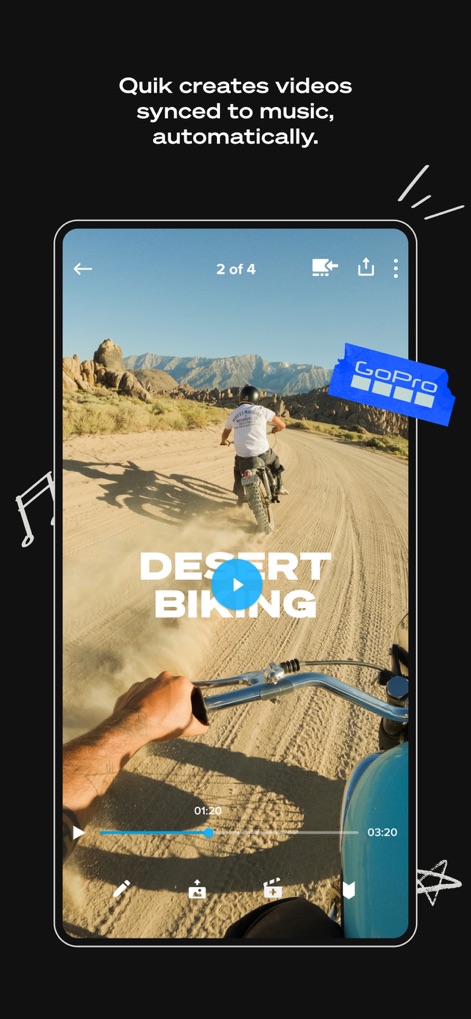
자동 하이라이트 생성
이 앱은 역동적인 모험 영상과 'GoPro' 브랜드 로고를 결합하여 음악에 맞춰 자동으로 편집된 하이라이트 비디오를 제공합니다.

자동 하이라이트 알림
사용자는 파도타기 장면과 함께 '자동 하이라이트 영상 준비 완료' 알림을 받아 중요한 순간을 놓치지 않고 확인할 수 있습니다.

미디어 자동 정리
이 앱은 해변에서 찍은 추억과 다양한 미디어 썸네일을 앨범으로 체계적으로 분류하여 사용자가 손쉽게 콘텐츠를 관리하도록 돕습니다.

정교한 속도 조절
이 앱은 공중에서 점프하는 스노보더의 역동적인 장면과 함께 비디오 속도 조절 슬라이더를 제공하여 영상에 드라마틱한 효과를 더할 수 있습니다.

비트에 맞춘 음악
사용자는 평화로운 말 먹이 주기 장면과 함께 다양한 '음악 카테고리'를 탐색하여 영상의 분위기를 완벽하게 표현할 수 있습니다.

환경 맞춤 필터
이 앱은 스노클링 하는 사람의 선명한 수중 장면과 함께 '수중' 및 '해변'과 같은 특정 환경에 최적화된 필터를 제공합니다.

영상에서 사진 추출
사용자는 스키를 타는 활강 장면과 함께 비디오 타임라인에서 원하는 순간을 선택하여 고해상도 이미지를 추출하고 저장할 수 있습니다.

GoPro 원격 제어
이 앱은 실시간으로 보이는 'GoPro 카메라 피드'와 함께 사용자가 스마트폰에서 카메라 설정 및 '녹화 시작/정지' 기능을 손쉽게 제어할 수 있게 합니다.

360도 영상 리프레임
이 도구는 '360도 스노보딩 영상'과 '오브젝트 트래킹' 기능을 통해 사용자가 원하는 시점을 선택하고 전통적인 영상으로 손쉽게 변환할 수 있도록 지원합니다.
설명
Download
비슷한 앱
유사한 기능과 사용자 경험을 가진 앱





이 페이지는 앱이나 개발자의 공식 페이지가 아니며, 정보 제공 및 논평을 목적으로 작성된 독립 편집 간행물입니다. 명시적으로 달리 언급되지 않는 한, 해당 앱이나 개발자는 MWM, Apple, Google Play, 앱 퍼블리셔 또는 앱 개발자와 제휴, 보증, 후원, 승인 또는 공식적으로 연결되어 있지 않으며, 이 페이지의 어떤 내용도 해당 앱이 MWM의 서비스를 사용하여 개발되었음을 의미하지 않습니다. 모든 상표, 로고, 스크린샷 및 기타 콘텐츠는 해당 소유자의 자산입니다.