
이 페이지는 앱이나 개발자의 공식 페이지가 아니며, 정보 제공 및 논평을 목적으로 작성된 독립 편집 간행물입니다. 명시적으로 달리 언급되지 않는 한, 해당 앱이나 개발자는 MWM, Apple, Google Play, 앱 퍼블리셔 또는 앱 개발자와 제휴, 보증, 후원, 승인 또는 공식적으로 연결되어 있지 않으며, 이 페이지의 어떤 내용도 해당 앱이 MWM의 서비스를 사용하여 개발되었음을 의미하지 않습니다. 모든 상표, 로고, 스크린샷 및 기타 콘텐츠는 해당 소유자의 자산입니다.


LightCut - AI Video Editor
영상 편집의 복잡함을 혐오하는 자들을 위한 앱이 나타났습니다. 이 앱은 AI가 당신의 비전을 현실로 만들어주는 '시간 여행자의 능력'을 부여합니다. 드론 푸티지와 지루한 수동 편집의 경계를 허물고, 탭 한 번으로 프로급 영상을 토해냅니다.
다운로드
2.5M+사용자 평점
총 평가 수
30.9K개발사
카테고리
Photo & Video지원 언어
14최신 버전
4.100.0크기
354.1 MB출시일
2021년 8월 12일모바일 콘텐츠 크리에이터를 위한 AI 기반 비디오 편집 앱의 주요 강점 평가.
LightCut - AI 비디오 에디터 핵심 기능 분석
DJI 장치 푸티지 직접 편집 지원
이 앱은 Mavic 3 시리즈, Air 3, Mini 4 Pro 및 Mini 3 시리즈 드론 푸티지뿐만 아니라 Osmo Mobile, Osmo Action 및 Osmo Pocket 시리즈 핸드헬드 푸티지를 스마트폰 저장 공간을 절약하며 직접 편집할 수 있도록 지원합니다.
AI 기반 원탭 편집
이 도구는 사용자가 좋아하는 비디오 클립과 사진을 선택하기만 하면, AI 기반 원탭 편집 기능이 분석을 거쳐 4K UHD를 포함한 공유 가능한 클립으로 자동 변환해 줍니다. AI는 푸티지를 분석하여 하이라이트 순간을 선택하고 적합한 비디오 템플릿과 매치하여 탁월한 결과물을 만들어냅니다.
에어리얼 오디오매치 (AI 기반 자동 음향 효과)
이 앱은 AI를 통해 드론 푸티지에 숲, 바다, 들판, 도심 거리 등 테마에 맞는 음향 효과를 자동으로 추가합니다. 몇 번의 탭만으로 고품질 음향 효과를 비디오에 추가할 수 있어 수동으로 검색하고 편집할 필요가 없습니다.
다양한 전문 템플릿
이 앱은 사용자가 원하는 템플릿과 템포를 선택하기만 하면 시선을 사로잡는 비디오를 자동으로 제작해 줍니다. 여행, 로드 트립, 자연, 건축 및 도시, 패션, 라이프스타일 브이로그, 스포츠, 항공 등 다양한 창의적인 템플릿 스타일을 제공합니다.
인스파이어 캠 촬영 모드 (전문가급 촬영 가이드)
이 앱은 사용자가 촬영 및 편집 방법에 대해 걱정할 필요 없이, 다양한 시나리오에서 훌륭한 장면을 얻는 방법에 대한 단계별 가이드를 제공합니다. 촬영 후에는 멋진 비디오가 자동으로 제작됩니다.
올인원 비디오 편집 도구
이 앱은 비디오 트리머, 비디오 커터, 슬로우/패스트 모션 등 편리한 기능과 다양한 스티커 및 글꼴 스타일을 통해 사용자가 창의적인 비디오를 만들 수 있도록 돕습니다. 필터, 효과 및 전환으로 비디오를 편집하고 결합할 수 있습니다.
자주 묻는 질문
에 대해 알아야 할 모든 것 LightCut - AI Video Editor
What is LightCut?
LightCut is an AI-powered video editing app designed for easy creation of stylish videos and vlogs. It provides awesome templates, effects, and an AI editor for both beginners and professionals.
Does LightCut support 4K video export?
Yes, LightCut supports 4K UHD video export. Its AI-powered One-Tap Edit feature can automatically transform selected clips and photos into share-worthy 4K UHD videos.
Can LightCut directly edit footage from DJI drones and handheld devices?
Yes, LightCut directly edits footage from DJI drones like Mavic 3 Series and Mini 4 Pro, and handheld devices such as Osmo Mobile and Osmo Action Series, without requiring export.
How does LightCut's AI video editor function?
LightCut's AI video editor analyzes selected video clips and photos. It identifies highlight moments and matches them with suitable templates to automatically create outstanding, share-worthy videos.
What types of creative templates does LightCut offer?
LightCut offers diverse creative templates across various styles. These include themes for travel, road trips, nature, building & city, fashion, lifestyle vlogs, sports, and aerial videos.
Can LightCut automatically add sound effects to drone videos?
Yes, LightCut features Aerial AudioMatch, an AI that automatically adds sound effects to drone footage. It uses themes like Forest or Urban Street and draws from a library of thousands of professional sounds.
Does LightCut offer guidance for shooting professional-looking videos?
Yes, LightCut provides guidance through its Inspire Cam feature. It offers convenient tutorials with step-by-step instructions on how to achieve great shots in a wide range of scenarios.
Is it possible to adjust video speed in LightCut?
Yes, LightCut allows users to adjust video speed with slow/fast motion tools. It also offers advanced speed curve controls with presets like Montage, Hero Moment, and Bullet Time for dynamic effects.
What unique visual effects are available in LightCut?
LightCut provides various visual effects, including filters, transitions, and Tilt-Shift effects. Tilt-Shift gives videos a miniaturized, unique look, particularly effective for urban scenes.
Does LightCut allow users to add text and stickers to videos?
Yes, LightCut enables users to add multiple stickers and diverse font styles. It offers various sticker categories like 3D, Vlog, and Cute for creative text and graphic overlays.
다음 스크린샷과 설명은 앱의 공식 스토어 목록에서 직접 가져온 것이며 앱 개발자의 자산입니다.
앱 스토어
스크린샷

사용자는 직관적인 인터페이스로 영상을 편집할 수 있으며, 하단 메뉴에서 "템플릿" 및 "편집" 기능을 통해 쉽게 접근할 수 있습니다.
강력한 AI 편집

이 앱은 "여행" 및 "비트" 등 다양한 카테고리의 트렌디한 비디오 템플릿을 제공하여 사용자가 쉽게 세련된 영상을 만들 수 있도록 돕습니다.
최신 유행 템플릿

사용자는 정교한 타임라인 편집 기능을 통해 영상을 세밀하게 조정할 수 있으며, "분할" 및 "속도" 조절과 같은 강력한 도구를 활용할 수 있습니다.
올인원 영상 편집

이 앱은 내장된 "비율" 설정과 "뷰티파이" 기능을 제공하여 사용자가 마치 전문가처럼 영상을 촬영하고 즉시 편집할 수 있게 합니다.
전문가처럼 촬영

DJI Mavic 3 Pro 및 Action 3와 같은 다양한 DJI 기기와의 빠른 연결을 지원하여, 사용자는 영상을 손쉽게 전송하고 편집할 수 있습니다.
간편한 기기 연결

이 앱은 "Flying Higher"와 같은 드론 전용 템플릿을 제공하여 사용자의 항공 촬영물에 최적화된 영상미와 역동적인 효과를 더해줍니다.
드론 영상 템플릿

사용자는 "곡선" 기능을 통해 영상의 속도를 정교하게 조절할 수 있으며, "영웅 순간" 및 "몽타주"와 같은 다양한 사전 설정 효과를 적용할 수 있습니다.
속도 곡선 조절

이 앱은 "무비" 및 "인물"과 같은 다양한 카테고리의 필터를 제공하여, 사용자가 "이전"과 "이후"를 비교하며 영상에 맞는 최적의 분위기를 연출할 수 있습니다.
다채로운 필터 효과
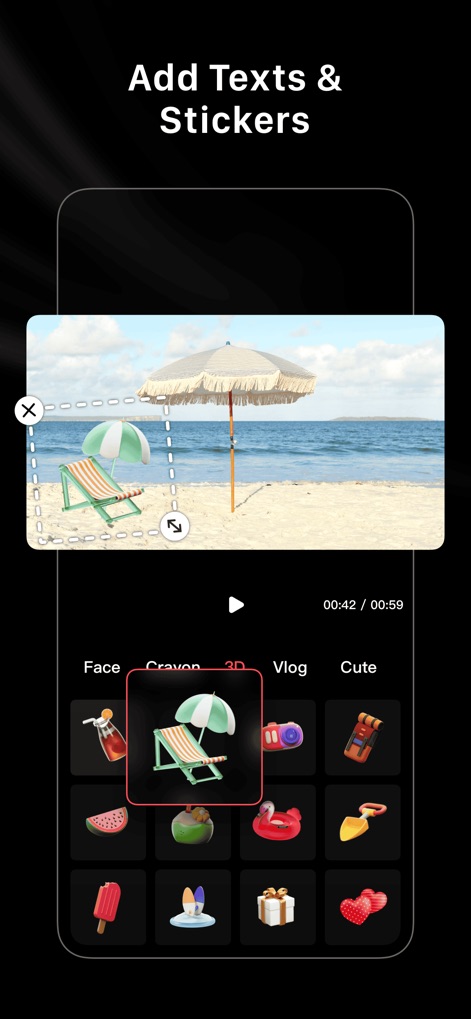
사용자는 "3D" 스티커와 "귀여운" 스티커 등 다양한 스타일의 시각적 요소를 영상에 추가하여 창의적인 표현을 할 수 있습니다.
텍스트 및 스티커

완성된 영상을 손쉽게 "인스타그램" 및 "틱톡"과 같은 주요 소셜 미디어 플랫폼으로 직접 공유하여, 사용자의 창작물을 널리 알릴 수 있습니다.
영상 공유의 편리함
설명
Download






이 페이지는 앱이나 개발자의 공식 페이지가 아니며, 정보 제공 및 논평을 목적으로 작성된 독립 편집 간행물입니다. 명시적으로 달리 언급되지 않는 한, 해당 앱이나 개발자는 MWM, Apple, Google Play, 앱 퍼블리셔 또는 앱 개발자와 제휴, 보증, 후원, 승인 또는 공식적으로 연결되어 있지 않으며, 이 페이지의 어떤 내용도 해당 앱이 MWM의 서비스를 사용하여 개발되었음을 의미하지 않습니다. 모든 상표, 로고, 스크린샷 및 기타 콘텐츠는 해당 소유자의 자산입니다.