Howbout: shared calendar

Howbout: shared calendar

다운로드: App Store
로고: Howbout: shared calendar

Howbout: 당신의 소셜 라이프를 위한 공유 캘린더

그룹 채팅을 현실로 바꾸세요. 일정을 동기화하고, 친구들의 여유 시간을 확인하고, 가장 친한 친구들을 위한 최고의 소셜 캘린더로 약속을 현실로 만드세요.

개발사

Howbout Ltd.

카테고리

Social Networking

다운로드

7M+

사용자 평점

4.8/5

총 평가 수

85K+

지원 언어

1

약속을 현실로 만드세요

이 인터페이스를 사용하는 7M+ 명의 사용자.

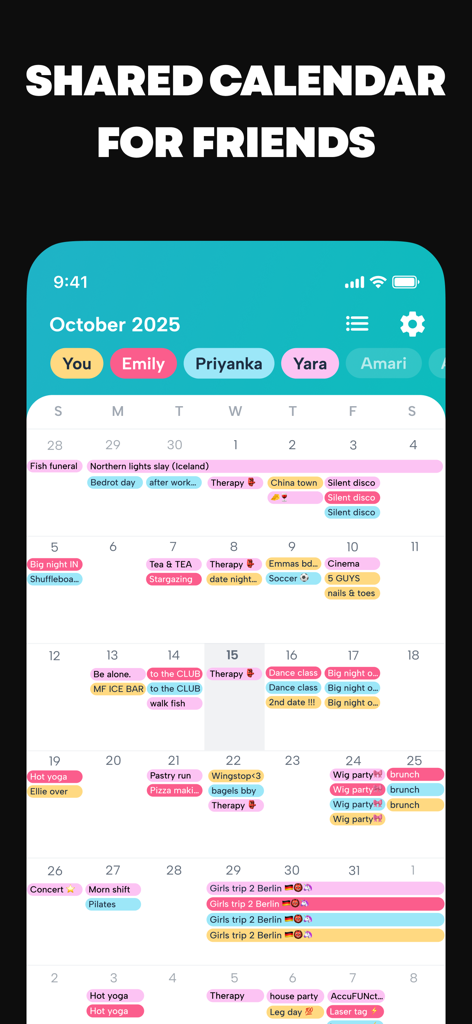
Howbout 앱이 소셜 이벤트와 친구 활동이 있는 화려한 공유 월간 캘린더 인터페이스를 보여주는 스크린샷
Howbout 앱이 소셜 이벤트와 친구 활동이 있는 화려한 공유 월간 캘린더 인터페이스를 보여주는 스크린샷

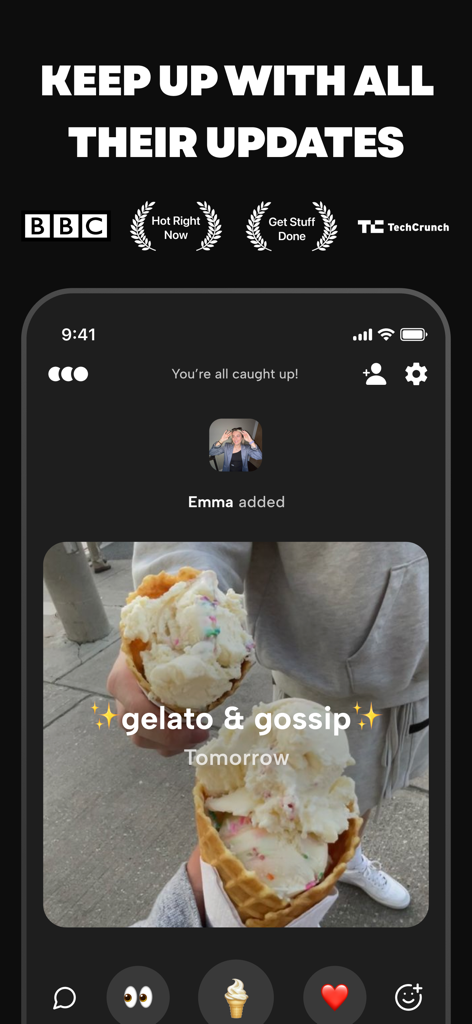
Howbout 앱 활동 피드에 소셜 반응과 함께 젤라또와 가십에 대한 친구의 약속이 표시됨
Howbout 앱 활동 피드에 소셜 반응과 함께 젤라또와 가십에 대한 친구의 약속이 표시됨

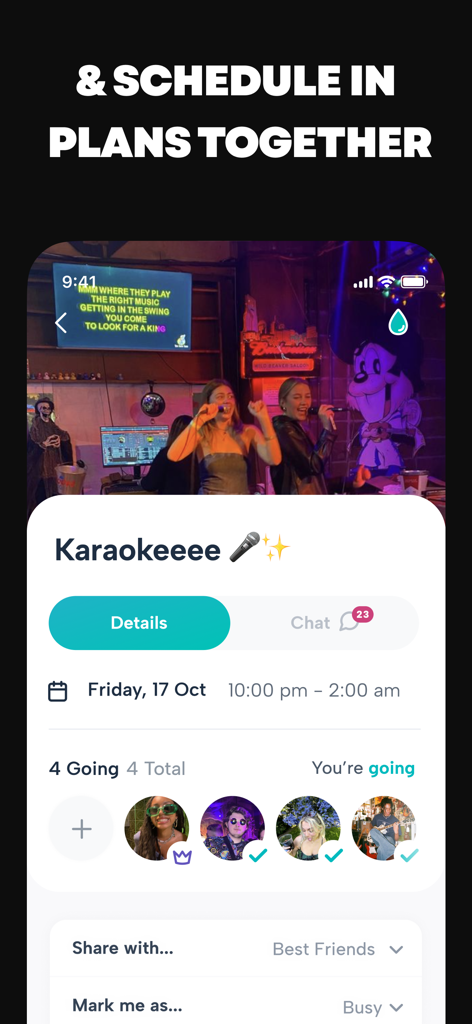
Howbout 앱 인터페이스에 친구 참석자 목록과 일정 세부 정보가 있는 노래방 이벤트 계획이 표시됨
Howbout 앱 인터페이스에 친구 참석자 목록과 일정 세부 정보가 있는 노래방 이벤트 계획이 표시됨

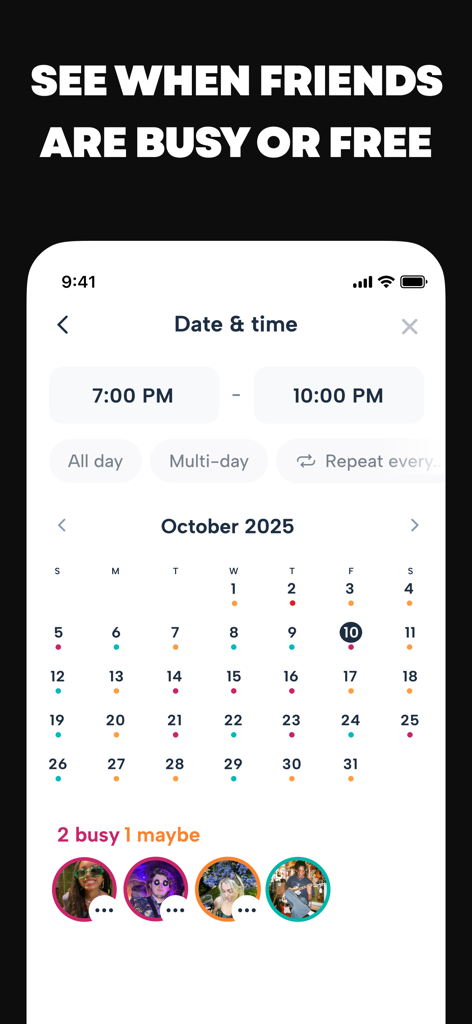
Howbout 앱 인터페이스에 친구들이 바쁘거나 약속을 잡을 수 있는 시간대를 나타내는 색상 코드 점이 있는 월간 캘린더 보기 표시
Howbout 앱 인터페이스에 친구들이 바쁘거나 약속을 잡을 수 있는 시간대를 나타내는 색상 코드 점이 있는 월간 캘린더 보기 표시

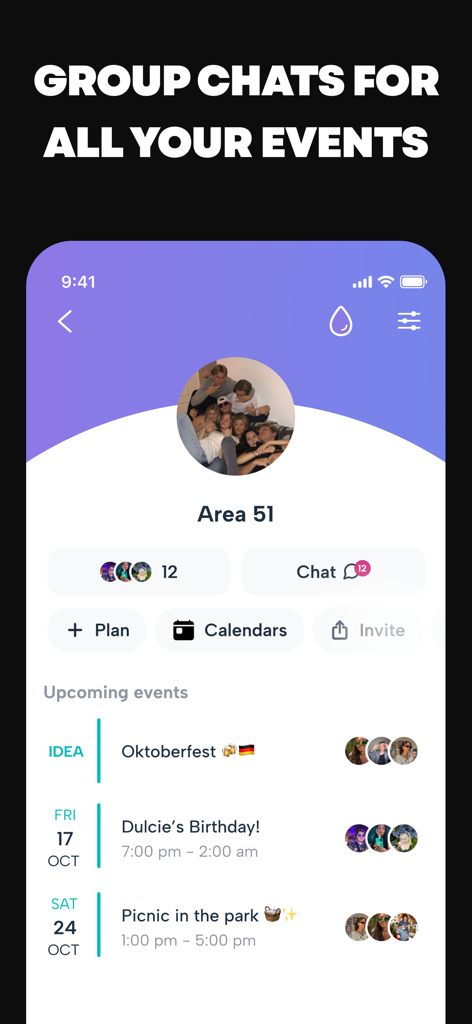
Howbout 앱 인터페이스에 예정된 이벤트와 채팅 기능이 있는 그룹 페이지 표시
Howbout 앱 인터페이스에 예정된 이벤트와 채팅 기능이 있는 그룹 페이지 표시

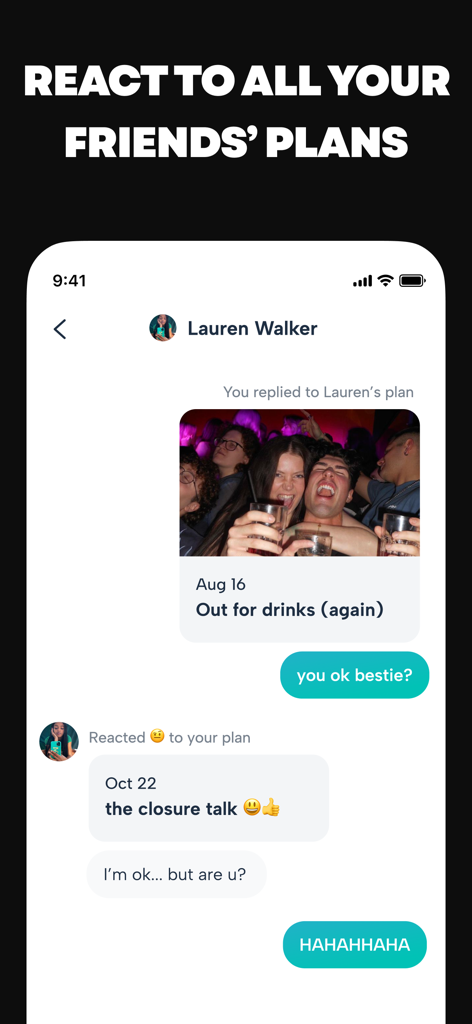
공유 캘린더 이벤트에 친구들이 반응하고 댓글을 다는 Howbout 앱 채팅 인터페이스를 보여주는 모바일 화면
공유 캘린더 이벤트에 친구들이 반응하고 댓글을 다는 Howbout 앱 채팅 인터페이스를 보여주는 모바일 화면

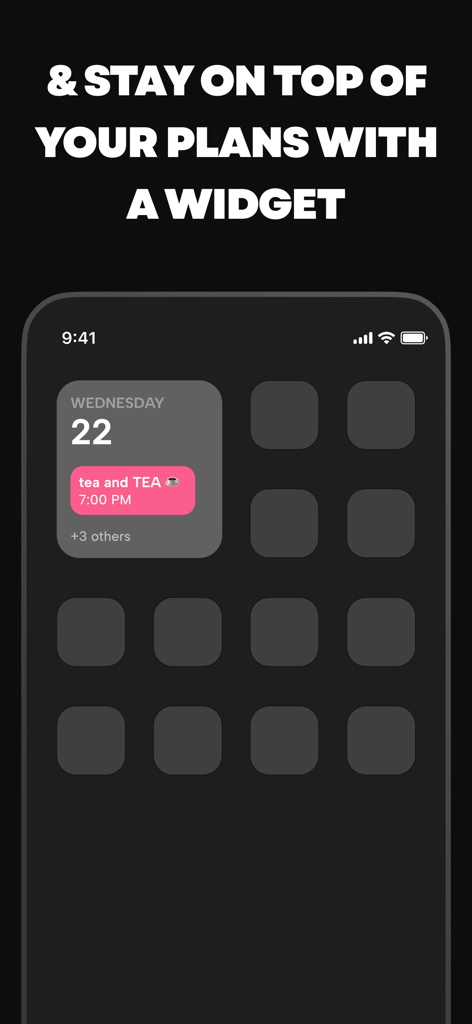
수요일 22일 오후 7시 차 약속을 표시하는 Howbout 앱 위젯이 있는 iPhone 홈 화면

수요일 22일 오후 7시 차 약속을 표시하는 Howbout 앱 위젯이 있는 iPhone 홈 화면

'같이 놀자'는 약속을 현실로 만드세요

이 앱을 돋보이게 하는 도구, 7M+ 명의 사용자가 선택.

🔍

즉각적인 약속 가능 여부 확인

끝없는 주고받기를 멈추세요. 친구들이 언제 자유로운지, 바쁜지를 즉시 확인하고 50개의 메시지 없이 약속을 확정하세요.

지루한 분위기는 던져버리세요

당신의 삶은 회의가 아닙니다. 고유한 스타일에 맞는 색상 코드, GIF, 헤더 사진으로 캘린더를 개인화하세요.

📸

모든 것을 한곳에

모든 약속에는 자체 채팅과 사진 보관함이 있습니다. 가기 전에 기대감을 공유하고, 끝난 후에 사진을 공유하세요. 모든 것을 한 곳에서.

앱 소개

에 대해 알아야 할 모든 것 Howbout: shared calendar.

설명

Howbout is the #1 shared calendar app made for friends. Because calendars don’t need to be boring. Your plans are fun, and your calendar should be too. … This is that app you’ve seen all over TikTok. Not ‘Howabout shared calendar’, not ‘How bout social calendar’, not ‘HowBout the social shared calendar’, not ‘How about a calendar?’, and not ‘Howbbout’... we're Howbout, and we're the absolute best shared calendar for friends. Millions of people are already on Howbout - you should be too. Also featured by Apple, Business Insider, BBC, MailOnline, TechCrunch and more! … SHARED CALENDAR - Easy calendar sharing with shared calendars and group calendars to keep up with what friends are doing COLOR-CODE YOUR EVENTS - And choose colors for each of your friends’ shared calendars too MAKE PLANS - Actually get plans out of the group chat and keep all the details together; add notes, descriptions, locations, memos, and fun header pictures or gifs too SHARE AVAILABILITY - See and manage friends’ schedules & planners; easily find when everyone’s free and see when they’re busy CUSTOMIZE & MAKE IT YOURS - Add a profile picture, choose colors that fit your personality, set up your Howbout with anything that makes you you! CHOOSE WHO SEES WHAT - Set your sharing and privacy settings for any event or friend CHAT, CHAT, CHAT - There’s a built-in group chat for every plan and group, and of course DMs too GET NOTIFICATIONS - Stay up to date with all your friends’ updates and activity, but choose what you want to get notified for FRIENDS-ONLY ACTIVITY FEED - See all your friends' latest updates on the activity feed (we’re all for snooping) SEND REACTS - Show friends you care by reacting to everything they’re adding SYNC CALENDARS - Already have a different calendar (like for your work, shift, school or class schedules or rota?) - sync it all into Howbout CALENDAR INTEGRATIONS - You can sync in any calendar that you see on your phone to Howbout - whether it’s your Apple Calendar, Google Calendar, Microsoft Outlook Calendar, or even subscribed calendars, like artist tour schedules, sports team calendars, moon & horoscope calendars - anything your heart desires! ADD A WIDGET - Use the widget to keep up with your schedule; see all your plans & events on your home screen without opening the app SHARE PICS & VIDS - Send pictures & videos directly in calendar events, chats, and groups SEND INVITES - Invite anyone easily with a link … Bored of keeping up with your friends on Howbout? Keep up with us instead: @howbout_app on socials, hello@howbout.app on email … If you decide to subscribe to Howbout+, your subscription will automatically renew unless auto-renew is turned off at least 24 hours before the end of the current billing period. Your account will be charged for renewal within 24 hours prior to the end of the current period. Subscriptions can be managed and auto-renewal turned off in your app store settings. … Terms of Use: www.apple.com/legal/internet-services/itunes/dev/stdeula/ Terms and Conditions: https://howbout.app/terms-and-conditions Privacy Policy: https://howbout.app/privacy-policy

최신 버전

13.3.5

크기

124.5 MB

출시일

2019년 11월 30일

친구들과 만날 준비가 되셨나요?

1위 소셜 캘린더에서 7백만 명의 사람들과 함께하세요. 그룹 채팅에서 벗어나 약속을 잡고, 친구들의 일정을 엿보고, '어쩌면'이라는 순간을 추억으로 만드세요.

다운로드: App Store
FAQ

자주 묻는 질문

에 대해 알아야 할 모든 것 Howbout: shared calendar

Howbout 앱이란 무엇인가요?

Howbout은 친구들과의 공유 캘린더 앱으로, 사용자들이 캘린더를 쉽게 공유하고, 약속을 잡고, 소셜 라이프를 한 곳에서 관리할 수 있도록 돕습니다.

Howbout을 사용하여 친구들과 캘린더를 공유할 수 있나요?

네, Howbout은 친구들의 활동을 파악하기 위해 공유 캘린더 및 그룹 캘린더를 통해 캘린더 공유를 쉽게 할 수 있는 공유 캘린더 앱입니다.

Howbout 앱에서 이벤트를 색상으로 구분할 수 있나요?

네, Howbout은 이벤트 색상 구분을 지원합니다. 사용자는 더 나은 정리를 위해 친구들의 공유 캘린더마다 특정 색상을 선택할 수도 있습니다.

Howbout은 사용자가 친구들과 약속을 잡는 데 어떻게 도움을 주나요?

Howbout은 세부 정보를 중앙 집중화하여 약속 잡는 것을 돕습니다. 사용자는 이벤트에 메모, 설명, 위치, 메모 및 재미있는 헤더 사진이나 GIF를 추가할 수 있습니다.

Howbout은 사용자가 친구들이 언제 자유로운지 또는 바쁜지 볼 수 있도록 도와주나요?

네, Howbout은 사용자가 친구들의 일정과 플래너를 공유하고 관리할 수 있도록 합니다. 모든 사람이 언제 자유로운지 쉽게 찾고 언제 바쁜지 볼 수 있도록 돕습니다.

Howbout 앱은 어떤 맞춤 설정 옵션을 제공하나요?

Howbout은 사용자가 프로필 사진을 추가하고 자신의 개성에 맞는 색상을 선택하여 앱을 독특하게 만들 수 있도록 하여 프로필을 맞춤 설정할 수 있도록 합니다.

Howbout은 이벤트 및 친구에 대한 개인 정보 보호 설정을 제공하나요?

네, Howbout은 개인 정보 보호 설정을 제공합니다. 사용자는 특정 이벤트 또는 개별 친구에 대한 공유 및 개인 정보 보호 설정을 지정할 수 있습니다.

Howbout 앱에 내장된 채팅 기능이 있나요?

네, Howbout에는 모든 약속 및 그룹에 대한 내장 그룹 채팅 기능이 포함되어 있습니다. 또한 개인 대화를 위한 직접 메시지(DM)도 제공합니다.

Google 또는 Apple Calendar와 같은 외부 캘린더를 Howbout과 동기화할 수 있나요?

네, Howbout은 다양한 캘린더 동기화를 지원합니다. 사용자는 Apple Calendar, Google Calendar, Microsoft Outlook Calendar 및 구독 캘린더를 통합할 수 있습니다.

Howbout은 빠른 액세스를 위한 홈 화면 위젯을 제공하나요?

네, Howbout은 위젯을 제공합니다. 사용자는 앱을 열지 않고도 모든 약속과 이벤트를 볼 수 있도록 홈 화면에 위젯을 추가할 수 있습니다.

Howbout에 친구를 초대하려면 어떻게 해야 하나요?

사용자는 링크를 보내 누구나 쉽게 Howbout에 초대할 수 있습니다.

Howbout에 대한 프리미엄 구독이 있나요?

네, Howbout은 Howbout+라는 구독 서비스를 제공합니다. 이는 결제 기간이 종료되기 24시간 전에 비활성화하지 않는 한 자동 갱신됩니다. 관리는 앱 스토어 설정에서 할 수 있습니다.

App information, icons, screenshots, and descriptions displayed on this page are sourced from the Apple App Store and are the property of their respective developers. Download estimates and rankings are based on MWM's proprietary models and may not reflect actual figures. This page is provided for informational and analytical purposes only.

Believe this page infringes your intellectual property? File a dispute