
이 페이지는 앱이나 개발자의 공식 페이지가 아니며, 정보 제공 및 논평을 목적으로 작성된 독립 편집 간행물입니다. 명시적으로 달리 언급되지 않는 한, 해당 앱이나 개발자는 MWM, Apple, Google Play, 앱 퍼블리셔 또는 앱 개발자와 제휴, 보증, 후원, 승인 또는 공식적으로 연결되어 있지 않으며, 이 페이지의 어떤 내용도 해당 앱이 MWM의 서비스를 사용하여 개발되었음을 의미하지 않습니다. 모든 상표, 로고, 스크린샷 및 기타 콘텐츠는 해당 소유자의 자산입니다.


다운로드
10M+사용자 평점
총 평가 수
22.9K개발사
카테고리
Graphics & Design지원 언어
14최신 버전
7.2.4크기
104.2 MB출시일
2016년 8월 26일모바일 디지털 아티스트를 위한 강력하고 포괄적인 기능 분석
Infinite Painter 앱 주요 기능 심층 분석
Apple Pencil 최적화
이 앱은 Apple Pencil의 모든 필압 및 기울기 감지 기능을 완벽하게 지원하며, 사용자가 Apple Pencil과 별도로 손가락 기능에 대한 설정을 지정할 수 있도록 하여 정교한 드로잉 경험을 제공합니다.
포괄적인 브러시 시스템
이 앱은 에어브러시, 캘리그래피, 오일 페인트 등 수백 가지의 내장 브러시를 제공하며, 각 브러시에 대해 100가지 이상의 사용자 지정 설정을 지원하여 아티스트가 표현의 폭을 넓힐 수 있게 해줍니다.
업계 선도적인 색상 보정 및 필터
이 도구는 그라디언트 맵, 색상 곡선, 40가지 이상의 라이브 필터 등 업계 최고 수준의 색상 보정 및 필터 기능을 갖추고 있어 사용자가 작품의 색감과 분위기를 정교하게 조정할 수 있게 해줍니다.
Photoshop®과 유사한 스마트 레이어
이 앱은 품질 손실 없이 여러 번 변형이 가능한 Photoshop®과 유사한 스마트 레이어 기능을 제공하여 사용자가 유연하게 디자인을 수정할 수 있도록 합니다.
고급 레이어 관리
사용자는 레이어를 쉽게 그룹화하고, 30가지 블렌드 모드와 마스크 기능을 활용하여 복잡한 작품을 정밀하게 구성하고 편집할 수 있습니다.
고급 선택 도구
이 앱은 라쏘, 사각형, 원형, 경로 등 다양한 고급 선택 도구를 제공하여 사용자가 특정 영역을 정밀하게 선택하고 편집할 수 있도록 합니다.
원근 가이드 및 스마트 도형
사용자는 5가지 원근 가이드와 스마트 도형 감지 기능을 활용하여 복잡한 원근법을 쉽게 구현하고 정교한 디자인 작업을 수행할 수 있습니다.
간편한 가져오기/내보내기 및 공유
이 앱은 사진, 클립보드 등 다양한 소스에서 이미지를 가져오고 JPG, PNG, 레이어드 PSD 등 여러 형식으로 내보낼 수 있어 사용자의 워크플로를 가속화합니다.
최소한의 직관적인 인터페이스
이 도구는 최소한의 직관적인 인터페이스를 갖추고 있어 사용자가 작업 공간을 최대한 활용하고 창작에 집중할 수 있도록 돕습니다.
타임랩스 기록 및 공유
이 도구는 사용자가 작업 과정을 타임랩스 비디오로 기록하고 소셜 네트워크에 공유하여 작품의 제작 과정을 효과적으로 보여줄 수 있도록 지원합니다.
자주 묻는 질문
에 대해 알아야 할 모든 것 Infinite Painter
Is Infinite Painter available on iPad and iPhone?
Yes, Infinite Painter is a painting, sketching, and drawing app created for both iPad and iPhone. It brings a powerful feature set to artists of all levels.
Does Infinite Painter offer a free trial?
Yes, Infinite Painter provides a 7-day trial to experience all its features. This trial includes 5 layers, basic transform, symmetry, and all built-in brushes.
How can users customize brushes in Infinite Painter?
Infinite Painter allows customizing over 100 settings for every brush. Users can also organize, share, and import or export custom brushes and sets.
Does Infinite Painter support the Apple Pencil?
Yes, Infinite Painter is designed for the Apple Pencil, providing full pressure and tilt support. This ensures a natural and responsive drawing experience on compatible devices.
What layer management features does Infinite Painter provide?
Infinite Painter offers layer support with 30 blend modes, masks for layers, adjustments, groups, and clipping masks. Users can easily group, expand, and collapse layers.
What file formats can Infinite Painter export artwork to?
Infinite Painter exports images as JPG, PNG, ZIP, layered PSD files, or Painter projects. This supports integration with various other platforms and workflows.
What features are available for free in Infinite Painter?
The free version of Infinite Painter includes a 7-day trial, 5 layers, Solid Fill, Lasso selection, Basic Transform, Symmetry, seamless pattern projects, and all built-in brushes with editing.
What are the advantages of the Infinite Painter Pro version?
Infinite Painter Pro provides HD canvas sizes, more layers, adjustments, live Filter layers, layer groups, layer masks, and over 40 powerful, professional tools for advanced artistry.
Does Infinite Painter include tools for perspective drawing?
Yes, Infinite Painter offers five different perspective guides for 3D cityscapes or a standard 2D grid. Users can also drag Rectangle and Circle shapes in perspective.
How does Infinite Painter support seamless pattern creation?
Infinite Painter supports seamless pattern projects as a core feature. This allows users to design and create intricate repeating patterns directly within the application.
다음 스크린샷과 설명은 앱의 공식 스토어 목록에서 직접 가져온 것이며 앱 개발자의 자산입니다.
앱 스토어
스크린샷

이 앱은 섬세한 레드 펜슬 드로잉과 정확한 안내선 기능을 제공하여 자연스러운 스케치 경험을 선사합니다.
종이 위의 스케치
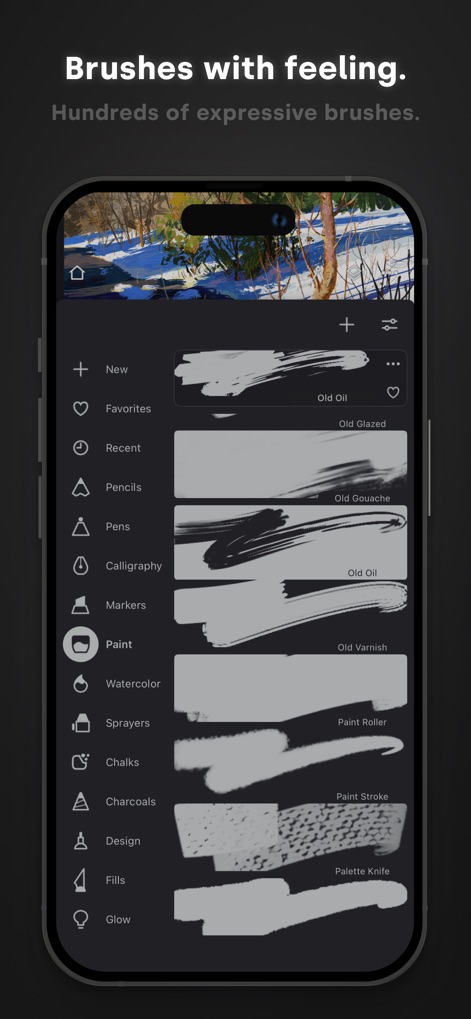
수백 가지의 내장된 브러시 카테고리와 다양한 브러시 스트로크 샘플을 통해 무한한 표현이 가능합니다.
풍부한 브러시 컬렉션

사용자는 레이어 패널에서 여러 레이어 마스크를 활용하고 레이어를 효율적으로 그룹화하여 비파괴 편집의 완전한 제어권을 가질 수 있습니다.
레이어 마스터리
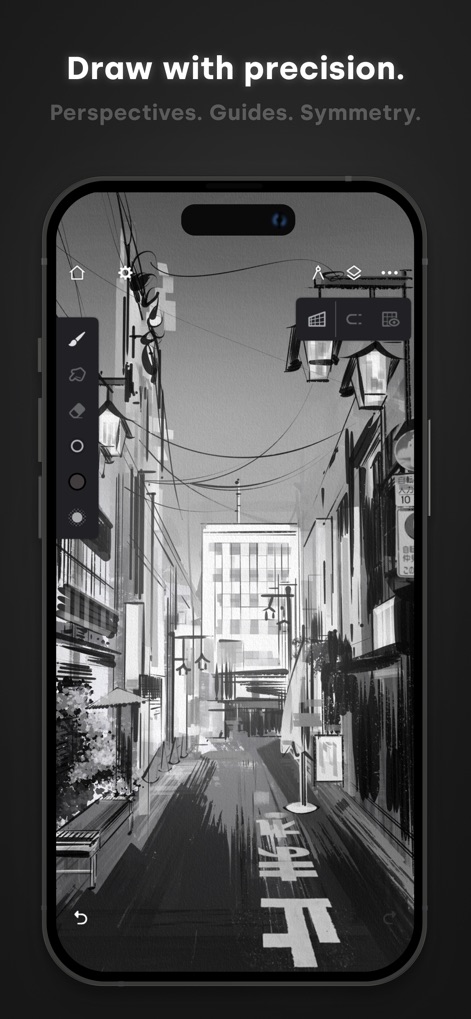
이 앱은 3D 도시 풍경을 위한 정확한 원근 가이드와 복잡한 도시 풍경 일러스트레이션을 위한 정밀한 드로잉 도구를 제공합니다.
정교한 구도 설정
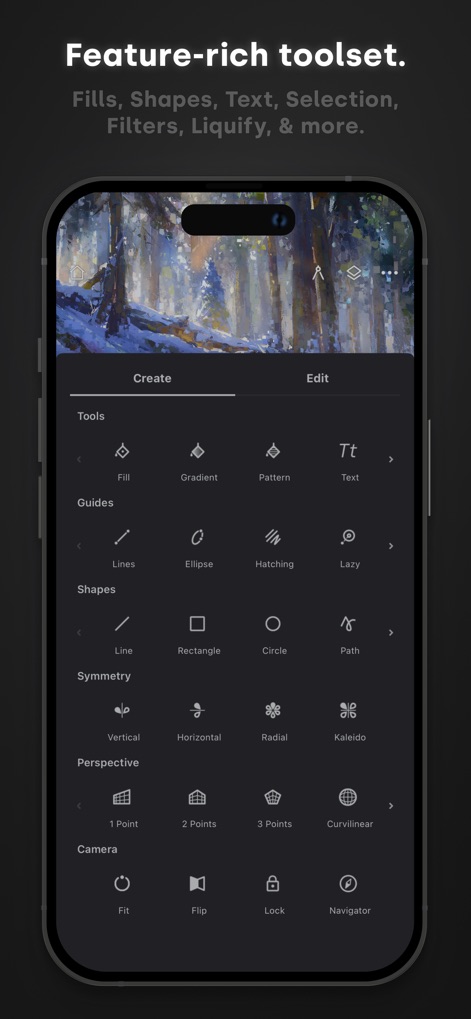
이 도구 모음은 선, 도형, 원근법 가이드와 같은 다양한 드로잉 보조 기능과 채우기 및 그라데이션과 같은 풍부한 편집 옵션을 제공합니다.
강력한 도구 모음
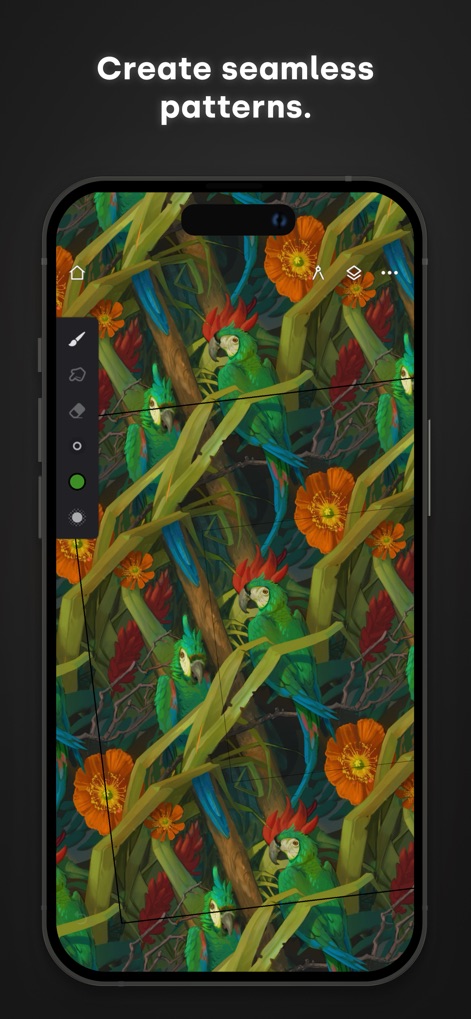
사용자는 생동감 넘치는 앵무새 패턴과 같은 복잡한 디자인을 만들 수 있으며, 명확한 패턴 경계를 통해 완벽하게 반복되는 결과물을 보장합니다.
완벽한 패턴 디자인

이 앱은 직관적인 색상환을 통해 폭넓은 색상을 탐색하고, 작품의 명암을 확인하는 흑백 미리보기 기능을 제공하여 전문적인 색상 조정을 돕습니다.
전문가의 색상 조정

사용자는 그림 위에 사용자 정의 가능한 텍스트 오버레이를 추가하고 글꼴 및 서식 옵션을 제공하는 전용 인터페이스를 통해 쉽게 편집할 수 있습니다.
쉬운 텍스트 추가
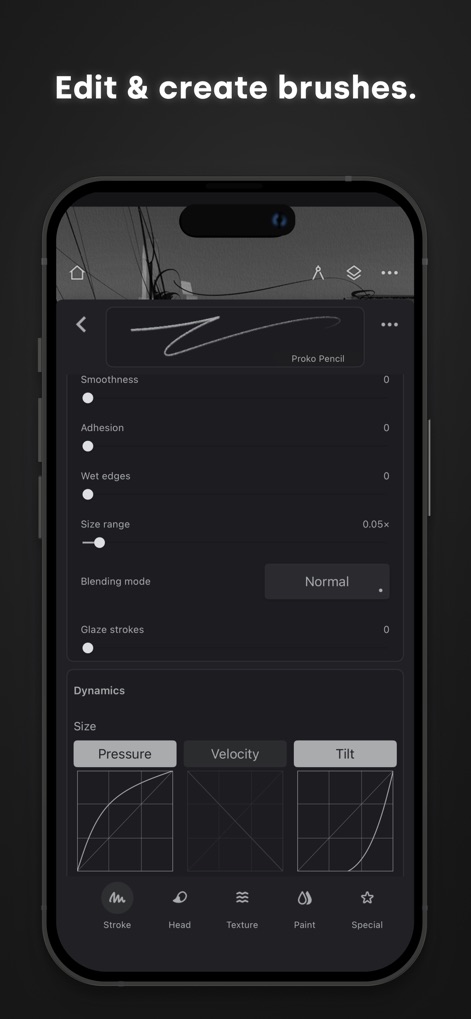
이 앱은 정교한 브러시 사용자 정의 슬라이더를 제공하여 부드러움과 혼합 모드를 조절하며, 압력 및 기울기 역학 설정을 통해 브러시 동작을 미세 조정할 수 있습니다.
브러시 맞춤 설정

이 도구를 사용하여 사용자는 숙련된 조명 기법과 섬세한 구성으로 인상적인 디지털 페인팅을 완성하여, 전문가 수준의 걸작을 탄생시킬 수 있습니다.
예술 작품 창작
설명
Download
비슷한 앱
유사한 기능과 사용자 경험을 가진 앱

Sketchbook®
Sketchbook, Inc.

Mental Canvas Draw
Mental Canvas, Inc.

ibis Paint
ibis inc.

ibis Paint X
ibis inc.

Paper: Sketch, Draw & Create
Evernote Corporation

Adobe Fresco: Draw & Paint App
Adobe Inc.

Art Set 4
Lofopi Ltd

MediBang Paint – Drawing & Art
MediBang inc.

Tayasui Sketches
SKETCHES SRL
이 페이지는 앱이나 개발자의 공식 페이지가 아니며, 정보 제공 및 논평을 목적으로 작성된 독립 편집 간행물입니다. 명시적으로 달리 언급되지 않는 한, 해당 앱이나 개발자는 MWM, Apple, Google Play, 앱 퍼블리셔 또는 앱 개발자와 제휴, 보증, 후원, 승인 또는 공식적으로 연결되어 있지 않으며, 이 페이지의 어떤 내용도 해당 앱이 MWM의 서비스를 사용하여 개발되었음을 의미하지 않습니다. 모든 상표, 로고, 스크린샷 및 기타 콘텐츠는 해당 소유자의 자산입니다.