
이 페이지는 앱이나 개발자의 공식 페이지가 아니며, 정보 제공 및 논평을 목적으로 작성된 독립 편집 간행물입니다. 명시적으로 달리 언급되지 않는 한, 해당 앱이나 개발자는 MWM, Apple, Google Play, 앱 퍼블리셔 또는 앱 개발자와 제휴, 보증, 후원, 승인 또는 공식적으로 연결되어 있지 않으며, 이 페이지의 어떤 내용도 해당 앱이 MWM의 서비스를 사용하여 개발되었음을 의미하지 않습니다. 모든 상표, 로고, 스크린샷 및 기타 콘텐츠는 해당 소유자의 자산입니다.

KineMaster (OLD)
이 앱은 모바일 기기를 손안의 거대한 편집실로 돌변시킨다. 평범한 영상을 곧바로 시선을 강탈하는 대작으로 변모시키는 연출자의 궁극적 권한을 사용자에게 부여한다.
다운로드
25M+사용자 평점
총 평가 수
261.0K개발사
카테고리
Photo & Video지원 언어
18최신 버전
5.2.17(1329)크기
97.5 MB출시일
2017년 4월 28일KineMaster (OLD) 주요 기능 분석
모바일 영상 전문가를 위한 핵심 편집 도구 평가
고품질 4K 60FPS 비디오 내보내기
이 앱은 사용자가 비디오를 4K 해상도 및 60프레임/초로 내보낼 수 있도록 지원하여, 전문적인 품질의 결과물을 보장합니다.
정밀한 비디오 및 이미지 편집 도구
이 도구는 비디오와 이미지를 정교하게 자르고, 크롭하며, 확대/축소할 수 있는 기능을 제공하여 세밀한 영상 구성을 가능하게 합니다.
방대한 에셋 스토어 콘텐츠 활용
사용자는 KineMaster 에셋 스토어에서 검색 가능한 다양한 전환 효과, 시각 효과, 스티커, 글꼴, 애니메이션 등을 다운로드하여 영상에 풍부함을 더할 수 있습니다.
비디오 템플릿을 통한 빠른 제작
이 앱은 비디오 템플릿을 다운로드하고 재편집할 수 있는 기능을 제공하여, 사용자가 빠르고 효율적으로 전문적인 비디오를 제작하도록 돕습니다.
워터마크 없는 전문적인 영상 제작 (프리미엄)
프리미엄 구독을 통해 사용자는 KineMaster 워터마크 없이 영상을 내보내고, 광고 없는 편집 환경을 경험할 수 있어 전문적인 콘텐츠 제작에 유리합니다.
무료 기본 기능 접근성
이 앱은 기본적인 영상 편집 기능을 무료로 제공하여, 사용자가 초기 비용 부담 없이 앱의 핵심 기능을 경험할 수 있도록 합니다.
자주 묻는 질문
에 대해 알아야 할 모든 것 KineMaster (OLD)
What are the main features of KineMaster (OLD)?
KineMaster (OLD) enables video creation with tools to cut, crop, zoom, and save in 4K at 60FPS. It also provides downloadable templates, assets from the Asset Store, and features for text, effects, and transitions.
Is KineMaster (OLD) a free application?
Yes, KineMaster (OLD) is completely free to use. Users can access additional features and remove the watermark with a KineMaster Premium subscription.
What benefits does a KineMaster Premium subscription offer?
A KineMaster Premium subscription removes the KineMaster watermark, provides an ad-free experience, and grants unlimited access to the entire Asset Store for enhanced video editing.
Can users download and re-edit video templates in KineMaster (OLD)?
Yes, KineMaster (OLD) allows users to download and re-edit video templates directly within the application to streamline their video creation process.
Does KineMaster (OLD) support 4K video export?
Yes, KineMaster (OLD) supports saving videos in high resolution, including 4K at 60 frames per second, ensuring high-quality output for users.
How can I access additional assets for video editing in KineMaster (OLD)?
KineMaster (OLD) users can access additional assets like transitions, effects, stickers, and fonts through the KineMaster Asset Store. A Premium subscription offers unlimited access.
Can I use Chroma Key for green screen effects in KineMaster (OLD)?
Yes, KineMaster (OLD) includes a Chroma Key feature. Users can enable and adjust the key color and detail curve to create professional green screen effects.
Does KineMaster (OLD) offer color correction tools?
Yes, KineMaster (OLD) provides powerful color controls for video adjustment. Users can modify parameters such as shadows, gain, and gamma to enhance their video's appearance.
What types of content can KineMaster (OLD) be used for?
KineMaster (OLD) is used by creators for YouTube, TikTok, and Instagram videos. Journalists, educators, marketers, and vloggers also utilize it professionally for various content creation needs.
Does KineMaster (OLD) have an option to record audio or video directly within the app?
Yes, KineMaster (OLD) features a "Built-in Recording Studio". This allows users to record audio or video directly within the application using the REC button on the interface.
다음 스크린샷과 설명은 앱의 공식 스토어 목록에서 직접 가져온 것이며 앱 개발자의 자산입니다.
앱 스토어
스크린샷

놀라운 비디오 제작
사용자는 타임라인 기반 편집 인터페이스와 직관적인 방사형 메뉴를 통해 복잡한 비디오 프로젝트를 쉽게 구성할 수 있습니다.

프로젝트 템플릿 탐색
이 앱은 다양한 카테고리의 미리보기 썸네일과 검색 기능을 제공하여 사용자가 프로젝트 템플릿을 손쉽게 찾아 다운로드하고 리믹스할 수 있도록 합니다.

풍부한 에셋 활용
사용자는 2,500개 이상의 다양한 전환 효과를 미리보고 선택하여 비디오 클립 사이에 동적인 전환을 추가하고, 이 모든 것을 직관적인 타임라인에서 관리할 수 있습니다.

내장 녹음 스튜디오
이 도구는 볼륨 엔벨로프 조절 기능을 통해 정교한 오디오 믹싱을 지원하며, 사용자는 시각적인 오디오 파형을 보면서 음량을 미세 조정할 수 있습니다.

텍스트 스타일 맞춤화
사용자는 텍스트 옵션 메뉴를 통해 글꼴, 정렬, 색상 등 다양한 스타일을 적용할 수 있으며, 비디오 미리보기에서 텍스트의 크기와 위치를 자유롭게 조절하여 시각적 매력을 더합니다.

즉석 그래픽 애니메이션
이 앱은 '클립 그래픽' 메뉴를 통해 다양한 애니메이션 프리셋을 제공하며, 사용자는 이를 비디오 클립에 즉시 적용하여 시각적으로 풍부한 효과를 손쉽게 추가할 수 있습니다.
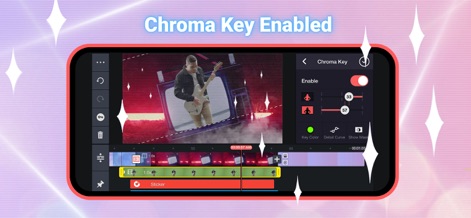
크로마 키 기능
사용자는 크로마 키 기능을 활성화하여 특정 색상의 배경을 투명하게 만들 수 있으며, 이를 통해 인물이나 객체를 다른 배경에 합성하여 전문적인 비디오 효과를 연출할 수 있습니다.

강력한 색상 제어
이 앱은 '조정' 메뉴에서 그림자, 게인, 감마와 같은 다양한 슬라이더를 제공하여 사용자가 비디오의 색상과 톤을 정교하게 제어할 수 있도록 합니다.

고화질 내보내기
사용자는 4K 2160P 해상도 및 60FPS 프레임 레이트 옵션을 선택하여 비디오를 최고 품질로 내보낼 수 있으며, 비트레이트 조절 슬라이더로 파일 크기와 품질 사이의 균형을 맞출 수 있습니다.
설명
Download
비슷한 앱
유사한 기능과 사용자 경험을 가진 앱

Edits: Video Editor
Instagram, Inc.

VLLO- Video Editor, Vlog Edits
vimosoft

YouCut - AI Video Editor
SHANTANU PTE. LTD.

必剪-B站官方出品
Shanghai Bilibili Animation Co.,Ltd

剪影 - 视频剪辑 & 卡点影集制作
Shanghai Jian Ji Software Technology Co., Ltd

Videoshop - Video Editor
Jajijujejo Inc.

VDIT - Video Maker & Editor
ImgBase, Inc.

Video Editor with Music・VidLab
Onelight Apps CY Ltd

Video Maker-movie maker&Editor
Changsha Fugui Bamboo Network Technology Co., Ltd.
이 페이지는 앱이나 개발자의 공식 페이지가 아니며, 정보 제공 및 논평을 목적으로 작성된 독립 편집 간행물입니다. 명시적으로 달리 언급되지 않는 한, 해당 앱이나 개발자는 MWM, Apple, Google Play, 앱 퍼블리셔 또는 앱 개발자와 제휴, 보증, 후원, 승인 또는 공식적으로 연결되어 있지 않으며, 이 페이지의 어떤 내용도 해당 앱이 MWM의 서비스를 사용하여 개발되었음을 의미하지 않습니다. 모든 상표, 로고, 스크린샷 및 기타 콘텐츠는 해당 소유자의 자산입니다.