Leica DISTO Plan
Leica DISTO Plan
다운로드: App Store

이 페이지는 앱이나 개발자의 공식 페이지가 아니며, 정보 제공 및 논평을 목적으로 작성된 독립 편집 간행물입니다. 명시적으로 달리 언급되지 않는 한, 해당 앱이나 개발자는 MWM, Apple, Google Play, 앱 퍼블리셔 또는 앱 개발자와 제휴, 보증, 후원, 승인 또는 공식적으로 연결되어 있지 않으며, 이 페이지의 어떤 내용도 해당 앱이 MWM의 서비스를 사용하여 개발되었음을 의미하지 않습니다. 모든 상표, 로고, 스크린샷 및 기타 콘텐츠는 해당 소유자의 자산입니다.

로고: Leica DISTO Plan
다운로드: App Store

Leica DISTO Plan

측정부터 CAD까지 워크플로우를 간소화하십시오. 중복 작업을 제거하고 100% 정밀도를 보장하기 위해 현장에서 직접 정확한 평면도, 3D 모델 및 상세한 DXF 내보내기를 생성하십시오.

주요 수치

다운로드

86K+

사용자 평점

4.2/5

총 평가 수

1K+

개발사

Leica Geosystems AG

카테고리

Productivity

지원 언어

11

최신 버전

3.2.2

크기

154.6 MB

출시일

2018년 6월 7일
기능

디지털 정밀도로 작업 현장을 마스터하십시오

Leica DISTO™를 강력한 측량 워크스테이션으로 변환하십시오. 첫 번째 측정부터 최종 CAD 내보내기까지 전체 워크플로우를 간소화하여 중복 작업과 인간의 오류를 제거하십시오.

즉각적인 평면도 생성

Smart Room을 사용하여 객실 치수를 순서대로 캡처하십시오. 앱은 측정하는 동안 자동으로 축척된 계획을 작성하여 수동 종이 스케치를 디지털 정확도로 대체합니다.

원활한 CAD 및 BIM 내보내기

현장과 사무실 간의 격차를 해소하십시오. 측정값을 DXF, DWG 또는 PDF 파일로 내보내 AutoCAD, Revit 및 전문 디자인 소프트웨어와 직접 통합하십시오.

다음 스크린샷과 설명은 앱의 공식 스토어 목록에서 직접 가져온 것이며 앱 개발자의 자산입니다.

앱 스토어

스크린샷
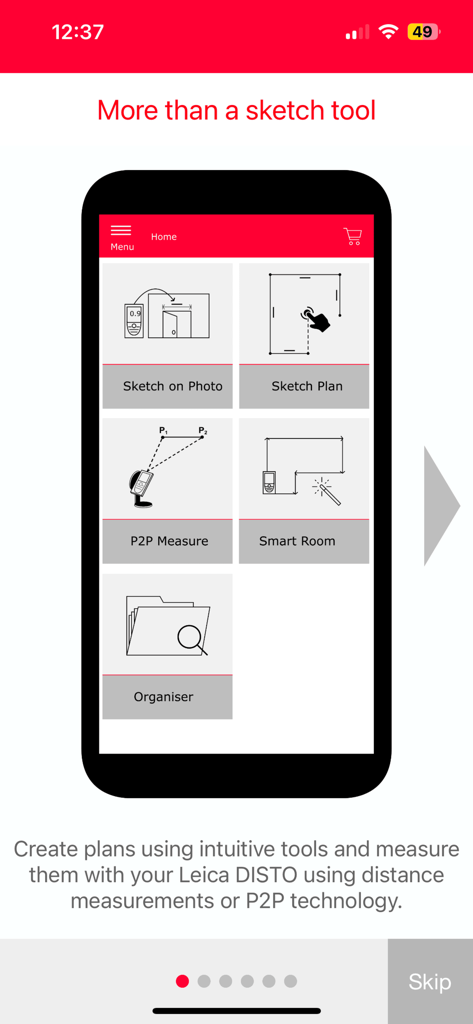
Leica DISTO Plan - Leica DISTO Plan 앱 홈 화면에는 Sketch on Photo, Sketch Plan, P2P Measure, Smart Room과 같은 측정 기능이 표시됩니다.

Leica DISTO Plan 앱 홈 화면에는 Sketch on Photo, Sketch Plan, P2P Measure, Smart Room과 같은 측정 기능이 표시됩니다.
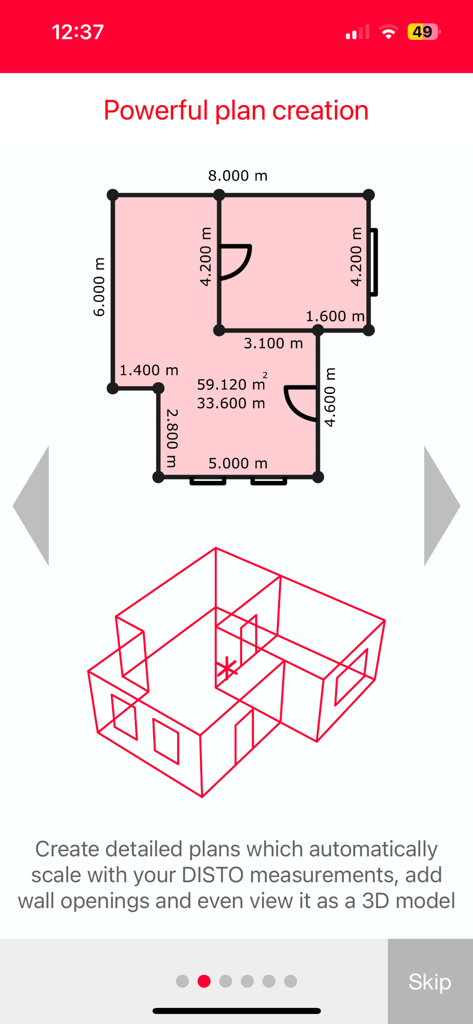
Leica DISTO Plan - Leica DISTO Plan 앱 화면에는 측정값이 있는 2D 평면도와 3D 와이어프레임 모델 시각화가 표시됩니다.
Leica DISTO Plan 앱 화면에는 측정값이 있는 2D 평면도와 3D 와이어프레임 모델 시각화가 표시됩니다.

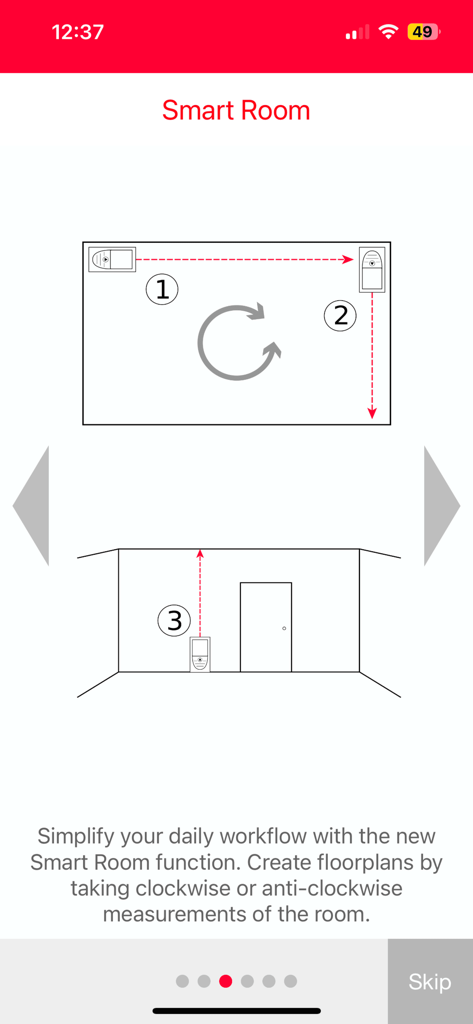
Leica DISTO Plan - Leica DISTO Plan 앱의 온보딩 화면으로 Smart Room 기능을 사용하여 디지털 평면도를 만드는 방법을 설명합니다.
Leica DISTO Plan 앱의 온보딩 화면으로 Smart Room 기능을 사용하여 디지털 평면도를 만드는 방법을 설명합니다.

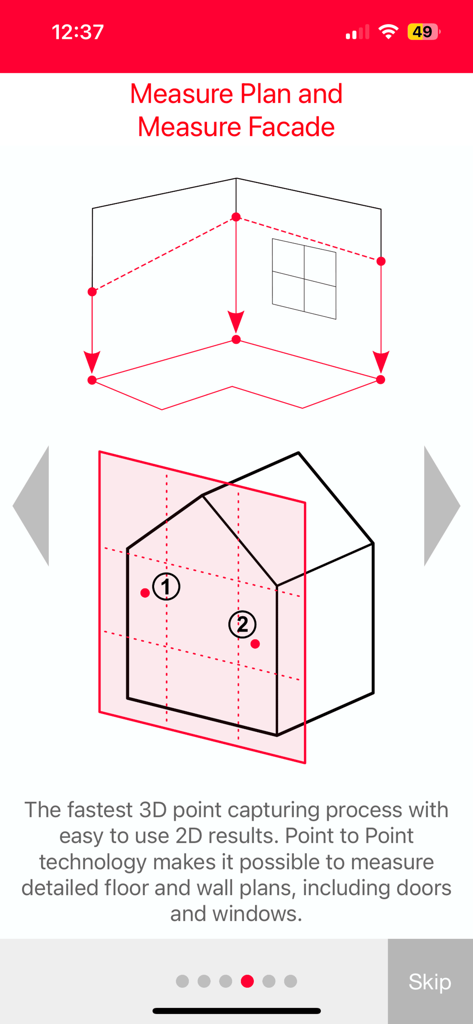
Leica DISTO Plan - Leica DISTO Plan 앱에서 바닥 및 벽 계획을 위한 3D 포인트 캡처를 보여주는 다이어그램
Leica DISTO Plan 앱에서 바닥 및 벽 계획을 위한 3D 포인트 캡처를 보여주는 다이어그램

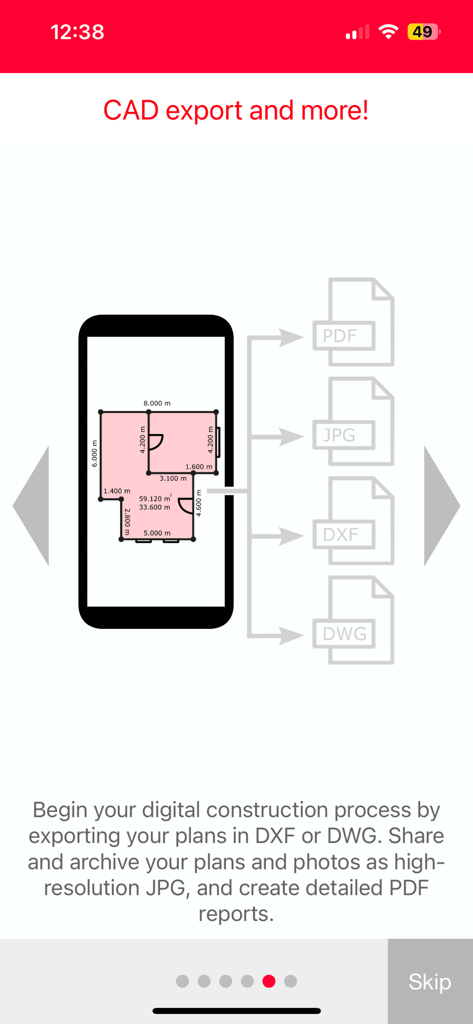
Leica DISTO Plan - 스마트폰 화면에 PDF, JPG, DXF 및 DWG 형식의 평면도 내보내기 옵션이 표시됩니다.
스마트폰 화면에 PDF, JPG, DXF 및 DWG 형식의 평면도 내보내기 옵션이 표시됩니다.

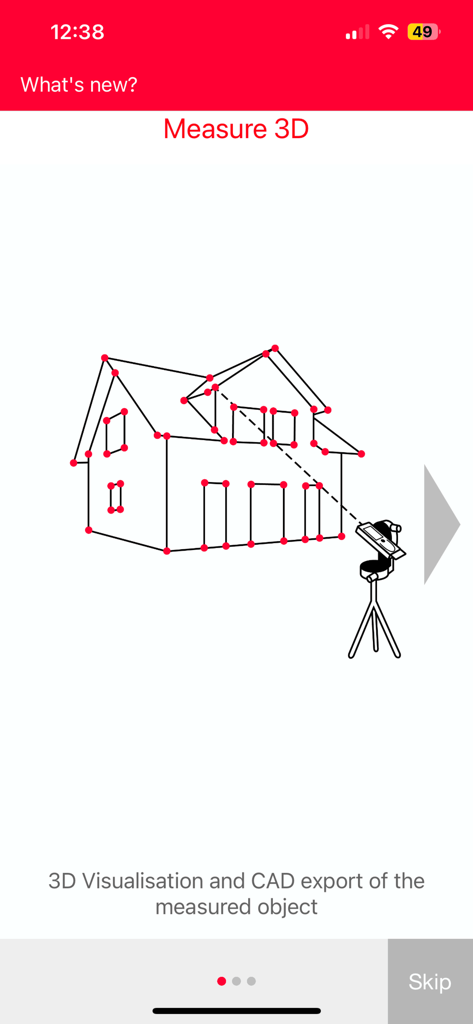
Leica DISTO Plan - 주택 시각화 및 CAD 내보내기를 위한 Measure 3D 기능에 대한 다이어그램
주택 시각화 및 CAD 내보내기를 위한 Measure 3D 기능에 대한 다이어그램

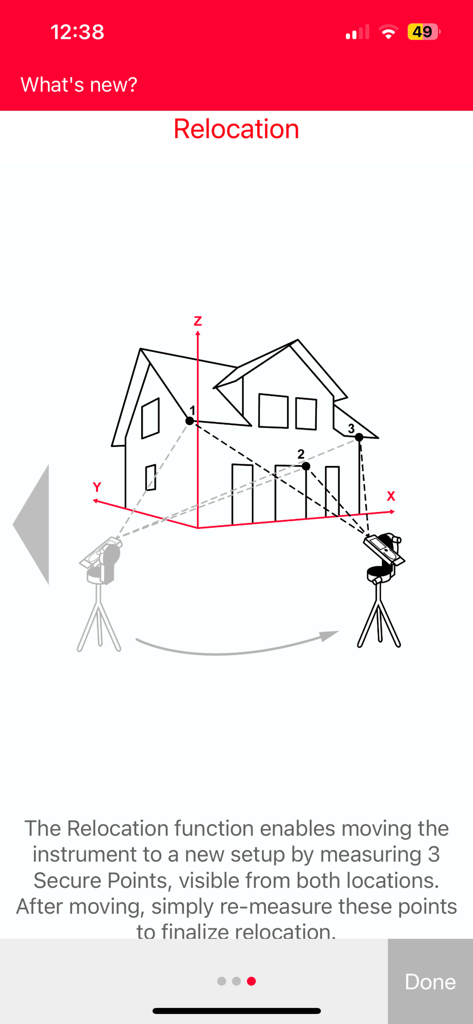
Leica DISTO Plan - Leica DISTO Plan 앱에서 측정 기기를 이동하기 위한 재배치 기능에 대한 다이어그램
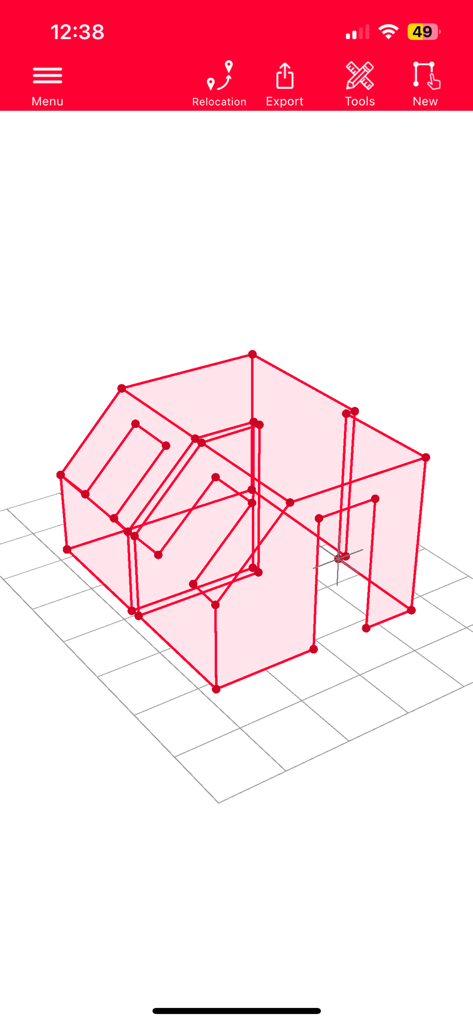
Leica DISTO Plan 앱에서 측정 기기를 이동하기 위한 재배치 기능에 대한 다이어그램

Leica DISTO Plan - Leica DISTO Plan 모바일 앱 인터페이스의 3D 와이어프레임 객실 측정 스케치
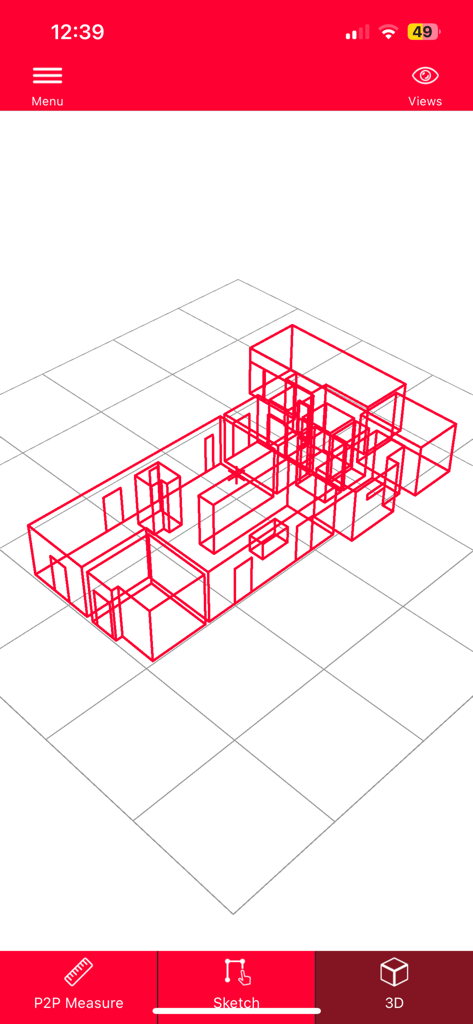
Leica DISTO Plan 모바일 앱 인터페이스의 3D 와이어프레임 객실 측정 스케치

Leica DISTO Plan - Leica DISTO Plan 앱의 3D 와이어프레임 평면도 시각화

Leica DISTO Plan 앱의 3D 와이어프레임 평면도 시각화

설명

The Leica DISTO™ Plan app assists you with the vital task of documenting and visualizing your measurements. Fingers can be used to sketch a floor plan on a smartphone or tablet and corresponding measurements are easily assigned to each line of the plan. This way you can easily plan the next steps of your project. Sketch Plan — create a scale drawing Simply use your fingers to create a sketch on your smartphone or tablet. Then take corresponding measurements and assign them to the relevant lines of your sketch. The app’s ‘auto-scale’ function automatically adjusts the lines’ length and the result is a scaled drawing, showing surface area and circumference. It is that easy to produce a CAD ready floor plan. Smart Room — plan while you are measuring Smart Room makes it possible to create accurate floor plans simply by taking clockwise or counterclockwise measurements of a room. Once all measurements are taken, the app automatically generates the plan. Sketch on Photo — dimension objects in pictures Leica DISTO™ Bluetooth® technology allows you to assign distance measurements to the appropriate part of a picture taken with your tablet or smartphone. This way you can document all your measurement results and easily process them later in the office. Measure Plan — create as-build plans for CAD The Leica DISTO™ app supports P2P technology which makes it possible to create detailed floor or wall plans, including doors and windows. Once complete, simply export your plans as a DXF or DWG file into your preferred CAD solution. Measure Façade – create detailed wall layouts Easily generate intricate wall layouts using P2P technology. This feature is designed for measuring 2D plans on vertical surfaces. You define a vertical plane, and the function will automatically project all measured points onto this plane for precision and clarity in your wall layouts. Then simply export your plans as a DXF or DWG file into your preferred CAD program. Earthworks – determine exact excavation volumes Thanks to P2P technology you can calculate precise excavation volumes, making it ideal for purposes such as billing and transport cost estimation. Simply measure the outline of the desired excavation and set the depth either by entering a value or by measuring it directly by your DISTO. Function also allows you to define various angles for the slope. Measure 3D – draw precise 3D plans Generate accurate 3D plans and seamlessly integrate data into CAD. Leverage the power of P2P technology for real-time 3D measurement visualization directly at the project site. Measurements can be then exported as a DXF or DWG file. Alternatively, you can choose the PDF Pro export with all the detailed information and measurement workflow. Relocation – add new dimensions to your measurements Empower your project flexibility with the Relocation function, enabling you to effortlessly shift your setup to a new location while seamlessly integrating essential data into your existing drawing. This feature is invaluable in situations where acquiring all necessary measurements from a single setup isn't feasible. Exports in standard formats — seamless integration All measurements and floor plans can be exported as a CAD drawing, JPG or in a PDF format. CAD exports are possible as DXF or DWG format, which allows to seamlessly integrate the measurement data with digitized construction. PDF export detailed reports include all created measurements in easy to read and understandable structure. The following Leica DISTO™ devices are supported: Leica DISTO™ D1 Leica DISTO™ X1 Leica DISTO™ D2 Leica DISTO™ D2-2 Leica DISTO™ D2G Leica DISTO™ D110/E7110i Leica DISTO™ X3 Leica DISTO™ X4 Leica DISTO™ D510/E7500i Leica DISTO™ D810 touch Leica DISTO™ S910 Leica DISTO™ D5 Leica DISTO™ X6

Download

다운로드: App Store

이 페이지는 앱이나 개발자의 공식 페이지가 아니며, 정보 제공 및 논평을 목적으로 작성된 독립 편집 간행물입니다. 명시적으로 달리 언급되지 않는 한, 해당 앱이나 개발자는 MWM, Apple, Google Play, 앱 퍼블리셔 또는 앱 개발자와 제휴, 보증, 후원, 승인 또는 공식적으로 연결되어 있지 않으며, 이 페이지의 어떤 내용도 해당 앱이 MWM의 서비스를 사용하여 개발되었음을 의미하지 않습니다. 모든 상표, 로고, 스크린샷 및 기타 콘텐츠는 해당 소유자의 자산입니다.







