
이 페이지는 앱이나 개발자의 공식 페이지가 아니며, 정보 제공 및 논평을 목적으로 작성된 독립 편집 간행물입니다. 명시적으로 달리 언급되지 않는 한, 해당 앱이나 개발자는 MWM, Apple, Google Play, 앱 퍼블리셔 또는 앱 개발자와 제휴, 보증, 후원, 승인 또는 공식적으로 연결되어 있지 않으며, 이 페이지의 어떤 내용도 해당 앱이 MWM의 서비스를 사용하여 개발되었음을 의미하지 않습니다. 모든 상표, 로고, 스크린샷 및 기타 콘텐츠는 해당 소유자의 자산입니다.


LumaShare Share/Print Station
원활한 무선 인쇄, 실시간 슬라이드쇼 및 인터넷 연결 없이도 즉각적인 소셜 공유로 줄을 빠르게 처리하고 고객에게 깊은 인상을 남기세요.
다운로드
23K+사용자 평점
총 평가 수
400개발사
카테고리
Photo & Video지원 언어
1최신 버전
4.0.2크기
31.2 MB출시일
2014년 5월 20일간편한 전문 공유
이벤트 ROI를 극대화하고 하이 스피드 공유, 오프라인 안정성 및 현대 이벤트 기업가를 위해 설계된 전문 디지털 디스플레이로 부스 병목 현상을 제거하세요.
즉각적인 다중 채널 공유
전용 iPad 스테이션에서 SMS, WhatsApp, 이메일 또는 QR 코드를 통해 사진, GIF, Boomerang을 공유하여 고객을 빠르게 처리하세요.
안정적인 오프라인 모드
장소의 불안정한 Wi-Fi로 인해 평판이 손상되지 않도록 하세요. LumaShare는 SMS 및 이메일을 로컬에 큐에 저장했다가 온라인에 다시 연결되면 자동으로 전송합니다.
자주 묻는 질문
에 대해 알아야 할 모든 것 LumaShare Share/Print Station
LumaShare는 무엇에 사용되나요?
LumaShare를 사용하면 dslrBooth 또는 LumaBooth에서 찍은 사진 부스 사진, 비디오 및 GIF를 보고 공유할 수 있습니다. 이메일, SMS, WhatsApp, AirDrop, QR 및 직접 인쇄를 통한 공유를 제공합니다.
LumaShare에서 사용할 수 있는 공유 옵션은 무엇인가요?
LumaShare는 이메일, SMS, WhatsApp, AirDrop 및 QR 코드를 통해 사진, 비디오 및 GIF에 대한 공유 옵션을 제공합니다. 이러한 기능은 원활하게 통합됩니다.
LumaShare는 인터넷 연결 없이 항목을 공유할 수 있나요?
예, LumaShare는 인터넷 연결 없이도 이메일 및 SMS 공유를 지원합니다. 다른 공유 방법은 네트워크 액세스가 필요할 수 있습니다.
LumaShare는 사진 인쇄를 지원하나요?
예, LumaShare는 AirPrint 호환 프린터 또는 dslrBooth 또는 LumaBooth에 연결된 프린터로 직접 인쇄할 수 있습니다.
슬라이드쇼를 위해 LumaShare를 외부 디스플레이에 연결하려면 어떻게 해야 하나요?
LumaShare는 Roku, AppleTV 또는 호환되는 스마트 TV와 같은 AirPlay 2 장치에 연결됩니다. 사용자는 외부 디스플레이에 HDMI 케이블을 사용할 수도 있습니다.
LumaShare를 사용하여 무제한으로 공유하려면 구독이 필요한가요?
예, SMS, 이메일, QR 코드 및 WhatsApp을 통한 무제한 공유에는 LumaShare 클라우드 스토리지 및 공유 구독이 필요합니다.
LumaShare 구독의 월별 비용은 얼마인가요?
LumaShare 클라우드 스토리지 및 공유 구독은 월 $8.99입니다. 결제는 iTunes 계정을 통해 처리됩니다.
LumaShare 구독을 관리하거나 취소할 수 있나요?
예, LumaShare 구독을 관리하고 iTunes 계정 설정에서 자동 갱신을 해제할 수 있습니다. 활성 기간 중에는 취소가 허용되지 않습니다.
LumaShare는 공유 또는 인쇄 전에 고지 사항을 표시할 수 있나요?
예, LumaShare는 게스트에게 표시되는 고지 사항을 추가할 수 있습니다. 이는 콘텐츠를 공유하거나 인쇄하기 전에 표시됩니다.
다음 스크린샷과 설명은 앱의 공식 스토어 목록에서 직접 가져온 것이며 앱 개발자의 자산입니다.
앱 스토어
스크린샷
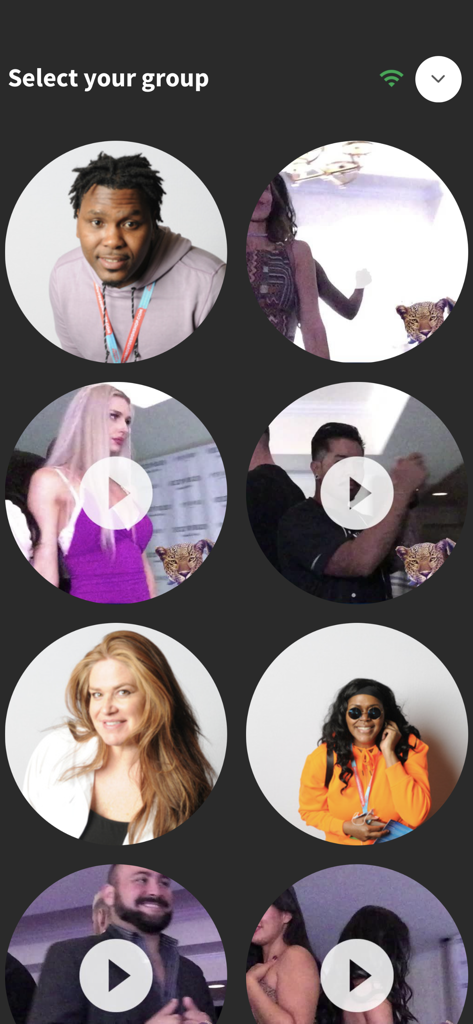
LumaShare 앱 화면에 선택을 위한 이벤트 사진 및 비디오의 원형 썸네일 표시.
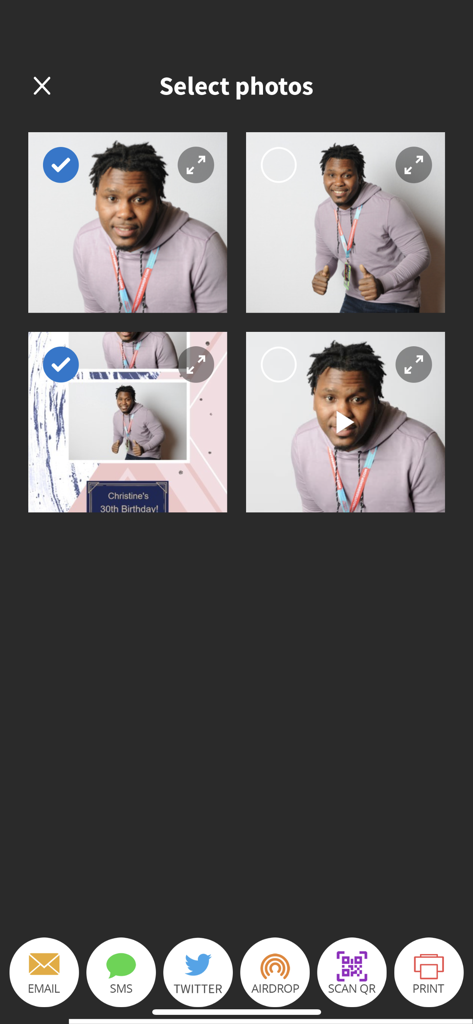
LumaShare 앱 인터페이스에서 사진 부스 사진을 선택하고 이메일, SMS 또는 QR 코드로 공유.
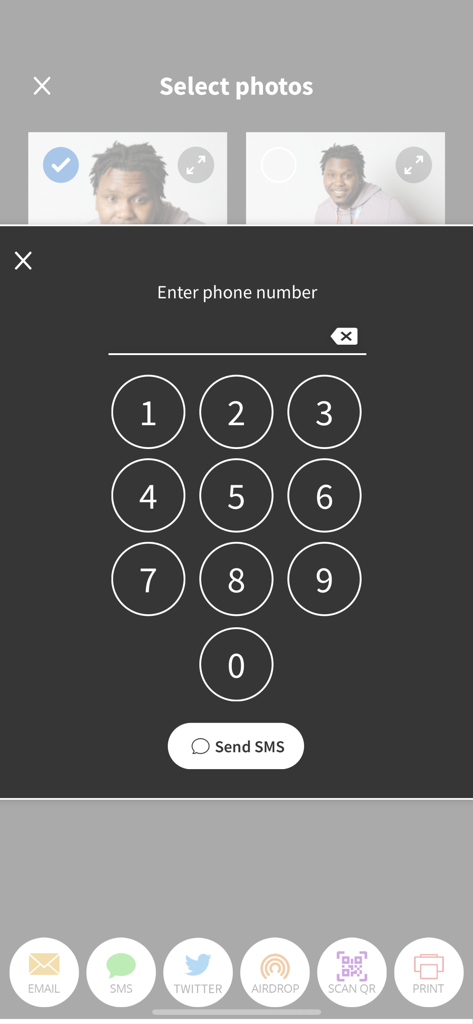
LumaShare 앱 화면에 사진 선택과 SMS 공유를 위한 전화번호 입력을 위한 숫자 키패드 표시.
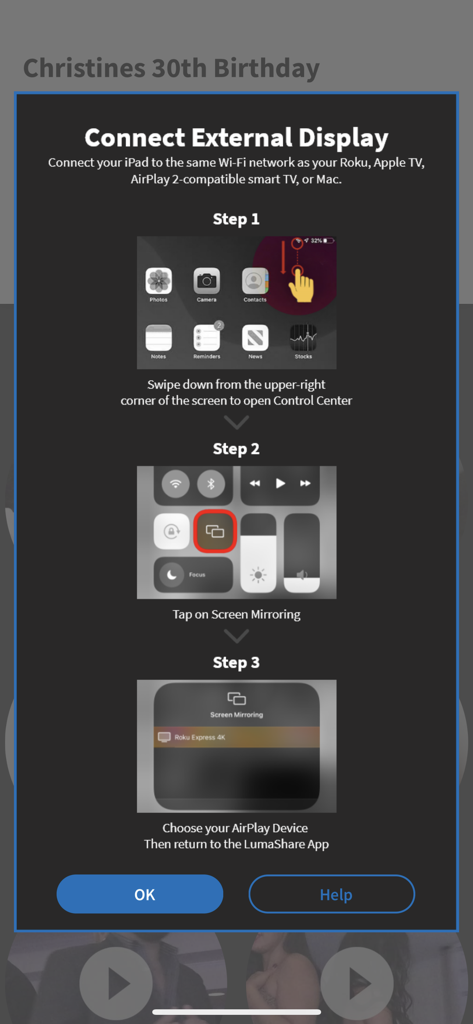
AirPlay 화면 미러링을 사용하여 LumaShare 앱을 외부 디스플레이에 연결하기 위한 단계별 지침
설명
Download
비슷한 앱
유사한 기능과 사용자 경험을 가진 앱

ChackTok - 360video&photobooth
LINKSIGN UK CO., LTD

Touchpix · Photo & Video Booth
Propfun

RevoSpin 360
MRKJ INC

LumaBooth Event Photo Booth
Lumasoft LLC

Mini Photobooth
Minivan Labs

Simple Booth HALO
SMPL Inc.

Simple Booth Classic
SMPL Inc.

BoothLab: Photo & Video Booth
Jorge Cozain

Wifibooth the PRO photo booth
Solodigitalis Inc.
이 페이지는 앱이나 개발자의 공식 페이지가 아니며, 정보 제공 및 논평을 목적으로 작성된 독립 편집 간행물입니다. 명시적으로 달리 언급되지 않는 한, 해당 앱이나 개발자는 MWM, Apple, Google Play, 앱 퍼블리셔 또는 앱 개발자와 제휴, 보증, 후원, 승인 또는 공식적으로 연결되어 있지 않으며, 이 페이지의 어떤 내용도 해당 앱이 MWM의 서비스를 사용하여 개발되었음을 의미하지 않습니다. 모든 상표, 로고, 스크린샷 및 기타 콘텐츠는 해당 소유자의 자산입니다.