
이 페이지는 앱이나 개발자의 공식 페이지가 아니며, 정보 제공 및 논평을 목적으로 작성된 독립 편집 간행물입니다. 명시적으로 달리 언급되지 않는 한, 해당 앱이나 개발자는 MWM, Apple, Google Play, 앱 퍼블리셔 또는 앱 개발자와 제휴, 보증, 후원, 승인 또는 공식적으로 연결되어 있지 않으며, 이 페이지의 어떤 내용도 해당 앱이 MWM의 서비스를 사용하여 개발되었음을 의미하지 않습니다. 모든 상표, 로고, 스크린샷 및 기타 콘텐츠는 해당 소유자의 자산입니다.


Microsoft Planner
직관적인 보드를 통해 작업을 시각적으로 정리하고, Office 365 내에서 원활하게 협업하며, 팀이 계획대로 진행되도록 유지하세요. 현대 전문가를 위해 설계되었습니다.
다운로드
6M+사용자 평점
총 평가 수
29K+개발사
카테고리
Productivity지원 언어
29최신 버전
1.17.11크기
150.6 MB출시일
2017년 5월 18일시각적 정확성으로 업무 흐름 마스터하기
모바일에서 Microsoft Planner의 강력한 기능을 경험하세요. 전문적인 효율성을 위해 설계된 도구로 작업을 정리하고, 팀과 협업하며, 마감일을 준수하세요.
직관적인 칸반 보드
작업을 시각적인 칸으로 정리하고 간단한 드래그 앤 드롭 기능으로 상태 변경을 관리하세요.
원활한 365 통합
안전한 Microsoft 생태계 내에서 파일, 사진, 토론을 작업에 직접 연결하세요.
자주 묻는 질문
에 대해 알아야 할 모든 것 Microsoft Planner
Microsoft Planner란 무엇인가요?
Microsoft Planner는 팀워크를 구성하는 간단하고 시각적인 방법을 제공합니다. 팀이 계획을 만들고, 작업을 구성하고 할당하고, 파일을 공유하고, 진행 상황에 대한 업데이트를 받을 수 있습니다.
Microsoft Planner를 사용하려면 Office 365 구독이 필요한가요?
예, Microsoft Planner를 사용하려면 적격한 Office 365 업무 또는 학교 구독이 필요합니다. Office 365 개인 계정은 지원하지 않습니다. 회사 구독에 대해 확실하지 않은 경우 IT 부서에 문의하십시오.
Microsoft Planner는 작업을 어떻게 구성하나요?
Microsoft Planner는 시각적으로 작업을 구성합니다. 각 계획에는 버킷으로 구성된 작업이 있는 자체 보드가 있습니다. 사용자는 상태 또는 담당자로 작업을 분류하고 열 간 드래그 앤 드롭으로 업데이트합니다.
팀은 Microsoft Planner 내에서 협업하고 채팅할 수 있나요?
예, Microsoft Planner는 Office 365를 위해 구축되었으며 팀이 직접 협업할 수 있도록 합니다. 사용자는 다른 애플리케이션 간에 전환하지 않고도 함께 작업하고, 사진을 첨부하고, 작업에 대한 대화를 나눌 수 있습니다.
Microsoft Planner는 여러 장치에서 액세스할 수 있나요?
예, Microsoft Planner는 모든 장치에서 작동합니다. 이 기능은 팀 구성원이 동기화 상태를 유지하도록 하여 모바일이든 책상에 있든 대화를 계속하고 작업을 업데이트할 수 있도록 합니다.
사용자는 Microsoft Planner에서 할당된 모든 작업을 어떻게 볼 수 있나요?
사용자는 Microsoft Planner의 '내 작업' 보기를 통해 할당된 모든 작업을 봅니다. 이를 통해 모든 계획에 걸쳐 모든 작업과 해당 상태에 대한 포괄적인 목록을 제공하여 개인의 기여도에 대한 가시성을 확보합니다.
Microsoft Planner의 작업에 파일과 사진을 첨부할 수 있나요?
예, Microsoft Planner의 작업에 파일과 사진을 첨부할 수 있습니다. 이 앱은 사진 앱에 액세스할 수 있는 권한을 요청하여 이미지를 선택하거나 카메라 앱에 액세스하여 새 사진을 찍어 작업에 직접 첨부합니다.
다음 스크린샷과 설명은 앱의 공식 스토어 목록에서 직접 가져온 것이며 앱 개발자의 자산입니다.
앱 스토어
스크린샷
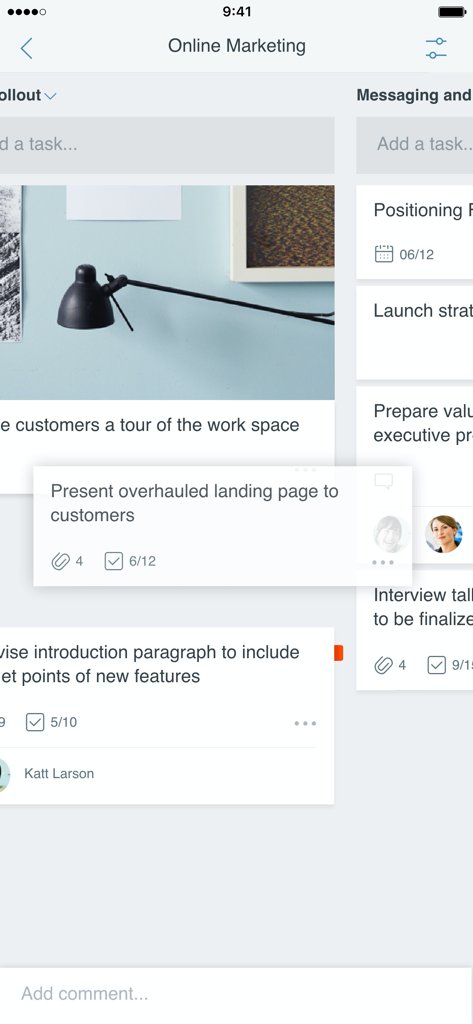
Microsoft Planner 모바일 앱 인터페이스로 프로젝트 작업 관리를 위한 시각적 칸반 보드를 보여줌
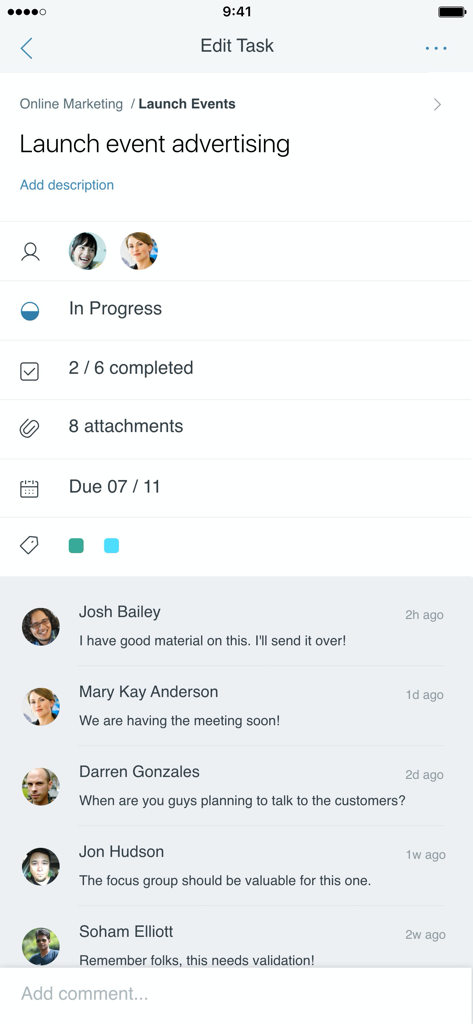
Microsoft Planner 모바일 앱 인터페이스로 상태 진행 상황과 팀 댓글이 포함된 작업 세부 정보를 보여줌
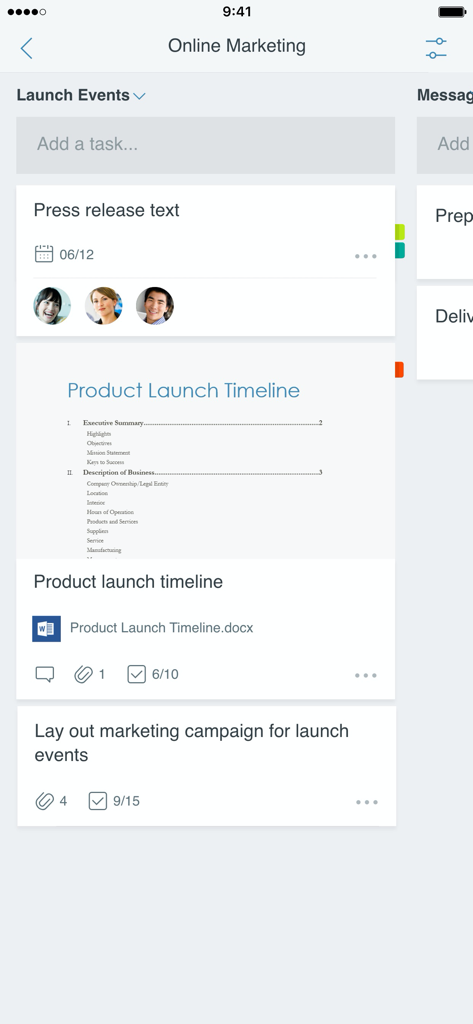
Microsoft Planner의 모바일 인터페이스로 팀 할당 및 첨부 파일이 있는 온라인 마케팅 프로젝트용 작업 보드를 보여줌
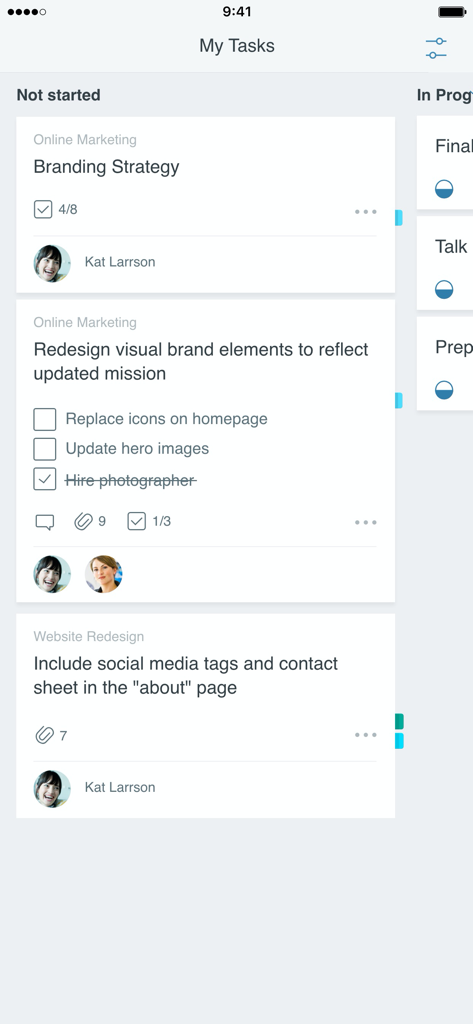
Microsoft Planner 앱 인터페이스로 시작 안 함 열에 정리된 작업 카드가 있는 칸반 보드를 보여줌
설명
Download
비슷한 앱
유사한 기능과 사용자 경험을 가진 앱

Xmind - Mind Map & Brainstorm
Xmind Ltd.

Smartsheet: Projects & Teams
Smartsheet Inc.

Miro: your visual workspace
Realtimeboard Inc.

Padlet
Wallwisher, Inc.

Asana: Work Management
Asana, Inc.

Microsoft Loop
Microsoft Corporation

Microsoft Whiteboard
Microsoft Corporation

Nola: Story Planner & Writing
indent Inc.

MeisterTask - Task Management
MeisterLabs
이 페이지는 앱이나 개발자의 공식 페이지가 아니며, 정보 제공 및 논평을 목적으로 작성된 독립 편집 간행물입니다. 명시적으로 달리 언급되지 않는 한, 해당 앱이나 개발자는 MWM, Apple, Google Play, 앱 퍼블리셔 또는 앱 개발자와 제휴, 보증, 후원, 승인 또는 공식적으로 연결되어 있지 않으며, 이 페이지의 어떤 내용도 해당 앱이 MWM의 서비스를 사용하여 개발되었음을 의미하지 않습니다. 모든 상표, 로고, 스크린샷 및 기타 콘텐츠는 해당 소유자의 자산입니다.