
이 페이지는 앱이나 개발자의 공식 페이지가 아니며, 정보 제공 및 논평을 목적으로 작성된 독립 편집 간행물입니다. 명시적으로 달리 언급되지 않는 한, 해당 앱이나 개발자는 MWM, Apple, Google Play, 앱 퍼블리셔 또는 앱 개발자와 제휴, 보증, 후원, 승인 또는 공식적으로 연결되어 있지 않으며, 이 페이지의 어떤 내용도 해당 앱이 MWM의 서비스를 사용하여 개발되었음을 의미하지 않습니다. 모든 상표, 로고, 스크린샷 및 기타 콘텐츠는 해당 소유자의 자산입니다.


Moises: The Musician's App
이 앱은 기존 음악의 견고한 벽을 허물어뜨린다. 사용자는 음원 속 모든 요소를 분리하고, 조절하며, 완전히 새로운 형태로 재구성하는 힘을 손에 넣는다.
다운로드
12.5M+사용자 평점
총 평가 수
82.6K개발사
카테고리
Music지원 언어
33최신 버전
2.125.0크기
124.9 MB출시일
2020년 11월 9일Moises: The Musician's App 핵심 기능 분석
AI 기반 음악 도구의 주요 기능을 전문가 시각에서 평가합니다.
AI 오디오 분리 (악기/보컬 스템 추출)
이 앱은 AI 기술을 활용하여 모든 노래에서 보컬, 드럼, 기타, 베이스, 피아노 및 기타 악기를 개별 스템으로 정밀하게 분리합니다. 사용자는 이를 통해 백킹 트랙을 만들거나 특정 악기 파트를 연습할 수 있습니다.
AI 코드 감지 및 악보 동기화
이 도구는 노래의 코드 진행을 자동으로 감지하고, 실시간으로 동기화된 기타 탭 및 코드를 제공합니다. 사용자는 초급부터 고급까지 다양한 난이도의 코드를 따라 연주하며 쉽게 곡을 익힐 수 있습니다.
스마트 메트로놈 (클릭 트랙 생성)
이 기능은 모든 노래의 비트에 맞춰 즉시 동기화되는 클릭 트랙을 생성합니다. 사용자는 정확한 박자에 맞춰 연습하고 연주할 수 있어 타이밍 감각을 향상시킬 수 있습니다.
오디오 속도 조절
이 앱은 원클릭으로 오디오 속도를 조절하여 어려운 섹션을 쉽게 연습할 수 있도록 돕습니다. 사용자는 BPM을 자동으로 감지하고 표시하여 학습 효율성을 극대화할 수 있습니다.
AI 키 감지 및 피치 변경
이 도구는 노래의 키를 감지하고, 사용자의 보컬 범위나 악기 튜닝에 맞춰 피치를 쉽게 변경할 수 있습니다. 12개의 모든 키로 즉시 조옮김하여 연습이나 가라오케에 활용할 수 있습니다.
음악 구간 트리밍 및 반복
이 기능은 AI가 노래의 특정 구간을 감지하여 사용자가 원하는 부분을 반복 재생할 수 있도록 합니다. 사용자는 집중적인 연습을 통해 특정 기술이나 파트를 마스터할 수 있습니다.
AI 가사 전사 (자동 생성)
이 앱은 음악 파일을 텍스트로 변환하여 가사를 자동으로 전사합니다. 사용자는 영어, 스페인어, 포르투갈어, 프랑스어, 이탈리아어 등 다양한 언어의 가사를 쉽게 확인하고 가라오케 트랙 제작에 활용할 수 있습니다.
공동 작업 세트리스트
이 도구는 사용자가 공동 작업자를 초대하여 노래 요소를 미세 조정하고 모든 음악 작업을 중앙 집중화할 수 있게 합니다. 이는 생산성을 향상시키고 팀 기반 연습이나 공연 준비를 간소화합니다.
자주 묻는 질문
에 대해 알아야 할 모든 것 Moises: The Musician's App
What is Moises: The Musician's App?
Moises is the world's #1 AI-powered vocal remover and stem player for musicians. It extracts or removes vocals and instruments from any song, allowing users to play music in any key and at any speed.
How does Moises remove vocals from a song?
Moises uses AI Audio Separation of Stems to easily separate vocals, drums, guitar, bass, piano, strings, and other instruments. This advanced technology effectively functions as a vocal remover.
What instruments can Moises separate from a track?
Moises can separate vocals, drums, guitar, bass, piano, strings, and various other instruments using AI. Premium plans include advanced separation for lead/rhythm guitar, acoustic/electric guitar, and main/background vocals.
Can Moises detect chords in a song?
Yes, Moises features AI Chord Detection that follows the bars and beats of a song. It provides instantly synced guitar tabs and chords, with beginner, intermediate, and advanced detection levels.
Does Moises provide lyric transcription?
Yes, Moises offers AI Lyric Transcription, converting audio into text. It supports English, Spanish, Portuguese, French, and Italian, making it suitable for creating karaoke tracks.
How do I change the speed of a song in Moises?
Moises includes an Audio Speed Changer. Users can slow down or speed up challenging sections with one click. Moises automatically detects and displays the BPM.
Can I change the key of a song using Moises?
Yes, Moises features a Pitch Changer to control and alter the audio key. It allows users to shift the pitch to match their vocal range or instrument tuning, which is great for practice.
Is there a free version of Moises available?
Yes, Moises offers a Free Plan. It includes vocals, drums, and bass stem separation, chord detection, metronome click-track, pitch shifting, BPM detection, and setlists.
What are the benefits of a Moises Premium Plan?
The Moises Premium Plan provides unlimited AI audio separation, stem extraction, and advanced instrument separation including Lead & Rhythm Guitar, and Main & Background Vocals. It also unlocks all practicing tools.
How can I collaborate with others in Moises?
Moises supports collaborative setlists. Users can invite collaborators, fine-tune song elements, and centralize musical work for enhanced productivity, enabling shared editing.
What audio and video file formats can Moises import and export?
Moises can import audio/video from Google Drive, Dropbox, iCloud, public URLs, iTunes, and other apps. It exports separated stems or custom mixes, supporting MP3, M4A, and WAV (Desktop only).
Can Moises create backing tracks for musicians?
Yes, Moises allows users to create various backing tracks, including acapella, drums, bass, guitar, karaoke, and piano backing tracks. This is achieved through its advanced stem separation technology.
How does Moises help with music practice?
Moises helps practice by offering features like Smart Metronome, Audio Speed Changer, Pitch Changer, AI Chord Detection, and the ability to trim and loop specific song parts for focused learning.
Is Moises an award-winning app?
Yes, Moises was recognized as an "iPad App of the Year Winner 2024". This award highlights its quality and impact in the music application category for iPad users.
다음 스크린샷과 설명은 앱의 공식 스토어 목록에서 직접 가져온 것이며 앱 개발자의 자산입니다.
앱 스토어
스크린샷
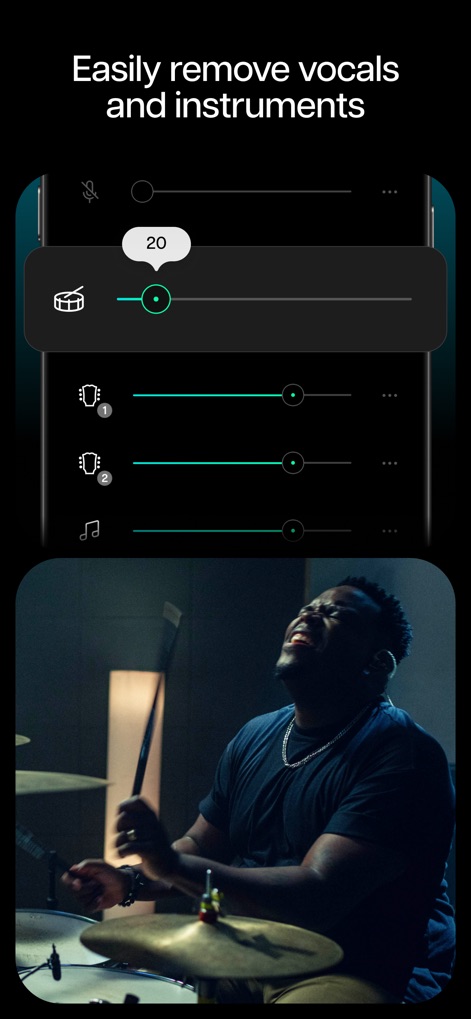
보컬 및 악기 분리
이 앱은 AI 기술을 활용하여 음악에서 보컬과 다양한 악기 트랙을 분리하며, 사용자는 각 트랙의 볼륨 슬라이더를 조절하여 원하는 믹스를 만들 수 있습니다.
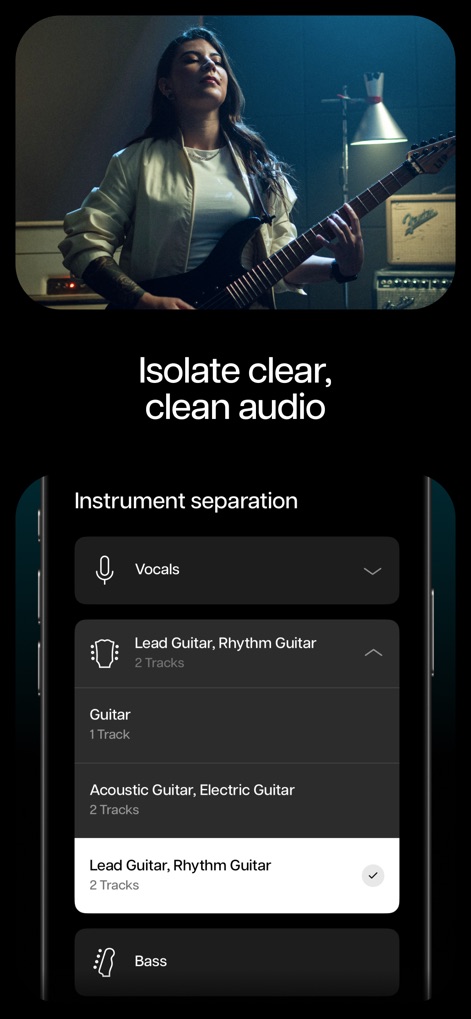
정밀한 악기 분리
이 앱은 보컬, 리드 기타, 베이스 등 세분화된 악기 트랙을 제공하여 사용자가 개별 요소를 명확하게 분리하고 특정 구성 요소를 선택할 수 있도록 돕습니다.

코드 즉시 확인
사용자는 이 앱의 AI 코드 감지 기능을 통해 재생 중인 음악의 코드를 즉시 시각적으로 확인할 수 있으며, 시간표시줄과 함께 나타나는 코드 진행을 따라 연습할 수 있습니다.
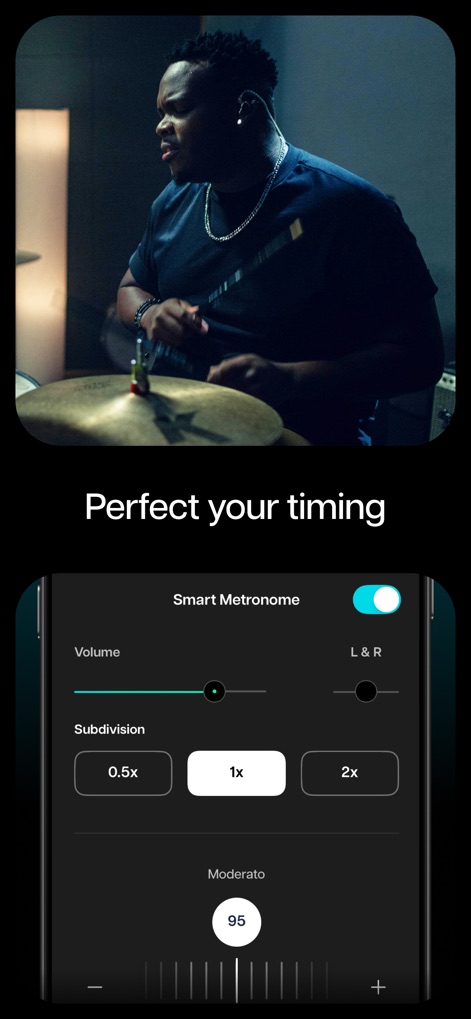
정확한 박자 연습
이 도구는 스마트 메트로놈 기능을 제공하여 사용자가 볼륨과 세분화 설정을 조절하며 어떤 곡에서든 정확한 박자를 연습하고, 템포를 조절하여 속도를 변경할 수 있습니다.
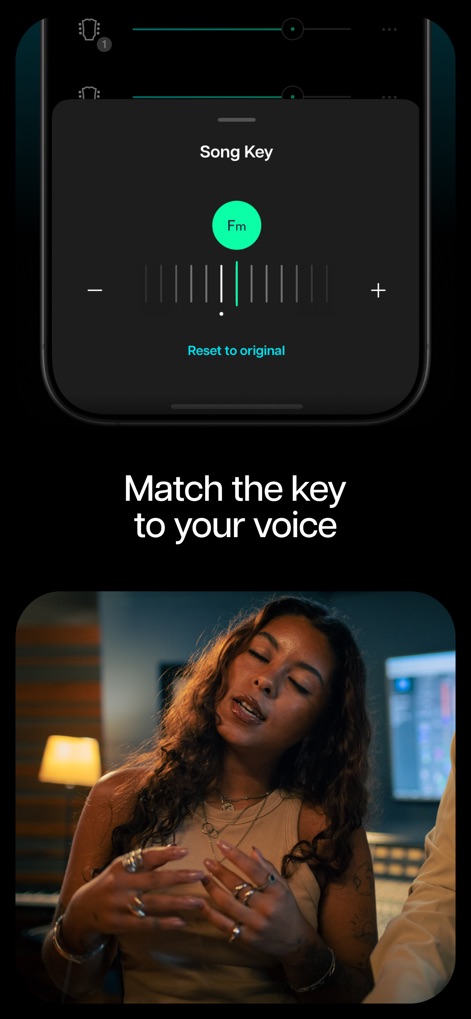
보컬에 맞는 키
이 앱은 사용자의 음역대나 악기 튜닝에 맞춰 곡의 키를 쉽게 조절할 수 있도록 슬라이더와 함께 현재 키(Fm)를 표시하여 보컬 연습을 최적화합니다.
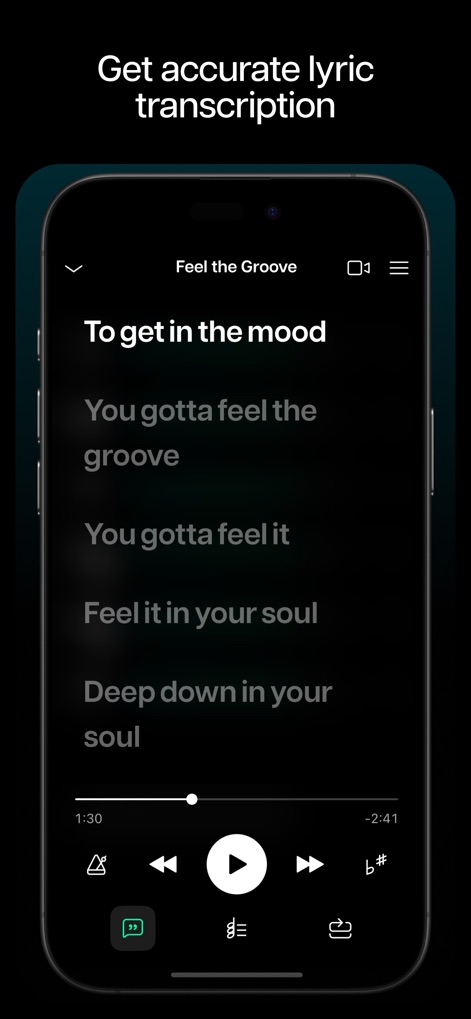
정확한 가사 변환
이 도구는 AI 가사 변환 기능을 통해 음악을 텍스트로 쉽게 변환하여 제공하며, 사용자는 플레이어와 동기화된 가사를 보면서 곡을 따라 부르거나 분석할 수 있습니다.
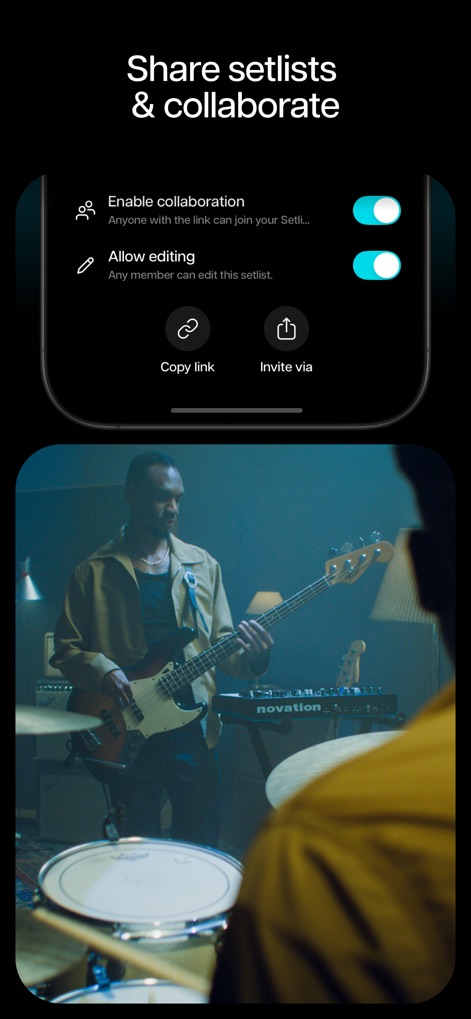
손쉬운 공동 작업
이 앱은 세트리스트 공동 작업 기능을 지원하여 사용자가 협업을 활성화하고 편집 권한을 부여하며, 링크를 통해 동료 음악가들을 초대할 수 있습니다.

특정 구간 반복
사용자는 이 앱의 AI가 감지한 곡의 특정 구간(예: 인트로, 벌스, 코러스)을 선택하여 반복 재생할 수 있으며, 이를 통해 어려운 부분을 집중적으로 연습하여 완벽하게 만들 수 있습니다.
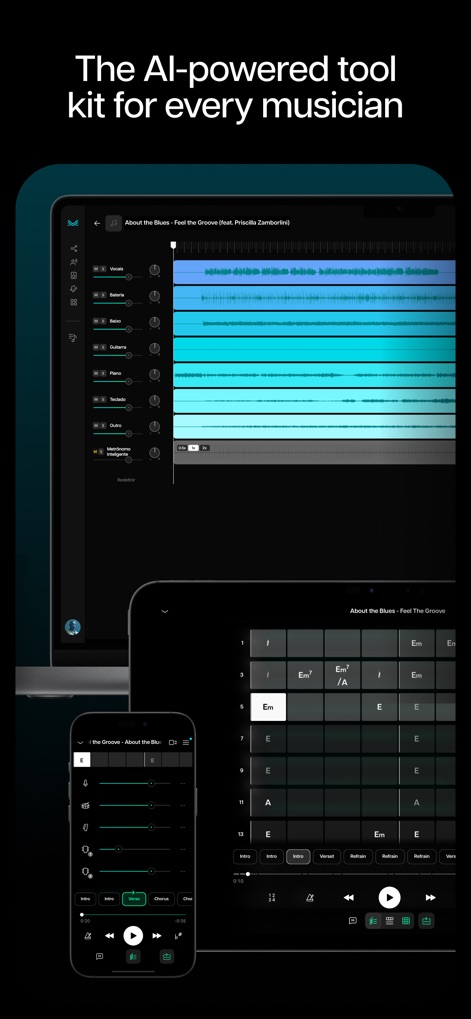
다재다능한 음악 도구
이 앱은 데스크톱, 태블릿, 모바일 등 다양한 기기에서 사용할 수 있으며, AI 분리된 트랙 관리, 코드 보기, 볼륨 조절 등 포괄적인 기능을 제공하여 모든 음악가에게 적합합니다.
설명
Download
비슷한 앱
유사한 기능과 사용자 경험을 가진 앱

Music Speed Changer ▶▶▶
Single Minded Productions, LLC

Vocal Remover - Musiclab
CHENGDU Yiwo Tech Development Co., Ltd

Audio Fusion
景睿 文

Audio Jam: AI for musicians
Kiraku Tech Co., Ltd.

Anytune Pro+: Studio Tools
Anytune Inc.

Strum - Play Guitar
W185 Holdings LLC

Chordify: Songs, Chords, Tuner
Chordify BV

Chord ai - Play any song!
Nomad AI OU

Audio Jam - AI for musicians
Mega e Limited
이 페이지는 앱이나 개발자의 공식 페이지가 아니며, 정보 제공 및 논평을 목적으로 작성된 독립 편집 간행물입니다. 명시적으로 달리 언급되지 않는 한, 해당 앱이나 개발자는 MWM, Apple, Google Play, 앱 퍼블리셔 또는 앱 개발자와 제휴, 보증, 후원, 승인 또는 공식적으로 연결되어 있지 않으며, 이 페이지의 어떤 내용도 해당 앱이 MWM의 서비스를 사용하여 개발되었음을 의미하지 않습니다. 모든 상표, 로고, 스크린샷 및 기타 콘텐츠는 해당 소유자의 자산입니다.